

PowerShell Script for Connecting D365
Open the Windows PowerShell ISE

Paste the Below command into PowerShell to Install the XRM
Install-Module Microsoft.Xrm.Data.PowerShell -Scope CurrentUser
Set the Execution Policy by using the below command
Set-ExecutionPolicy –ExecutionPolicy RemoteSigned –Scope CurrentUser
Set the Security Protocol by using the below command
[System.Net.ServicePointManager]::SecurityProtocol = [System.Net.SecurityProtocolType]::Tls12
Set the Username by using the below command
$Username= “Replace with your Username”
Set the Password by using the below command
$Password="Replace with your Password"
Converting the Password to Secure String by using the below command
$pwd = ConvertTo-SecureString $Password -AsPlainText -Force
Adding the Username and Password to the System.Management.Automation.PSCredential by using the below command
$credentials = New-Object System.Management.Automation.PSCredential($Username, $pwd)
Pass the CRM URL to Establishing the connection and store the connection into $CRMConnection Variable by using the below command
$CRMConnection = Connect-CrmOnline -Credential $credentials -ServerUrl " Replace with your URL " -ForceOAuth
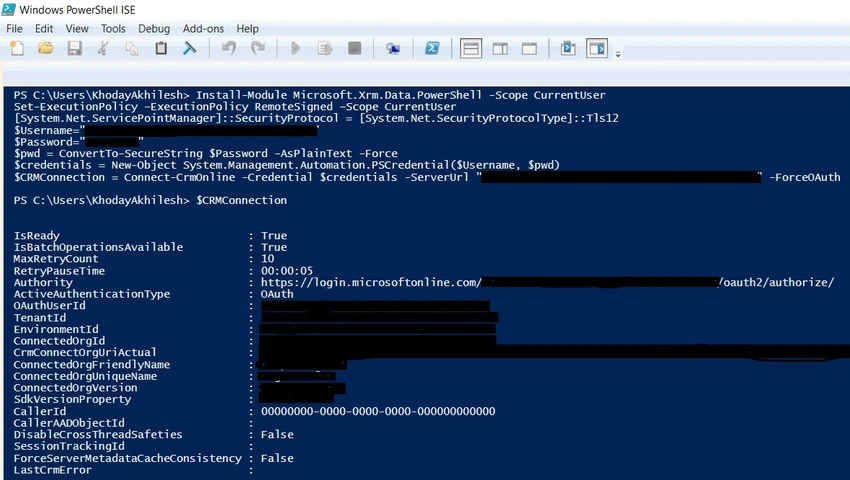
Final Result
Now connected to D365 using PowerShell Script.
Join the conversation! Your thoughts help the community grow.