hi below is my for i want to add textbox input to gridview
below code is before bracket it will added all data added correctly.but if using bracket then not added
input in textbox is
8-A
4-B
12-A
[2-D
6-C]5
8-A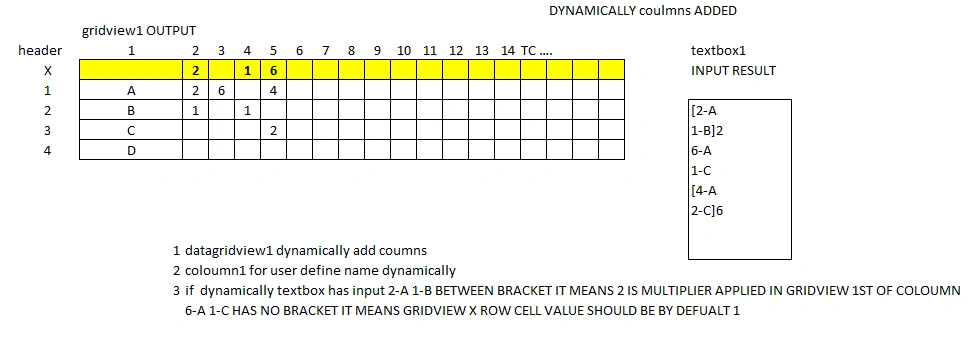
 private void textBox11_TextChanged(object sender, EventArgs e)
 {
      string input = textBox11.Text;
      ProcessInputAndUpdateGrid(input);

 }

 //
 private void ProcessInputAndUpdateGrid(string input)
 {
     // Clear previous data
     dataGridView1.Columns.Clear();
     dataGridView1.Rows.Clear();

     // Initialize grid with "Column1" and first row "X"
     dataGridView1.Columns.Add("Column1", "Column1");
     dataGridView1.Rows.Add("X");

     Dictionary rowMap = new Dictionary();
     string lastColumnName = "";

     bool inBracket = false; // Track if we're inside a bracket
     int currentMultiplier = 1; // Default multiplier
     string bracketContent = ""; // Store content inside the bracket

     // Split input into lines
     var lines = input.Split(new[] { '\n', '\r' }, StringSplitOptions.RemoveEmptyEntries);

     foreach (var line in lines)
     {
         string trimmedLine = line.Trim();

         if (trimmedLine.StartsWith("["))
         {
             // We have encountered a bracketed section
             inBracket = true;
             bracketContent = trimmedLine.Substring(1).Trim(); // Collect content inside the bracket
         }
         else if (trimmedLine.EndsWith("]"))
         {
             // We are closing the bracket
             inBracket = false;
             bracketContent += "\n" + trimmedLine.Substring(0, trimmedLine.Length - 1).Trim(); // Add this line to bracket content

             // Parse multiplier after closing bracket (if available)
             string afterBracketContent = trimmedLine.Substring(trimmedLine.IndexOf(']') + 1).Trim();
             if (!string.IsNullOrEmpty(afterBracketContent) && !int.TryParse(afterBracketContent, out currentMultiplier))
             {
                 currentMultiplier = 1; // If no valid multiplier is found, use default multiplier (1)
             }

             // Process the bracket content with the correct multiplier
             ProcessBracketContent(bracketContent, currentMultiplier, rowMap, ref lastColumnName);

             // Reset bracket content for future use
             bracketContent = "";
         }
         else if (inBracket)
         {
             // We're inside the bracket, collect content until we encounter closing bracket
             bracketContent += "\n" + trimmedLine;
         }
         else
         {
             // Process regular lines (outside bracket) with default multiplier 1
             ProcessItem(trimmedLine, rowMap, 1, ref lastColumnName); // Default multiplier 1 for non-bracketed lines
         }
     }

     // Apply default multiplier of 1 to the last column in the X row
     if (!string.IsNullOrEmpty(lastColumnName))
     {
         if (dataGridView1.Rows[0].Cells[lastColumnName].Value == null)
         {
             dataGridView1.Rows[0].Cells[lastColumnName].Value = 1;
         }
     }
 }

 private void ProcessBracketContent(string bracketContent, int multiplier, Dictionary rowMap, ref string lastColumnName)
 {
     // Split bracket content into items and process them
     var items = bracketContent.Split(new[] { '\n', '\r' }, StringSplitOptions.RemoveEmptyEntries);
     foreach (var item in items)
     {
         ProcessItem(item.Trim(), rowMap, multiplier, ref lastColumnName); // Process each item with the correct multiplier
     }
 }

 private void ProcessItem(string item, Dictionary rowMap, int multiplier, ref string lastColumnName)
 {
     // Parse value and key from input like "2-A"
     var parts = item.Split('-');
     if (parts.Length != 2) return;

     if (!int.TryParse(parts[0], out int value))
     {
         MessageBox.Show("Error: Invalid value in input.", "Input Error", MessageBoxButtons.OK, MessageBoxIcon.Error);
         return;
     }
     string key = parts[1];

     // Add row for the key if not exists
     if (!rowMap.ContainsKey(key))
     {
         rowMap[key] = dataGridView1.Rows.Add(key);
     }

     // Determine column dynamically
     string columnName = "C" + (2 + dataGridView1.Columns.Count - 1); // Start from C2 dynamically
     if (!dataGridView1.Columns.Contains(columnName))
     {
         dataGridView1.Columns.Add(columnName, columnName);
     }

     // Assign value to the corresponding cell
     dataGridView1.Rows[rowMap[key]].Cells[columnName].Value = value;

     // Assign multiplier to X row (if applicable)
     if (multiplier > 1)
     {
         dataGridView1.Rows[0].Cells[columnName].Value = multiplier;
     }

     // Track the last column name for future processing
     lastColumnName = columnName;
 }
Tuhin PaulPosted Jan 28, 2025, 2:38 PM
you're having issues with processing input that includes brackets and multipliers.
This updated code should handle the bracketed input with multipliers correctly. Here's what changed:
1. The code now properly handles the closing bracket and the multiplier that follows it.
2. The multiplier is always set in the X row, even if it's 1.
3. The bracket content is processed as a whole after the closing bracket is found, applying the correct multiplier to all items within the bracket.
This should correctly process your input, including the bracketed sections with multipliers. The grid should now show:
- Column C2 with 8 for A, 4 for B, multiplier 1 in X row
- Column C3 with 12 for A, multiplier 1 in X row
- Column C4 with 2 for D, 6 for C, multiplier 5 in X row
- Column C5 with 8 for A, multiplier 1 in X row