Hello Team,
When I click save instead saving the data it duplicate same data mutilple time.
private void SaveBill()
{
try
{
if (DGVClientBill.Rows.Count > 0)
{
// update product qty
if (MessageBox.Show("Please confirm if you want to save this record?", stitle, MessageBoxButtons.YesNo, MessageBoxIcon.Question) == DialogResult.Yes)
{
for (int i = 0; i < DGVClientBill.Rows.Count; i++)
{
con.Open();
SqlCommand cmd = new SqlCommand("insert into tblSales(SDate,SProductName,SPrice,SQty, SAmount,SCustomer)values(@sDate,@sProductName,@sPrice,@sQty, @sAmount,@sCustomer)", con);
cmd.Parameters.AddWithValue("@sDate", dtBillindDate.Value.ToString("dd-MM-yyyy"));
cmd.Parameters.AddWithValue("@sProductName", txtProductName.Text);
cmd.Parameters.AddWithValue("@sPrice", txtSellingPrice.Text);
cmd.Parameters.AddWithValue("@sQty", txtQuantity.Text);
cmd.Parameters.AddWithValue("@sAmount", Convert.ToDecimal(DGVClientBill.Rows[i].Cells["dgvTotal"].Value.ToString()));
cmd.Parameters.AddWithValue("@sCustomer", txtCustomer.Text);
cmd.ExecuteNonQuery();
con.Close();
MessageBox.Show("Bill successfully saved !", "POS", MessageBoxButtons.OK, MessageBoxIcon.Information);
}
}
}
// Clear();
}
catch (Exception Ex)
{
con.Close();
MessageBox.Show(Ex.Message);
}
}
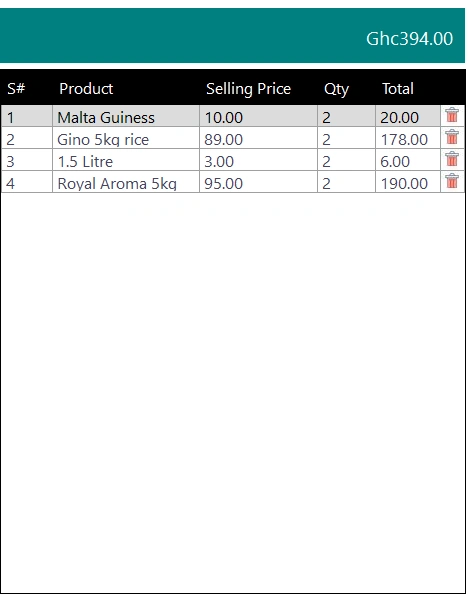

Amit MohantyPosted Nov 24, 2023, 6:18 AM
This is my new remodification of the code but it is still saving a single data out of the rest, because you have used DGVClientBill.CurrentRow. Do you want to insert all rows from the DGVClientBill to your database, if yes try this:
Emmmanuel FIADUFEPosted Nov 24, 2023, 8:04 AM
Thank you Amit, it is working now
Sam HobbsPosted Nov 23, 2023, 9:17 PM
If it were me I would put a breakpoint (you can use F9 to do that) somewhere in the code and then debug. When the breakpoint is hit I would look at the data. Probably the data is the same every time. If so then you need to determine why it is always the same.
Yogi SPosted Nov 23, 2023, 6:03 PM
Close visual studio, restart pc and see if it solves the problem. Happend to me some years back, restarting solved my problem.
Emmmanuel FIADUFEPosted Nov 23, 2023, 3:33 PM
This is my new remodification of the code but it is still saving a single data out of the rest.
private void SaveBill()
{
try
{
// Save Sales data
if (MessageBox.Show("Please confirm if you want to save this record?", stitle, MessageBoxButtons.YesNo, MessageBoxIcon.Question) == DialogResult.Yes)
{
{
con.Open();
SqlCommand cmd = new SqlCommand("insert into tblSales(SDate,SProductName,SPrice,SQty, SAmount,SCustomer)values(@sDate,@sProductName,@sPrice,@sQty, @sAmount,@sCustomer)", con);
cmd.Parameters.AddWithValue("@sDate", dtBillindDate.Value.ToString("dd-MM-yyyy"));
cmd.Parameters.AddWithValue("@sProductName", Convert.ToString(DGVClientBill.CurrentRow.Cells["dgvProduct"].Value));
cmd.Parameters.AddWithValue("@sPrice", Convert.ToDecimal(DGVClientBill.CurrentRow.Cells["dgvSellingPrice2"].Value).ToString("#0.00"));
cmd.Parameters.AddWithValue("@sQty", Int32.Parse(DGVClientBill.CurrentRow.Cells["dgvQunatity"].Value.ToString()));
cmd.Parameters.AddWithValue("@sAmount", Convert.ToDecimal(DGVClientBill.CurrentRow.Cells["dgvTotal"].Value).ToString("#0.00"));
cmd.Parameters.AddWithValue("@sCustomer", txtCustomer.Text);
cmd.ExecuteNonQuery();
con.Close();
MessageBox.Show("Bill successfully saved !", "POS", MessageBoxButtons.OK, MessageBoxIcon.Information);
}
}
}
// Clear();
catch (Exception Ex)
{
con.Close();
MessageBox.Show(Ex.Message);
}
}
Emmmanuel FIADUFEPosted Nov 23, 2023, 3:09 PM
I remove the loop and this time round it saves only one data out of the rest
private void SaveBill()
{
try
{
if (MessageBox.Show("Please confirm if you want to save this record?", stitle, MessageBoxButtons.YesNo, MessageBoxIcon.Question) == DialogResult.Yes)
{
{
con.Open();
SqlCommand cmd = new SqlCommand("insert into tblSales(SDate,SProductName,SPrice,SQty, SAmount,SCustomer)values(@sDate,@sProductName,@sPrice,@sQty, @sAmount,@sCustomer)", con);
cmd.Parameters.AddWithValue("@sDate", dtBillindDate.Value.ToString("dd-MM-yyyy"));
cmd.Parameters.AddWithValue("@sProductName", txtProductName.Text);
cmd.Parameters.AddWithValue("@sPrice", txtSellingPrice.Text);
cmd.Parameters.AddWithValue("@sQty", txtQuantity.Text);
cmd.Parameters.AddWithValue("@sAmount", Convert.ToDecimal(DGVClientBill.CurrentRow.Cells["dgvTotal"].Value).ToString("#0.00"));
cmd.Parameters.AddWithValue("@sCustomer", txtCustomer.Text);
cmd.ExecuteNonQuery();
con.Close();
MessageBox.Show("Bill successfully saved !", "POS", MessageBoxButtons.OK, MessageBoxIcon.Information);
}
}
}
// Clear();
catch (Exception Ex)
{
con.Close();
MessageBox.Show(Ex.Message);
}
}
Amit MohantyPosted Nov 23, 2023, 1:55 PM
You are looping through DataGridView rows but fetching the values from textboxes rather than from the DataGridView itself. May be that's the reason of duplicating the value.