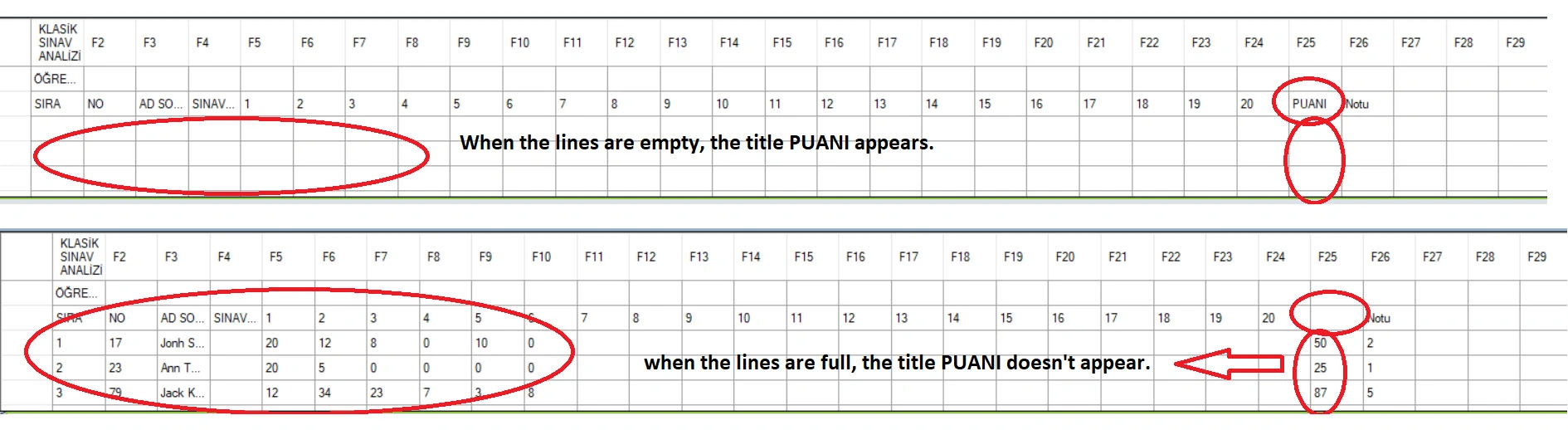
I'm going crazy please help. I am pulling the data from Excel into datagrdiview. However, when the data under the SCORE heading is empty, the title appears. I couldn't understand why it didn't appear when it was full.
        private void button2_Click(object sender, EventArgs e)
        {
            try
            {
                comboBox1.SelectedIndex = -1;
                OpenFileDialog openFileDialog = new OpenFileDialog();
                openFileDialog.Filter = "Excel Files|*.xls;*.xlsx";
                openFileDialog.ShowDialog();

                if (!string.IsNullOrEmpty(openFileDialog.FileName))
                {

                    OleDbcon = new OleDbConnection(@"Provider =Microsoft.ACE.OLEDB.12.0;Data Source=" + openFileDialog.FileName + ";Extended Properties='Excel 12.0;IMEX=1;'");
                    OleDbcon.Open();
                    DataTable dt = OleDbcon.GetOleDbSchemaTable(OleDbSchemaGuid.Tables,new object[] { null, null, null, "TABLE" });
                    OleDbcon.Close();

                    comboBox1.Items.Clear();

                    for (int i = 0; i < dt.Rows.Count; i++)
                    {
                        string sheetName = dt.Rows[i]["TABLE_NAME"].ToString();
                        sheetName = sheetName.Substring(0, sheetName.Length + i++);
                        i++;

                        var str = sheetName;
                        str = new string((from c in str
                                          where char.IsWhiteSpace(c) || char.IsLetterOrDigit(c)
                                          select c
                            ).ToArray());

                        comboBox1.DisplayMember = sheetName;
                        comboBox1.Items.Add(str);

                    }

                }
            }
            catch (Exception ex)
            {
                // Hata alirsak ekrana bastiriyoruz.
                MessageBox.Show("Dosya Seçilmedi!Hata :" + ex.Message);
            }
        }
 private void comboBox1_SelectedIndexChanged(object sender, EventArgs e)
 {
     try
     {
         OleDbDataAdapter oledbDa = new OleDbDataAdapter("Select * from [" + comboBox1.DisplayMember + "]", OleDbcon);
         DataTable dt = new DataTable();
         oledbDa.Fill(dt);
         dataGridView1.DataSource = dt;
     }
     catch (Exception err)
     {
         MessageBox.Show("Hata! " + err.Message, "Hata Olustu.Dosya Seçilmedi!", MessageBoxButtons.OK, MessageBoxIcon.Error);
     }
 }
/forums/uploadfile/56c12d/04072024123540PM/Excel-Mark.xlsx
Mehmet FatihPosted Apr 8, 2024, 10:26 AM
If you examine the Excel file, you can see that the cell contains the title. When the data under the title is empty, the PUANI title appears. However, it does not appear when it is full.
Abhishek YadavPosted Apr 8, 2024, 9:45 AM
It seems like the issue is with the way you are accessing the data from Excel and displaying it in the DataGridView. When the data under the SCORE heading is empty, it is possible that the column is not being included in the DataTable that you are binding to the DataGridView.
To resolve this issue, you can modify your code to check if the column exists in the DataTable before binding it to the DataGridView. You can use the following code snippet as a reference:
This modification will ensure that the DataGridView is only bound to the DataTable if the SCORE column exists in the DataTable. Otherwise, it will display an error message informing the user that the column is missing.
Mehmet FatihPosted Apr 8, 2024, 8:45 AM
You misunderstood the situation. The title is in a cell in the middle. The title is not visible where it is shown in the picture.Unfortunately, this is not exactly what I want.
Jithu ThomasPosted Apr 8, 2024, 6:18 AM
Try with the above code.