
Field Type Description Example
Sales Territory 2A SOAP sales territory for that order .See SOAP-2207 SA
Invoice/Credit- Value is either I or C 1A I for invoice and C for credit card payment I
Hard Coded "XX" 2A XX
Hard Coded Underscore 1A _
Invoice Number 8A A2R invoice number, received in Payment Status Update 467087HI
Hard Coded Underscore 1A _
Hard Coded "X" 1A X
Hard Coded Underscore 1A _
Date YYMMDD 6A Date sent to A2R 230327
Hard Coded Underscore 1A _
Time HHMM 4A Time sent to A2R 1442
Example: SAIXX_123456KI_X_231130_1153.PDF
Format of pdf file generation if we have
14 records that time 14 pdf files generated.
This is our Records and generate pdf files and send to ftp.
this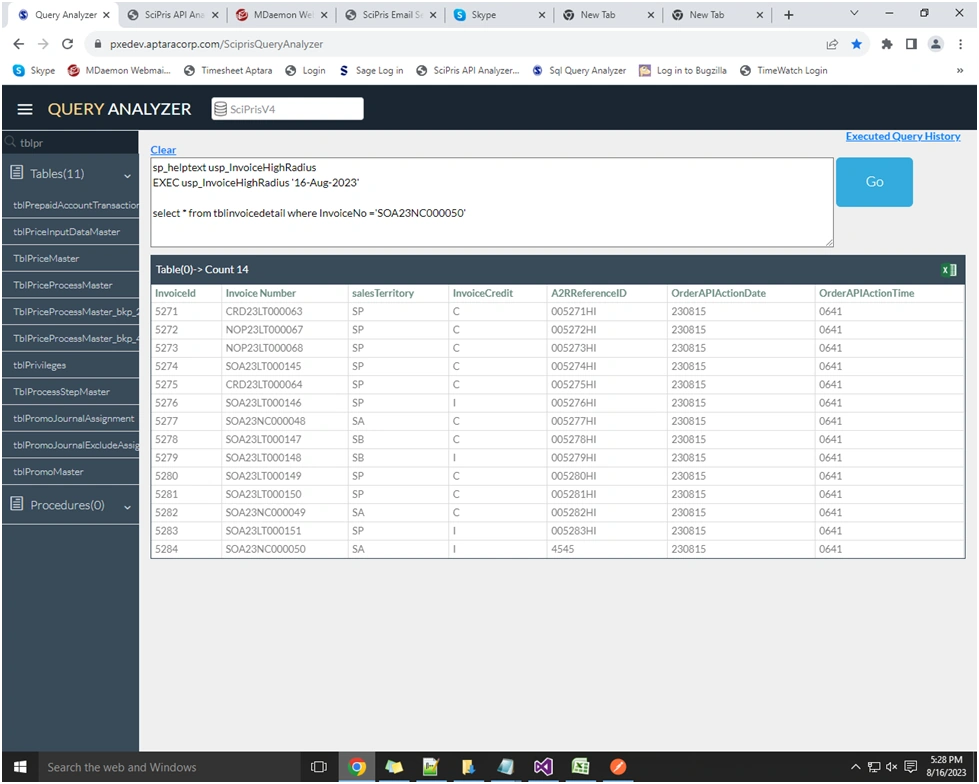
Cr BhargaviPosted Aug 17, 2023, 11:12 AM
Please use novacode to generate the PDF file in python
Abhishek YadavPosted Aug 17, 2023, 9:48 AM
you can use novacode or itext.pdf
Tasadduq BurneyPosted Aug 17, 2023, 8:05 AM
Generate PDF Files: You can use a library like
fpdfin Python to create PDF files. Here's an example of how you might generate a PDF file for each record:Send PDF Files to FTP: To send the generated PDF files to an FTP server, you can use the
ftpliblibrary in Python. Here's how you can do it:Deepak RawatPosted Aug 17, 2023, 5:57 AM
You can use various libraries to generate a PDF file in Python. One commonly used library is
report lab.Saravanan GanesanPosted Aug 16, 2023, 5:30 PM
To generate PDF files based on the provided format and data for 14 records in an MVC5 application and then send them to an FTP server, you can follow these steps:
{
public string SalesTerritory { get; set; }
public string InvoiceCreditType { get; set; }
public string HardCodedXX { get; set; }
// ... other properties
}
Here's a simplified example of how you might generate PDFs and upload them to an FTP server:
using iTextSharp.text;
using iTextSharp.text.pdf;
using System.IO;
using FluentFTP;
// ...
foreach (var record in records)
{
// Generate the filename
string filename = $"{record.SalesTerritory}{record.HardCodedXX}_{record.InvoiceNumber}_{record.DateYYMMDD}_{record.TimeHHMM}.PDF";
// Create the PDF document
Document doc = new Document();
string pdfFilePath = Path.Combine("path/to/pdf/folder", filename);
using (FileStream fs = new FileStream(pdfFilePath, FileMode.Create))
{
PdfWriter writer = PdfWriter.GetInstance(doc, fs);
doc.Open();
// Add content to the PDF here
doc.Close();
}
// Upload the PDF to FTP server
using (var ftp = new FtpClient("ftp.example.com", "username", "password"))
{
ftp.Connect();
using (FileStream fs = new FileStream(pdfFilePath, FileMode.Open))
{
ftp.Upload(fs, $"/remote/folder/{filename}");
}
ftp.Disconnect();
}
}
Please note that this is a simplified example and you might need to handle exceptions, add actual content to the PDF, and manage error handling more robustly in a real-world scenario. Also, make sure to replace placeholders like
"path/to/pdf/folder","ftp.example.com","username", and"password"with actual values.