Dear friends,
I am trying to load a nested table based on parent grid id using Abp web form and javascript. getting an error listed below.
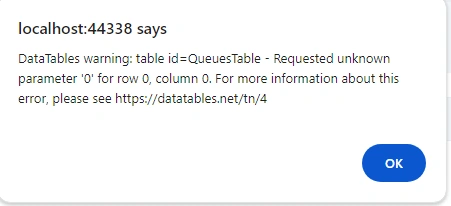
my razor page is like this
@L["Actions"]
@L["Name"]
@L["TicketRangeMin"]
@L["TicketRangeMax"]
@L["TicketCode"]
@L["IsDefaultQueue"]
@L["LastTicketId"]
SequenceNumber
Status
TicketNumber
and below is the javascript for load data
//--------------parent grid settings and data loading for parent grid
var dataTableColumns = [
{
rowAction: {
items:
[
{
text: l("Expand"),
visible: abp.auth.isGranted('QueuingSystem.Queues.Edit'),
action: function (data) {
//-----------this is the id of nested table
var queueTicketTable = document.getElementById("QueueTicketTable");
var row = $(data.record.queue.id);
var queueId = row[0];
//-------set a api to get result based on id
var result = queueService.getTicketsByQueueId(queueId);
QueuedataTableColumns = result;
}
}
]
},
width: "1rem"
},
{ data: "queue.name" },
{ data: "queue.ticketRangeMin" },
{ data: "queue.ticketRangeMax" },
{ data: "queue.ticketCode" },
{
data: "queue.isDefaultQueue",
render: function (isDefaultQueue) {
return isDefaultQueue ? '' : '';
}
},
{ data: "queue.lastTicketId" }
];
//---columns for nested table
var QueuedataTableColumns = [
{ data: "tickts.status" },
{ data: "tickts.TicketNumber" },
{ data: "tickts.SequenceNumber" }
];
//---------------this is the parent table where nested table populate based on its id
var dataTable = $("#QueuesTable").DataTable(abp.libs.datatables.normalizeConfiguration({
processing: true,
serverSide: true,
paging: true,
searching: false,
scrollX: true,
autoWidth: true,
scrollCollapse: true,
order: [[1, "asc"]],
ajax: abp.libs.datatables.createAjax(queueService.getList, getFilter),
columnDefs: dataTableColumns
}));
//-------------this is the nested table(nested table) i want to load
var QueuedataTable = $('#QueueTicketTable').DataTable({
processing: true,
serverSide: true, // You may need to set this to false if you're not handling server-side processing
paging: true,
searching: false,
scrollX: true,
autoWidth: true,
scrollCollapse: true,
order: [[0, "asc"]], // Set the default sort order, adjust as needed
columns: QueuedataTableColumns
});
Bineesh ViswanathPosted Feb 26, 2024, 11:02 AM
i am getting error like this
code to trigger click event
text: l("Expand"),
id: "expandButton",
visible: abp.auth.isGranted('QueuingSystem.Queues.Edit'),
action: function (data) {
var row = $(data.record.queue.id);
currentQueueId = row[0];
populateDataTable(currentQueueId);
}
and the function to populate data is below
function populateDataTable(currentQueueId) {
queueService.getTicketsByQueueId(currentQueueId)
.then(function (data) {
var ticketList = data.map(function (ticket) {
return {
status: ticket.status,
ticketNumber: ticket.ticketNumber,
sequenceNumber: ticket.sequenceNumber
};
});//-------------Till this point, code is working. 26 Feb 2024
var queueTable = document.getElementById("dummyTable");
queueTable.innerHTML = "";
debugger;
var QueuedataTableColumns = [
{ data: "sequenceNumber" },
{ data: "status" },
{ data: "ticketNumber" }
];
queueTable = $("#dummyTable").DataTable({
processing: true,
serverSide: true,
paging: true,
searching: false,
scrollX: true,
autoWidth: true,
scrollCollapse: true,
order: [[1, "asc"]],
columnDefs: dataTableColumns
});
ticketList.forEach(function (ticket) {
var row = document.createElement("tr");
var statusCell = document.createElement("td");
statusCell.textContent = ticket.status;
row.appendChild(statusCell);
var ticketNumberCell = document.createElement("td");
ticketNumberCell.textContent = ticket.ticketNumber;
row.appendChild(ticketNumberCell);
var sequenceCell = document.createElement("td");
sequenceCell.textContent = ticket.sequenceNumber;
row.appendChild(sequenceCell);
// Append the row to the table
queueTable.appendChild(row);
});
})
.catch(function (error) {
alert("Error fetching tickets:", error);
});
}
Bineesh ViswanathPosted Feb 20, 2024, 7:30 AM
Amit Mohanty,
my requirement is to load parent data (queue) initially and then load child data (ticket data based on queue id) in button click. the hide and show thing is been done before, but data loading is too slow, we need to change to show only one row(s) of child data based on queue id
Amit MohantyPosted Feb 20, 2024, 7:04 AM
If you're correctly obtaining the queue ID from the selected row, then issue might lie in how you're trying to show the nested table on the web page. First make sure the nested table (QueueTicketTable) is initially hidden and when the expand button is clicked, show the nested table and load data into the nested table.
For example:
Bineesh ViswanathPosted Feb 20, 2024, 5:45 AM
Dear Amit Mohanty,
the code you provided is not working as we expected, value is undefined.
using below code, i am getting the exact id of selected column. The issue is that the table not showing in web page.
var row = $(data.record.queue.id);
var queueId = row[0];
Amit MohantyPosted Feb 19, 2024, 1:45 PM
I think the issue is in below code.
Try to use below code.
Bineesh ViswanathPosted Feb 19, 2024, 10:30 AM
@Abhishek Yadav,
I have added the code you provided. still the expand button not working as expected.
this is the current view of grid.
need to show a nested view of child table based on the id of this table. QueueTicketTable is the child table here
below is the Abp razor view tag where i set two table.
Abhishek YadavPosted Feb 19, 2024, 9:44 AM