In this application I have radgridview when I click row expand the data will be loaded. When the user click on data row the user will drag the row data and drop in another row. The current row count data is updated instantly but the updated row count is not updating instantly. The user have given the code on radgridview selectionchanged event. Is there any way to get the radgridview updated instantly?
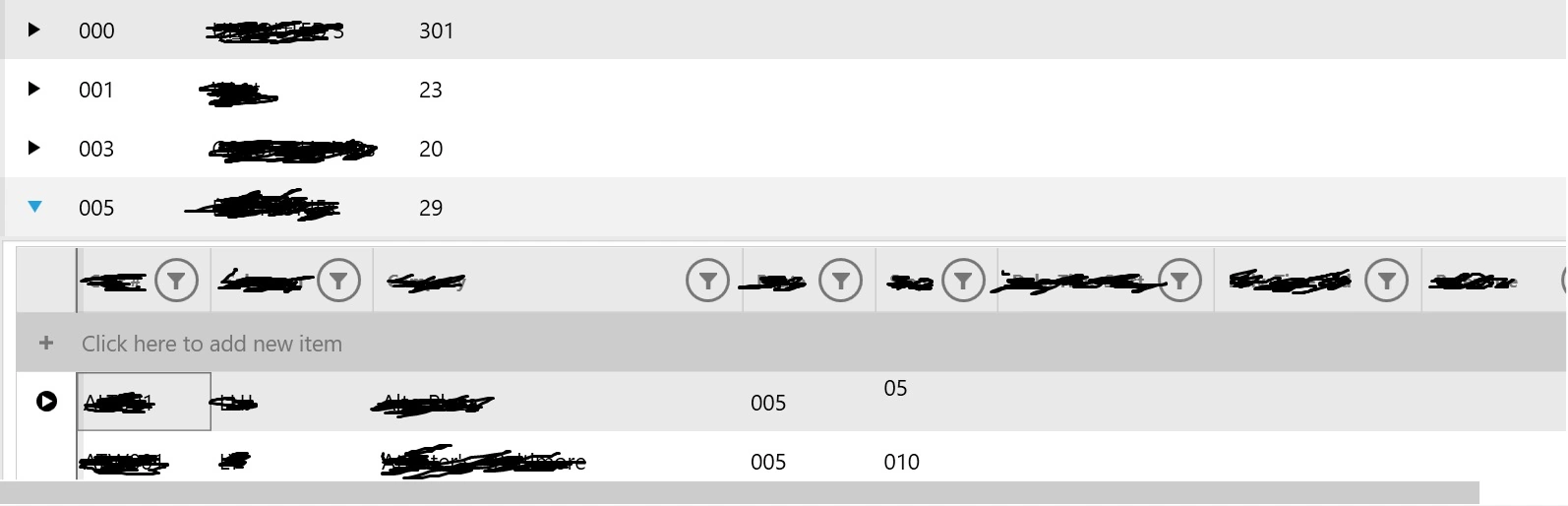
The above is radgridview in WPF. For eg when I click the row 29 value and drop in row 20 value. The row 29 will be decreased as 28 and row 20 is not updated as 21. This is the problem I am facing. As the code is placed as row selection changed event so when I expand the row, the row is updating. But the user needs to updated at same time instantly.
xaml.cs
        ///
        /// Increase / Decrease the count during change  in grid.
        ///
        private void Grid1_SelectionChanged(object sender, SelectionChangeEventArgs e)
        {
            var gridView = sender as RadGridView;

            var sampleViewModel = gridView.DataContext as SampleInformationBase;
            var masterViewModel = DataContext as SampleMasterViewModel;

            if (masterViewModel != null && sampleViewModel != null)
                gridView.ParentRow.Cells[3].Content = sampleViewModel.Count;

        }
The same functionality should happen but instantly both the row to be updated. But gridview selectionchanged means it will be updated during row selection. But I want to be updated when drag & drop itself.
StudentMasterViewModelBase
///
/// Handles a
///
protected virtual void DropStudent(object pParameter)
{
if (pParameter is DragDropParameter)
{
var ddParameter = (pParameter as DragDropParameter);
var recipientRoute = ddParameter.DropRecipient as RouteInformationBase;
//int receipeRoutecount = recipientRoute.CustomerCount +1;
if (recipientRoute != null)
{
RecipientRoute = recipientRoute.Route;
var draggedItem = ddParameter.DraggedItem as StudentBase;
draggedItem.Route = RecipientRoute;
if (!recipientRoute.RouteStudents.Contains(draggedItem))
recipientRoute.RouteStudents.Add(draggedItem);
}
}
AutoNotifyPropertyChanged();
}
///
/// Handles when a
///
///
private void OnRouteStudentsChanged(object sender, NotifyCollectionChangedEventArgs e)
{
if (e.Action == NotifyCollectionChangedAction.Add && e.NewItems != null)
{
foreach (StudentBase RouteStudent in e.NewItems)
{
// Subscribe to data object's EditEnded event
RouteStudent.EditEnded += OnRouteStudentEdited;
RouteStudent.BeginEdit();
RouteStudent.EndEdit();
}
}
if (e.Action == NotifyCollectionChangedAction.Remove && e.OldItems != null)
{
foreach (StudentBase RouteStudent in e.OldItems)
{
// Unsubscribe from the data object's EditEnded event
RouteStudent.EditEnded -= OnRouteStudentEdited;
}
}
AutoNotifyPropertyChanged();
}
///
/// Handles when a
///
private void OnRouteStudentEdited(object sender)
{
if (sender is StudentBase StudentBase)
{
if (!string.IsNullOrWhiteSpace(StudentBase.Custno) && !string.IsNullOrWhiteSpace(RecipientRoute))
{
UpdateRouteChanges(StudentBase.Custno, RecipientRoute);
OnRouteStudentSaved(sender as StudentBase);
}
}
AutoNotifyPropertyChanged();
}
///
/// Ensures the recently-changed
/// Recently-changed (RouteData);
foreach (RouteInformationBase route in routeInformationCopy)
{
if (route.Route != RouteStudent.Route)
{
var match = route.RouteStudents.Where(x => x.Custno == RouteStudent.Custno).FirstOrDefault();
if (match != null)
{
var routeData = RouteData.Where(x => x.Route == route.Route).FirstOrDefault();
routeData.RouteStudents.Remove(match);
}
}
}
}
AutoNotifyPropertyChanged();
}
Abhishek YadavPosted Apr 1, 2024, 5:02 AM
To update the RadGridView instantly after a drag and drop operation, you can manually update the data source bound to the RadGridView. Here are some steps you can follow to achieve this:
1. After the drag and drop operation is completed, update the data source bound to the RadGridView with the new data. This can be done in the `DropStudent` method where you are handling the drag and drop operation.
2. Once the data source is updated, you can rebind the RadGridView to reflect the changes. You can do this by setting the `ItemsSource` property of the RadGridView to null and then reassigning the updated data source.
Here's how you can modify the `DropStudent` method to update the data source and rebind the RadGridView:
Replace `YourDataSource` with the actual property that is bound to the `ItemsSource` property of the RadGridView.
By manually updating the data source and rebind the RadGridView after the drag and drop operation, you should see the changes reflected instantly in the grid.