

Microsoft released PowerToys 0.94 with Settings Search, Shortcut Conflict Detection, and New Mouse Cursor Mode
Microsoft has rolled out PowerToys 0.94, and this release is packed with quality-of-life improvements that make the popular productivity toolset even smoother to use. From a new search experience in Settings to smarter shortcut conflict detection and accessibility upgrades, PowerToys continues to refine the Windows experience for developers, power users, and everyday users alike.
Settings Search: Find What You Need Faster

PowerToys now includes a search box in Settings, making it easier than ever to locate the right configuration.
Supports fuzzy matching (no need to type the exact name).
Press Ctrl+F or click the box to start typing.
Suggestions appear instantly, and a Show all results option reveals everything in one view.
Shortcut Conflict Detection
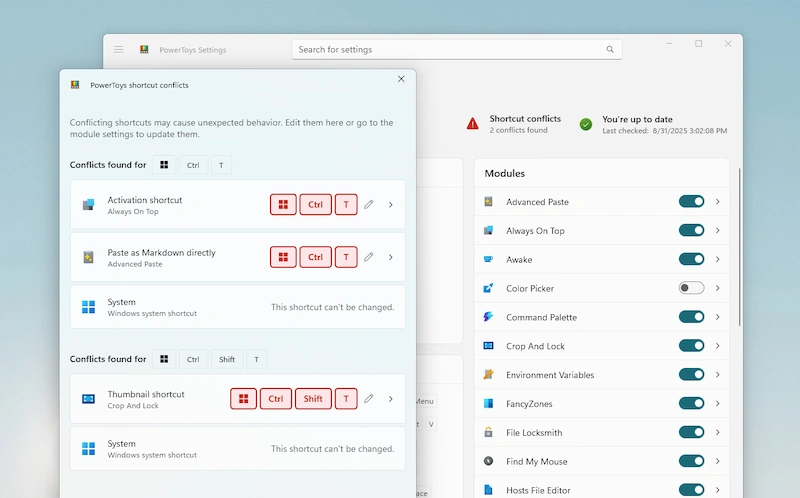
If you’ve ever pressed a hotkey only to trigger two actions at once, you’ll appreciate this one. PowerToys now highlights shortcut conflicts directly in the UI:
Conflicting shortcuts appear in red.
A new conflicts dashboard tile shows the total number of conflicts.
One click opens a full overview, making it easy to reassign shortcuts.
Mouse Pointer Crosshairs: New Gliding Cursor Mode

Accessibility takes center stage with a gliding cursor option. This mode lets you:
Control the mouse using just a single shortcut.
Move step by step with more precision.
Lock horizontal and vertical positions before clicking.
This feature is especially useful for users who find precise mouse movements challenging.
Other Notable Improvements
Installer upgraded from WiX3 to WiX5 for better security and reliability.
Quick Accent now supports Maltese, with frequently used accents remembered across sessions.
Windows 10 context menu modules now clean up properly on uninstall.
Hosts Editor gains a “No leading spaces” option.
Command Palette gets bug fixes, visual updates, and new developer-friendly filters.
What’s Coming in PowerToys 0.95?
Next month’s release is set to include:
A revamped Keyboard Manager UI.
A new automatic theme switcher to toggle between light and dark mode based on your schedule.
You can grab the latest release through PowerToys’ built-in updater or from the official release page.
Join the conversation! Your thoughts help the community grow.