

Background
Many times their is a need in a project's reporting module to upload and download the specific types of files with restrictions; I am also working with these types of modules, so I want to share my experience to others so they can benefit from this aricle when they encounter the same type of task.
So by considering the above requirement I decided to write this article especially focusing on beginners and those who want to learn how to upload only PDF files and display in a grid view and download files in a gridview selected event which is displayed in the grid view.
Now before creating the application, let us create a table named PDFFiles in a database to store the Uploaded PDF files in a database table having the following fields (shown in the following image):

In the above table I have created four columns, they are id for the unique identity, Name for the PDF file name, type for file type and data to store the actual content of the files with binary datatype because the content of the files stored in bytes.
I hope you have created the same type of table.
Now let us start to create an application to upload and download PDF files step-by-step.
- "Start" - "All Programs" - "Microsoft Visual Studio 2010".
- "File" - "New Project" - "C#" - "Empty Project" (to avoid adding a master page).
- Give the Project name such as PDFFileUploadDownload or another as you wish and specify the location.
- Then right-click on Solution Explorer - "Add New Item" - Default.aspx page.
- one File upload control, two Buttons, one label and a grid view.
- <form id="form1" runat="server">
- <div>
- <table>
- <tr>
- <td> Select File </td>
- <td>
- <asp:FileUpload ID="FileUpload1" runat="server" ToolTip="Select Only Excel File" /> </td>
- <td>
- <asp:Button ID="Button1" runat="server" Text="Upload" onclick="Button1_Click" /> </td>
- <td>
- <asp:Button ID="Button2" runat="server" Text="View Files" onclick="Button2_Click" /> </td>
- </tr>
- </table>
- <table>
- <tr>
- <td>
- <p>
- <asp:Label ID="Label2" runat="server" Text="label"></asp:Label>
- </p>
- </td>
- </tr>
- </table>
- <asp:GridView ID="GridView1" runat="server" Caption="Excel Files " CaptionAlign="Top" HorizontalAlign="Justify" DataKeyNames="id" onselectedindexchanged="GridView1_SelectedIndexChanged" ToolTip="Excel FIle DownLoad Tool" CellPadding="4" ForeColor="#333333" GridLines="None">
- <RowStyle BackColor="#E3EAEB" />
- <Columns>
- <asp:CommandField ShowSelectButton="True" SelectText="Download" ControlStyle-ForeColor="Blue" /> </Columns>
- <FooterStyle BackColor="#1C5E55" Font-Bold="True" ForeColor="White" />
- <PagerStyle BackColor="#666666" ForeColor="White" HorizontalAlign="Center" />
- <SelectedRowStyle BackColor="#C5BBAF" Font-Bold="True" ForeColor="#333333" />
- <HeaderStyle BackColor="Gray" Font-Bold="True" ForeColor="White" />
- <EditRowStyle BackColor="#7C6F57" />
- <AlternatingRowStyle BackColor="White" /> </asp:GridView>
- </div>
- </form>
Now switch to design mode and double-click on the upload button and put the following code to upload and validate that only PDF files are allowed to be upload.
- protected void Button1_Click(object sender, EventArgs e) {
- Label2.Visible = true;
- string filePath = FileUpload1.PostedFile.FileName; // getting the file path of uploaded file
- string filename1 = Path.GetFileName(filePath); // getting the file name of uploaded file
- string ext = Path.GetExtension(filename1); // getting the file extension of uploaded file
- string type = String.Empty;
- if (!FileUpload1.HasFile) {
- Label2.Text = "Please Select File"; //if file uploader has no file selected
- } else
- if (FileUpload1.HasFile) {
- try {
- switch (ext) // this switch code validate the files which allow to upload only PDF file
- {
- case ".pdf":
- type = "application/pdf";
- break;
- }
- if (type != String.Empty) {
- connection();
- Stream fs = FileUpload1.PostedFile.InputStream;
- BinaryReader br = new BinaryReader(fs); //reads the binary files
- Byte[] bytes = br.ReadBytes((Int32) fs.Length); //counting the file length into bytes
- query = "insert into PDFFiles (Name,type,data)" + " values (@Name, @type, @Data)"; //insert query
- com = new SqlCommand(query, con);
- com.Parameters.Add("@Name", SqlDbType.VarChar).Value = filename1;
- com.Parameters.Add("@type", SqlDbType.VarChar).Value = type;
- com.Parameters.Add("@Data", SqlDbType.Binary).Value = bytes;
- com.ExecuteNonQuery();
- Label2.ForeColor = System.Drawing.Color.Green;
- Label2.Text = "File Uploaded Successfully";
- } else {
- Label2.ForeColor = System.Drawing.Color.Red;
- Label2.Text = "Select Only PDF Files "; // if file is other than speified extension
- }
- } catch (Exception ex) {
- Label2.Text = "Error: " + ex.Message.ToString();
- }
- }
- }
Add the following code in the view file button click to View uploaded PDF files in GridView
- protected void Button2_Click(object sender, EventArgs e) {
- connection();
- query = "Select *from PDFFiles";
- SqlDataAdapter da = new SqlDataAdapter(query, con);
- DataSet ds = new DataSet();
- da.Fill(ds);
- GridView1.DataSource = ds;
- GridView1.DataBind();
- con.Close();
- }
Add the following code to the Gridview selected index changed event to download the files,
- protected void GridView1_SelectedIndexChanged(object sender, EventArgs e) {
- connection();
- SqlCommand com = new SqlCommand("select Name,type,data from PDFFiles where id=@id", con);
- com.Parameters.AddWithValue("id", GridView1.SelectedRow.Cells[1].Text);
- SqlDataReader dr = com.ExecuteReader();
- if (dr.Read()) {
- Response.Clear();
- Response.Buffer = true;
- Response.ContentType = dr["type"].ToString();
- Response.AddHeader("content-disposition", "attachment;filename=" + dr["Name"].ToString()); // to open file prompt Box open or Save file
- Response.Charset = "";
- Response.Cache.SetCacheability(HttpCacheability.NoCache);
- Response.BinaryWrite((byte[]) dr["data"]);
- Response.End();
- }
- }
Then run the page which will look as in the following,
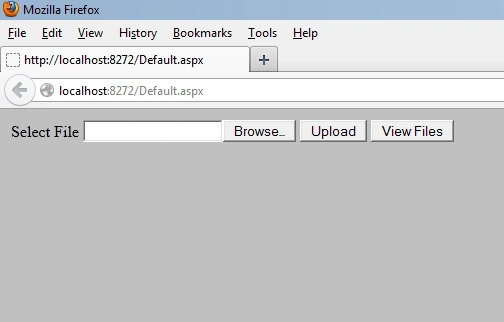
From the above view I am using two buttons to do the upload; one to upload the selected files to the database and view files which shows the files in a grid view which is stored in a database table.
Now run the application and select the file other than PDF which shows the following error as shown in the following:

Now select the PDF file, which shows the following message after being successfully uploaded:
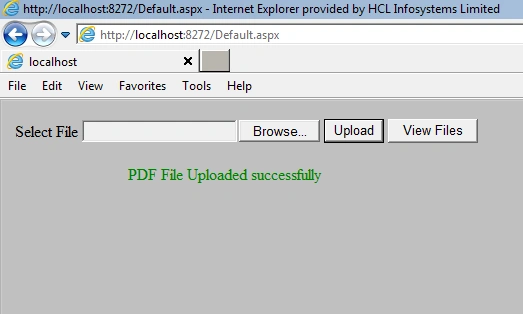
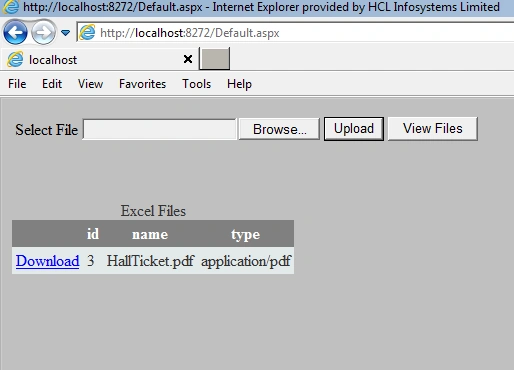
Now click on view files details. The gridview shows the uploaded files with details as shown below.
Now click on the download button of the gridview, the following prompt message is displayed as shown in following image:
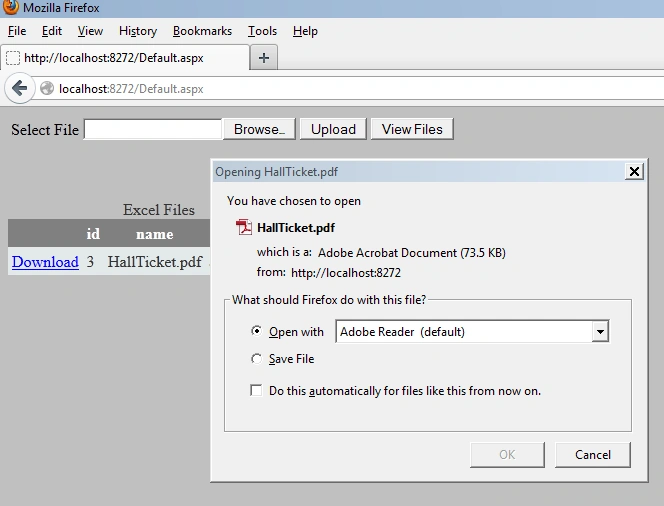
Then choose browse with Adobe Reader and click on the ok button. Then the file will be opened in PDF format .
Summary
I hope this article is useful for all readers, if you have any suggestion then please contact me including beginners also.
Note
Download the zip file from the attachment for the full source code of an application.
Div tables are great to layout website sections on the page!
Michael ClintonPosted Aug 15, 2022, 10:37 PM
How can you change this to open the PDF file from the database into a preview panel?
Noe PazPosted Jan 11, 2021, 7:02 PM
Your code helped me a lot, thanks you
Noe PazPosted Jan 11, 2021, 7:01 PM
In the sql server table the id must be autoincremental and the connection string must be configured
Noe PazPosted Jan 11, 2021, 7:01 PM
Good work, brother ,your code helped me a lot,
SyedAli HamzaPosted Jun 30, 2020, 5:45 AM
Great Work.
Kajal MahatoPosted May 24, 2020, 11:29 PM
Not working ..code ..
koushik gopikrishnanPosted Feb 4, 2020, 11:57 PM
Will this code work on asp.net core web app
Reza RezaPosted Jan 4, 2020, 4:29 AM
Wonderful, it is very good article and useful for all.
Kartik SolankiPosted Jun 28, 2019, 1:30 AM
When I upload pdf first time after then i refresh page multiple time then the record inserted in database to store multiple time.
juzar paraPosted Dec 30, 2018, 9:46 PM
Hi can you send sln file, please - [email protected]
Ramzanali MominPosted Dec 17, 2018, 3:12 AM
Nice article sir
Alejandro VegaPosted Dec 12, 2018, 8:36 PM
Error no envia los datos a phpMysql , como puedo solucionar el error.
sunny kumarPosted Nov 15, 2018, 1:10 AM
Killler job bro, btw id is an autoincrement field. if u can help me with one more that how to add a read more and hide less in gridview if the data is fetched from database
juzar paraPosted Jun 5, 2018, 5:49 AM
Hi, i am trying for same code in window application c#, please forward me, i am just a beginner
devulapalli sundariPosted Feb 7, 2018, 1:33 AM
How did id got the value 3/
devulapalli sundariPosted Feb 7, 2018, 1:32 AM
How did "id" got its value?
DK gangwarPosted Dec 27, 2017, 12:37 AM
Hello Vithal, where is the connection() defination
Upendra Pratap ShahiPosted Nov 9, 2017, 6:41 AM
Nice one..........................
Elvin GaldoPosted Aug 30, 2017, 12:07 AM
Hi, Vithal im looking an app that doing something like this, but this app can edit/fill up the pdf file and upload it to another data base as a completed and signed document?
nore mosratiPosted Aug 8, 2017, 4:36 AM
HI thanks for this web app but this is't for Excel files it's for PDF files
kalu singh raoPosted Jul 11, 2016, 2:16 AM
Nice...
Chris GullisonPosted Mar 17, 2016, 7:02 PM
Instead of download the PDF to your local machine, is there a way to get the PDF that you selected to pop up on the same screen?
Vithal WadjePosted Mar 13, 2016, 4:09 PM
mohan g sir solution was developed in 2010 version might be you are using latest version
mohan gPosted Mar 9, 2016, 4:16 AM
if i download this zip file and try to open in visual studio it says unable to download all solutions
Vithal WadjePosted Dec 22, 2015, 9:33 AM
its depend on browser
siva balanPosted Dec 22, 2015, 8:50 AM
prompt box alert didnt work for me sir
Vithal WadjePosted Dec 8, 2015, 9:14 AM
yes refer my other articles
sakthi velPosted Dec 8, 2015, 12:56 AM
how can i view the uploaded files in grid view instead of downloading
Vithal WadjePosted Aug 8, 2015, 7:09 AM
use join
Raman GulatiPosted Aug 7, 2015, 4:32 PM
i have two tables so i want column from both tables to retrieve in gridview. can you help
saikat dasPosted Apr 3, 2015, 12:52 PM
how can i delete a uploaded file from gridview ? is it possible?Can you please send some link
Vithal WadjePosted Jan 27, 2015, 9:42 AM
check your database table column datatype,it must be a varbinary not varchar
Mike HammondsPosted Jan 26, 2015, 4:28 PM
I'm getting this error every time I press upload a file, "Error: Implicit conversion from data type varchar to varbinary is not allowed. Use the CONVERT function to run this query."
Vithal WadjePosted Aug 30, 2014, 12:55 AM
write this logic in web service and add web service reference to web or other application
tasbiha sajjadPosted Aug 21, 2014, 12:49 PM
how to do this using webservices in asp.net
Vithal WadjePosted Jul 26, 2014, 1:18 PM
thanks DJ sir
DJ NickellPosted Jul 25, 2014, 10:17 PM
you rock
uroosah BanoPosted May 28, 2014, 2:11 PM
i just want the code for update and delete for uploading and deleting the file uploaded in database
uroosah BanoPosted May 28, 2014, 2:10 PM
could u send me the link to the article because I cant find it sir
Vithal WadjePosted May 28, 2014, 1:20 PM
yes sure refer my article list,you will find all solution
uroosah BanoPosted May 28, 2014, 1:07 PM
sir could u help me the update and delete function on the same grid
Vithal WadjePosted May 19, 2014, 2:34 PM
please check sql connection
aditya sinhaPosted Apr 28, 2014, 2:25 AM
sir when i was trying to upload the file each time the page said "Object reference not set to an instance of an object. " How to fix this and what does this mean,i am new to asp.net,please help
luis navaPosted Apr 24, 2014, 7:18 PM
Se?or muchas gracias por este tutorial a mi funciona perfectamenete solo me gustaria saber si le puede agrgar un button para eliminar el archivo
gagan sainiPosted Mar 25, 2014, 12:24 PM
sir can u tell me the solution as early as possible
gagan sainiPosted Mar 25, 2014, 12:17 PM
sir this code works when uploading the file....but does not work when download the file from grid view....only selected row color change...no such dialogbox open like above to download file...plz sir help me
Vithal WadjePosted Sep 17, 2013, 8:46 AM
thanks Lazola sir for reading article ,please download attached zip file in which you will get whole code,as I know i have not defined any file upload restriction
Lazola BooiPosted Sep 17, 2013, 5:43 AM
Also, if possible, how could i increase the upload size. As I see, the code only uploads pdf's less than 1mb. I want to add files greater than 1mb
Lazola BooiPosted Sep 17, 2013, 5:28 AM
Hello, the code works just fine. But I cant seem to download the staff. Also, I cant see where you coded the part so that I can try fix it. Please help me in this regard, I am a graduate programmer..still new to this. Thanks in Advance
Vithal WadjePosted Sep 12, 2013, 2:15 PM
Lazola sir,can you post the your sample code that you are using
Lazola BooiPosted Sep 12, 2013, 8:18 AM
Hello, I am interested in your code snippet as I am doing a similar project. I get an error that states that I did not set the object reference. How could I resolve this?
Vithal WadjePosted Sep 1, 2013, 9:43 AM
thanks a lot rizwan ahmed sir
rizwan ahmedPosted Aug 31, 2013, 4:14 PM
Thanks alot :) this code is too help full for me :)
Vithal WadjePosted Aug 20, 2013, 1:45 PM
dave sir,you have declared two connection string in web.config file,please check it
Dave BowmanPosted Aug 19, 2013, 4:57 PM
I cannot seem to get this to work properly I keep getting the below error c--- s0103: the name 'connection' does not exist in the current context. Any idea what I may be doing wrong?
Dave BowmanPosted Aug 19, 2013, 4:57 PM
hello there,
Vithal WadjePosted May 15, 2013, 2:39 PM
your connection string in web.config is wrong first make it perfect
Tony PitwoodPosted May 13, 2013, 6:02 AM
Unable to upload - hits error: Error: A network-related or instance-specific error occurred while establishing a connection to SQL Server. The server was not found or was not accessible. Verify that the instance name is correct and that SQL Server is configured to allow remote connections. (provider: Named Pipes Provider, error: 40 - Could not open a connection to SQL Server) In Connection, constr = "Data Source=datasourcename;Initial Catalog=databasename;User ID=username;Password=sqlpassword" Should this not have values instead?
rain boyPosted May 8, 2013, 2:48 AM
your totorial help me but where column name and type for input value
sankeertheditedPosted Mar 20, 2013, 8:11 AMEdited Mar 20, 2013, 8:13 AM
thanx and can you give me code for upload and download pdfs which is of large size for example pdf length is 20mb in c# and asp.net using database.please provide me result as early as possible
Vithal WadjePosted Jan 2, 2013, 7:13 AM
thanx prachi
Prachi ChandrakarPosted Jan 2, 2013, 7:13 AM
Thank you so much really helpful tutorial. :)