

Introduction
This article provides some interview questions and answers of MVC, basically covering most of MVC 2, MVC 3 and MVC 4 topics that are more likely to be asked in job interviews/tests/exams.
The sole purpose of this article is to sum up important questions and answers that can be used by developers to brush-up on MVC before they go to an interview including it.
What is MVC?
MVC is a framework pattern that splits an application's implementation logic into three component roles: models, views, and controllers.
- Model: The business entity on which the overall application operates. Many applications use a persistent storage mechanism (such as a database) to store data. MVC does not specifically mention the data access layer because it is understood to be encapsulated by the Model.
- View: The user interface that renders the Model into a form of interaction.
- Controller: Handles a request from a View and updates the Model that results in a change of the Model's state.
To implement MVC in .NET we need mainly three classes (View, Controller and the Model).
Explain MVC Architecture?
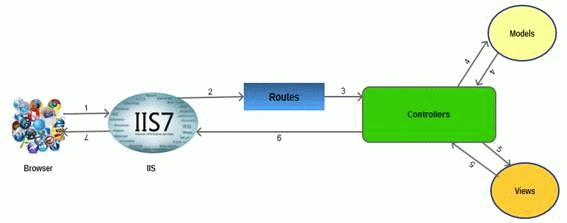
The architecture is self-explanatory. The browser (as usual) sends a request to IIS, IIS searches for the route defined in the MVC application and es the request to the controller as specified by the route, the controller communicates with the model and es the populated model (entity) to View (front end), Views are populated with model properties, and are rendered on the browser, ing the response to the browser through IIS via controllers that invoked the specified View.
What are the new features of MVC 2?
ASP.NET MVC 2 was released in March 2010. Its main features are:
- Introduction of UI helpers with automatic scaffolding with customizable templates.
- Attribute-based model validation on both client and server.
- Strongly typed HTML helpers.
- Improved Visual Studio tooling.
- There were also many API enhancements and "pro" features, based on feedback from developers building a variety of applications on ASP.NET MVC 1, such as:
- Support for partitioning large applications into areas.
- Asynchronous controllers support.
- Support for rendering subsections of a page/site using Html.RenderAction.
- Many new helper functions, utilities, and API enhancements.
What are the new features of MVC 3?
ASP.NET MVC 3 shipped just 10 months after MVC 2 in Jan 2011. Some of the top features in MVC 3 included:
- The Razor view engine.
- Support for .NET 4 Data Annotations.
- Improved model validation
- Greater control and flexibility with support for dependency resolution and global action filters.
- Better JavaScript support with unobtrusive JavaScript, jQuery Validation, and JSON binding.
- Use of NuGet to deliver software and manage dependencies throughout the platform.
What are the new features of MVC 4?
The following are the top features of MVC 4:
- ASP.NET Web API.
- Enhancements to default project templates.
- Mobile project template using jQuery Mobile.
- Display Modes.
- Task support for Asynchronous Controllers.
- Bundling and minification.
Explain "page lifecycle" of ASP.NET MVC
The following processes are performed by ASP.NET MVC page::
- App initialization
- Routing
- Instantiate and execute controller
- Locate and invoke controller action
- Instantiate and render view
Advantages of MVC Framework
- Provides a clean separation of concerns among UI (Presentation layer), model (Transfer objects/Domain Objects/Entities) and Business Logic (Controller).
- Easy to UNIT Test.
- Improved reusability of views/model. One can have multiple views that can point to the same model and vice versa.
- Improved structuring of the code.
What is meant by Separation of Concerns?
As per Wikipedia 'the process of breaking a computer program into distinct features that overlap in functionality as little as possible'. The MVC design pattern aims to separate content from presentation and data-processing from content.
Where do we see Separation of Concerns in MVC?
Between the data-processing (Model) and the rest of the application.
When we talk about Views and Controllers, their ownership itself explains separate. The views are just the presentation form of an application, it does not need to know specifically about the requests coming from the controller. The Model is independent of View and Controllers, it only holds business entities that can be ed to any View by the controller as required for exposing them to the end user. The controller is independent of Views and Models, its sole purpose is to handle requests and it on as per the routes defined and as per the need of rendering the views. Thus our business entities (model), business logic (controllers) and presentation logic (views) lie in logical/physical layers independent of each other.
What is Razor View Engine?
Razor is the first major update to render HTML in MVC 3. Razor was designed specifically as a view engine syntax. It has one main focus: code-focused templating for HTML generation. Here's how that same markup would be generated using Razor:
- @model MvcMusicStore.Models.Genre
- @{ViewBag.Title = "Browse Albums";}
- <div class="genre">
- <h3><em>@Model.Name</em> Albums</h3>
- <ul id="album-list">
- @foreach (var album in Model.Albums)
- {
- <li>
- <a href="@Url.Action("Details", new { id = album.AlbumId })">
- <img alt="@album.Title" src="@album.AlbumArtUrl" />
- <span>@album.Title</span>
- </a>
- </li>
- }
- </ul>
- </div>
What is Unobtrusive JavaScript?
Unobtrusive JavaScript is a general term that conveys a general philosophy, similar to the term REST (Representational State Transfer). The high-level description is that unobtrusive JavaScript doesn't intermix JavaScript code in your page markup. For example, rather than hooking in via event attributes like onclick and onsubmit, the unobtrusive JavaScript attaches to elements by their ID or class, often based on the presence of other attributes (such as HTML5 data-attributes).
It's got semantic meaning and all of it; the tag structure, element attributes and so on should have a precise meaning. Strewing JavaScript gunk across the page to facilitate interaction (I'm looking at you, -doPostBack!) harms the content of the document.
What is JSON Binding?
MVC 3 included JavaScript Object Notation (JSON) binding support via the new JsonValueProviderFactory, enabling the action methods to accept and model-bind data in JSON format. This is especially useful in advanced Ajax scenarios like client templates and data binding that need to post data back to the server.
What is Dependency Resolution?
MVC 3 introduced a new concept called a dependency resolver, that greatly simplified the use of dependency injection in your applications. This made it easier to decouple application components, making them more configurable and easier to test.
Support was added for the following scenarios:
- Controllers (registering and injecting controller factories, injecting controllers)
- Views (registering and injecting view engines, injecting dependencies into view pages)
- Action filters (locating and injecting filters)
- Model binders (registering and injecting)
- Model validation providers (registering and injecting)
- Model metadata providers (registering and injecting)
- Value providers (registering and injecting)
What are Display Modes in MVC 4?
Display modes use a convention-based approach to allow selecting various views based on the browser making the request. The default view engine first looks for views with names ending with ".Mobile.cshtml" when the browser's user agent indicates a known mobile device. For example, if we have a generic view titled "Index.cshtml" and a mobile view titled "Index.Mobile.cshtml" then MVC 4 will automatically use the mobile view when viewed in a mobile browser.
Additionally, we can register your own custom device modes that will be based on your own custom criteria, all in just one code statement. For example, to register a WinPhone device mode that would serve views ending with ".WinPhone.cshtml" to Windows Phone devices, you'd use the following code in the Application_Start method of your Global.asax:
- DisplayModeProvider.Instance.Modes.Insert(0, new DefaultDisplayMode("WinPhone")
- {
- ContextCondition = (context => context.GetOverriddenUserAgent().IndexOf
- ("Windows Phone OS", StringComparison.OrdinalIgnoreCase) >= 0)
- });
"AuthConfig.cs" configures security settings, including sites for OAuth login.
What is BundleConfig.cs in MVC 4?
"BundleConfig.cs" in MVC4 registers bundles used by the bundling and minification system. Several bundles are added by default, including jQuery, jQueryUI, jQuery validation, Modernizr, and default CSS references.
What is FilterConfig.cs in MVC 4?
This is used to register global MVC filters. The only filter registered by default is the HandleErrorAttribute, but this is a great place to put other filter registrations.
What is RouteConfig.cs in MVC 4?
"RouteConfig.cs" holds the granddaddy of the MVC config statements and Route configuration.
What is WebApiConfig.cs in MVC 4?
Used to register Web API routes, as well as set any additional Web API configuration settings.
What's new for adding a controller in a MVC 4 application?
Previously (in MVC 3 and MVC 2), the Visual Studio Add Controller menu item only displayed when we right-clicked on the Controllers folder. However, the use of the Controllers folder was purely for organization. (MVC will recognize any class that implements the IController interface as a Controller, regardless of its location in your application.) The MVC 4 Visual Studio tooling has been modified to display the Add Controller menu item for any folder in your MVC project. This allows us to organize controllers however you would like, perhaps separating them into logical groups or separating MVC and Web API controllers.
What are the software requirements of an ASP.NET MVC 4 application?
MVC 4 runs on the following Windows client operating systems:
- Windows XP
- Windows Vista
- Windows 7
- Windows 8
It runs on the following server operating systems:
- Windows Server 2003
- Windows Server 2008
- Windows Server 2008 R2
MVC 4 development tooling is included with Visual Studio 2012 and can be installed on Visual Studio 2010 SP1/Visual Web Developer 2010 Express SP1.
What are the various types of Application Templates used to create an MVC application?
The various templates are as follows:
- The Internet Application template: This contains the beginnings of an MVC web application, enough that you can run the application immediately after creating it
and see a few pages. This template also includes some basic account management functions that run against the ASP.NET Membership.
- The Intranet Application template: The Intranet Application template was added as part of the ASP.NET MVC 3 Tools Update. It is similar to the Internet Application template, but the account management functions run against Windows accounts rather than the ASP.NET Membership system.
- The Basic template: This template is pretty minimal. It still has the basic folders, CSS, and MVC application infrastructure in place, but no more. Running an application created using the Empty template just gives you an error message.
Why use Basic template? The Basic template is intended for experienced MVC developers who want to set up and configure things exactly how they want them.
- The Empty template: The Basic Template was previously called the Empty Template, but developers complained that it wasn't quite empty enough. With MVC 4, the previous Empty
Template was renamed Basic, and the new Empty Template is about as empty as possible.
It has the assemblies and basic folder structure in place, but that's about it.
- The Mobile Application template: The Mobile Application template is preconfigured with jQuery Mobile to jump-start creating a mobile only website. It includes mobile visual themes, a touch-optimized UI, and support for Ajax navigation.
- The Web API template: The ASP.NET Web API is a framework for creating HTTP services.
The Web API template is similar to the Internet Application template but is streamlined for Web API development. For instance, there is no user account management functionality, since Web API account management is often significantly different from standard MVC account management. Web API functionality is also available in the other MVC project templates, and even in non-MVC project types.
What are the default Top-level directories created when adding a MVC 4 application?
The default Top-level directories are:
- /Controllers: For Controller classes that handle URL requests
- /Models: For classes that represent and manipulate data and business objects
- /Views: For UI template files that are responsible for rendering output like HTML
- /Scripts: For JavaScript library files and scripts (.js)
- /Images: For images used in your site
- /Content: For CSS and other site content, other than scripts and images
- /Filters: For code filters
- /App_Data: To store data files you want to read/write
- /App_Start: For configuration code of features like Routing, Bundling, Web API.
What is namespace of ASP.NET MVC?
ASP.NET MVC namespaces as well as classes are located in assembly System.Web.Mvc.
Note: Some of the content has been taken from various books/articles.
What is System.Web.Mvc namespace?
This namespace contains classes and interfaces that support the MVC pattern for ASP.NET Web applications. This namespace includes classes that represent controllers, controller factories, action results, views, partial views, and model binders.
What is System.Web.Mvc.Ajax namespace?
The System.Web.Mvc.Ajax namespace contains classes that support Ajax scripting in an ASP.NET MVC application. The namespace includes support for Ajax scripts and Ajax option settings as well.
What is System.Web.Mvc.Async namespace?
The System.Web.Mvc.Async namespace contains classes and interfaces that support asynchronous actions in an ASP.NET MVC application.
What is System.Web.Mvc.Html namespace?
The System.Web.Mvc.Html namespace contains classes that help render HTML controls in an MVC application. This namespace includes classes that support forms, input controls, links, partial views, and validation.
What is ViewData, ViewBag and TempData?
MVC provides ViewData, ViewBag and TempData for ing data from the controller, view and in subsequent requests as well. ViewData and ViewBag are similar to some extent but TempData performs additional roles.
What are the roles and similarities between ViewData and ViewBag?
- Maintains data when moving from controller to view.
- es data from the controller to the respective view.
- Their value becomes null when any redirection occurs, because their role is to provide a way to communicate between controllers and views. It's a communication mechanism within the server call.
What are the differences between ViewData and ViewBag (taken from a blog)?
- ViewData is a dictionary of objects derived from the ViewDataDictionary class and accessible using strings as keys.
- ViewBag is a dynamic property that takes advantage of the new dynamic features in C# 4.0.
- ViewData requires typecasting for complex data types and checks for null values to avoid error.
- ViewBag doesn't require typecasting for complex data types.
NOTE: Although there might not be a technical advantage to choosing one format over the other, there are some critical differences to be aware of between the two syntaxes.
One obvious difference is that ViewBag works only when the key being accessed is a valid C# identifier. For example, if you place a value in ViewData["KeyWith Spaces"] then you can't access that value using ViewBag because the code won't compile.
Another key issue to be aware of is that dynamic values cannot be ed in as parameters to extension methods. The C# compiler must know the real type of every parameter at compile time in order for it to choose the correct extension method.
If any parameter is dynamic then compilation will fail. For example, this code will always fail: @Html.TextBox("name", ViewBag.Name). To work around this, either use ViewData["Name"] or cast the value to a specific type: (string) ViewBag.Name.
What is TempData?
TempData is a dictionary derived from the TempDataDictionary class and stored in a short-lived session. It is a string key and object value.
It maintains the information for the duration of an HTTP Request. This means only from one page to another. It helps to maintain data when we move from one controller to another controller or from one action to another action. In other words, when we redirect Tempdata, it helps to maintain the data between those redirects. It internally uses session variables. Temp data used during the current and subsequent request only means it is used when we are sure that the next request will be redirecting to the next view. It requires typecasting for complex data types and checks for null values to avoid errors. Generally it is used to store only one-time messages, like error messages and validation messages.
How can you define a dynamic property using viewbag in ASP.NET MVC?
Assign a key name with the syntax "ViewBag.[Key]=[ Value]" and value using the equal to operator.
For example, you need to assign a list of students to the dynamic Students property of ViewBag as in the following:
- List<string> students = new List<string>();
- countries.Add("Akhil");
- countries.Add("Ekta");
- ViewBag.Students = students;
- //Students is a dynamic property associated with ViewBag.
Rakesh AlajipurPosted Nov 1, 2017, 9:29 PM
Thanks for sharing helpful information..
Pradeep SahooPosted May 9, 2016, 10:29 PM
Nice . Thanks for sharing
Gowtham RajamanickamPosted Apr 7, 2016, 3:04 AM
good article about MVC
Karthikeyan KPosted Apr 6, 2016, 11:49 AM
Good one sir
Debasis SahaPosted Apr 6, 2016, 10:09 AM
Good One..
Rahul Kumar SaxenaPosted Apr 6, 2016, 7:10 AM
Good Show
Jaipal ReddyPosted Apr 6, 2016, 5:04 AM
Nice collection sir. .
Sr KarthigaPosted Mar 2, 2016, 7:19 AM
good one
Sr KarthigaPosted Mar 2, 2016, 7:19 AM
Nice explanation
Lalit RaghavPosted Jul 1, 2015, 8:39 AM
nice
Pramod ThakurPosted Oct 22, 2014, 10:25 PM
Thank you for sharing awsm article :)
Hussain AhmedPosted Jun 6, 2014, 3:32 AM
Very Informative...Thanx
karunakarPosted Jan 6, 2014, 7:36 AM
Good Article..
Former memberPosted Sep 26, 2013, 12:36 PM
very good collection and thanx for the collection
Ekta MittalPosted Aug 21, 2013, 4:31 AM
Good Collection.Useful.
Sunny SharmaPosted Aug 21, 2013, 4:31 AM
Thanks for sharing, very useful article, Thumbs Up!
ad codersPosted Aug 21, 2013, 4:20 AM
Very Nice Article Sir.
Raj KumarPosted Aug 21, 2013, 3:35 AM
Very nice and useful...keep them coming