

Introduction
An alert box is often used if you want to make sure information comes through to the user and it displays some information to the user.
Step 1
Open Visual Studio 2012 and click "File" -> "New" -> "Project...". A window is opened. In this window, click HTML Application for TypeScript under Visual C#.
Provide the name of your application as "Alert_Box" and then click "Ok".
Step 2
After Step 1 completes the project has been created. A new window is opened on the right side. This window is called the Solution Explorer. The Solution Explorer contains the ts file, js file, and CSS file.
Coding
Alert_box.ts
- class alertbox {
- show() {
- var str = ( < HTMLTextAreaElement > document.getElementById("Text1")).value;
- alert("TextBox Value is " + str);
- }
- }
- window.onload = () => {
- var msb = new alertbox();
- var bttn = document.getElementById("Button1");
- bttn.onclick = function() {
- msb.show();
- }
- };
Alert_BoxDemo.aspx
- < !DOCTYPEhtml >
- <
- htmllang = "en"
- xmlns = "http://www.w3.org/1999/xhtml" >
- <
- head >
- <
- metacharset = "utf-8" / >
- <
- title > TypeScript HTML App < /title>
- <
- linkrel = "stylesheet"
- href = "app.css"
- type = "text/css" / >
- <
- scriptsrc = "app.js" > < /script>
- <
- /head>
- <
- body >
- <
- h3 > Alert Box in TypeScript < /h3>
- <
- inputid = "Text1"
- type = "text" / >
- <
- inputid = "Button1"
- type = "button"
- value = "Show" / >
- <
- divid = "content" / >
- <
- /body>
- <
- /html>
app.js
- var alertbox = (function() {
- function alertbox() {}
- alertbox.prototype.show = function() {
- var str = (document.getElementById("Text1")).value;
- alert("TextBox Value is " + str);
- };
- return alertbox;
- })();
- window.onload = function() {
- var msb = new alertbox();
- var bttn = document.getElementById("Button1");
- bttn.onclick = function() {
- msb.show();
- };
- };
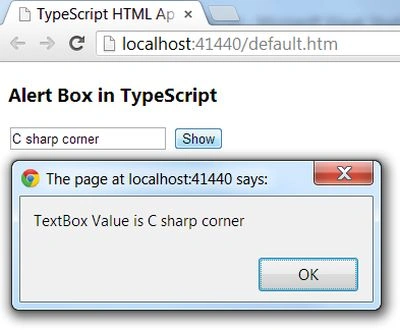
Output 1
Enter the value in the TextBox then click on the "Show" button.
Referenced By
http://www.typescriptlang.org/
Join the conversation! Your thoughts help the community grow.