

Introduction
Before reading further, read the following articles.
- Overview of Scalable Vector Graphics (SVG)
- Scalable Vector Graphics - Rectangle
- Scalable Vector Graphics - Circle
- Scalable Vector Graphics - Ellipse
- Scalable Vector Graphics - Line
- Scalable Vector Graphics - Polyline
- Scalable Vector Graphics - Polygon
- Scalable Vector Graphics - Path 1
- Scalable Vector Graphics - Path 2
Now let's proceed to learn curves in SVG Path.
SVG Path curves
Here, the curves used in SVG path are known as “Bezier curves”. A Bezier curve is just a polynomial expression used to describe the curve path. These curves are also drawn using a <path> tag by including absolute and relative positions.
There are the following two types of Bezier curves.
 Quadratic Bezier curves
When there are two endpoints and one control point it is known as the Quadratic Bezier curve. It can be drawn using a <path> tag and using the "Q" or "q" command for absolute or relative positions respectively.
Let's see an example to understand Quadratic Bezier curves.
Example 1
Quadratic Bezier curves
When there are two endpoints and one control point it is known as the Quadratic Bezier curve. It can be drawn using a <path> tag and using the "Q" or "q" command for absolute or relative positions respectively.
Let's see an example to understand Quadratic Bezier curves.
Example 1
- <html>
- <body>
- <svg height="300" width="700">
- <path d="M70,70 Q10,150 230,60" style="stroke:red; stroke-width:3; fill:none;" />
- </svg>
- </body>
- </html>
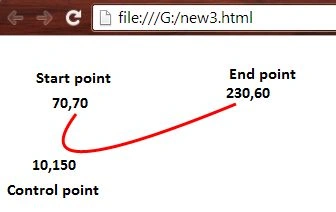
- <html>
- <body>
- <svg height="300" width="700">
- <path d="M30,30 Q20,130 220,50" style="stroke:blue; stroke-width:3; fill:none;" />
- <path d="M90,40 Q10,20 230,40" style="stroke:orange; stroke-width:4; fill:none;" />
- <path d="M210,65 Q150,130 350,60" style="stroke:lime; stroke-width:5; fill:none;" />
- </svg>
- </body>
- </html>

- <html>
- <body>
- <svg height="400" width="450">
- <path d="M 100 350 l 150 -300" stroke="lightgrey" stroke-width="2" fill="none" stroke-dasharray="10 3"/>
- <path d="M 250 50 l 150 300" stroke="lightgrey" stroke-width="2" fill="none" stroke-dasharray="10 3"/>
- <path d="M 175 200 l 150 0" stroke="lightgrey" stroke-width="2" fill="none" stroke-dasharray="10 3"/>
- <path d="M 100 350 q 150 -300 300 0" stroke="lime" stroke-width="5" fill="none" />
- <g stroke="black" stroke-width="3" fill="black">
- <circle cx="100" cy="350" r="3" />
- <circle cx="250" cy="50" r="3" />
- <circle cx="400" cy="350" r="3" />
- <circle cx="175" cy="200" r="3" />
- <circle cx="250" cy="200" r="3" />
- <circle cx="325" cy="200" r="3" />
- </g>
- </svg>
- </body>
- </html>
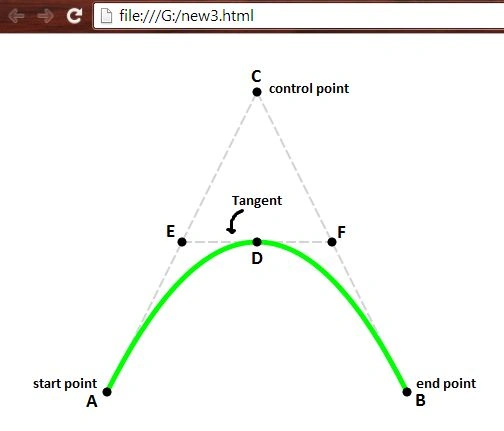
- <html>
- <body>
- <svg height="400" width="450">
- <path d="M50,150 C40,20 260,20 250,150" stroke="tomato" stroke-width="2" fill="none""/>
- <g stroke="black" stroke-width="3" fill="black">
- <circle cx="50" cy="150" r="3" />
- <circle cx="250" cy="150" r="3" />
- </g>
- <g stroke="grey" stroke-width="2" fill="lightgrey">
- <circle cx="70" cy="70" r="3" />
- <circle cx="230" cy="70" r="3" />
- </g>
- </svg>
- </body>
- </html>
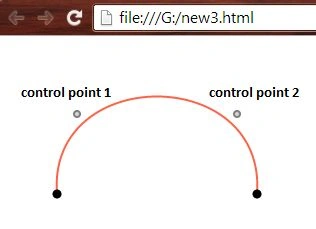
- <html>
- <body>
- <svg height="400" width="750">
- <path d="M50,100 C80,20 150,130 220,100" stroke="purple" stroke-width="2" fill="none""/>
- <path d="M250,30 C150,50 450,50 350,30" stroke="red" stroke-width="2" fill="none"" stroke-dasharray="10 3"/>
- <path d="M370,100 C350,50 540,150 520,100" stroke="skyblue" stroke-width="2" fill="none""/>
- <g stroke="grey" stroke-width="3" fill="lightgrey">
- <circle cx="50" cy="100" r="3" />
- <circle cx="220" cy="100" r="3" />
- <circle cx="250" cy="30" r="3" />
- <circle cx="350" cy="30" r="3" />
- <circle cx="370" cy="100" r="3" />
- <circle cx="520" cy="100" r="3" />
- </g>
- </svg>
- </body>
- </html>

Thank you, keep learning and sharing.
Gopi ChandPosted Aug 11, 2015, 1:14 PM
Thanks a lot everyone for such nice comments :)
Shridhar SharmaPosted Aug 11, 2015, 11:37 AM
Nice series.
Nilesh JadavPosted Aug 11, 2015, 9:56 AM
Nice one sir great
Abhishek JaiswalPosted Jul 31, 2015, 2:27 AM
Interesting, keep sharing more! :)
Sibeesh VenuPosted Jul 31, 2015, 1:58 AM
Nice Share!.
Neeraj KumarPosted Jul 30, 2015, 12:52 PM
great
RakeshPosted Jul 30, 2015, 12:20 PM
Good one sir
Santhakumar MunuswamyPosted Jul 30, 2015, 10:47 AM
Thanks for nice one
Nilesh JadavPosted Jul 30, 2015, 9:38 AM
Nice one sir Thank you for sharing
Rajeesh MenothPosted Jul 30, 2015, 9:22 AM
Nice one