
In this article, I will be creating a Data Access Layer using WCF. I will be using MEF(Managed Extensibility Framework) to export the data from the Data Access Layer class and then import it.
MEF(Managed Extensibility Framework) offers a nice way to create Composable applications where I can easily import and export data.
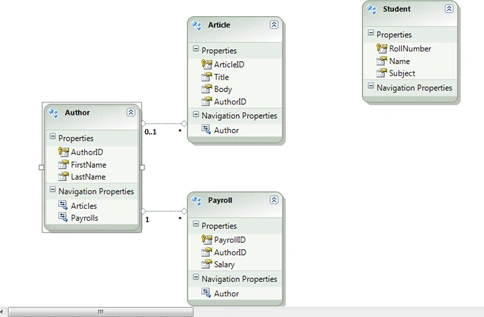
Created a ADO.Net Entity Data Model as shown in diagram below:
Create a new WCF Service as shown below:
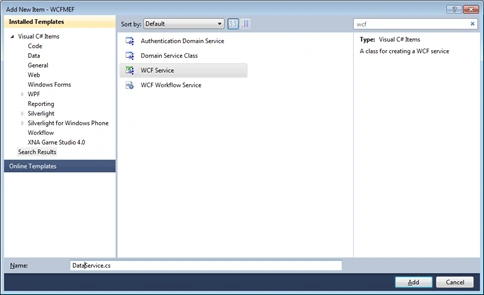
Two files would be added to the solution as DataService and IDataService.cs.
Add a method GetArticles() to IDataService.cs:
- [ServiceContract]
- public interface IDataService
- {
- [OperationContract]
- IEnumerable GetArticles();
- }
- public IEnumerable GetArticles()
- {
- PublishingCompanyEntities context = new PublishingCompanyEntities();
- var article = from art in context.Articles
- select art.Title;
- return article;
- }
- Create a class named as Data
- class Data
- {
- }
- Add a property named Articles.
- class Data
- {
- public IEnumerable Articles { get; set; }
- }
- Add the Method GetData(). Call the method GetArticles() of DataService .
- class Data
- {
- public IEnumerable Articles { get; set; }
- public IEnumerable GetData()
- {
- DataService ds = new DataService();
- return Articles = ds.GetArticles();
- }
- }
- Add the Export attribute on the property Articles.
- class Data
- {
- [Export]
- public IEnumerable Articles { get; set; }
- public IEnumerable GetData()
- {
- DataService ds = new DataService();
- return ds.GetArticles();
- }
- }
- Also add an Export attribute on the Data Class.
- [Export]
- class Data
- {
- [Export]
- public IEnumerable Articles { get; set; }
- public IEnumerable GetData()
- {
- DataService ds = new DataService();
- return ds.GetArticles();
- }
- }
- I need to set the value of the Articles Property. I will do that in the Contructor of the Data Class. So here is my final class.
- [Export]
- class Data
- {
- public Data()
- {
- Articles = GetData();
- }
- [Export]
- public IEnumerable Articles { get; set; }
- public IEnumerable GetData()
- {
- DataService ds = new DataService();
- return Articles = ds.GetArticles();
- }
- }
Creating another class App
- Create a class App.
- class App
- {
- }
- Add a method Run() and put the code to compose the container.
- class App
- {
- public void Run()
- {
- var catalog = new AssemblyCatalog (System.Reflection.Assembly.GetExecutingAssembly());
- var container = new CompositionContainer(catalog);
- container.ComposeParts(this);
- }
- }
- Create a property Articles and this time add an import attribute
- class App
- {
- [Import]
- public IEnumerable Articles { get; set;}
- public void Run()
- {
- var catalog = new AssemblyCatalog(System.Reflection.Assembly.GetExecutingAssembly());
- var container = new CompositionContainer(catalog);
- container.ComposeParts(this);
- }
- }
- Create an object for the Data Class and Import it.
- class App
- {
- [Import]
- public IEnumerable Articles { get; set;}
- [Import]
- Data data;
- public void Run()
- {
- var catalog = new AssemblyCatalog(System.Reflection.Assembly.GetExecutingAssembly());
- var container = new CompositionContainer(catalog);
- container.ComposeParts(this);
- }
- }
- Add a foreach to iterate through the articles.
- class App
- {
- [Import]
- public IEnumerable Articles { get; set;}
- [Import]
- Data data;
- public void Run()
- {
- var catalog = new AssemblyCatalog(System.Reflection.Assembly.GetExecutingAssembly());
- var container = new CompositionContainer(catalog);
- container.ComposeParts(this);
- foreach (string art in Articles)
- {
- Console.WriteLine(art);
- }
- }
- }
Please note that to add the Export and Import attributes you need to add a reference to System.ComponentModel.Composition.
Call the App class now.
- static void Main(string[] args)
- {
- App a = new App();
- a.Run();
- Console.ReadKey();
- }
It works. Happy Coding.
hePosted Feb 28, 2013, 10:16 PM
Thanks
Angelina ErinPosted Jul 26, 2011, 12:33 AM
Helpful Article
Riya SehgalPosted Jul 26, 2011, 12:20 AM
Good logic mahadesh.....