
Introduction
When working with customers, many times I am asked, "How do I implement a custom zoom bar into my application?" At first glance this may seem like a difficult task, but with a little explanation on a few concepts and some sample code, you can easily implement a full-featured zoom bar that meets the needs of your application. In this article I will show you how to build a custom zoom bar using the prebuilt zoom levels defined within Map Suite Web Edition; however, the same concepts apply to building a custom zoom bar using the Map Suite Desktop Edition as well.
Zoom Levels Explained
The Map Suite Desktop, Web and Engine products each come with eighteen prebuilt zoom levels to handle the most common zooming scenarios, ranging from worldwide coverage down to local streets. Having these prebuilt zoom levels at your disposal gives you complete control over how the map is rendered at each zoom level. For example, if you have a map of the world, you wouldn't want to show a lot of detail like country names or roads when the map is zoomed completely out. But as you zoom in, typically you would want to turn on more information such as labels and other map features. With Map Suite you can do just that – from tailoring ZoomLevel18 for views that show the entire globe, down to customizing ZoomLevel01 for a very detailed zoom area like local streets or small land parcels.
Note: Map Suite also allows you to specify your own zoom levels if the prebuilt levels don't meet your needs.
Getting Started
Now that we have covered how zoom levels work, let's get to the fun part: building our sample application with a custom zoom bar. To get started, you will need to create a new ASP.NET web application in Visual Studio 2005. Next, you will need to reference the Map Suite Web Edition .NET Control and drag it on to the web page. Also, don't forget to add the HTTP Handler section to your Web.config file so the map control can render properly.
Now let's add some code to the Page_Load event to initialize the Map and load up our layer representing all the countries in the world. Additionally, we will write some code to color these countries in a reddish hue and turn on country name labeling for zoom levels one to fourteen.
Page_Load Code:
if (!IsPostBack)
{
// Set property of map control
Map1.MapUnit = MapLengthUnits.DecimalDegrees;
Map1.Mode = Map.ModeType.Pan;
Rectangle Rect = new Rectangle(0, 0, (int)Map1.Width.Value, (int)Map1.Height.Value);
Map1.CanvasGeoBrush = new GeoLinearGradientBrush(Rect, GeoColor.GeographicColors.Ocean1, GeoColor.GeographicColors.Ocean2, GeoLinearGradientMode.ForwardDiagonal);
Map1.AjaxEnabled = true;
// Load world countries layer
Layer cntryLayer = new Layer(this.Server.MapPath("") + @"\SampleData\world\cntry02.shp", true);
//Color Countries with labels for all zoom level 14 and below
cntryLayer.ZoomLevel01.GeoStyle = GeoAreaStyles.GetHueFamilyStyle(6, GeoColor.KnownColors.Red, GeoColor.KnownColors.Gray);
cntryLayer.ZoomLevel01.GeoTextStyle = GeoTextStyles.Country1("CNTRY_NAME");
cntryLayer.ZoomLevel01.ApplyUntilZoomLevel = ApplyUntilZoomLevel.ZoomLevel14;
//Color Countries with no labels to higest zoom levels
cntryLayer.ZoomLevel14.GeoStyle = GeoAreaStyles.GetHueFamilyStyle(6, GeoColor.KnownColors.Red, GeoColor.KnownColors.Gray);
cntryLayer.ZoomLevel14.ApplyUntilZoomLevel = ApplyUntilZoomLevel.ZoomLevel18;
Map1.Layers.Add(cntryLayer);
// Save some values in session
Session.Add("FullScale", Map1.CurrentScale);
}
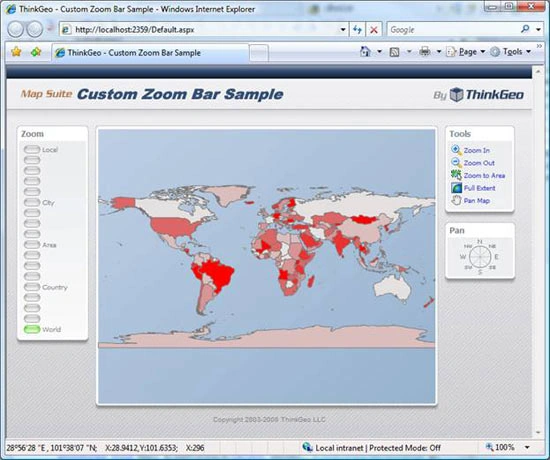
Once you have this code implemented, you should be able to run your project and have a map displaying similar to the one below.
HTML Code
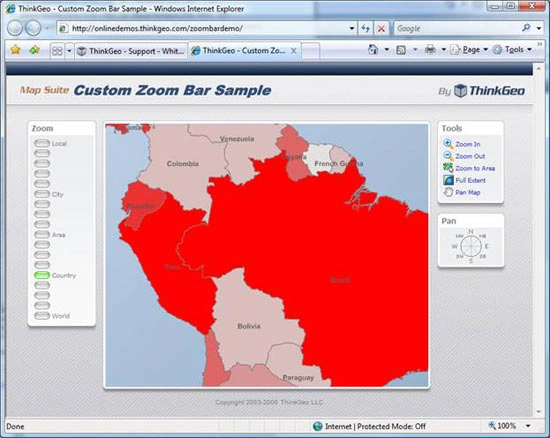
Now that we have a simple map displaying, it's time to take it to the next step and create our custom zoom bar using standard HTML. To do this, we will create a rather large zoom bar which has a button for each of the eighteen prebuilt zoom levels within Map Suite. If eighteen zoom levels seem like too many, remember that you have complete control over the number of zoom levels and you can implement the number that makes sense for your application. Below is the HTML that you'll need in order to implement a zoom bar with all eighteen levels. As you will notice, for each Zoom Button we make an AJAX call and pass in the level that each button represents. Once you have the HTML implemented, the next step is to add the server side code to zoom the map in to the proper level.
<!-- Zoom Bar -->
<p class="ZoomButton">
<img id="Level1" src="./images/zoom.gif" width="25px" height="12px" alt="" onclick="javascript:AjaxEvent('ClickLevel1','Map1');" class="imgbtn" style="cursor: hand" /> Local
</p>
<p class="ZoomButton">
<img id="Level2" src="./images/zoom.gif" width="25px" height="12px" alt="" onclick="javascript:AjaxEvent('ClickLevel2','Map1');" class="imgbtn" style="cursor: hand" />
</p>
<p class="ZoomButton">
<img id="Level3" src="./images/zoom.gif" width="25px" height="12px" alt="" onclick="javascript:AjaxEvent('ClickLevel3','Map1');" class="imgbtn" style="cursor: hand" />
</p>
<p class="ZoomButton">
<img id="Level4" src="./images/zoom.gif" width="25px" height="12px" alt="" onclick="javascript:AjaxEvent('ClickLevel4','Map1');" class="imgbtn" style="cursor: hand" />
</p>
<p class="ZoomButton">
<img id="Level5" src="./images/zoom.gif" width="25px" height="12px" alt="" onclick="javascript:AjaxEvent('ClickLevel5','Map1');" class="imgbtn" style="cursor: hand" />
</p>
<p class="ZoomButton">
<img id="Level6" src="./images/zoom.gif" width="25px" height="12px" alt="" onclick="javascript:AjaxEvent('ClickLevel6','Map1');" class="imgbtn" style="cursor: hand" /> City
</p>
<p class="ZoomButton">
<img id="Level7" src="./images/zoom.gif" width="25px" height="12px" alt="" onclick="javascript:AjaxEvent('ClickLevel7','Map1');" class="imgbtn" style="cursor: hand" />
</p>
<p class="ZoomButton">
<img id="Level8" src="./images/zoom.gif" width="25px" height="12px" alt="" onclick="javascript:AjaxEvent('ClickLevel8','Map1');" class="imgbtn" style="cursor: hand" />
</p>
<p class="ZoomButton">
<img id="Level9" src="./images/zoom.gif" width="25px" height="12px" alt="" onclick="javascript:AjaxEvent('ClickLevel9','Map1');" class="imgbtn" style="cursor: hand" />
</p>
<p class="ZoomButton">
<img id="Level10" src="./images/zoom.gif" width="25px" height="12px" alt="" onclick="javascript:AjaxEvent('ClickLevel10','Map1');" class="imgbtn" style="cursor: hand" /> Area
</p>
<p class="ZoomButton">
<img id="Level11" src="./images/zoom.gif" width="25px" height="12px" alt="" onclick="javascript:AjaxEvent('ClickLevel11','Map1');" class="imgbtn" style="cursor: hand" />
</p>
<p class="ZoomButton">
<img id="Level12" src="./images/zoom.gif" width="25px" height="12px" alt="" onclick="javascript:AjaxEvent('ClickLevel12','Map1');" class="imgbtn" style="cursor: hand" />
</p>
<p class="ZoomButton">
<img id="Level13" src="./images/zoom.gif" width="25px" height="12px" alt="" onclick="javascript:AjaxEvent('ClickLevel13','Map1');" class="imgbtn" style="cursor: hand" />
</p>
<p class="ZoomButton">
<img id="Level14" src="./images/zoom.gif" width="25px" height="12px" alt="" onclick="javascript:AjaxEvent('ClickLevel14','Map1');" class="imgbtn" style="cursor: hand" /> Country
</p>
<p class="ZoomButton">
<img id="Level15" src="./images/zoom.gif" width="25px" height="12px" alt="" onclick="javascript:AjaxEvent('ClickLevel15','Map1');" class="imgbtn" style="cursor: hand" />
</p>
<p class="ZoomButton">
<img id="Level16" src="./images/zoom.gif" width="25px" height="12px" alt="" onclick="javascript:AjaxEvent('ClickLevel16','Map1');" class="imgbtn" style="cursor: hand" />
</p>
<p class="ZoomButton">
<img id="Level17" src="./images/zoom.gif" width="25px" height="12px" alt="" onclick="javascript:AjaxEvent('ClickLevel17','Map1');" class="imgbtn" style="cursor: hand" />
</p>
<p class="ZoomButton">
<img id="Level18" src="./images/zoombar_on.gif" width="25px" height="12px" alt="" onclick="javascript:AjaxEvent('ClickLevel18','Map1');" class="imgbtn" style="cursor: hand" /> World
</p>
Server Side Code
With the zoom bar now implemented in the webpage, it's time to write some server side code to capture the AJAX event and zoom the map in to the proper level. To handle the AJAX event raised from the JavaScript click event on the zoom bar button, we need to implement the Map's AjaxPostback event, write a case statement based on the argument from each zoom bar button and set the map zoom level accordingly. Below is some sample code showing how to implement this functionality.
Map1_AjaxPostback Code:
protected void Map1_AjaxPostback(object sender, AjaxPostbackEventArgs e)
{
switch (e.EventName)
{
case "ClickLevel1":
Map1.CurrentScale = GetScaleFromZoomlevel(Map1.Layers[0].ZoomLevel01);
break;
case "ClickLevel2":
Map1.CurrentScale = GetScaleFromZoomlevel(Map1.Layers[0].ZoomLevel02);
break;
case "ClickLevel3":
Map1.CurrentScale = GetScaleFromZoomlevel(Map1.Layers[0].ZoomLevel03);
break;
case "ClickLevel4":
Map1.CurrentScale = GetScaleFromZoomlevel(Map1.Layers[0].ZoomLevel04);
break;
case "ClickLevel5":
Map1.CurrentScale = GetScaleFromZoomlevel(Map1.Layers[0].ZoomLevel05);
break;
case "ClickLevel6":
Map1.CurrentScale = GetScaleFromZoomlevel(Map1.Layers[0].ZoomLevel06);
break;
case "ClickLevel7":
Map1.CurrentScale = GetScaleFromZoomlevel(Map1.Layers[0].ZoomLevel07);
break;
case "ClickLevel8":
Map1.CurrentScale = GetScaleFromZoomlevel(Map1.Layers[0].ZoomLevel08);
break;
case "ClickLevel9":
Map1.CurrentScale = GetScaleFromZoomlevel(Map1.Layers[0].ZoomLevel09);
break;
case "ClickLevel10":
Map1.CurrentScale = GetScaleFromZoomlevel(Map1.Layers[0].ZoomLevel10);
break;
case "ClickLevel11":
Map1.CurrentScale = GetScaleFromZoomlevel(Map1.Layers[0].ZoomLevel11);
break;
case "ClickLevel12":
Map1.CurrentScale = GetScaleFromZoomlevel(Map1.Layers[0].ZoomLevel12);
break;
vishwa kumarPosted Jun 17, 2009, 7:17 AM
this article is good
sachu ssPosted Jan 27, 2009, 1:30 AM
Will this work fine in Windows Xp and VS 2005? I tried to implement the same in VS 2005 (framework 2.05), it was not working?