

Mutex means mutual exclusion. Mutex is a class in .NET framework. It is thread synchronization process. Mutex is used to prevent the execution of a shared resource by multiple threads. It allows only one single thread to enter to execute a particular task. It is used in single process or multiple processes. It can also be used for interprocess synchronization. Monitor/Lock prevents shared resource from internal threads, but Mutex prevent from both internal as well as external threads. In another way we can say, mutex provide thread safety against internal/external threads.
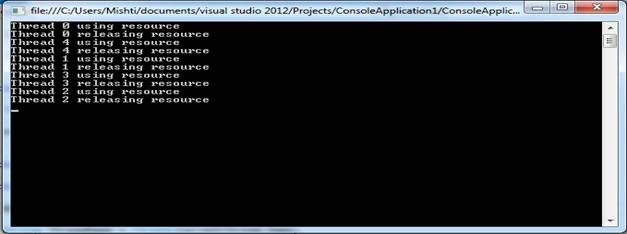
Example: Multiple threads are writing to file in this example.
I have synchronized multiple thread using mutex. Only one thread is accessing shared resource (file here) at a time.
- using System;
- using System.Threading;
- using System.IO;
- class ConsoleApplication1
- {
- static void Main(string[] args)
- {
- for (int i = 0; i < 5; i++)
- {
- Thread thread = new Thread(new ThreadStart(Go));
- thread.Name = String.Concat("Thread ", i);
- thread.Start();
- }
- Console.ReadLine();
- }
- static void Go()
- {
- Thread.Sleep(500);
- WriteFile();
- }
- static Mutex mutex = new Mutex();
- static void WriteFile()
- {
- mutex.WaitOne();
- String ThreadName = Thread.CurrentThread.Name;
- Console.WriteLine("{0} using resource", ThreadName);
- try
- {
- using(StreamWriter sw = new StreamWriter("C:\\abc.txt", true))
- {
- sw.WriteLine(ThreadName);
- }
- } catch (Exception ex)
- {
- Console.WriteLine(ex.Message);
- }
- Console.WriteLine("{0} releasing resource", ThreadName);
- mutex.ReleaseMutex();
- }
Handling single Instance of Application:
- namespace ConsoleApplication1
- {
- class SingleInstance
- {
- static void Main(string[] args)
- {
- String appGUID = ”5 a913d2e - 1 d4b - 492 c - a408 - df315ca3de93”;
- bool ok;
- Mutex mutex = new System.Threading.Mutex(true, appGUID, out ok);
- if (!ok)
- {
- Console.WriteLine("Another instance is already running.");
- } else
- {
- Console.WriteLine("Single instance is running.");
- }
- Console.ReadLine();
- }
- }
- }
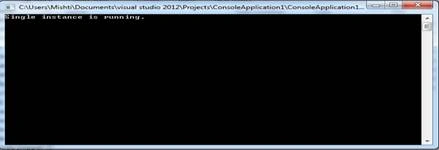
When application will be launched first time, you can see the following message.
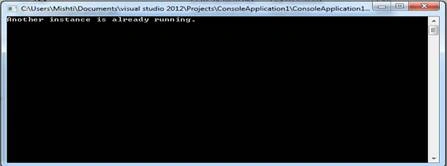
When application is launched more than 1 times then you will see the following message.
Note:
- The name of the mutex should be a unique identifier of assembly or GUID.
- Mutex hits performance, so it should be used when synchronization across process boundaries is required.
Leszek GajeckiPosted Oct 19, 2021, 8:39 AM
This topic is extended also at https://www.c-sharpcorner.com/UploadFile/1d42da/threading-with-mutex/
Leszek GajeckiPosted Oct 19, 2021, 8:35 AM
Thank you for introduction to Mutex
Sunil NaneraPosted Sep 20, 2017, 10:53 PM
Nice explanation :)
Vivek KumarPosted Feb 4, 2016, 2:38 PM
Nice article
Manoj KallaPosted Jan 30, 2016, 11:37 AM
Thanks for sharing
Jaipal ReddyPosted Jan 26, 2016, 11:15 PM
Thanks for sharing. .
Debasis SahaPosted Jan 26, 2016, 9:13 AM
Good One..
Rajesh SinghPosted Jan 26, 2016, 9:05 AM
Thank u
Muhammad Aqib ShehzadPosted Jan 26, 2016, 8:12 AM
nice share
Santhakumar MunuswamyPosted Jan 26, 2016, 12:57 AM
Thanks for nice share