

Introduction
Notifications are generally common in most of the wearable applications. As a developer, one has to understand how to build notifications.
The following combination of classes are used for building notifications:
- Notification
- NotificationCompact.Action
- NotificationCompat.Builder
- NotificationCompat.WearableExtender
- NotificationManagerCompat
The notifications in wearables are designed in a similar fashion but there is something called stacked notification that you see only on wearables. Stacked notifications are nothing but a group of notifications which are stacked together and is shown as a single card. It lets the user to choose and read all notifications.
Please take a look into the following link to have some understanding about Android Wear
Example 1: Constructing a Notification instance.
The following is the code sample for constructing a simple Notification instance. We are yet to display the notification which you will be learning next.
- Notification notification = new NotificationCompat.Builder(this)
- .setSmallIcon(R.mipmap.ic_launcher)
- .setContentTitle("CP notification")
- .setContentText("CodeProject wear notification!")
- .build();
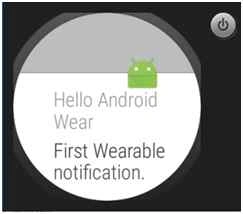
In this example, we will be adding a wearable feature to notification by extending the notification instance to have WearableExtender instance.
You may set any of the available properties of WearableExtender as you wish. Finally it has to be attached to the Notification instance by making a call to the “extend” method and passing in theWearableExtender instance. Also in this example, you can see below a NotificationManagerCompat instance is being used to create a wearable notification.
Code Info
Please note – The following code snippet is part of open source sample.
- NotificationCompat.WearableExtender wearableExtender =
- new NotificationCompat.WearableExtender()
- .setHintShowBackgroundOnly(true);
- Notification notification =
- new NotificationCompat.Builder(this)
- .setSmallIcon(R.drawable.ic_launcher)
- .setContentTitle("Hello Android Wear")
- .setContentText("First Wearable notification.")
- .extend(wearableExtender)
- .build();
- NotificationManagerCompat notificationManager =
- NotificationManagerCompat.from(this);
- int notificationId = 1;
- notificationManager.notify(notificationId, notification);
Example 3: Stacked Notification.
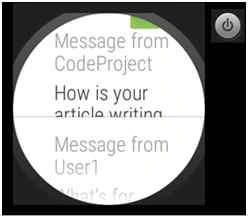
In this example, we will see how to build a stacked notification. The following is the code snippet that shows how to display stacked notifications.
You can see below, you can have two or more Notification instances and a NotificationManagerCompat instance is used for displaying grouped notifications. In order for the stacked notifications to be shown together, we have to group the Notification and that’s done by setting the same group key to all the Notification instance which you are interested in.
- public void DisplayStackedNotifications() {
- final String GROUP_KEY = "group_messages";
- Notification notification1 = new NotificationCompat.Builder(this)
- .setContentTitle("Message from User1")
- .setContentText("What's for lunch? "
- + "Can we have a veggie burger?")
- .setSmallIcon(R.mipmap.ic_launcher)
- .setGroup(GROUP_KEY)
- .build();
- Notification notification2 = new NotificationCompat.Builder(this)
- .setContentTitle("Message from CodeProject")
- .setContentText("How is your article writing going?")
- .setSmallIcon(R.mipmap.ic_launcher)
- .setGroup(GROUP_KEY)
- .build();
- NotificationManagerCompat notificationManager = NotificationManagerCompat.from(this);
- notificationManager.notify(1, notification1);
- notificationManager.notify(2, notification2);
- }
Example 4: Adding action(s) to notification.
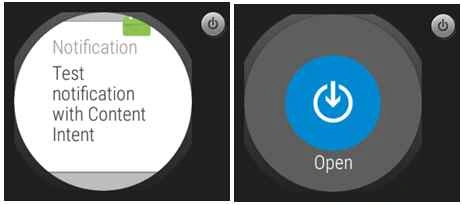
In this example, let us see how we can add actions to notifications. There are times, you wish to not only show notifications but if you are also interested in including some of the actions that should be triggered, say you wish to open a new activity or do some other interesting things, then you should be adding actions.
There is something called primary actions on wearables, you can set a content action on NotificationCompat.Builder by making a call to setContentIntent.
Code Info
Please Note – The code snippet is based on How exactly to use Notification.Builder.
- public void NotificationWithPrimaryIntent()
- {
- int notificationID = 0;
- NotificationCompat.Builder builder = new NotificationCompat.Builder(this)
- .setSmallIcon(R.mipmap.ic_launcher)
- .setContentTitle("Notification")
- .setContentText("Test notification with Content Intent");
- Intent notificationIntent = new Intent(this, MyDisplayActivity.class);
- PendingIntent contentIntent = PendingIntent.getActivity(this, 0, notificationIntent,
- PendingIntent.FLAG_UPDATE_CURRENT);
- builder.setContentIntent(contentIntent);
- NotificationManager notificationManager =
- (NotificationManager) getSystemService(Context.NOTIFICATION_SERVICE);
- notificationManager.notify(notificationID, builder.build());
- }
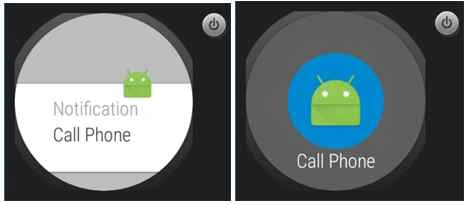
Let us see how to add custom action to notification. The following is the code snippet for the same. Here’s what we do.
- We are creating an Intent instance with an action ACTION_DIAL to dial the wearable connected phone.
- A PendingIntent instance is created to use the callPhoneIntent. Next, we are building a NotificationCompat.Action with an icon, text and the pending intent.
- NotificationCompat.Builder instance is created with an icon, text, title. Also you will notice, there is an action being added by making a call to addAction passing in theNotificationCompat.Action instance.
- At last, a NotificationManager instance is created to notify the user by making a call to “notify” method with the notification id and NotificationCompat.Builder instance.
- public void NotificationWithAction()
- {
- int notificationID = 0;
- Intent callPhoneIntent = new Intent(Intent.ACTION_DIAL);
- PendingIntent callPhonePendingIntent = PendingIntent.getActivity(this, 0,
- callPhoneIntent, PendingIntent.FLAG_UPDATE_CURRENT);
- NotificationCompat.Action callPhoneAction =
- new NotificationCompat.Action.Builder(R.mipmap.ic_launcher, "Call Phone",
- callPhonePendingIntent)
- .build();
- NotificationCompat.Builder builder =
- new NotificationCompat.Builder(this)
- .setSmallIcon(R.mipmap.ic_launcher)
- .setContentTitle("Notification")
- .setContentText("Call Phone")
- .addAction(callPhoneAction);
- NotificationManager notificationManager =
- (NotificationManager) getSystemService(Context.NOTIFICATION_SERVICE);
- notificationManager.notify(notificationID, builder.build());
- }
Example 5: Notification through broadcast receiver
In this example, we will try to understand how to display notification within the broadcast receiver. We need an Intent instance to trigger or send a broadcast. Also the BroadcastReceiver is responsible for receiving the broadcast message.
We will be modifying the AndroidManifest.xml file to include the broadcast receiver with an intent filter action as com.example.ranjan.wearablenotification.SHOW_NOTIFICATION. It is very important to add this change else the broadcast receiver won’t be able to receive anything.
- <receiver
- android:name=".MyPostNotificationReceiver"
- android:exported="true" >
- <intent-filter>
- <action android:name="com.example.ranjan.wearablenotification.SHOW_NOTIFICATION" />
- </intent-filter>
- </receiver>
- public class MyPostNotificationReceiver extends BroadcastReceiver {
- public static final String CONTENT_KEY = "contentText";
- public MyPostNotificationReceiver() {
- }
- @Override
- public void onReceive(Context context, Intent intent) {
- Intent displayIntent = new Intent(context, MyDisplayActivity.class);
- String text = intent.getStringExtra(CONTENT_KEY);
- Notification notification = new Notification.Builder(context)
- .setSmallIcon(R.mipmap.ic_launcher)
- .setContentTitle(text)
- .extend(new Notification.WearableExtender()
- .setDisplayIntent(PendingIntent.getActivity(context, 0, displayIntent,
- PendingIntent.FLAG_UPDATE_CURRENT)))
- .build();
- ((NotificationManager) context.getSystemService(Context.NOTIFICATION_SERVICE))
- .notify(0, notification);
- Toast.makeText(context, context.getString(R.string.notification_posted),
- Toast.LENGTH_SHORT).show();
- }
- }
- public class MyStubBroadcastActivity extends Activity {
- @Override
- protected void onCreate(Bundle savedInstanceState) {
- super.onCreate(savedInstanceState);
- Intent intent = new Intent();
- intent.setAction("com.example.ranjan.wearablenotification.SHOW_NOTIFICATION");
- intent.putExtra(MyPostNotificationReceiver.CONTENT_KEY, getString(R.string.title));
- sendBroadcast(intent);
- finish();
- }
- }
Sr KarthigaPosted Feb 14, 2016, 7:54 AM
Good one sir
Nilesh JadavPosted Oct 19, 2015, 1:16 AM
Nice one !!
Ankit BansalPosted Oct 19, 2015, 12:43 AM
nice one..thanks for sharing with us..
Santhakumar MunuswamyPosted Oct 18, 2015, 2:15 AM
Good Article
Priyaranjan K SPosted Oct 17, 2015, 1:20 PM
Good One ...
Rajeesh MenothPosted Oct 17, 2015, 12:21 PM
Nice One!!