
There are many differences between .NET Framework and .NET Compact Framework, yet many developers port their desktop applications to mobile platforms as if they were the same. Microsoft did some great work by creating the .NET Framework and the .NET Compact Framework which made the porting much easier. Still there are many peculiarities of the .NET Compact Framework which a good developer must consider. Taking a desktop solution, removing the unsupported methods and recompiling for Compact Framework often works, but leads to applications that don't look good (often because of the removed unsupported methods), are difficult to control (because they were designed to be used on a desktop which relies on a mouse) and are slow (simply because the processor speed is 5 times or even slower than on a desktop).
Let's have a look at standard Visual Studio DataGrid - a popular control among .NET developers which can be used to display data in tabular form. The problem with the compact version of DataGrid is that it was designed for desktop environment and then just dropped into the .NET CF. In this article I will show some typical issues one can encounter when developing mobile applications and how to solve them using a grid control that was designed for mobile devices from the scratch.
Data loading
DataGrid is a fine control when working with ADO.NET. However, ADO.NET is not very useful on .NET CF, because it copies the entire database into memory which is both slow and memory consuming. Furthermore, there is no simple way to manually insert new rows of data into the DataGrid instead of using data binding. Resco SmartGrid for .NET CF does not only provide a simple way of adding new rows of data, but most importantly ease of manipulation and customization that can be implemented using Visual Studio's designer. Adding data rows means adding Row objects to the SmartGrid's collection of rows.
Graphics capabilities
Whereas on a desktop computer the user can still quite comfortably view a 20 column grid, on a mobile device showing even 4 columns can pose a problem. On a mobile device each pixel is precious and potentially useful to render data. Plain text is very universal for describing various data types, but is also space consuming. To make the most of every pixel on the screen, using the graphics helps a lot.
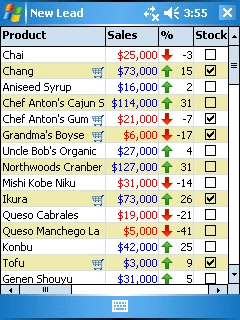
Imagine that we have a database table containing the names of products, the monthly sales volumes in USD, the percentage of increase or decrease compared to the previous month and stocking information. Such information can be described using text (which is the only option when using DataGrid) or it can be graphically depicted as seen on Figure 1. The color of numbers in monthly sales already tells the user whether there was an increase or a decrease. The arrow icons are therefore not even necessary but they improve the user's ability to quickly tell the increased products from the decreased ones. The checkbox is also a much more convenient indicator of stock availability than plain True/False text strings or 1/0 numbers. The shopping-cart icon can provide even more information on readiness of the product for sale. Developers can easily handle the click on the shopping-cart icon and perform a meaningful action such as displaying an ordering form.


Alexey MelnikovPosted Sep 18, 2009, 6:30 PM
You can also obtain the CompactGrid control: http://www.cf-technologies.net/compactgrid.php