

Introduction
This article has 12 important FAQ's which covers unit testing, automated testing, data driven test, load/ performance test, code coverage , database testing and ordered testing.
I have collected around 400 FAQ questions and answers in Silverlight, Azure, VSTS, WCF, WPF, WWF, SharePoint, Design Patterns, UML etc. Feel free to download these FAQ PDF's from my site http://www.questpond.com
VSTS 2010 download
This article uses VSTS heavily so in case you do not have the BETA download the same from:-
http://www.microsoft.com/downloads/details.aspx?FamilyID=255fc5f1-15af-4fe7-be4d-263a2621144b&displaylang=en
What is Unit testing?
Unit testing is validation and verification methodology where the developers test the individual units of source code. Some key points to be remembered from: -
- A unit is the smallest part in the application which can be tested. So it can be either a method. Function or class.
- These tests are conducted during development.
- Unit test belongs to the white box testing category.
What are the different ways by which you can do unit testing with .NET?
There are 2 primary / accepted ways of doing unit testing:-
- NUNIT
- Visual studio team edition test system
Can we start with a simple NUNIT example?
Ok so let's say we want to do unit testing for a simple class 'clsInvoiceCalculation' shown below. This class calculates total cost by taking per product cost and number of products as input.
public class clsInvoiceCalculation
{
public int CalculateCost(int intPerProductCost, int intNumberOfProducts)
{
return intPerProductCost *intNumberOfProducts;
}
}
Let's say we want to execute the below test case on the above class using NUNIT.
|
Per product cost |
Number of products |
Expected output |
|
10 |
20 |
200 |
Step 1:- The first step is to download to the NUNIT software from http://nunit.org/index.php?p=download
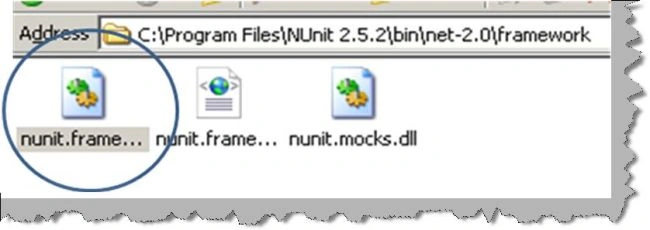
Step 2:- Create a new C# class project and add reference to "C:\Program Files\NUnit 2.5.2\bin\net-2.0\framework\nunit.framework.dll". We also need to add reference to the class project which we are testing i.e. the invoice project.
Step 3:- Add reference to the NUNIT and your invoice project in your code.
using NUnit.Framework;
using Invoice;
Step 4:- We need to create a simple class with 'TestFixture' as attribute. We then to create a method attributed with 'Test' which will have our test.

You can see in the above figure how the 'TestInvoiceCalculation' method creates a object of 'clsInvoiceCalculation' , passes the values and checks if the returned values has the expected results. 'Assert' command is used to check if the expected output and the results return match.

Step 5:- Once we are finished with our test case we need to compile the same to create a DLL. Once the DLL compilation is done go to program files - nunit and click on nunit. Now the nunit user interface will open. Click on file - open project and select your test DLL. Once you select your DLL you will get a screen as shown below. On the right hand side you can see your test class with test function which has the test case. Check the test function and hit run. Now if the test case passes you will see a full green color or else you will see a red color with details of why the test case fails.



Join the conversation! Your thoughts help the community grow.