

Walkthrough
- Create an OCX customized control, either using Visual C++6.0 or Visual Basic 6.0 or download one from the internet, any one because the purpose here is to step through the manner of hosting it within a given Windows .Net application. (In my case, I ran the research on local machine for a given OCX and I have chosen the MSFlexGrid.ocx control and a testing control.
- Copy and paste your control in the root drive say the C:\
- Open the command prompt by browsing to Start>All programs>Accessory>Command prompt then type those couple of lines as bellow:
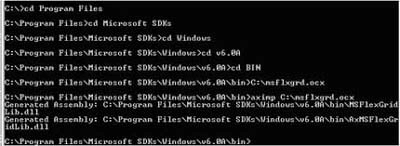
The aximp that stands for ActiveX Control Importer is used in this case. It does the conversion type definitions according to COM type library for an OCX control into a standard Windows Forms control. Because Windows Forms can only host Windows Forms controls and not any other control types at any cases including the OCX ones, Of Corse. Aximp.exe generates a wrapper like the RCW the runtime callable wrapper class for an ActiveX control that can be hosted on a Windows Form. This is the only way that allows the OCX use.
As the figure above shows, there is a new generated dll called MSFlexGridLib.dll located in C:\Program Files\Microsoft SDKs\Windows\v6.0A\Bin.
- Create a new Windows application project.
- Add a reference to this dll by going to the solution explorer, right clicking on the project and selecting Add reference menu item.
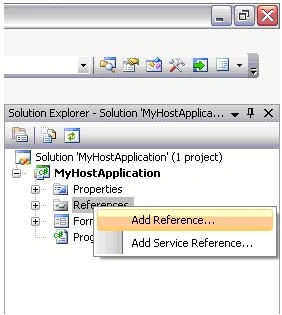
Figure 1
- Select browse tab as follow :
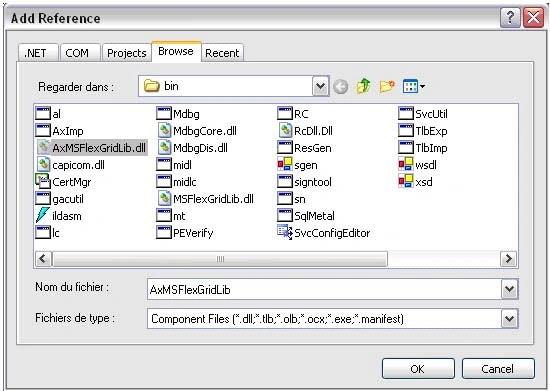
Figure 2
- As you can remark, the reference to your new generated dll is added.
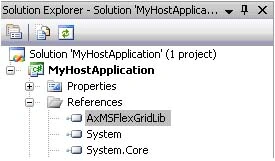
Figure 3
- Now, add the namespace using AxMSFlexGridLib; then add this couple of code within the load event handler
stub as under:
private void Form1_Load(object sender, EventArgs e)
{
AxMSFlexGrid oGrid = new AxMSFlexGrid();
oGrid.Visible = true;
oGrid.Parent = this;
oGrid.Dock = DockStyle.Fill;
oGrid.CellBackColor = Color.Bisque;
oGrid.Cols = 7;
oGrid.Rows = 30;
}
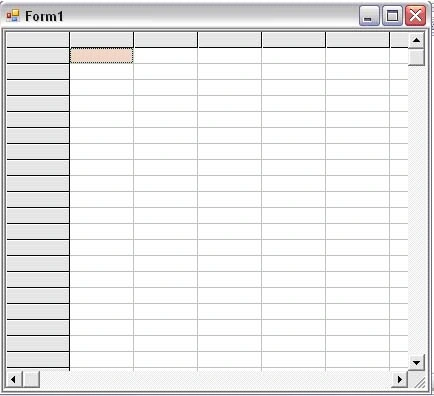
Figure 4
Good Dotneting !!!
mohamed arafathPosted Jan 26, 2021, 4:00 PM
I am trying to access the OCX in windows service and getting "Catastrophic failure (Exception from HRESULT: 0x8000FFFF (E_UNEXPECTED))" while accessing the properties. Any suggestions pls
John SamuelPosted Mar 28, 2019, 6:58 AM
I am new to C#, Can you please share how to call an OCX file in C#.
Former memberPosted Jul 31, 2015, 1:55 AM
i create dll and how to use this dll in web app in asp.net
Sachin KumarPosted Aug 30, 2010, 12:46 PM
Thanks, It's a very nice way to host OCX file in window application