Blue Theme Orange Theme Green Theme Red Theme
 
Dundas Dashboard
Home | Forums | Videos | Photos | Downloads | Blogs | E-Books | Interviews | Jobs | Beginners | Training
 | Consulting  
Submit an Article Submit a Blog 
 Login Close
User Id:
Password:
 
Forgot Password
Forgot Username
Why Register
 Jump to
Skip Navigation Links
TechnologyExpand Technology
WebsiteExpand Website
 Resources  
Close
 Our Network  
Close
Search :       Advanced Search »
Home » Internet & Web » Create FTP and Web IIS Virtual Directory using C#

Create FTP and Web IIS Virtual Directory using C#

In this example we will create a Windows Form Project that will create new FTP and Web IIS Virtual Directories from code based on the name and path specified by the user.

Author Rank:
Technologies: .NET 1.0/1.1,Visual C# .NET
Total downloads :
Total page views :  31689
Rating :
 4.4/5
This article has been rated :  5 times
   Print Read/Post comments Post a comment  Rate  
   Email to a friend  Bookmark  Similar Articles  Author's other articles  
 
Become a Sponsor


In this example we will create a Windows Form Project that will create new FTP and Web IIS Virtual Directories from code based on the name and path specified by the user. You can create virtual directories on the local computer by specifying the server name as "localhost" or you can create the virtual directory on a remote computer by specifying the machine name.

We make use of the DirectoryServices namespace for creating the Virtual directory.

Step 1: Create the Project and the basic User Interface.

Create a new Visual C# Windows Forms Project and add controls on the default form as shown below.
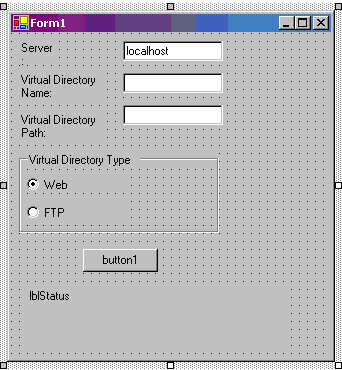


Figure 1: User interface 

Control Property Name Property Value
Label Text Server
TextBox Name txtServer
Text localhost
Label Text Virtual Directory Name
TextBox Name txtVDirName
Label Text Virtual Directory Path
TextBox Name txtVDir
GroupBox Text Virtual Directory Type
RadioButton Label Web
RadioButton Label FTP
Button
Label Name lblStatus

The windows form allows the user to specify the server name on which to create the virtual directory, the virtual directory name, the virtual directory path, the type of virtual directory (FTP or Web). We will now add the code to create the virtual directory when the button is clicked. The code is specified in the code listing below.

We first determine if the user has selected to create an FTP virtual directory or a Web Virtual Directory. Based on this selection, we set the values for the schema name and a part of the path for the IIS root to create the node in. We now create a DirectoryEntry object for the root of the IIS directory on the server specified by the user which points to the web or ftp root. We then add a node to the children collection of the root node and set the value for the Path property of the newly created node. If the user selected to create a web virtual directory, we set the new node as an application. We then commit the changes and close the directory entry nodes. Finally we display the status - whether successful or error, to the user. You need to make sure that the user has the privileges to create the new virtual directories before running the sample.

private void button1_Click(object sender, System.EventArgs e)
{
string strSchema= "";
string strRootSubPath = "";
if (radioButton1.Checked)
{
strSchema = "IIsWebVirtualDir";
strRootSubPath = "/W3SVC/1/Root";
}
if (radioButton2.Checked)
{
strSchema = "IIsFtpVirtualDir";
strRootSubPath = "/MSFTPSVC/1/Root";
}
if (strSchema == "")
{
strSchema = "IIsWebVirtualDir";
strRootSubPath = "/W3SVC/1/Root";
}
DirectoryEntry deRoot=
new DirectoryEntry("IIS://" + txtServer.Text + strRootSubPath);
try
{
deRoot.RefreshCache();
DirectoryEntry deNewVDir = deRoot.Children.Add(txtVDirName.Text,strSchema);
deNewVDir.Properties["Path"].Insert(0,txtVDir.Text);
deNewVDir.CommitChanges();
deRoot.CommitChanges();
// Create a Application
if (strSchema == "IIsWebVirtualDir")
deNewVDir.Invoke("AppCreate",
true);
// Save Changes
deNewVDir.CommitChanges();
deRoot.CommitChanges();
deNewVDir.Close();
deRoot.Close();
lblStatus.Text = "Virtual Directory " + txtVDirName.Text + "(" + txtVDir.Text + ") has been created";
}
catch (Exception ex)
{
lblStatus.Text = "Error: " + ex.Message;
}
}

Code Listing : Button Click event handler code - create a new virtual directory.

Please refer to the complete code listing available for download at the top of the article.  
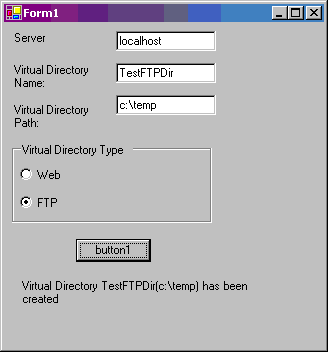


Figure : Creating a virtual directory from our program. This creates a FTP Virtual directory named "TestFTPDir" pointing to path "C:\Temp"

Conclusion:

In this article, we saw how to create FTP and Web virtual directories programmatically. This can be very useful in deployment scenarios.


Login to add your contents and source code to this article
 [Top] Rate this article
 About the author
 
Dipal Choksi
Dipal Choksi has over 10 years of industry experience in team-effort projects and also as an individual contributor. She has been working on the .Net platform since the beta releases of .Net 1.0.
Looking for C# Consulting?
C# Consulting is founded in 2002 by the founders of C# Corner. Unlike a traditional consulting company, our consultants are well-known experts in .NET and many of them are MVPs, authors, and trainers. We specialize in Microsoft .NET development and utilize Agile Development and Extreme Programming practices to provide fast pace quick turnaround results. Our software development model is a mix of Agile Development, traditional SDLC, and Waterfall models.
Click here to learn more about C# Consulting.
 
Introducing MaxV - one click. infinite control. Hyper-V Hosting from MaximumASP.
Finally – a virtual platform that delivers next-generation Windows Server 2008 Hyper-V virtualization technology from a managed hosting partner you can truly depend on. Visit www.maximumasp.com/max for a FREE 30 day trial. Hurry offer ends soon. Climb aboard the MaxV platform and take advantage of High Availability, Intelligent Monitoring, Recurrent Backups, and Scalability – with no hassle or hidden fees. As a managed hosting partner focused solely on Microsoft technologies since 2000, MaximumASP is uniquely qualified to provide the superior support that our business is built on. Unparalleled expertise with Microsoft technologies lead to working directly with Microsoft as first to offer IIS 7 and SQL 2008 betas in a hosted environment; partnering in the Go Live Program for Hyper-V; and product co-launches built on WS 2008 with Hyper-V technology.
Dynamic PDF
ceTE software specializes in components for dynamic PDF generation and manipulation. The DynamicPDF™ product line allows you to dynamically generate PDF documents, merge PDF documents and new content to existing PDF documents from within your applications.
Go.NET
Build custom interactive diagrams, network, workflow editors, flowcharts, or software design tools. Includes many predefined kinds of nodes, links, and basic shapes. Supports layers, scrolling, zooming, selection, drag-and-drop, clipboard, in-place editing, tooltips, grids, printing, overview window, palette. 100% implemented in C# as a managed .NET Control. Document/View/Tool architecture with many properties&events. Optional automatic layout.
Dundas Software
Dundas Chart for .NET is the most advanced .NET charting package available today.  With an extremely complete feature set, elegant architecture and easy implementation, Dundas Chart can quickly add advanced Charting functionality to enhance and transform ASP.NET and Windows Forms applications.  Whether you are implementing charting into internal projects, or building applications for clients, Dundas Chart offers advanced technology and advanced results to get the most out of data.
Clickatell's SMS Gateway
Clickatell's Developer Solutions allow you to SMS enable any website or application via a range of API's. Learn More about our API connections.
Free access to .NET Memory Management video
Everything you need to know about Garbage Collection, Temporary Objects, Fragmentation, Finalization and common causes of memory leaks in .NET. Watch the video here.
Microsoft Visual Studio 2010
Microsoft Visual Studio 2010 offers more to developers than any other Visual Studio release. Work more productively and collaboratively-with greater control over your work at every step. The Beta 2 can give you a head start on achieving efficiency.
 
   Print Read/Post comments Post a comment  Rate  
   Email to a friend  Bookmark  Similar Articles  Author's other articles  
 
 Post a Feedback, Comment, or Question about this article
Subject:  
Comment:  
Dundas Dashboard
Become a Sponsor
 Comments
Great Sample by bali On March 14, 2008
Never created IIS Virtual Directory programmaticaly before. This article helped a lot.. Was able to programmaticaly create my first Virtual Directory!!!!!!!!!!
Reply | Email | Delete | Modify | 
how to set default document by mahadev On October 1, 2008
can u tell me how to set default document and to check 'enable default document' checkbox
Reply | Email | Delete | Modify | 
Subject: by gaurav On October 15, 2008
Comment:
Reply | Email | Delete | Modify | 
Make Virtual Directory Writable by rob On December 12, 2008
FTP is set up properly, but defaults to only read access... How to make it writable. User account has permission to write, but ftp account does not.
Reply | Email | Delete | Modify | 
Make Virtual Directory Writable - Answer by rob On December 12, 2008
Here's how to do it deNewVDir.Properties["AccessWrite"][0] = true Can't explain all of it yet, but I'll learn.
Reply | Email | Delete | Modify | 
ftp server by Kardes On August 24, 2009
Hi everbody

I want to ask a question. I want to write a interface.  its mission is to send video files to some different ip adresses over internet. 
  Can you advice me?  in which language can I write it.
Reply | Email | Delete | Modify | 

 Hosted by MaximumASP  |  Found a broken link?  |  Contact Us  |  Terms & conditions  |  Privacy Policy  |  Site Map  |  Suggest an Idea  |  Media Kit
Current Version: 5.2009.6.2
 © 1999 - 2009  Mindcracker LLC. All Rights Reserved