Game Description
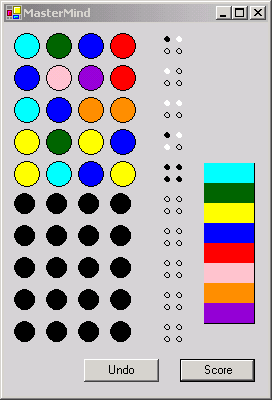
This is the game of Mastermind written in C#. The game is played by clicking on a set of 4 colors and then hitting the score button. Colors can repeat themselves in this game, so be wary! The score is determined each time with the following rules:
A black peg to the right of your guess indicates that one of the pegs is in the right location in the row (although you do not necessarily know which position it is referring to). Four black pegs indicates you have won the game because all 4 colors are in the right position in the row. A white peg indicates that one of the pegs is correct, but its in the wrong position in the row. An empty peg (hollow circle), indicates that one of the colored pegs is completely wrong and is not part of the puzzle. Anotherwords, if after pressing the Score button, you have 4 hollow pegs, then you can eliminate all the pegs in the row as being part of the solution to the puzzle.
Strategy
Use the previous guesses and logic to figure out which pegs are referring to which colors.
Application Design
This is a GDI+ application and utilizes the DrawEllipse and FillEllipse routines to draw the pegs on the board. It is also a good application for examining multidimensional arrays. Below is the UML design for Mastermind:
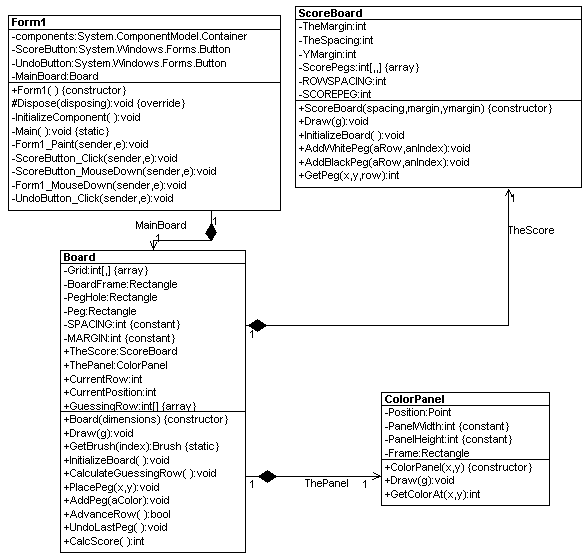
Fig 1.2 - UML Design Reverse Engineered using WithClass 2000
You'll notice that a lot of the design is centralized around the Board class. The Board class draws the color pegboard and calls the ScoreBoard class to draw the score peg column. The ColorPanel is also drawn directly onto the form and has a routine for determining which color is chosen by the user called GetColorAt. Below is the sequence of events that happens when a user chooses a color on the panel:
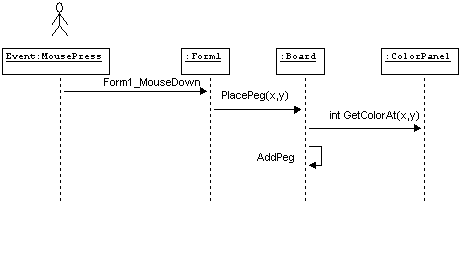
Fig 1.3 - Sequence of events after pressing ColorPanel using WithClass
The Mouse Coordinates on the form are used to determine the location of the color on the color panel and then the next available peghole in the row is filled.
The board is drawn using a 2 dimensional Grid array to store the color peg positions. The position is scaled to the appropriate location on the form:
public void Draw(Graphics g)
{
// cycle through the Grid Matrix and place the
// indicated colored peg at the indicated location
for (int i = 0; i < Grid.GetLength(0); i++)
{
for (int j = 0; j < Grid.GetLength(1); j++)
{
// a Grid value of 0 indicates an empty slot
// draw an empty hole
if (Grid[i,j] == 0)
{
Rectangle r = new Rectangle(PegHole.Left, PegHole.Top, PegHole.Width, PegHole.Height);
r.Offset(i* (PegHole.Width + SPACING), j* (PegHole.Height + SPACING));
r.Offset(MARGIN, MARGIN);
g.DrawEllipse(Pens.Black, r);
g.FillEllipse(Brushes.Black, r);
}
else
{
// there is a peg here, draw the colored peg
Rectangle r = new Rectangle(Peg.Left, Peg.Top, Peg.Width, Peg.Height);
r.Offset(i* (PegHole.Width + SPACING), j* (PegHole.Height + SPACING));
r.Offset(MARGIN, MARGIN);
Brush aBrush = Brushes.Black;
// This routine retrieves the brush matching
// the integer at the grid point
aBrush = GetBrush(Grid[i,j]);
// draw the colored peg with the determined brush
Pen aPen = new Pen(aBrush,1);
g.FillEllipse(aBrush, r);
g.DrawEllipse(Pens.Black, r);
aPen.Dispose();
}
}
}
// draw the score column
TheScore.Draw(g);
// draw the color peg choice panel
ThePanel.Draw(g);
}
Listing 1.0 - Drawing the entire board of Mastermind
The last interesting code to look at in this project is the scoring algorithm. The score is determined by first figuring out the locations that the player matched exactly and marking them. Then the white pegs are determined by going through each peg in the solution row and checking it against all the pegs of the player row. Again, arrays are used extensively here:
public int CalcScore()
{
int nExact = 0;
int nThere = 0;
int nCount = 0;
int[] places = new int[4]{-1, -1, -1, -1};
int[] places2 = new int[4]{-1, -1, -1, -1};
// match exact rows first, this is easier
for (int i = 0; i < 4; i++)
{
if (GuessingRow[i] == Grid[i, CurrentRow])
{
nExact++;
TheScore.AddBlackPeg(CurrentRow, nCount);
nCount++;
places[i] = 1;
places2[i] = 1;
}
}
// check the special case where the player may have solved the puzzle
if (nExact == 4)
{
return nExact;
}
// now check for all the white pegs, a bit trickier
for (int i = 0; i < 4; i++)
{
for (int j = 0; j < 4; j++)
{
// make sure the positions aren't the same and the pegs in the different positions
// both in the solution and the player row haven't already been determined
if ((i != j) && (places[i] != 1) && (places2[j] != 1))
{
// if the GuessedRow color matches the Grid Color at a different position
// We have a white peg
if (GuessingRow[i] == Grid[j, CurrentRow])
{
nThere++;
TheScore.AddWhitePeg(CurrentRow, nCount);
nCount++;
places[i] = 1;
places2[j] = 1;
j = 5; // force a break, (I know, you can also use break;)
}
}
}
}
return nExact; // return the # of exact (black pegs) that matched
}
Summary
This is the first cut. While playing the game, one thing I noticed would be a nice improvement would be to be able to specify the row hole you want to fill, rather than fill in order from left to right. This will come out in the next version. Have fun!