

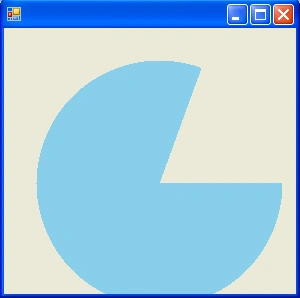
This Blog is showing that how can you draw Pie shape in F# windows form application with some lines of code using FillPie method.
where Brush is an object that determine color used to fill the pie shape.
Example
open
System.Drawing
open
System.Windows.Forms
let
form =
//
create a new form setting the minimum size
let temp = new
Form(MinimumSize = new Size(80, 80))
//
repaint the form when it is resize
temp.Resize.Add (fun _
-> temp.Invalidate())
//
a brush to provide the shapes color
let brush = new
SolidBrush(Color.SkyBlue)
temp.Paint.Add (fun e
->
// calculate the width and height of the shape
let width, height = temp.Width - 54, temp.Height
- 54
//
draw the required shape
e.Graphics.FillPie
(brush, 32, 32, width, height, 0, 290))
//
return the form to the top level
temp
Application.Run(form)
Output
Join the conversation! Your thoughts help the community grow.