Skip to content
Loading
how to use ngx-translate in angular2+
+1
  • Mukesh Nayak
    For  me its working . Just share your code
    +1
  • Mukesh Nayak
    no it doesn't work
    +1
  • Mukesh Nayak
    Hi dev,
     
    I think we can go like following :
    1. <label>    
    2.      Hobbies    
    3.      <select #personSelect >    
    4.        <option *ngFor="let hobb of person[0].hobbies" [value]="hobb.title" >{{ hobb.title}}option>    
    5.      select>    
    6.    label>
    1. this.person = [{Name: 'maroua',   
    2.                       gender: 'f',  
    3.                       hobbies: [  
    4.                           {title: 'swimming', description: 'description'},  
    5.                           {title: 'dancing', description: 'description'},  
    6.                           ]}];  
    Output


    Let me know if this works
     
    Mukesh Nayak 
    +1
  • Mukesh Nayak
     
    ah yes, but my teacher forced us to work with array
    +1
  • Mukesh Nayak
    Hi Dev ,
     
    Considering your question i created a class structure like following :
    1. export class Person {  
    2.     Name: string;  
    3.     gender: string;  
    4.     hobbies: Array;  
    5. }  
    6.   
    7. export class Hobbies {  
    8.     Title: string;  
    9.     Description: string;  
    10.   
    11.     constructor(tit: string, des: string) {  
    12.         this.Title = tit;  
    13.         this.Description = des;  
    14.     }  
    15.   
    16. }  
     and then created the person object accordingly 
    1.  person:Person;  
    2.   
    3. constructor() {  
    4.   
    5. this.person = new Person();  
    6.    this.person.Name = "Mukesh";  
    7.    this.person.gender = "male";  
    8.    this.person.hobbies = new Array();  
    9.    this.person.hobbies.push(new Hobbies("title1","Description1"));  
    10.    this.person.hobbies.push(new Hobbies("title2","Description2"));  
    11. }  
     Finaly Populated dropdownlist as
    1.      Hobbies  
    2.        
    3.        "let hobb of person.hobbies" [value]="hobb.Title" >{{ hobb.Title}}  
    4.        
    5.      
    6.  
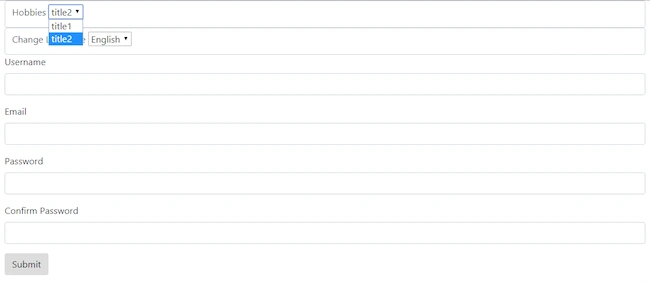
    And then output as :
     
     
    Hope this will help
     
    Regards,
    Mukesh Nayak 
    +1
  • Hi, Thank you Can you help on this For example I have a array like this This.person = [{Name: 'maroua', gender: 'f', hobbies: [{title: 'swimming', description: 'description'}]}}]; How can I fill a select option with hobbies.title
    +1
  • Mukesh Nayak
    Hi Dev,
     
    I have used information from following sites and created a sample application :
     
    "https://scotch.io/tutorials/how-to-implement-a-custom-validator-directive-confirm-password-in-angular-2"
    "https://www.npmjs.com/package/ng2-translate" 
     
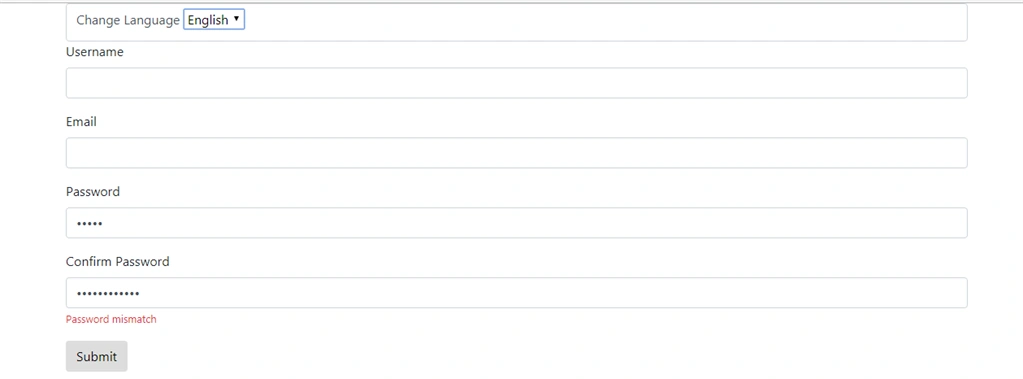
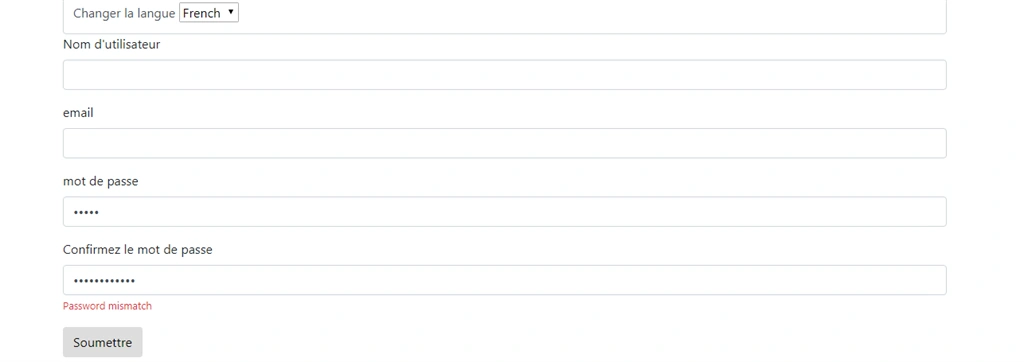
    My application looks like :


    I have uploaded the src part of the code.
     
    Regards,
    Mukesh Nayak
    +1
  • Manav Pandya
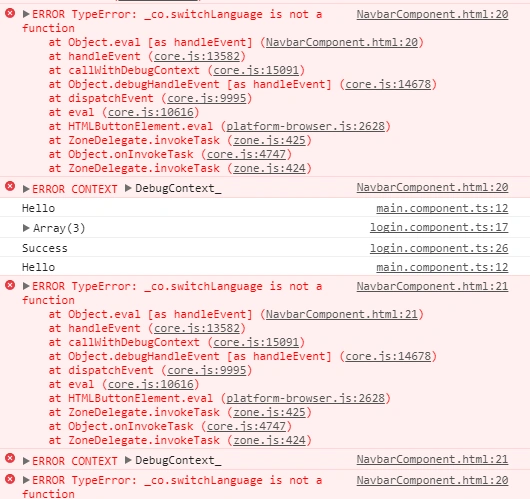
    i detected this error 
      
     
    app.component.ts 
    1. import { Component } from '@angular/core';  
    2. import {Globals} from './globals';  
    3. import { TranslateService } from '@ngx-translate/core';  
    4.   
    5. @Component({  
    6.   selector: 'app-root',  
    7.   templateUrl: './app.component.html',  
    8.   styleUrls: ['./app.component.css']  
    9. })  
    10. export class AppComponent   
    11. {  
    12.   title = 'app';  
    13.   
    14.   constructor(private translate: TranslateService) {  
    15.     translate.setDefaultLang('en');  
    16.   }  
    17.   
    18.   switchLanguage(language: string) {  
    19.     this.translate.use(language);  
    20.   }  
    21.   
    22. }  
     app.module.ts
     
    1. import { BrowserModule } from '@angular/platform-browser';  
    2. import { NgModule } from '@angular/core';  
    3.   
    4. import {routes} from './app.routing'  
    5. import { FormsModule } from '@angular/forms';  
    6. import { LocationStrategy, HashLocationStrategy } from '@angular/common';  
    7.   
    8. import { AppComponent } from './app.component';  
    9. import { NavbarComponent } from './navbar/navbar.component';  
    10. import { SidebarComponent } from './sidebar/sidebar.component';  
    11. import { FooterComponent } from './footer/footer.component';  
    12.   
    13. import { HomeComponent } from './main/main.component';  
    14. import { LoginComponent } from './login/login.component';  
    15. import { RegisterComponent } from './register/register.component';  
    16.   
    17. import {Globals} from './globals'  
    18. import { AboutComponent } from './about/about.component';  
    19. import { ContactComponent } from './contact/contact.component';  
    20.   
    21. import { HttpClientModule, HttpClient } from '@angular/common/http';  
    22. import { TranslateModule, TranslateLoader } from '@ngx-translate/core';  
    23. import { TranslateHttpLoader } from '@ngx-translate/http-loader';  
    24.   
    25. export function HttpLoaderFactory(http: HttpClient) {  
    26.   return new TranslateHttpLoader(http);  
    27. }  
    28.   
    29. @NgModule({  
    30.   declarations: [  
    31.     AppComponent,  
    32.     NavbarComponent,  
    33.     SidebarComponent,  
    34.     HomeComponent,  
    35.     FooterComponent,  
    36.     LoginComponent,  
    37.     RegisterComponent,AboutComponent,ContactComponent  
    38.   ],  
    39.   imports: [  
    40.     BrowserModule,routes,FormsModule,  
    41.     HttpClientModule,  
    42.     TranslateModule.forRoot({  
    43.       loader: {  
    44.         provide: TranslateLoader,  
    45.         useFactory: HttpLoaderFactory,  
    46.         deps: [HttpClient]  
    47.       }  
    48.     })  
    49.   ],  
    50.   providers: [Globals, {  
    51.     provide: LocationStrategy, useClass: HashLocationStrategy  
    52. }],  
    53.   bootstrap: [AppComponent]  
    54. })  
    55. export class AppModule { }  
    main.component.ts
     
    1.   
    2. <div id="main-content">  
    3.         <div class="jumbotron">  
    4.             <span class="sp" translate> Title span>  
    5.             <br />  
    6.               
    7.         div>  
    8.     div>  
    9.   
    10.       
    11.   
    12.   
    navbar.component.ts
     
    1.   
    2. <nav class="navbar navbar-default navbar-fixed-top">  
    3.     <div class="container-fluid">  
    4.         <div class="navbar-btn">  
    5.             <button type="button" class="btn-toggle-offcanvas"><i class="lnr lnr-menu">i>button>  
    6.         div>  
    7.           
    8.         <div class="navbar-brand">  
    9.             <a [routerLink]='["/home"]'>Quantum Technologiesa>  
    10.         div>  
    11.           
    12.         <div class="navbar-right">  
    13.           
    14.                   
    15.                 <div class="btn-group">  
    16.                     <a type="button" class="btn btn-primary dropdown-toggle" data-toggle="dropdown">  
    17.                       Choose your language <span class="caret">span>  
    18.                     a>  
    19.                     <ul class="dropdown-menu" role="menu" style="margin-right: 13px;">  
    20.                         <li><button (click)="switchLanguage('en')">enbutton>li>  
    21.                         <li><button (click)="switchLanguage('fr')">frbutton>li>  
    22.                     ul>  
    23.                   div>  
    24.                   
    25.         div>  
    26.     div>  
    27. nav>  
    28.   
    29.   
    30.   
     
    +1
  • Manav Pandya
     
    but i get this error getlang() undefined
    +1
  • Manav Pandya
    Hello
     
    You can get complete help by following below articles :
     
    http://www.ngx-translate.com/
     
    https://medium.com/letsboot/translate-angular-4-apps-with-ngx-translate-83302fb6c10d
     
    https://scotch.io/tutorials/simple-language-translation-in-angular-2-part-1
     
    Thanks sir 
    0