

In this tutorial, I’ll show you how to bind GridView using MVC5 C# using Razor. In the previous tutorial I haven’t used any database, but here we will use and then we manually feed some data into our table and bind that data to GridView. So it’s a kind of Binding GridView with database.
Step 1
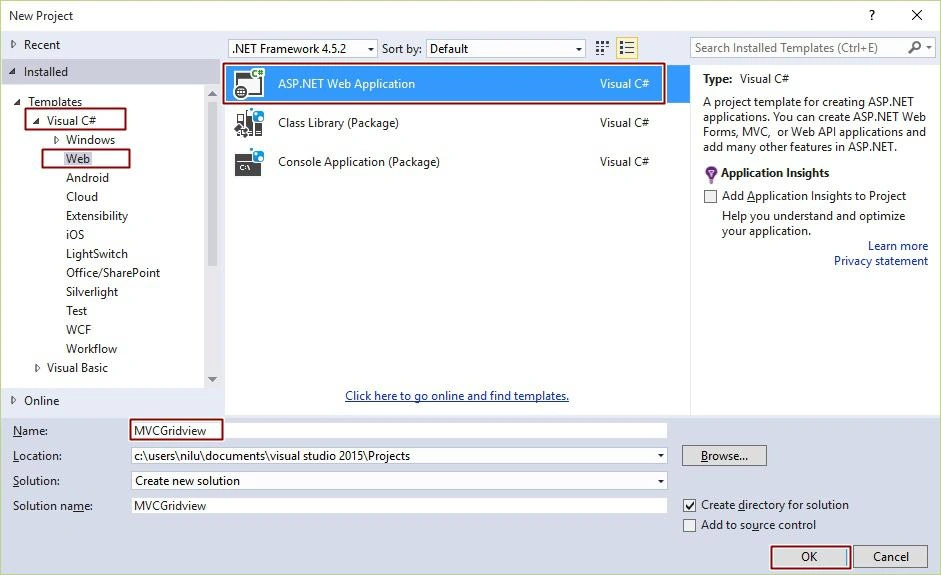
Open Visual Studio 2010, Go to the New Project - Visual C#, Web, then ASP.NET MVC Web Application and click OK.
Step 2
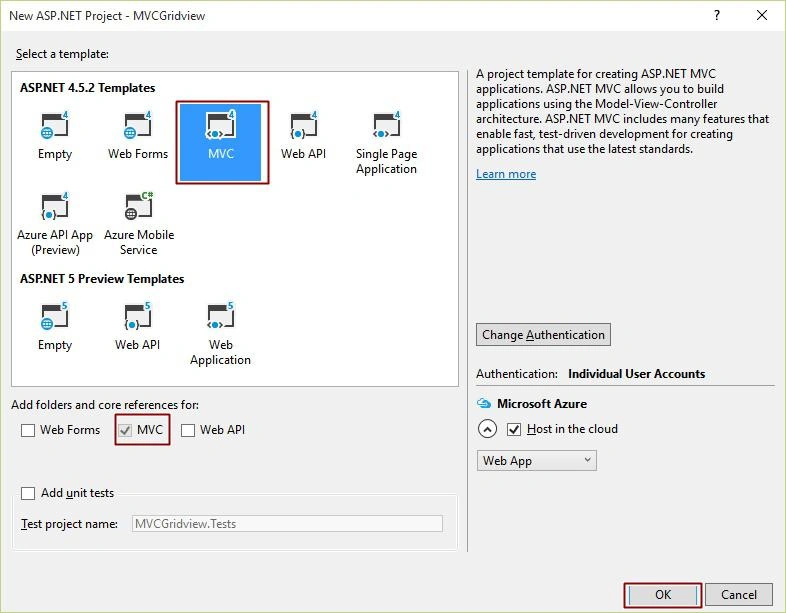
After Clicking OK, New ASP.NET MVC5 Project window will open and there you have to choose MVC and press OK.
Step 3
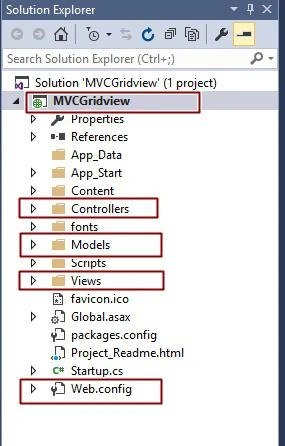
After Clicking OK, you will see something like the following image in your Solution Explorer. You need to look out for Model, Controller and View folders that are the main files in MVC, others are too but these are main files.
DATABASE CHAMBER:
Step 4
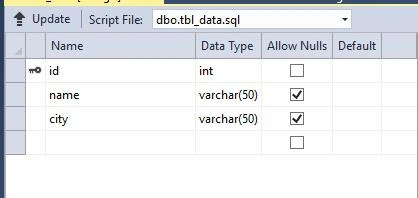
Right Click on your Project - Add New Item, then SQL Server Database and Add it. Go to your Database that resides in Server Explorer - [Database.mdf], We will create a table - tbl_data, Go to the database.mdf, Table and Add New table. Design your table like the following:
Web.Config File:
- <connectionStrings>
- <add name="DefaultConnection" connectionString="Data Source=(LocalDb)\MSSQLLocalDB;AttachDbFilename=|DataDirectory|\aspnet-MVCBindGridView-20150920090324.mdf;Initial Catalog=aspnet-MVCBindGridView-20150920090324;Integrated Security=True"
- providerName="System.Data.SqlClient" />
- <add name="StudentContext" connectionString="Data Source=NiluNilesh;Initial Catalog=mynewdata;Integrated Security=True" providerName="System.Data.SqlClient"></add>
- </connectionStrings>
Step 4
Right Click on Models - Add New Item, then Add a Class File [Class.cs] and ame it as Student.cs. Write the following code in Student.cs file.
Student.cs
- using System;
- using System.Collections.Generic;
- using System.Linq;
- using System.Web;
- using System.ComponentModel.DataAnnotations;
- using System.ComponentModel.DataAnnotations.Schema;
- namespace MVCBindGridView.Models
- {
- [Table("tbl_data")]
- public class Student
- {
- [Key]
- public int id { get; set; }
- public string name { get; set; }
- public string city { get; set; }
- }
- }
StudentContext.cs
- using System;
- using System.Collections.Generic;
- using System.Linq;
- using System.Web;
- using System.Data.Entity;
- namespace MVCBindGridView.Models
- {
- public class StudentContext : DbContext
- {
- public DbSet<Student> student { get; set; }
- }
- }
Step 5
Right Click on Controller, Add Empty Controller, Name it – StudentController.cs. Write the following code and don’t forget to add namespace of model.
- using System;
- using System.Collections.Generic;
- using System.Linq;
- using System.Web;
- using System.Web.Mvc;
- using MVCBindGridView.Models;
- namespace MVCBindGridView.Controllers
- {
- public class StudentController : Controller
- {
- // GET: Student
- public ActionResult Index()
- {
- StudentContext stdntcntxt = new StudentContext();
- var data = stdntcntxt.student;
- return View(data.ToList());
- }
- }
- }
Step 6
Right click on Index() method and Add View like the following image.
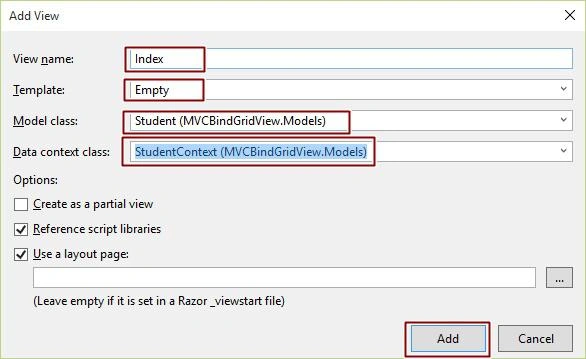
You will see under view that there is a folder named student created and inside that folder get your index.cshtml. Write the following code:
Index.cshtml
- @model IEnumerable<MVCBindGridView.Models.Student>
- @{
- ViewBag.Title = "Bind Gridview with Database";
- WebGrid grid = new WebGrid(Model);
- }
- <h2>Bind GridView in MVC5 with Database</h2>
- @grid.GetHtml(columns: new[]
- {
- grid.Column("id"),
- grid.Column("name"),
- grid.Column("city")
- }
- )
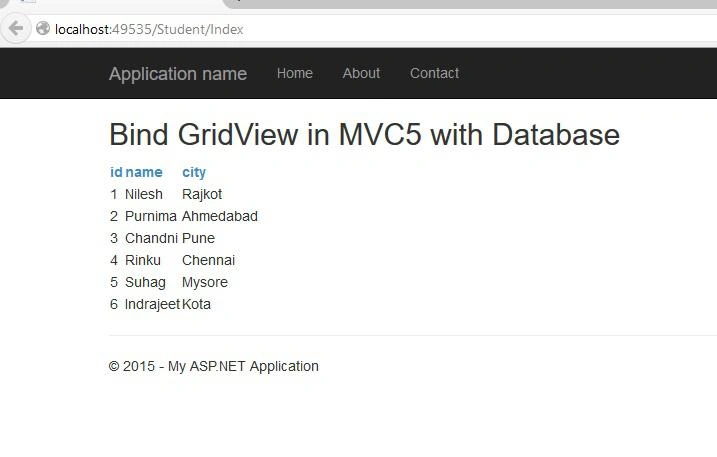
Hope you like it. Thank you for reading. Have a good day.
Bhavesh JadavPosted Oct 4, 2018, 2:29 AM
Good...........
rabi pandaPosted Oct 19, 2017, 12:26 AM
Sir ,no data is coming ,only column name is showing.
rajasekhar kollapuPosted May 18, 2017, 8:21 AM
Please help me to display image in mvc grid
mahesh nPosted Mar 16, 2017, 5:14 AM
Sir.. I am fresher.. what is this "DbContext"??? (StudentContext?:?DbContext??)
Amit Kumar SinghPosted Feb 3, 2016, 6:42 AM
Good One
Vignesh ManiPosted Jan 27, 2016, 5:06 AM
Good one
Arul RPosted Oct 28, 2015, 5:32 AM
Good one !!!
Mohammed IbrahimPosted Sep 29, 2015, 3:28 PM
nice
Ankit BansalPosted Sep 29, 2015, 7:26 AM
nice..
Ajeet MishraPosted Sep 29, 2015, 1:56 AM
GOOD ONE
Harshad PansuriyaPosted Sep 29, 2015, 1:37 AM
Nice One
Sujeet SumanPosted Sep 29, 2015, 1:14 AM
Nice Article...............
Lalit RaghavPosted Sep 29, 2015, 12:59 AM
Nice
Anil KumarPosted Sep 29, 2015, 12:47 AM
nyc
Vinodh NarayananPosted Sep 29, 2015, 12:46 AM
nice share]
Rajeesh MenothPosted Sep 28, 2015, 2:20 PM
Nice One..
Santhakumar MunuswamyPosted Sep 28, 2015, 2:08 PM
Good one