

Introduction
Validation is a process by which we can prevent erroneous/incorrect data in the form/server. It is very essential to have the input to the form validated before taking the form submission data for further processing. When there are many fields in the form, the PHP validation script becomes too complex. When you validate web pages or a web form using a validation process, simply check the content of the code to ensure it is valid and free from errors.
Validation Coding in PHP
<?php
$con=mysql_connect("localhost","root","");
mysql_select_db("Test",$con);
@$a=$_POST['text_name'];
@$b=$_POST['text_mobile'];
@$c=$_POST['text_email'];
@$d=$_POST['text_user'];
@$e=$_POST['text_pass'];
@$f=$_POST['text_repass'];
if(@$_POST['insert'])
{
//echo $sql1="insert into emp values('$a','$b','$c','$d','$e','$f')";
//mysql_query($sql1);
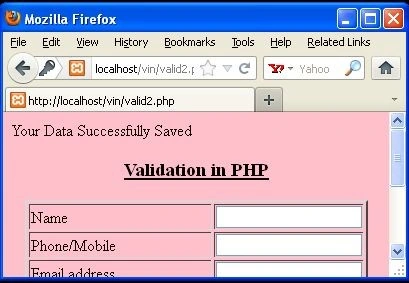
echo "Your Data Successfully Saved";
}
?>
<html>
<head></head>
<script language="javascript" type="text/javascript">
function validate()
{
if(document.getElementById("text_name").value=="")
{
alert("Please Enter Your Name");
document.getElementById("text_name").focus();
return false;
}
if(!(isNaN(document.validation.text_name.value)))
{
alert("Name has character only!");
return false;
}
if(document.getElementById("text_mobile").value=="")
{
alert("Please Enter Your Mobile Number");
document.getElementById("text_mobile").focus();
return false;
}
if((isNaN(document.validation.text_mobile.value)))
{
alert("Mobile has numeric only!");
return false;
}
var emailPat=/^([\w-]+(?:\.[\w-]+)*)@((?:[\w-]+\.)*\w[\w-]{0,66})\.([a-z]{2,6}(?:\.[a-z]{2})?)$/i
var emailid=document.getElementById ("text_email").value;
var matchArray = emailid.match(emailPat);
if (matchArray == null)
{
alert("Your email address is wrong. Please try again.");
document.getElementById("text_email").focus();
return false;
}
if(document.getElementById("text_user").value=="")
{
alert("Please Enter User Name");
document.getElementById("text_user").focus();
return false;
}
if(document.getElementById("text_pass").value=="")
{
alert("Please Enter Your Password");
document.getElementById("text_pass").focus();
return false;
}
if(document.getElementById("text_repass").value=="")
{
alert("Please ReEnter Your Password");
document.getElementById("text_repass").focus();
return false;
}
if(document.getElementById("text_repass").value!="")
{
if(document.getElementById("text_repass").value != document.getElementById("text_pass").value)
{
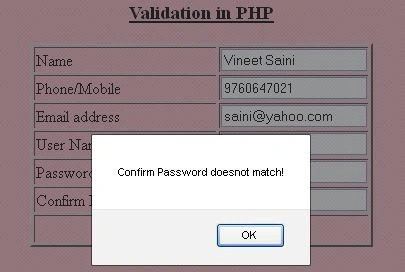
alert("Confirm Password doesnot match!");
document.getElementById("text_repass").focus();
return false;
}
}
return true;
}
</script>
<body bgcolor="pink">
<form name="validation" method="post" onsubmit="return validate();">
<center>
<h3><u>Validation in PHP</u></h3>
<table border="2">
<tr>
<td width="179">Name</td>
<td><label>
<input name="text_name" type="text" id="text_name" />
</label></td>
</tr>
<tr>
<td width="179">Phone/Mobile</td>
<td><label>
<input name="text_mobile" type="text" id="text_mobile" />
</label></td>
</tr>
<tr>
<td width="179">Email address </td>
<td><label>
<input name="text_email" type="text" id="text_email" />
</label></td>
</tr>
<tr>
<td>User Name</td>
<td><label>
<input name="text_user" type="text" id="text_user" />
</label></td>
</tr>
<tr>
<td>Password </td>
<td><label>
<input name="text_pass" type="password" id="text_pass" />
</label></td>
</tr>
<tr>
<td>Confirm Password</td>
<td><label>
<input name="text_repass" type="password" id="text_repass" />
</label></td>
</tr>
<tr align="center">
<td colspan="2"><label>
<input type="submit" name="insert" value="Save" />
</label></td>
</tr>
</table>
</center>
</form>
</body>
</html>
When user fill in all columns correctly and click on Save button and message will displayed i.e. "Your data successfully saved". Like as in the below image.
Conclusion
In this article you saw how to apply validation in a PHP form. Using this article one can easily understand validation in PHP.
bikash bholPosted Sep 27, 2013, 12:36 AM
nice
Vinod KumarPosted Mar 25, 2013, 11:59 PM
Hi..Vineet [email protected]
Husain AhmedPosted Oct 10, 2012, 6:55 AM
thanks
Vineet Kumar SainiPosted Sep 11, 2012, 4:29 AM
Thanks Jitendra..
jitendra kumarPosted Sep 11, 2012, 4:13 AM
that really simple and easy to understand so, thanksssssssssssssss..............
Satyapriya NayakPosted May 23, 2012, 11:20 PM
Hi Vipender, Refer the link for validation in PHP http://www.c-sharpcorner.com/UploadFile/051e29/validation-in-php/
Vijay PrativadiPosted Mar 15, 2012, 12:33 AM
Very Nice Vineet...Keep Posting More!!!