

Step 1
The first step is to download the DotNetZip Library in your project from the Nuget Manager: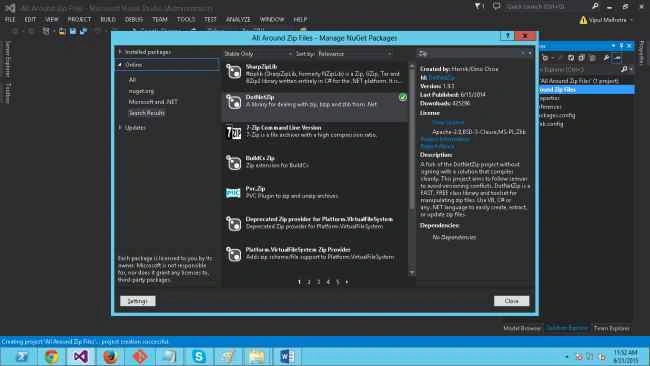
After doing that, you would need to now include the DLL in your C# code as well, using the following namespace.
- using Ionic.Zip;
Displaying Files from Zip files
To proceed with this, let's make a sample Zip file and include it in the root of our project. The following is the structure of the Zip file:
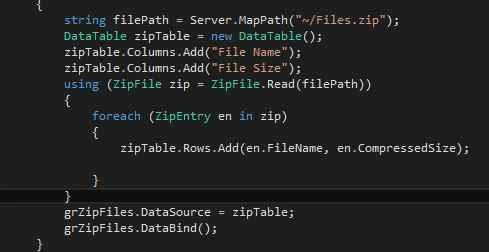
Now, let's start reading the files one by one and display their names in a GridView.
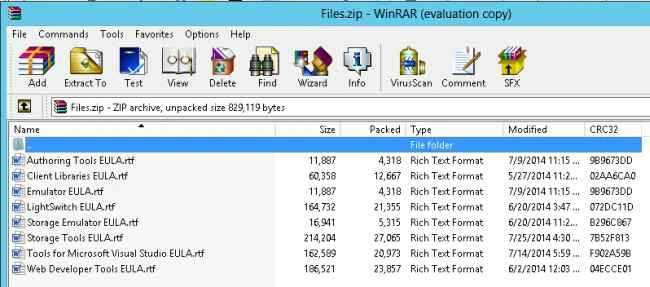
Code Description: The code reads each file from the path provided and provides the name and the size of each of them. It is then displayed in a GridView as in the following:
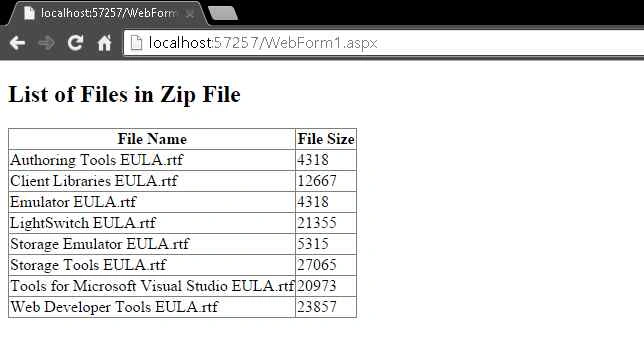
There are a few more parameters that we can get for the file, like Compression Method, CompressedTime and so on.
Downloading multiple files as Zip
To get this, we first display the files located on the server in a GridView. By doing this, we are providing the functionality to the user to select the files that needs to be downloaded.
We first store some files in a new folder named “Files” located at the root of the project.
Then we write the following mentioned code to get this in a GridView along with a checkbox using which the file(s) can be selected.
The code is as in the following:
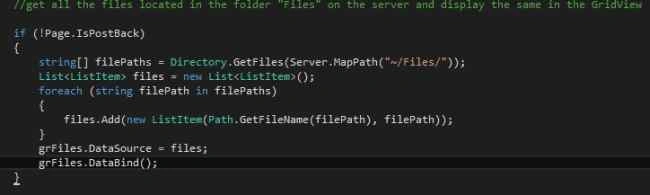
The code just reads the file inside a location and stores the name in a generic list.
The output of that is:
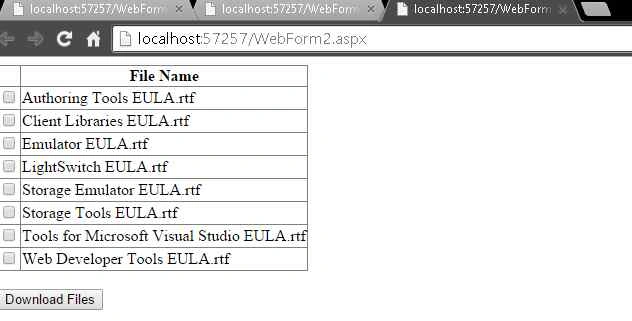
Now, in the next step we will write the code to get all the Selected files downloaded in the Zip format.

The preceding code will be executed on the click of the Download button and will download the selected files in the Zip format.
I have also attached the project to this article. You can download it for the code.
Feel free to comment.
Thanks,
Vipul
Sr KarthigaPosted Feb 26, 2016, 9:35 AM
good one
Sr KarthigaPosted Feb 26, 2016, 9:35 AM
nice explanation
Manoj KulkarniPosted Sep 9, 2015, 1:33 AM
Nice article. Thank you for sharing
Akash MalhotraPosted Sep 3, 2015, 3:15 PM
Nice article
pooja guptaPosted Jul 19, 2015, 12:41 PM
good one
Rahul PrajapatPosted Jul 6, 2015, 4:36 AM
Good article vipul sir
Santhakumar MunuswamyPosted Jun 22, 2015, 2:30 PM
Thanks for nice article
Akash NaginaPosted Jun 22, 2015, 9:05 AM
nice artcle..
pooja guptaPosted Jun 22, 2015, 5:44 AM
Great article. It helped alot.. thanks
Sibeesh VenuPosted Jun 22, 2015, 5:02 AM
Good One.
Vipul MalhotraPosted Jun 22, 2015, 3:07 AM
Thanks everyone...
Gopi ChandPosted Jun 22, 2015, 1:35 AM
Great article....welcome
Manoj KulkarniPosted Jun 22, 2015, 1:11 AM
Good One
Jaipal ReddyPosted Jun 22, 2015, 12:40 AM
good one
Ankit BansalPosted Jun 21, 2015, 11:41 PM
Gud 1