

This is the next article in the series of
database applications in JSP. In this article, I am going to describe the
metadata in JSP. First we construct a database and then make the DSN generate a JSP
application that uses the metadata concept. To construct a database and DSN you may
follow the first application of database ( working with
database application in JSP).
For this application you may follow the following steps.
Step 1 : Create a New Project
In this step we select New Project option from file menu.
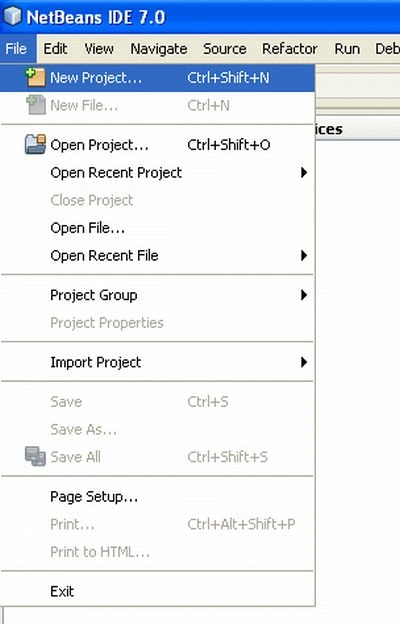
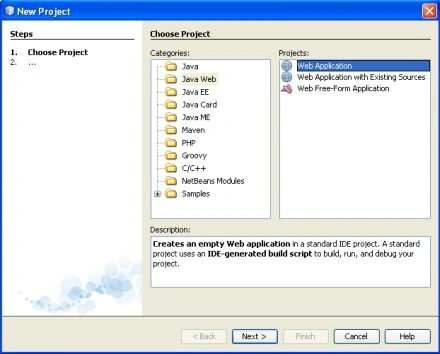
Step 2 : Choose Project
In this step we select web application from Java web option and then click on
the next button.
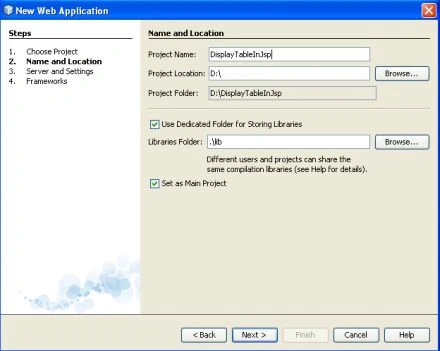
Step 3 : Name and Location
In this step we give it a specific name and set a specific location and click
on the next button.
Step 4 : Server and Setting
We select a specific server for this application and click on the next button.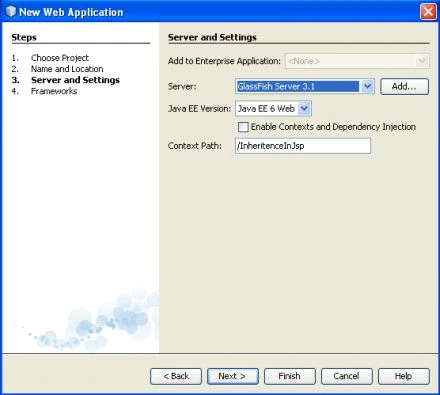
Step 5 : Select Framework
There is no need to select any framework for this application, so just click on the
finish button.
Step 6 : Create jsp file
We create one jsp file for this application.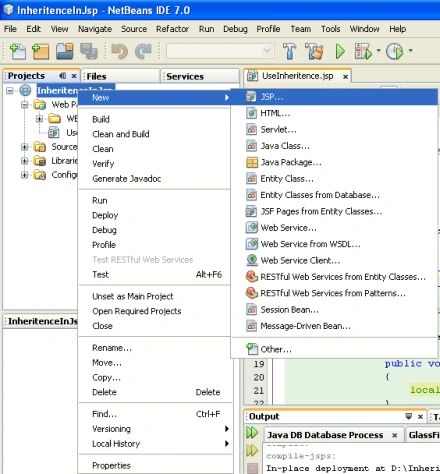
metadata.jsp
<%@ page import="java.sql.*" %>
<% Class.forName("sun.jdbc.odbc.JdbcOdbcDriver"); %>
<HTML>
<HEAD>
<TITLE>Using Metadata In
Table</TITLE>
</HEAD>
<BODY
BGCOLOR="green">
<H1>Using Metadata In Table</H1>
<%
Connection connection = DriverManager.getConnection(
"jdbc:odbc:data2");
Statement statement = connection.createStatement() ;
ResultSet resultset =
statement.executeQuery("select * from table1") ;
%>
<TABLE BORDER="1">
<TR>
<TH><%= resultset.getMetaData().getColumnName(1)%></TH>
<TH><%= resultset.getMetaData().getColumnName(2)%></TH>
<TH><%= resultset.getMetaData().getColumnName(3)%></TH>
<TH><%= resultset.getMetaData().getColumnName(4)%></TH>
<TH><%= resultset.getMetaData().getColumnName(5)%></TH>
</TR>
<%
while(resultset.next()){ %>
<TR>
<TD> <%= resultset.getString(1) %></td>
<TD> <%= resultset.getString(2) %></TD>
<TD> <%= resultset.getString(3) %></TD>
<TD> <%= resultset.getString(4) %></TD>
<TD> <%= resultset.getString(5) %></TD>
</TR>
<% } %>
</TABLE>
</BODY>
</HTML>
Step 7 : Compile and Run the application
Now we compile the application and then run it on the server and
find the following output.
Output
metadata.jsp

Resources related to this article
Join the conversation! Your thoughts help the community grow.