

Hello guys!
This is the 12th part of the article series about Python. In this article series, you will learn Python step-by-step and easily.
Getting Theme
For getting the theme of Python, kindly go through my previous articles:
- Diving Into Python: Chapter 1
- Diving Into Python: Chapter 2
- Diving Into Python: Chapter 3
- Diving Into Python: Chapter 4
- Diving Into Python: Chapter 5
- Diving Into Python: Chapter 6
- Diving Into Python: Chapter 7
- Diving Into Python: Chapter 8
- Diving Into Python: Chapter 9
- Diving Into Python: Chapter 10
- Diving Into Python: Chapter 11
Dictionary
Dictionaries are like containers that can be used for holding value or set of values (elements). The concept of a dictionary in Python is the same as the concept of a hash in several other programming languages.
 The entire concept of dictionary rotates around the following two essential things:
- Values
- Keys
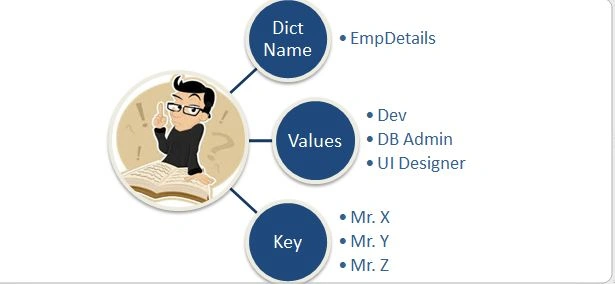
The Keys are for accessing a specific value at an address and the Values are the stuff that is at that address. This might sound a bit confusing but there is no need to worry, one example will smash it all.
Example
- EmpDetails = {‘Mr.X’ : ‘Dev’ , \
- ‘Mr. Y’ : ‘DB Admin’, \
- ‘Mr. Z’ : ‘UI Designer’, \ }
- EmpDetails = {‘Mr.X’ : ‘Dev’ , \
- ‘Mr. Y’ : ‘DB Admin’, \
- ‘Mr. Z’ : ‘UI Designer’, \ }
- EmpDetails = {‘Mr.X’ : ‘Dev’ , ‘Mr. Y’ : ‘DB Admin’, ‘Mr. Z’ : ‘UI Designer’ };
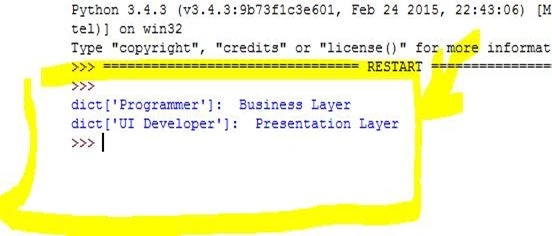
- dict = {'Programmer': 'Business Layer', 'DataBase Admin': 'Database Layer', 'UI Developer': 'Presentation Layer'};
- print ("dict['Programmer']: ", dict['Programmer'])
- print ("dict['UI Developer']: ", dict['UI Developer'])
- Adding a new element
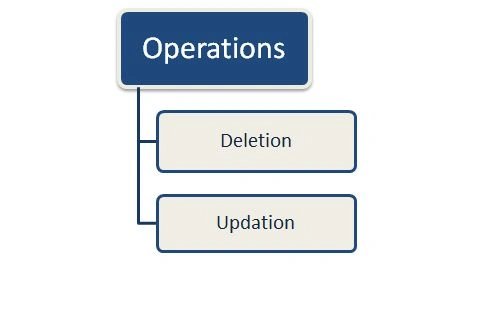
- Updating a new key-value
- Modifying an existing entry
- Deleting an existing entry
Let's explore it with an example.
Example
# Updating Dictionary
- dict = {'Programmer': 'Business Layer', 'DataBase Admin': 'Database Layer', 'UI Developer': 'Presentation Layer'};
- dict['Programmer'] = 'Architecture Design';
- print ("dict['Programmer']: ", dict['Programmer'])
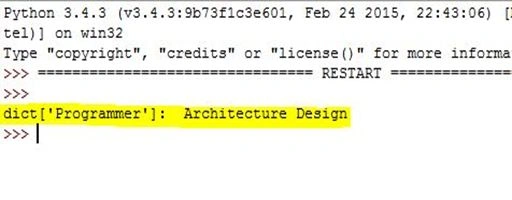
- dict = {'Programmer': 'Business Layer', 'DataBase Admin': 'Database Layer', 'UI Developer': 'Presentation Layer'};
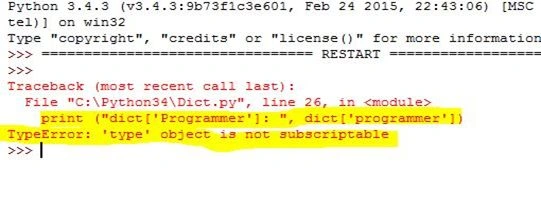
- del dict['UI Developer'];
- dict.clear(); # remove all entries in dict
- del dict ; # delete entire dictionary
- print ("dict['Programmer']: ", dict['programmer'])
- print ("dict['Database Admin']: ", dict['Database Admin'])
- dict1 = ('CSK', 180)
- dict2 = ('MI', 175)
- print (cmp(dict1, dict2))
- print (cmp(dict2, dict1))
- tup = len ('C# Corner')
- print (a)
- Do as much as code you can.
- Code anything you want, the best way to learn.
- Don't just study things, try to learn them.
- Work on your Concepts.
- Work on the fundamentals of any technology or stuff you want to learn
Moto
“Keep calm and code Python”.
I tried to make this an interesting and interactive article and wish you guys going to like that, meanwhile if you have any suggestions then your welcome.
Until the next part, keep sharing!
DungxkPosted Oct 7, 2015, 11:48 AM
12 chapter, great article, thanks! :)
Abhishek JaiswalPosted May 23, 2015, 9:00 AM
Thanks!! :)
NitinPosted May 23, 2015, 8:58 AM
good one
Abhishek JaiswalPosted May 21, 2015, 12:53 PM
Thanks buddy! :)
Gopi ChandPosted May 21, 2015, 10:23 AM
Great article :)