

Hello guys!
This article is the seventh part of this article series. This article explains lists and tuples in Python, the related operations and the functioning in detail using several examples and graphics. So let's explore it.
To get the theme of Python, kindly go through my previous articles:
- Diving into Python: Chapter 1
- Diving into Python: Chapter 2
- Diving into Python: Chapter 3
- Diving into Python: Chapter 4
- Diving into Python: Chapter 5
- Diving into Python: Chapter 6
Lists
Lists are one of the most valuable Data Types in programming language and so they are in Python. One can easily see that lists are somehow similar to arrays but still, there are a huge difference between both of these data types, which are that an array contains homogeneous (of the same data type) items whereas lists contain heterogeneous (of various data types) items. This can also be considered to be an advantage of lists over arrays.
Now let's get back to lists. Lists contain items separated the commas and enclosed in brackets "[ ] ". The values stored in a list can be accessed using "[:]" (depending on their respective index).
Structure
A simple structure of accessing elements using indexes is:
Print list[ index]
Example
Now let's go through some examples.
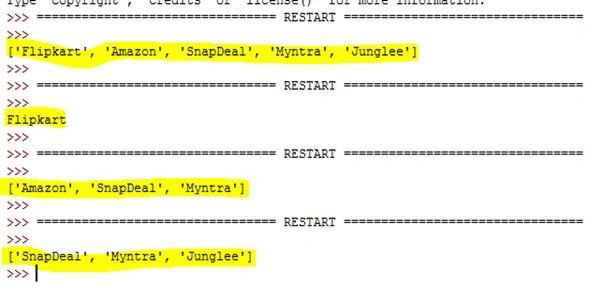
- list = ['Flipkart', 'Amazon', 'SnapDeal', 'Myntra', 'Junglee']
- # Print Complete List
- print (list)
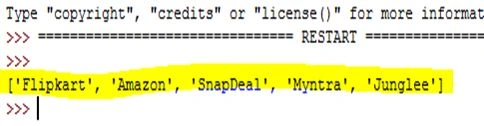
Output- ['Flipkart', 'Amazon', 'SnapDeal ', 'Myntra', 'Junglee']
- # Print Element at Index 0
- print (list[0])
Output- Flipkart
- # Prints Element from Index 1 to 3
- print (list[1:4])
Output- ['Amazon', 'SnapDeal ', 'Myntra']
- # Prints Element Starting from Index 2
- print (list[2:])
Output- ['SnapDeal ', 'Myntra', 'Junglee']
(Now let's have a look at some of the operations over lists).
Output Window
List | Concatenation
You can concatenate elements of two lists using the "+" operator as we do in strings.
For Example:
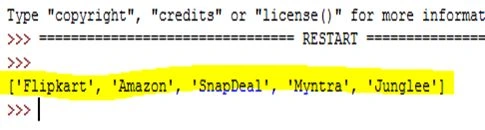
- list1 = ['Flipkart', 'Amazon', 'SnapDeal']
- list2 = ['Myntra', 'Junglee']
- # Concatenating two Lists
- print (list1 + list2)
Output- ['Flipkart', 'Amazon', 'SnapDeal ', 'Myntra', 'Junglee']
Output Window
List | Repetition
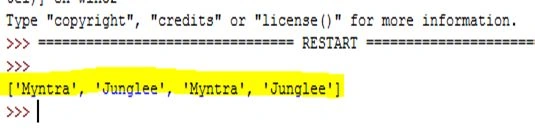
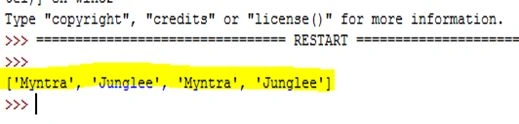
For repeating a list's elements twice or more we can use the "*" operator in the same fashion as we do in strings.
For Example:

Abhishek JaiswalPosted May 20, 2015, 3:52 AM
Thanks buddy! :)
Gowtham RajamanickamPosted May 20, 2015, 1:14 AM
good one
Abhishek JaiswalPosted May 15, 2015, 4:30 PM
Thanks buddy! :)
NitinPosted May 15, 2015, 2:32 PM
good
Jonathan UlfengPosted May 15, 2015, 10:23 AM
I think you meant to say: Size and elements in a tuple can't be changed, other than that, great article.
Sibeesh VenuPosted May 15, 2015, 7:53 AM
Good one mate
Gopi ChandPosted May 15, 2015, 1:55 AM
Another nice part of the series.. good keep it up