

Introduction
In this article we will do Create, Read, Update and Delete (CRUD) operations in the WebAPI using the Fiddler Tool. Here we need to create a database and connect with the Web API application. We can use the various methods for the CRUD operations in Fiddler, such as POST, GET, PUT and DELETE. The POST method is for creating the data, GET is used to read the data, PUT is used to update the data and finally is the DELETE method for deleting the data.
Now let's start by creating the database in SQL.
Step 1
Create a database :
- use mudita
- create table UserInfo(UId varchar(10) primary key, UserName varchar(20), Address varchar(50))
- Insert into UserInfo values('1','Smith','Delhi')
- Insert into UserInfo values('2','Jhon','Gurgao')
- Insert into UserInfo values('3','Priyam','Manipur')
Step 2
Now we will create a Web API application:
- Start Visual Studio 2013.
- From Start window Select "New Project".
- Select "Installed" -> "Template" -> "Visual C#" -> "Web" -> "Visual Studio 2012" and select "ASP.NET MVC4 Web Application".

- Click on the "OK" button.
- From the MVC4 project window select "Web API".
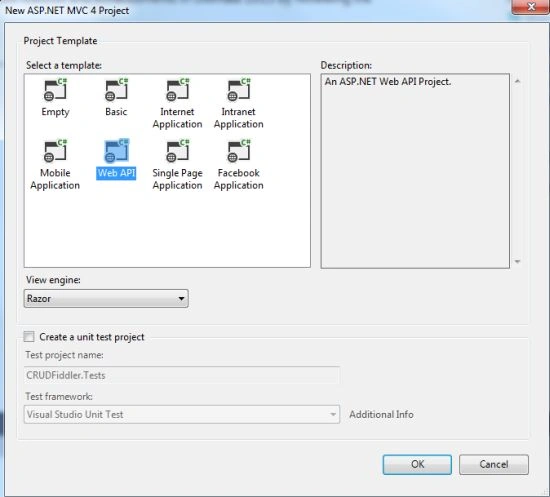
- Click on the "OK" button.
Step 2
Now add the ADO.NET Entity Model.
- Right-click on the Model folder in Solution Explorer.
- Select "Add" -> "New Item" -> "ADO.NET" and click on the "Add" button.
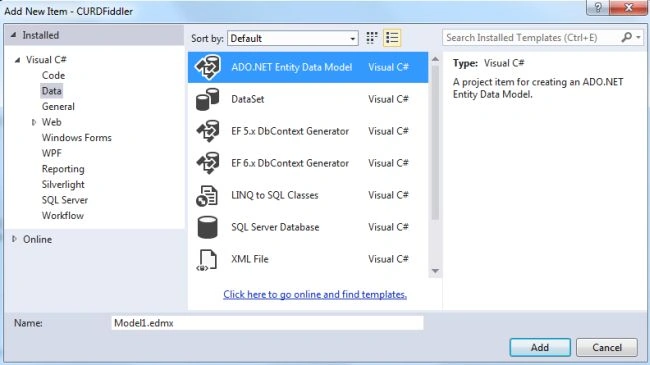
- Open a new Entity wizard.
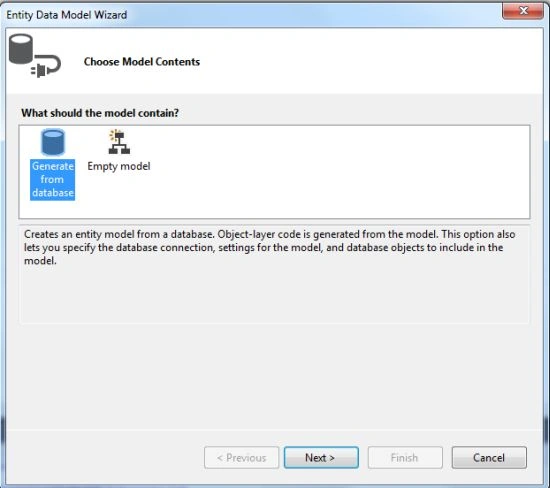
- Click on the "Next" button then open the new dialog box.
- Click on the "New connection" button.
- And fill in the user id and password.
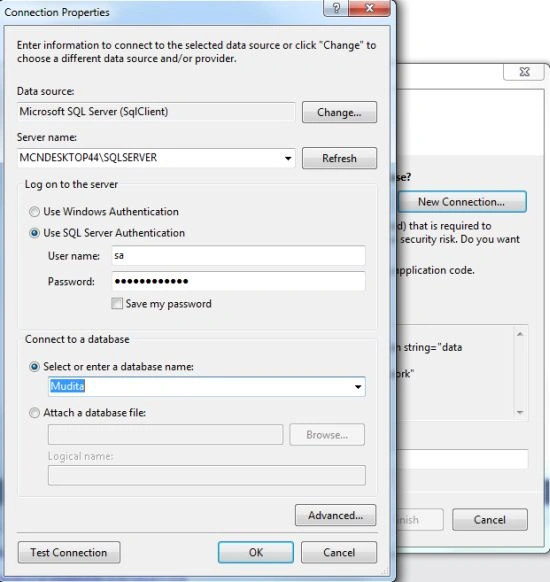
- Now select the option to create the sensitive data.
- Click on the "Next" button.
- Now select the table.

- Click on the "Finish" button.
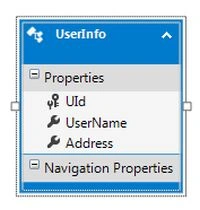
- Then the Model diagram is displayed.
Step 3
Now in the Model folder add the Repository class with the following code:
- using System;
- using System.Collections.Generic;
- using System.Linq;
- using System.Web;
- namespace CURDFiddler.Models
- {
- public class UsersRepository
- {
- public static List<UserInfo> GetAllUsers()
- {
- MuditaEntities1 dataContext=new MuditaEntities1();
- var query = from user in dataContext.UserInfoes
- select user;
- return query.ToList();
- }
- public static UserInfo GetUser(string userID)
- {
- MuditaEntities1 dataContext=new MuditaEntities1();
- var query = (from user in dataContext.UserInfoes
- where user.UId==userID
- select user).SingleOrDefault();
- return query;
- }
- public static void InsertUser(UserInfo newUser)
- {
- MuditaEntities1 dataContext = new MuditaEntities1();
- dataContext.UserInfoes.Add(newUser);
- dataContext.SaveChanges();
- }
- public static void UpdateUser(UserInfo oldUser)
- {
- MuditaEntities1 dataContext = new MuditaEntities1();
- var query = (from user in dataContext.UserInfoes
- where user.UId==oldUser.UId
- select user).SingleOrDefault();
- query.UId= oldUser.UId;
- query.UserName = oldUser.UserName;
- query.Address = oldUser.Address;
- dataContext.SaveChanges();
- }
- public static void DeleteUser(string UId)
- {
- MuditaEntities1 dataContext = new MuditaEntities1();
- var query = (from user in dataContext.UserInfoes
- where user.UId == UId
- select user).SingleOrDefault();
- dataContext.UserInfoes.Remove(query);
- dataContext.SaveChanges();
- }
- }
- }
Step 4
In the Controller Folder add the API controller:
- In the Solution Explorer.
- Right-click on the Controller folder.
- Select "Add" -> "Controller".
- From the Template select "Empty API controller".
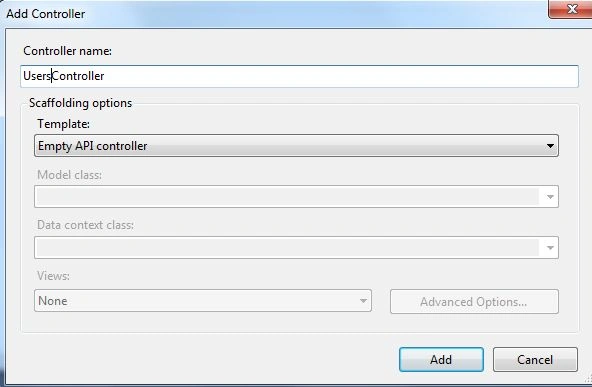
- Click on the "OK" button.
Add the following code:
- using CURDFiddler.Models;
- using System;
- using System.Collections.Generic;
- using System.Linq;
- using System.Net;
- using System.Net.Http;
- using System.Web.Http;
- namespace CURDFiddler.Controllers
- {
- public class UsersController : ApiController
- {
- public List<UserInfo> Get()
- {
- return UsersRepository.GetAllUsers();
- }
- public UserInfo Get(string id)
- {
- return UsersRepository.GetUser(id);
- }
- public void Post([FromBody]UserInfo user)
- {
- UsersRepository.InsertUser(user);
- }
- public void Put([FromBody]UserInfo user)
- {
- UsersRepository.UpdateUser(user);
- }
- public void Delete(string id)
- {
- UsersRepository.DeleteUser(id);
- }
- }
- }
Step 5
- Execute the application. Copy the URL. Now open Fiddler and click on the compose tab and then paste the URL and navigate to the following URL: "http://localhost:18849/api/users".
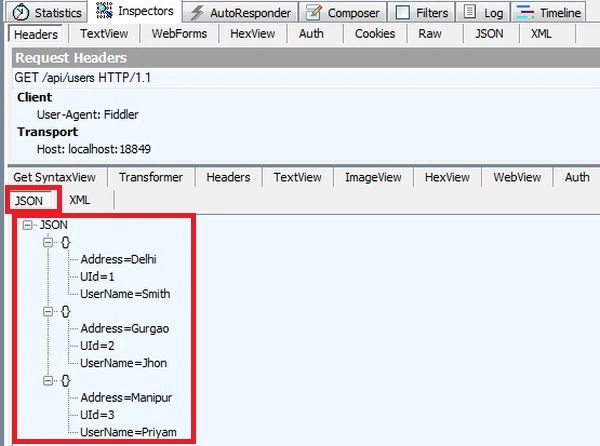
Now fetch the data from the database through ID:
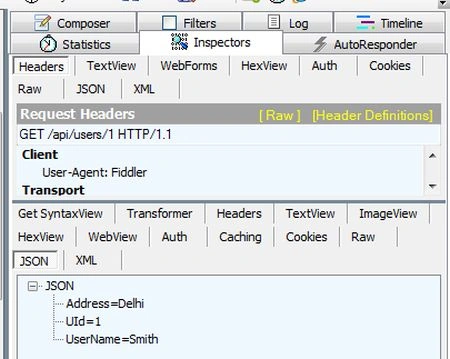
- Now we insert the data in the database. Select the POST method then write the URI into the address bar. And then specify the Content-Type:application/json. Use the following code for the Request body:
{"UId":"4","UserName":"Priya","Address":"Lucknow"}
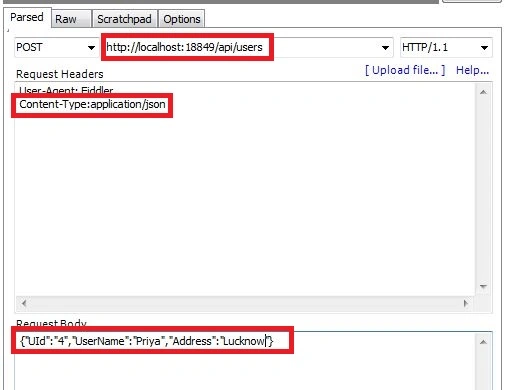
Click on the "Execute" button and again select the GET method for showing the data.
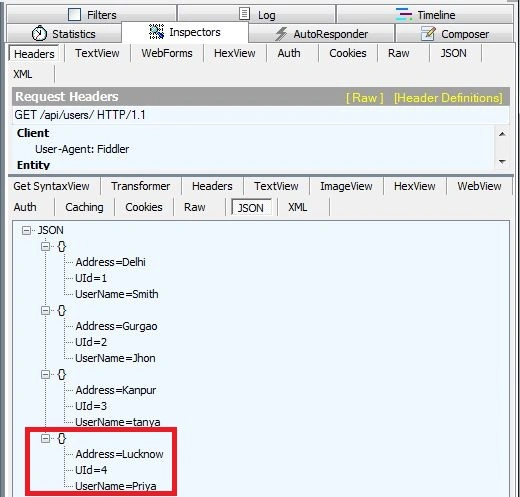
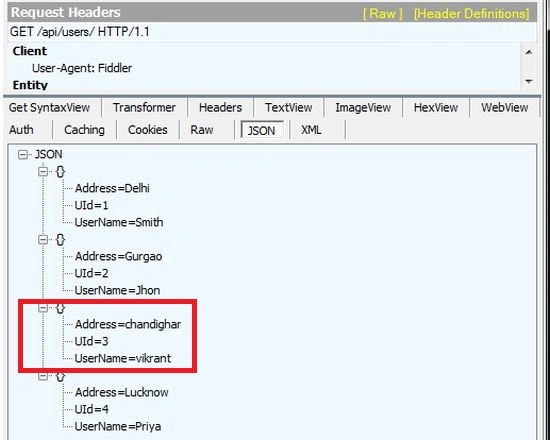
- Update the data in the database. Select the PUT method then write the URI into the address bar. then Specify the Content-Type:application/json. Use the following code for the request body:
{"UId":"3","UserName":"Vikrant","Address":"Chandighar"}

Click on the "Execute" button and again select the GET method for displaying the data.
- Now to delete the data from the database, select the delete method and write the URI with the ID.
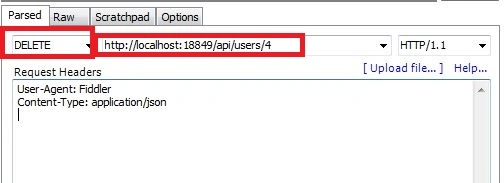
- Click on the "Execute" button and again see the data.

Debendra DashPosted Jun 23, 2015, 6:32 AM
Good one.
Gowtham RajamanickamPosted Mar 27, 2015, 9:43 AM
goodone..
Nimit JoshiPosted Mar 27, 2014, 1:35 AM
Thanks Mudita.. This article is very easy to understand..
Raj KumarPosted Jan 17, 2014, 7:29 AM
well done mudita...nice article