

Introduction
The string concatenation approach is an effective way to generate client-side markup for small sections of markup. As the amount of markup grows, it adds complexity to the code that needs to concatenate it, resulting in something that is increasingly difficult to maintain.
Client-side templates are powerful alternatives to simple string concatenation that lets you quickly and effectively transform JSON data into HTML in a very maintainable way. Client-side templates define reusable sections of markup by combining simple HTML with data expressions that can range from a simple placeholder to be replaced with data values, to full-blown JavaScript logic that can perform even more powerful data processing directly within the template.
Mustache (Template System)
Mustache is an open source web template system developed for languages such as ActionScript, C++, Clojure, CoffeeScript, ColdFusion, D, Erlang, Fantom, Go, Java, JavaScript, Lua, .NET, Objective-C, Perl, PHP, Python, Ruby, Scala and XQuery.
You can grab a copy of the library by visiting http://mustache.github.io/. Mustache is “logic-less” template syntax. “Logic-less” means that it doesn’t rely on procedural statements (if, else, for, and so on.): Mustache templates are entirely defined with tags. It is named "Mustache" because of heavy use of curly braces that resemble a mustache. Mustache is used mainly for mobile and web applications.
Mustache.js with ASP.NET Web Form
This section of article will introduce how to use a client-side template on your web form instead of string concatenation. So let’s start. First create a web form that will use string concatenation to display person detail. Create a Person class that will be used to show a list of people on the web.
- namespace MustacheTemplate
- {
- public class Person
- {
- public int PersonID { get; set; }
- public string Name { get; set; }
- public bool Registered { get; set; }
- }
- }
- using System;
- using System.Collections.Generic;
- using System.Web.Script.Serialization;
- using System.Web.Services;
- namespace MustacheTemplate
- {
- public partial class ShowTemplate : System.Web.UI.Page
- {
- protected void Page_Load(object sender, EventArgs e)
- {
- }
- [WebMethod]
- public static string GetAllPerson()
- {
- var RegisteredUsers = new List<Person>();
- RegisteredUsers.Add(new Person() { PersonID = 1, Name = "Sandeep Singh",
- Registered = true });
- RegisteredUsers.Add(new Person() { PersonID = 2, Name = "Raviender Singh",
- Registered = false });
- RegisteredUsers.Add(new Person() { PersonID = 3, Name = "Hameer Singh",
- Registered = true });
- RegisteredUsers.Add(new Person() { PersonID = 4, Name = "Kuldepp Singh",
- Registered = false });
- JavaScriptSerializer js = new JavaScriptSerializer();
- return js.Serialize(RegisteredUsers);
- }
- }
- }
- <%@ Page Language="C#" AutoEventWireup="true" CodeBehind="ShowTemplate.aspx.cs"
- Inherits="MustacheTemplate.ShowTemplate" %>
- <!DOCTYPE html>
- <html xmlns="http://www.w3.org/1999/xhtml">
- <head runat="server">
- <title></title>
- <script src="Scripts/jquery-2.1.0.min.js"></script>
- <script type="text/javascript">
- $(document).ready(function ()
- {
- var tablePerson = $("#tblPerson");
- var divPerson = $("#divPerson");
- $.ajax({
- cache: false,
- type: "POST",
- url: "ShowTemplate.aspx/GetAllPerson",
- data: {},
- contentType: "application/json; charset=utf-8",
- dataType: "json",
- success: function (data)
- {
- var personList = JSON.parse(data.d);
- $.each(personList, function (id, person) {
- var personRow = "<tr><td>" + person.PersonID + "</td>" +
- "<td>" + person.Name + "</td>"+
- "<td>" + person.Registered + "</td></tr>";
- tablePerson.append(personRow);
- });
- },
- error: function (xhr, ajaxOptions, thrownError)
- {
- alert('Failed to retrieve person list.');
- }
- });
- });
- </script>
- </head>
- <body>
- <form id="form1" runat="server">
- <table id="tblPerson" border="1" style="border-collapse:collapse">
- <tr>
- <th>Id</th>
- <th>Name</th>
- <th>Registered</th>
- </tr>
- </table>
- </form>
- </body>
- </html>
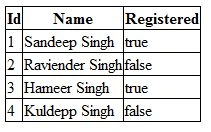
Figure 1.1 A List of Persons
Note that from the web form code you are concatenating a string for <td> tags to show person details. It is small markup section so it’s not looking complex but when you develop a complex markup then it will not be easy to maintain and read so you need to define a separate template for it and call it where it is needed on the web form. So let’s see the code for the template.
- <script type="text/template" id="tempPerson">
- <tr>
- <td>{{PersonID}}</td>
- <td> {{Name}}</td>
- <td>{{Registered}}</td>
- </tr>
- </script>
- function (id, person)
- {
- var template = $('#tempPerson').html();
- var html = Mustache.render(template, person);
- }
- <%@ Page Language="C#" AutoEventWireup="true" CodeBehind="MustacheExample.aspx.cs"
- Inherits="MustacheTemplate.MustacheExample" %>
- <!DOCTYPE html>
- <html xmlns="http://www.w3.org/1999/xhtml">
- <head id="Head1" runat="server">
- <title></title>
- <script src="Scripts/jquery-2.1.0.min.js"></script>
- <script src="Scripts/mustache.js"></script>
- <script type="text/javascript">
- $(document).ready(function () {
- var tablePerson = $("#tblPerson");
- var divPerson = $("#divPerson");
- $.ajax({
- cache: false,
- type: "POST",
- url: "ShowTemplate.aspx/GetAllPerson",
- data: {},
- contentType: "application/json; charset=utf-8",
- dataType: "json",
- success: function (data) {
- var personList = JSON.parse(data.d);
- $.each(personList, function (id, person)
- {
- var template = $('#tempPerson').html();
- var html = Mustache.render(template, person);
- tablePerson.append(html);
- });
- },
- error: function (xhr, ajaxOptions, thrownError) {
- alert('Failed to retrieve person list.');
- }
- });
- });
- </script>
- <script type="text/template" id="tempPerson">
- <tr>
- <td>{{PersonID}}</td>
- <td> {{Name}}</td>
- <td>{{Registered}}</td>
- </tr>
- </script>
- </head>
- <body>
- <form id="form1" runat="server">
- <table id="tblPerson" border="1" style="border-collapse:collapse">
- <tr>
- <th>Id</th>
- <th>Name</th>
- <th>Registered</th>
- </tr>
- </table>
- </form>
- </body>
- </html>
- <script type="text/template" id=" tempPerson">
- {{#Registered}}
- <tr>
- <td>{{PersonID}}</td>
- <td> {{Name}}</td>
- <td>{{Registered}}</td>
- </tr>
- {{/Registered}}
- </script>
Mustache.js with ASP.NET MVC
In the previous article “Rendering a Partial View and JSON Data Using AJAX in ASP.Net MVC” I introduced you to the concept of rendering JSON data in ASP.NET MVC where I used the string concatenation approach but this section of article will introduce you to how to use a Mustache client template in an ASP.NET MVC application instead of string concatenation. I will explain this concept with a simple example. The example is that books are showing in a web depending on publisher. I choose a publisher from a dropdown list then the books information is shown in the web page depending on publisher. So let’s see this example in detail.
Getting Started
I add the ADO.NET Entity Model to the application to do the database operations mapped from the “Development” database. The ADO.NET Entity Model is an Object Relational Mapping (ORM) that creates a higher abstract object model over ADO.NET components. This ADO.NET Entity Model is mapped to with “Development” database so the context class is “DevelopmentEntities” that inherits the DbContext class.
This “Development” database has two tables, one is the Publisher table and the other is the BOOK table. Tables have 1-to-many relationships, in other words one publisher can publish multiple books but each book is associated with one publisher. If you want to learn more about this application database design then please check my previous article “An MVC Application with LINQ to SQL”.
The ADO.NET Entity Model is mapped to both tables. The connection string for this has the same name as the context class name and this connection string is created in the web.config file. You can change the name of the connection string. The context class name and connection string name is just a convention, not a configuration, so you can change it with a meaningful name. The following Figure 1.2 shows the ADO.NET Entity Model mapping with both tables.
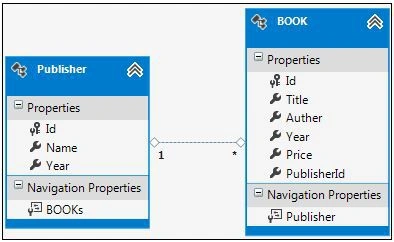
Figure 1.2 The ADO.NET Entity Model mapping with Publisher and Book tables
Now the ADO.NET Entity Model is ready for the application and it's time to move on the next step of the application, the model design so let’s see the application’s model.
Model Design
- using System.Collections.Generic;
- using System.ComponentModel.DataAnnotations;
- using System.Web.Mvc;
- namespace MustacheMVCApplication.Models
- {
- public class PublisherModel
- {
- public PublisherModel()
- {
- PublisherList = new List<SelectListItem>();
- }
- [Display(Name = "Publisher")]
- public int Id { get; set; }
- public IEnumerable<SelectListItem> PublisherList { get; set; }
- }
- }
- namespace MustacheMVCApplication.Models
- {
- public class BookModel
- {
- public string Title { get; set; }
- public string Author { get; set; }
- public string Year { get; set; }
- public decimal Price { get; set; }
- }
- }
Controller Design
I create two controllers, one for the publisher that shows a publisher’s list in a dropdown list and another is a book controller that shows book details depending on publisher. The publisher controller defines a single action method that is the same in both concepts; rendering a partial view and JSON data and the book controller also defines an action methods, that rendering JSON data.
- using System.Collections.Generic;
- using System.Linq;
- using System.Web.Mvc;
- using MustacheMVCApplication.Models;
- namespace MustacheMVCApplication.Controllers
- {
- public class PublisherController : Controller
- {
- public ActionResult Index()
- {
- PublisherModel model = new PublisherModel();
- using (DAL.DevelopmentEntities context = new DAL.DevelopmentEntities())
- {
- List<DAL.Publisher> PublisherList = context.Publishers.ToList();
- model.PublisherList = PublisherList.Select(x =>
- new SelectListItem()
- {
- Text = x.Name,
- Value = x.Id.ToString()
- });
- }
- return View(model);
- }
- }
- }
- using System.Collections.Generic;
- using System.Linq;
- using System.Web.Mvc;
- using MustacheMVCApplication.Models;
- namespace MustacheMVCApplication.Controllers
- {
- public class BookController : Controller
- {
- public JsonResult BooksByPublisherId(int id)
- {
- IEnumerable<BookModel> modelList = new List<BookModel>();
- using (DAL.DevelopmentEntities context = new DAL.DevelopmentEntities())
- {
- var books = context.BOOKs.Where(x => x.PublisherId == id).ToList();
- modelList = books.Select(x =>
- new BookModel()
- {
- Title = x.Title,
- Author = x.Auther,
- Year = x.Year,
- Price = x.Price
- });
- }
- return Json(modelList,JsonRequestBehavior.AllowGet);
- }
- }
- }
- public static void RegisterRoutes(RouteCollection routes)
- {
- routes.IgnoreRoute("{resource}.axd/{*pathInfo}");
- routes.MapRoute(
- name: "Default",
- url: "{controller}/{action}/{id}",
- defaults: new { controller = "Publisher", action = "Index", id = UrlParameter.Optional }
- );
- routes.MapRoute("BooksByPublisherId",
- "book/booksbypublisherid/",
- new { controller = "Book", action = "BooksByPublisherId" },
- new[] { "MustacheMVCApplication.Controllers" });
- }
- <script type="text/template" id="tempBook">
- <b>Title :</b> {{Title}} <br/>
- <b> Author :</b> {{Author}}<br/>
- <b> Year :</b> {{Year }} <br/>
- <b> Price :</b> {{Price }}<hr/>
- </script>
- function (id, book)
- {
- var template = $('#tempBook').html();
- var bookData = Mustache.render(template, book);
- }
- @model MustacheMVCApplication.Models.PublisherModel
- <script src="~/Scripts/jquery-2.1.0.min.js"></script>
- <script src="~/Scripts/mustache.js"></script>
- <script type="text/javascript">
- $(document).ready(function () {
- $("#Id").change(function () {
- var id = $("#Id").val();
- var booksDiv = $("#booksDiv");
- $.ajax({
- cache: false,
- type: "GET",
- url: "@(Url.RouteUrl("BooksByPublisherId"))",
- data: { "id": id },
- success: function (data) {
- var result = "";
- booksDiv.html('');
- $.each(data, function (id, book) {
- var template = $('#tempBook').html();
- var bookData = Mustache.render(template, book);
- booksDiv.append(bookData);
- });
- },
- error: function (xhr, AJAXOptions, thrownError) {
- alert('Failed to retrieve books.');
- }
- });
- });
- });
- </script>
- <script type="text/template" id="tempBook">
- <b>Title :</b> {{Title}} <br/>
- <b> Author :</b> {{Author}}<br/>
- <b> Year :</b> {{Year }} <br/>
- <b> Price :</b> {{Price }}<hr/>
- </script>
- <div>
- @Html.LabelFor(model=>model.Id)
- @Html.DropDownListFor(model => model.Id, Model.PublisherList)
- </div>
- <div id="booksDiv">
- </div>
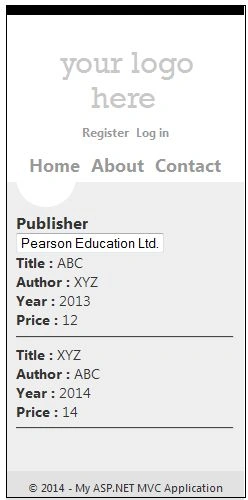
Figure 1.3 Books detail of a publisher
Conclusion
While the client template approach may seem like a lot of work, in most cases the ease of maintenance and the lower bandwidth costs that it allows make it well worth the up-front cost. When your application relies on many AJAX interactions that results in complex client-side markup, a client template is often a great choice.
Gowtham RajamanickamPosted Mar 13, 2015, 5:21 AM
Awesome Article, Clearly Explain Everything
Sandeep Singh ShekhawatPosted May 22, 2014, 8:13 AM
Hi tri_inn, jQuery template is Embedded JavaScript Templates while mustchae template is a Logic-less Templates which you can create in separate file.
Sandeep Singh ShekhawatPosted May 22, 2014, 8:11 AM
1. Very popular choice with a large, active community.2. Server side support in many languages, including Java. 3. Logic-less templates do a great job of forcing you to separate presentation from logic. 4. Clean syntax leads to templates that are easy to build, read, and maintain.
Former memberPosted May 21, 2014, 3:16 AM
You should have explained why people use Mustache as client side template because there are lots other client side template library exist....one which i used Jquery template that was fine too. so explain what kind of advantage people can expect from Mustache if u know. thanks
Akhil MittalPosted Feb 14, 2014, 7:05 AM
Good
Sam HobbsPosted Feb 9, 2014, 4:23 PM
People often list .NET as a language but it is not a language.
Sam HobbsPosted Feb 9, 2014, 4:21 PM
Good article. Yes, developers, especially beginners, tend to choose the simplest solution that can become more complicated later. When it does, it is often too much work to chose an alternative but the chosen solution is also a substantial amount of code to maintain and improve. Experienced programmers such as you understand the value of understanding and using solutions capable of complexity.