
Introduction
For my current project I was looking for a free library to create Microsoft Excel files on a server and converting these Excel files to a PDF in C#. As a first try for creating the Excel files I used the free library EPPlus with good results. Since EPPlus doesn't support coversion of Excel files to PDF, hence I'm trying to use another free library, Spire.Xls for converting to PDF. The facts proved that it is the right choice, it is very simple and fast to complete the conversion and the results are quite perfect. The best thing I found using EPPlus.dll and Spire.Xls.dll is that there is no need to install Microsoft Excel or Office. Here I want to share the solution that I implemented with you, hoping it might help someone.
Application Overview
I will introduce my entire solution in two parts.
The first part describes how to create Excel with cell ranges, images, cell styling (Border, Color, Fill, Font, Number, Alignments) by EPPlus.
Detailed procedure for the first part
Step 1: Create an empty Excel and add a sheet
- ExcelPackage pck = new ExcelPackage();
- var ws = pck.Workbook.Worksheets.Add("Data");
- AddData(ws);
- public static void AddData(ExcelWorksheet worksheet)
- {
- worksheet.Cells["A1"].Value = "AdventureWorks Inc.";
- using (ExcelRange r = worksheet.Cells["A1:G1"])
- {
- //Merge from A1 to G1 cells into a cell
- r.Merge = true;
- //Set the style of this cell
- r.Style.Font.SetFromFont(new Font("Britannic Bold", 22, FontStyle.Italic));
- r.Style.Font.Color.SetColor(Color.White);
- r.Style.HorizontalAlignment = OfficeOpenXml.Style.ExcelHorizontalAlignment.CenterContinuous;
- r.Style.Fill.PatternType = OfficeOpenXml.Style.ExcelFillStyle.Solid;
- r.Style.Fill.BackgroundColor.SetColor(Color.FromArgb(23, 55, 93));
- r.Style.Border.BorderAround(ExcelBorderStyle.Thin, Color.Black);
- worksheet.Cells["A2"].Value = "Year-End Sales Report";
- using (ExcelRange cell = worksheet.Cells["A2:G2"])
- {
- cell.Merge = true;
- cell.Style.Font.SetFromFont(new Font("Britannic Bold", 18, FontStyle.Italic));
- cell.Style.Font.Color.SetColor(Color.Black);
- cell.Style.HorizontalAlignment = ExcelHorizontalAlignment.CenterContinuous;
- cell.Style.Fill.PatternType = ExcelFillStyle.Solid;
- cell.Style.Fill.BackgroundColor.SetColor(Color.FromArgb(184, 204, 228));
- cell.Style.Border.BorderAround(ExcelBorderStyle.Thin, Color.Black);
- }
- //Set the value and style for cells["A4:G4"]
- worksheet.Cells["A4"].Value = "Name";
- worksheet.Cells["B4"].Value = "Job";
- worksheet.Cells["C4"].Value = "Region";
- worksheet.Cells["D4"].Value = "Monthly";
- worksheet.Cells["E4"].Value = "Quota";
- worksheet.Cells["F4"].Value = "Sales";
- worksheet.Cells["G4"].Value = "Quota";
- worksheet.Cells["A4:G4"].Style.Fill.PatternType = ExcelFillStyle.Solid;
- worksheet.Cells["A4:G4"].Style.Fill.BackgroundColor.SetColor(Color.DarkGray);
- worksheet.Cells["A4:G4"].Style.Font.Bold = true;
- worksheet.Cells["A4:G4"].Style.Border.BorderAround(ExcelBorderStyle.Thin, Color.Black);
- }
- }
- AddPictures(ws);
- public static void AddPictures(ExcelWorksheet ws)
- {
- Image image = Image.FromFile("..\\..\\Butterfly01.jpg");
- OfficeOpenXml.Drawing.ExcelPicture pic = ws.Drawings.AddPicture("Pic1",image);
- //Set the postion of drawing picture
- pic.SetPosition(150, 100);
- pic.Border.LineStyle = eLineStyle.Solid;
- pic.Border.Fill.Color = Color.DarkCyan;
- pic.Fill.Style = eFillStyle.SolidFill;
- pic.Fill.Color = Color.White;
- pic.Fill.Transparancy = 50;
- image = Image.FromFile("..\\..\\Butterfly02.jpg");
- pic = ws.Drawings.AddPicture("Pic2", image);
- pic.SetPosition(300, 110);
- //Set the size of drawing picture
- pic.SetSize(150);
- }
- FileInfo info = new FileInfo(@"Drawing.xlsx");
- pck.SaveAs(info);
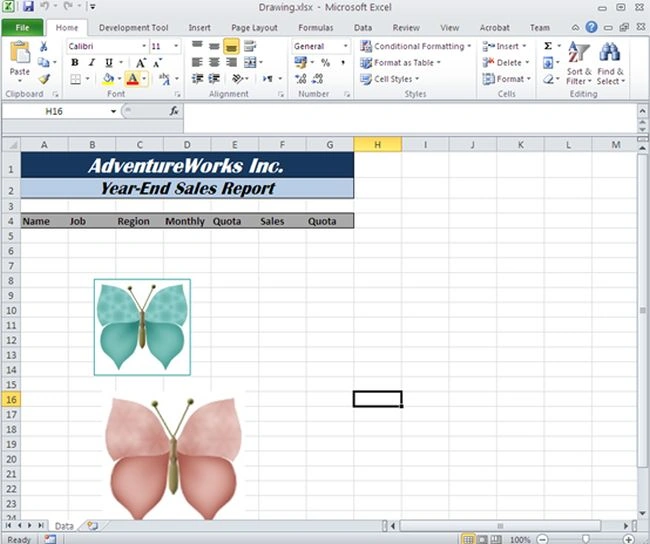
The second part shows using Spire.Xls to convert an Excel file to PDF.
Simple code for the second part
- Workbook workbook = new Workbook();
- //Load excel file
- workbook.LoadFromFile(info.Name);
- //Save excel file to pdf file.
- workbook.SaveToFile("result.pdf", Spire.Xls.FileFormat.PDF);
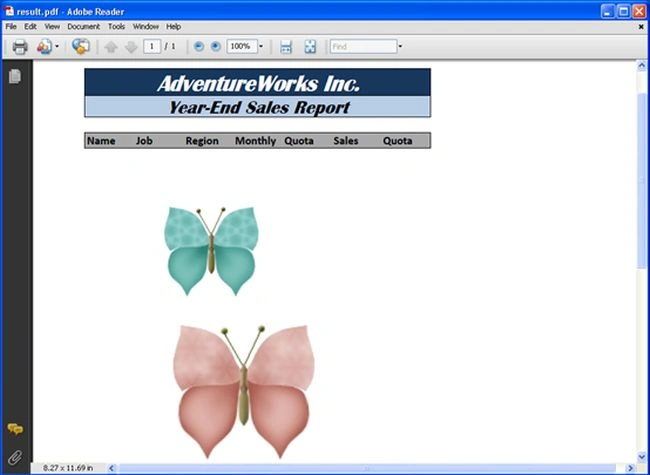
The complete code of my solution is as follows:
- using OfficeOpenXml;
- using OfficeOpenXml.Style;
- using OfficeOpenXml.Drawing;
- using OfficeOpenXml.Drawing.Chart;
- using Spire.Xls;
- namespace ExcelToPDFwithEpplusAndSpireXls
- {
- class Program
- {
- static void Main(string[] args)
- {
- FileInfo info = new FileInfo(@"Drawing.xlsx");
- ExcelPackage pck = new ExcelPackage();
- var ws = pck.Workbook.Worksheets.Add("Data");
- AddData(ws);
- AddPictures(ws);
- pck.SaveAs(info);
- Workbook workbook = new Workbook();
- workbook.LoadFromFile(info.Name);
- workbook.SaveToFile("result.pdf", Spire.Xls.FileFormat.PDF);
- System.Diagnostics.Process.Start("result.pdf");
- }
- //Add data to worksheet.
- public static void AddData(ExcelWorksheet worksheet)
- {
- worksheet.Cells["A1"].Value = "AdventureWorks Inc.";
- using (ExcelRange r = worksheet.Cells["A1:G1"])
- {
- //Merge from A1 to G1 cells into a cell
- r.Merge = true;
- //Set some styles of this cell
- r.Style.Font.SetFromFont(new Font("Britannic Bold", 22, FontStyle.Italic));
- r.Style.Font.Color.SetColor(Color.White);
- r.Style.HorizontalAlignment = OfficeOpenXml.Style.ExcelHorizontalAlignment.CenterContinuous;
- r.Style.Fill.PatternType = OfficeOpenXml.Style.ExcelFillStyle.Solid;
- r.Style.Fill.BackgroundColor.SetColor(Color.FromArgb(23, 55, 93));
- r.Style.Border.BorderAround(ExcelBorderStyle.Thin, Color.Black);
- worksheet.Cells["A2"].Value = "Year-End Sales Report";
- using (ExcelRange cell = worksheet.Cells["A2:G2"])
- {
- cell.Merge = true;
- cell.Style.Font.SetFromFont(new Font("Britannic Bold", 18, FontStyle.Italic));
- cell.Style.Font.Color.SetColor(Color.Black);
- cell.Style.HorizontalAlignment = ExcelHorizontalAlignment.CenterContinuous;
- cell.Style.Fill.PatternType = ExcelFillStyle.Solid;
- cell.Style.Fill.BackgroundColor.SetColor(Color.FromArgb(184, 204, 228));
- cell.Style.Border.BorderAround(ExcelBorderStyle.Thin, Color.Black);
- }
- //Set the value and styles for cells["A4:G4"]
- worksheet.Cells["A4"].Value = "Name";
- worksheet.Cells["B4"].Value = "Job";
- worksheet.Cells["C4"].Value = "Region";
- worksheet.Cells["D4"].Value = "Monthly";
- worksheet.Cells["E4"].Value = "Quota";
- worksheet.Cells["F4"].Value = "Sales";
- worksheet.Cells["G4"].Value = "Quota";
- worksheet.Cells["A4:G4"].Style.Fill.PatternType = ExcelFillStyle.Solid;
- worksheet.Cells["A4:G4"].Style.Fill.BackgroundColor.SetColor(Color.DarkGray);
- worksheet.Cells["A4:G4"].Style.Font.Bold = true;
- worksheet.Cells["A4:G4"].Style.Border.BorderAround(ExcelBorderStyle.Thin, Color.Black);
- }
- }
- //Add pictures to worksheet
- public static void AddPictures(ExcelWorksheet ws)
- {
- Image image = Image.FromFile("..\\..\\Butterfly01.jpg");
- OfficeOpenXml.Drawing.ExcelPicture pic = ws.Drawings.AddPicture("Pic1",image);
- //Set the postion of drawing picture
- pic.SetPosition(150, 100);
- pic.Border.LineStyle = eLineStyle.Solid;
- pic.Border.Fill.Color = Color.DarkCyan;
- pic.Fill.Style = eFillStyle.SolidFill;
- pic.Fill.Color = Color.White;
- pic.Fill.Transparancy = 50;
- image = Image.FromFile("..\\..\\Butterfly02.jpg");
- pic = ws.Drawings.AddPicture("Pic2", image);
- pic.SetPosition(300, 110);
- //Set the size of drawing picture
- pic.SetSize(150);
- }
- }
- }
Sandip G PatilPosted Apr 17, 2020, 8:48 AM
Nice article
Nelson CPosted Feb 27, 2015, 7:40 AM
although the article is some days old, be aware that the free version has limitations. Have you figured out another solution to this?