

Introduction
Windows Phone supports voice input as well as voice output. In this article we will learn how to convert text into speech in Windows Phone 8. This feature is also known as Text-To-Speech (TTS) . You can use it in your application for pronouncing the text. Let's see how to use this feature in our app.
Speech Synthesis Namespace
The Windows.phone.Speech.Synthesis namespace contains the text to speech functionality. It consists of the following classes:
- InstalledVoices
Provide access to the synthesized voices that are available for use.
- SpeechBookmarkedReachedEventArgs
Provides arguments of the BookmarkedReached event.
- SpeechStartedEventArgs
Arguments for the speech started event.
- SpeechSynthesizer
Main class that is used for working with a synthesized TTS voice.
- VoiceInformation
Defines Information about TTS.
Speak Text Async Method
- This is the main method that we need to use in our app for converting text into voice.
- Signature
await SpeakTextAsync(String)
- Arguement
String: A plain text that we want to convert.
Implementing TTS
The following code snippet implements the text to speech feature:
XAML
<phone:PhoneApplicationPage
x:Class="Demo.MainPage"
xmlns="http://schemas.microsoft.com/winfx/2006/xaml/presentation"
xmlns:x="http://schemas.microsoft.com/winfx/2006/xaml"
xmlns:phone="clr-namespace:Microsoft.Phone.Controls;assembly=Microsoft.Phone"
xmlns:shell="clr-namespace:Microsoft.Phone.Shell;assembly=Microsoft.Phone"
xmlns:d="http://schemas.microsoft.com/expression/blend/2008"
xmlns:mc="http://schemas.openxmlformats.org/markup-compatibility/2006"
mc:Ignorable="d"
FontFamily="{StaticResource PhoneFontFamilyNormal}"
FontSize="{StaticResource PhoneFontSizeNormal}"
Foreground="{StaticResource PhoneForegroundBrush}"
SupportedOrientations="Portrait" Orientation="Portrait"
shell:SystemTray.IsVisible="True">
<!--LayoutRoot is the root grid where all page content is placed-->
<Grid x:Name="LayoutRoot" Background="Transparent">
<Grid.RowDefinitions>
<RowDefinition Height="Auto"/>
<RowDefinition Height="*"/>
</Grid.RowDefinitions>
<!--TitlePanel contains the name of the application and page title-->
<StackPanel x:Name="TitlePanel" Grid.Row="0" Margin="12,17,0,28">
<TextBlock Text="Demo" Style="{StaticResource PhoneTextNormalStyle}" Margin="12,0"/>
<TextBlock Text="TTS Demo" Margin="9,-7,0,0" FontSize="40"/>
</StackPanel>
<!--ContentPanel - place additional content here-->
<Grid x:Name="ContentPanel" Grid.Row="1" Margin="12,0,12,0">
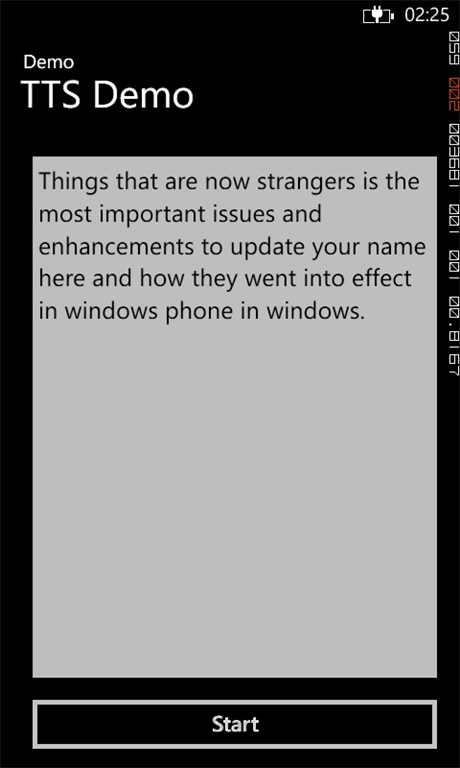
<Button Name="startBtn" Click="startBtn_Click" Content="Start" HorizontalAlignment="Left" Margin="10,0,0,10" Width="446" Height="72" VerticalAlignment="Bottom"/>
<TextBox Name="txtArea" Text="Text To Speak" HorizontalAlignment="Left" Height="567" Margin="10,0,0,0" TextWrapping="Wrap" VerticalAlignment="Top" Width="446" InputScope="Text" />
</Grid>
</Grid>
</phone:PhoneApplicationPage>
C# Code Behind
using Microsoft.Phone.Controls;
using System;
using System.Collections.Generic;
using System.Linq;
using System.Net;
using System.Windows;
using System.Windows.Controls;
using Windows.Phone.Speech.Synthesis;
namespace Demo
{
public partial class MainPage : PhoneApplicationPage
{
// Constructor
public MainPage()
{
InitializeComponent();
}
private async void startBtn_Click(object sender, RoutedEventArgs e)
{
SpeechSynthesizer s = new SpeechSynthesizer(); // New TTS Instance
await s.SpeakTextAsync(txtArea.Text); // Start TTS
}
}
}
Summary
TTS is a very useful feature that can be used creatively to create some wonderful apps. As a last note don't forget to set a ID_CAP_SPEECH_RECOGNITION Capablity in your app manifest.
Join the conversation! Your thoughts help the community grow.