

Introduction
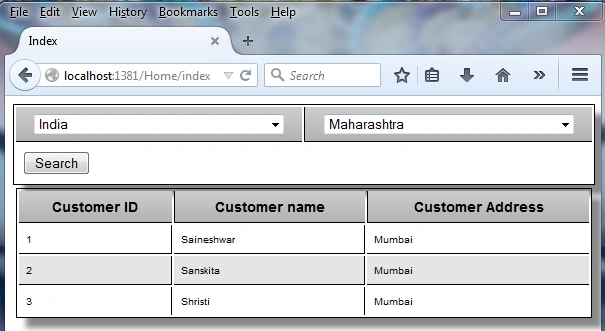
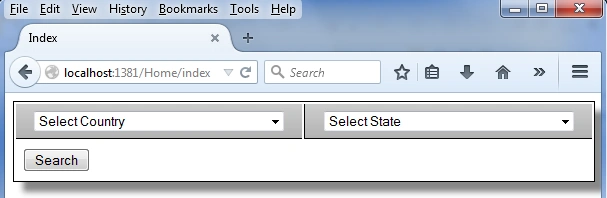
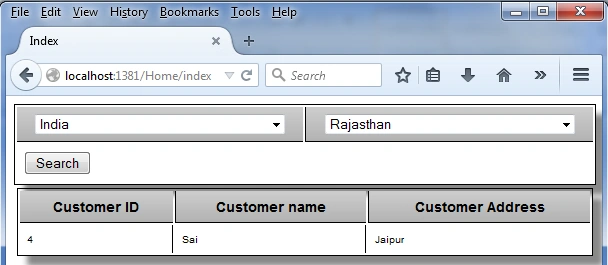
The following is a snapshot of what we will create in this article.
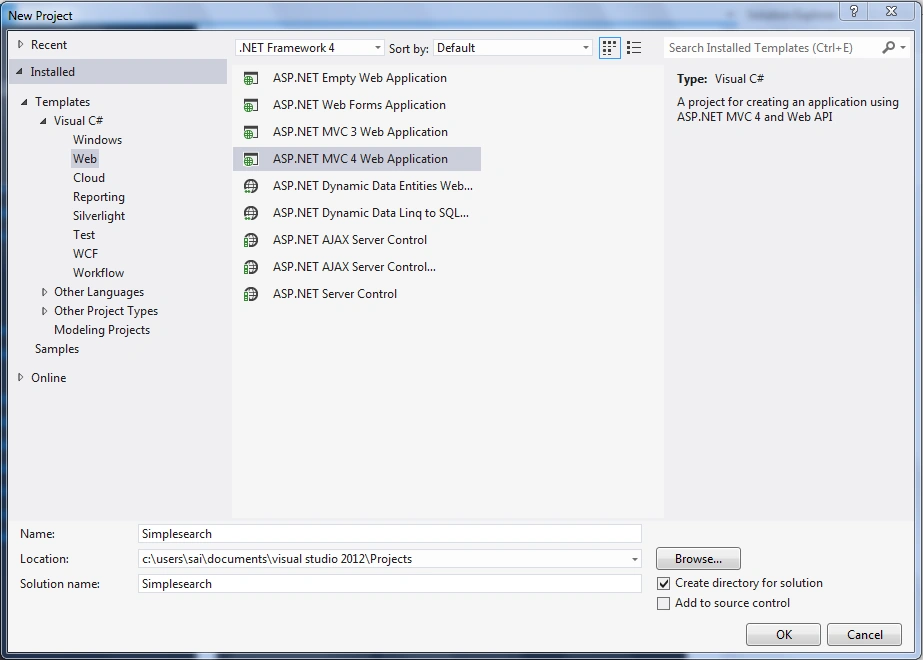
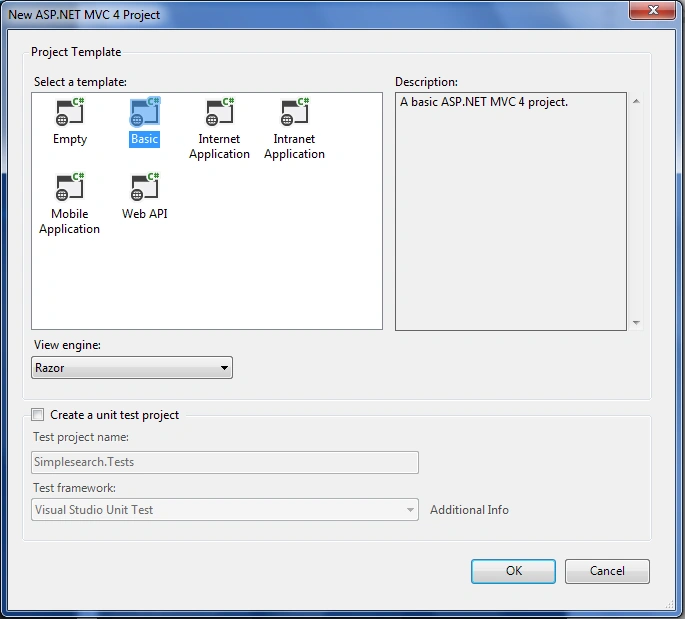
- Creating MVC basic application
- Adding an ADO.Net entity model to the application
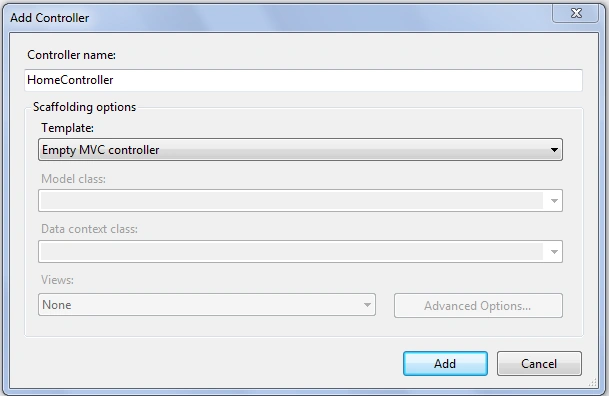
- Adding a Home Controller
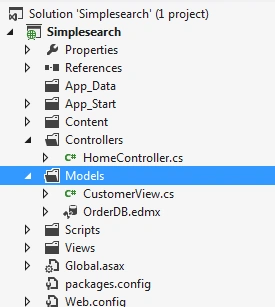
- Adding a View Model (CustomerView)
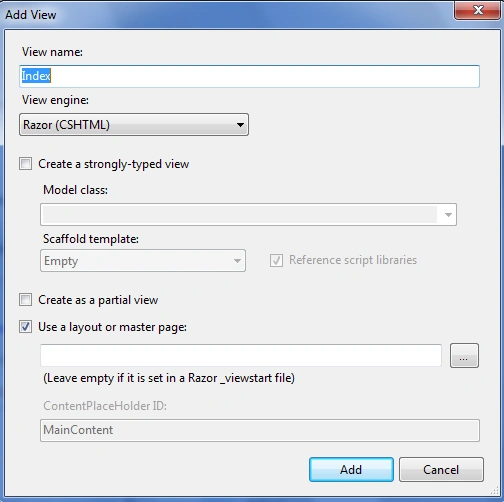
- Adding a View
- Binding a dropdown to Country
- Binding a dropdown to states based on the country using JSON
- Creating a partial view for displaying records in the Grid
- Final output
- Creating Insert Update and Delete application In MVC 4 Using Razor
- Creating Simple WebGrid In MVC 4 Using Simple Model And Dataset
- Binding Dropdownlist With Database In MVC
- Creating Simple Cascading Dropdownlist In MVC 4 Using Razor
- Binding Radiobutton and Radiobuttonlist in Various Way in MVC With Database
- How to Create Google Charts With MVC 4
- Globalization and Localization in ASP.Net MVC 4
- Creating Simple Checkbox list in MVC 4 Using Razor
- Creating MVC basic application
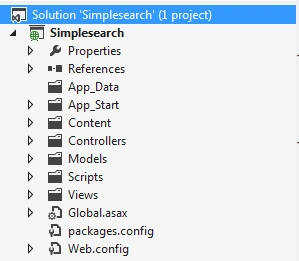
- Adding an ADO.NET Entity Data Model to the application (.edmx)
- Country
- State
- Customerdetails
Country Table
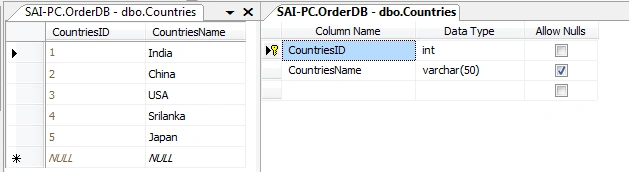
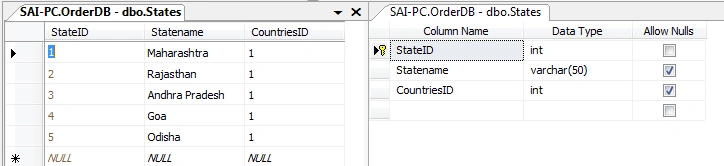

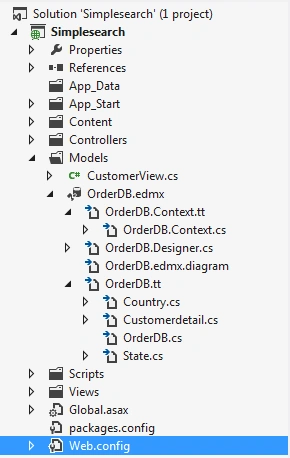
- For adding, right-click on the Model Folder select Add then inside that select ADO.NET Entity Data Model.
- After selecting, a small dialog will pop up to prompt for a name; I am providing the name OrderDB. Then click on the OK button.
- After clicking on the OK button a new wizard will pop up with the name Entity Data Model wizard. In that select Generate from Database.
- Next a wizard will pop up for the Connection Properties. Here just enter all the connection related information for the database that you want to use and then select “Yes include the sensitive data in the connection string”.
- Now in the next wizard it will ask for selecting tables from the database and inside that select [Country, State , Customerdetails ] then finally click on the Finish button.
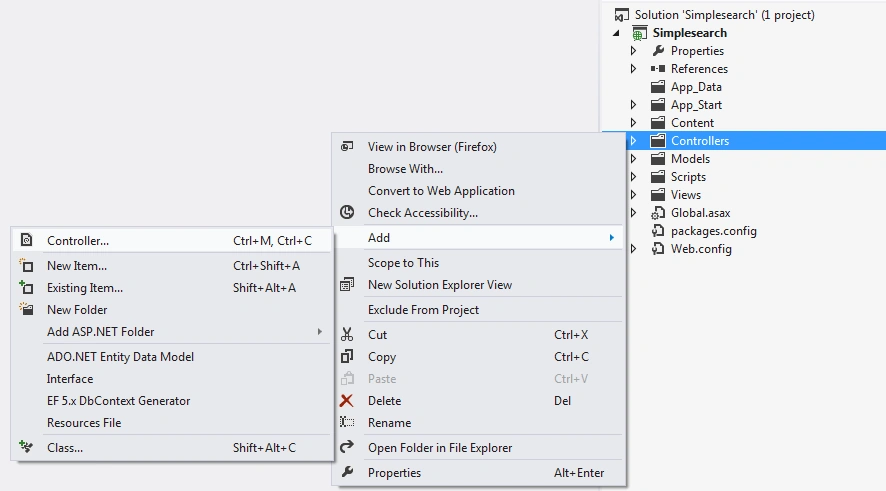
- Adding Home Controller
- using System;
- using System.Collections.Generic;
- using System.Data.Objects.SqlClient;
- using System.Linq;
- using System.Web;
- using System.Web.Mvc;
- using Simplesearch.Models;
- namespace Simplesearch.Controllers
- {
- public class HomeController : Controller
- {
- [HttpGet]
- public ActionResult Index()
- {
- return View();
- }
- }
- }
- Adding view Model (CustomerView)
- using System;
- using System.Collections.Generic;
- using System.Linq;
- using System.Web;
- using Simplesearch.Models;
- namespace Simplesearch.Models
- {
- public class CustomerView
- {
- }
- }
- using System;
- using System.Collections.Generic;
- using System.Linq;
- using System.Web;
- using Simplesearch.Models;
- namespace Simplesearch.Models
- {
- public class CustomerView
- {
- public int SelectedCountriesId { get; set; }
- public List<Country> Countrieslist { get; set; }
- public List<Customerdetail> Customerdetail { get; set; }
- }
- }
- Adding View
- @{
- ViewBag.Title = "Index";
- }
- <h2>Index</h2>
- [HttpGet]
- public ActionResult Index()
- {
- OrderDBEntities objord = new OrderDBEntities();
- var Countrieslist = (from clist in objord.Countries
- select clist);
- CustomerView CV = new CustomerView();
- CV.Countrieslist = Countrieslist.ToList();
- ViewData["Selectedstate"] = 0;
- CV.Customerdetail = null;
- return View(CV);
- }
- }
- public JsonResult GetStates(string id)
- {
- if (id == null)
- {
- id = "0";
- }
- int CountriesID = Convert.ToInt32(id);
- OrderDBEntities objord = new OrderDBEntities();
- var states = (from slist in objord.States
- where (slist.CountriesID == CountriesID)
- select new { slist.StateID, slist.Statename }).ToList();
- return Json(new SelectList(states, "StateID", "Statename"));
- }
- @model Simplesearch.Models.CustomerView
- @{
- Layout = null;
- }
- Binding dropdown Country
- <div class="CSSTableGenerator">
- <table style="width: 100%">
- <tr>
- <td>
- @Html.DropDownListFor(m => m.SelectedCountriesId,
- new SelectList(Model.Countrieslist, "CountriesID", "CountriesName"),
- "Select Country", new { style = "width:250px", @class = "dropdown1" })
- </td>
- <td>
- @Html.DropDownList("State",
- new SelectList(string.Empty, "StateID", "Statename"), "Select State",
- new { style = "width:250px", @class = "dropdown1" })
- </td>
- </tr>
- <tr>
- <td colspan="2">
- <input type="submit" value="Search" />
- </td>
- </tr>
- </table>
- </div>
- Binding dropdown states based on country using JSON
- <script src="~/Scripts/jquery-1.7.1.min.js"></script>
- <script src="~/Scripts/jquery.validate.min.js"></script>
- <script src="~/Scripts/jquery.validate.unobtrusive.min.js"></script>
- <script type="text/javascript">
- $(document).ready(function () {
- //Dropdownlist Selectedchange event
- $("#SelectedCountriesId").change(function () {
- $("#State").empty();
- $.ajax({
- type: 'POST',
- url: '@Url.Action("GetStates")', // we are calling json method
- dataType: 'json',
- data: { id: $("#SelectedCountriesId").val() },
- success: function (states) {
- // states contains the JSON formatted list
- // of states passed from the controller
- $("#State").append('<option value="' + "0" + '">' + "Select State" + '</option>');
- debugger;
- $.each(states, function (i, state) {
- $("#State").append('<option value="' + state.Value + '">' + state.Text + '</option>');
- // here we are adding option for States
- });
- },
- error: function (ex) {
- alert('Failed to retrieve states.' + ex);
- }
- });
- return false;
- })
- });
- </script>
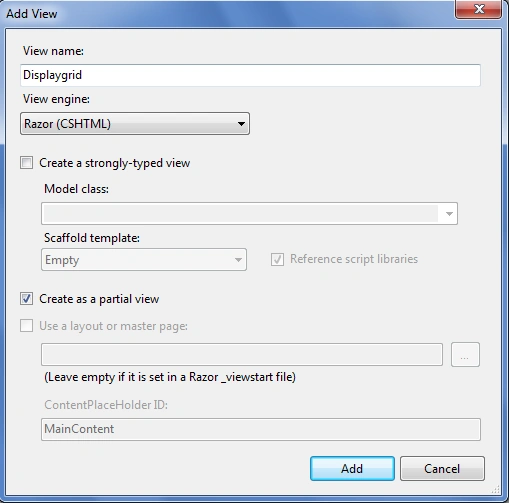
- Creating Partial view for displaying records in grid
- @model List<Simplesearch.Models.Customerdetail>
- <link href="~/Content/TableCSSCode1.css" rel="stylesheet" />
- <div class="CSSTableGenerator">
- <table>
- <tr>
- <td>Customer ID</td>
- <td>Customer name</td>
- <td>Customer Address</td>
- </tr>
- @for (int i = 0; i < Model.Count(); i++)
- {
- <tr>
- <td>
- @Model[i].CustomerID
- </td>
- <td>
- @Model[i].Customername
- </td>
- <td>
- @Model[i].CustomerAddress
- </td>
- </tr>
- }
- </table>
- </div>
- <table style="width: 100%">
- <tr>
- <td>
- @if (Model.Customerdetail != null)
- {
- @Html.Partial("Displaygrid", Model.Customerdetail);
- }
- </td>
- </tr>
- </table>
- [HttpPost]
- public ActionResult Index(FormCollection fc, CustomerView objcv)
- {
- string CountriesID = Convert.ToString(objcv.SelectedCountriesId); //tightly coupled
- string StateID = fc["State"];
- ViewData["Selectedstate"] = StateID;
- OrderDBEntities objord = new OrderDBEntities();
- var Countrieslist = (from clist in objord.Countries select clist);
- CustomerView CV = new CustomerView();
- int stateid = Convert.ToInt32(StateID);
- var Customerlist = (from Custlist in objord.Customerdetails
- where Custlist.StateID == stateid
- select Custlist);
- CV.Countrieslist = Countrieslist.ToList();
- CV.SelectedCountriesId = objcv.SelectedCountriesId;
- CV.Customerdetail = Customerlist.ToList();
- return View(CV);
- }
- string CountriesID = Convert.ToString(objcv.SelectedCountriesId); //tightly coupled
- string StateID = fc["State"];
- ViewData["Selectedstate"] = StateID;
- OrderDBEntities objord = new OrderDBEntities();
- var Countrieslist = (from clist in objord.Countries select clist);
- CustomerView CV = new CustomerView();
- int stateid = Convert.ToInt32(StateID);
- var Customerlist = (from Custlist in objord.Customerdetails
- where Custlist.StateID == stateid
- select Custlist);
- CV.Countrieslist = Countrieslist.ToList();
- CV.SelectedCountriesId = objcv.SelectedCountriesId;
- CV.Customerdetail = Customerlist.ToList();
- return View(CV);
- if (@ViewData["Selectedstate"] != 0)
- {
- $("#State").val(@ViewData["Selectedstate"]);
- }
- <script type="text/javascript">
- window.onload = function()
- {
- rebindState ()
- };
- </script>
- <script type="text/javascript">
- function rebindState () {
- debugger;
- if (@ViewData["Selectedstate"] != 0) {
- $("#SelectedCountriesId").val(@Model.SelectedCountriesId);
- $.ajax({
- type: 'POST',
- url: '@Url.Action("GetStates")',
- dataType: 'json',
- data: {
- id: $("#SelectedCountriesId").val()
- },
- success: function (states) {
- $.each(states, function (i, state) {
- $("#State").append('<option value="' + state.Value + '">'
- + state.Text + '</option>');
- if (@ViewData["Selectedstate"] != 0) {
- $("#State").val(@ViewData["Selectedstate"]);
- }
- });
- },
- error: function (ex) {
- alert('Failed to retrieve states.' + ex);
- }
- });
- }
- }
- </script>
- using System;
- using System.Collections.Generic;
- using System.Data.Objects.SqlClient;
- using System.Linq;
- using System.Web;
- using System.Web.Mvc;
- using Simplesearch.Models;
- namespace Simplesearch.Controllers
- {
- public class HomeController : Controller
- {
- [HttpGet]
- public ActionResult Index()
- {
- OrderDBEntities objord = new OrderDBEntities();
- var Countrieslist = (from clist in objord.Countries
- select clist);
- CustomerView CV = new CustomerView();
- CV.Countrieslist = Countrieslist.ToList();
- ViewData["Selectedstate"] = 0;
- CV.Customerdetail = null;
- return View(CV);
- }
-
- [HttpPost]
- public ActionResult Index(FormCollection fc, CustomerView objcv)
- {
- string CountriesID = Convert.ToString(objcv.SelectedCountriesId); //tightly coupled
- string StateID = fc["State"];
- ViewData["Selectedstate"] = StateID;
- OrderDBEntities objord = new OrderDBEntities();
- var Countrieslist = (from clist in objord.Countries select clist);
- CustomerView CV = new CustomerView();
- int stateid = Convert.ToInt32(StateID);
- var Customerlist = (from Custlist in objord.Customerdetails
- where Custlist.StateID == stateid
- select Custlist);
- CV.Countrieslist = Countrieslist.ToList();
- CV.SelectedCountriesId = objcv.SelectedCountriesId;
- CV.Customerdetail = Customerlist.ToList();
- return View(CV);
- }
- public JsonResult GetStates(string id)
- {
- if (id == null)
- {
- id = "0";
- }
- int CountriesID = Convert.ToInt32(id);
- OrderDBEntities objord = new OrderDBEntities();
- var states = (from slist in objord.States
- where (slist.CountriesID == CountriesID)
- select new { slist.StateID, slist.Statename }).ToList();
- return Json(new SelectList(states, "StateID", "Statename"));
- }
- }
- }
- @model Simplesearch.Models.CustomerView
- @{
- Layout = null;
- }
- <!DOCTYPE html>
- <html>
- <head>
- <meta name="viewport" content="width=device-width" />
- <title>Index</title>
- <link href="~/Content/TableCSSCode(1).css" rel="stylesheet" />
- <link href="~/Content/TableCSSCode.css" rel="stylesheet" />
- <script src="~/Scripts/jquery-1.7.1.min.js"></script>
- <script src="~/Scripts/jquery.validate.min.js"></script>
- <script src="~/Scripts/jquery.validate.unobtrusive.min.js"></script>
- <script type="text/javascript">
- $(document).ready(function () {
- //Dropdownlist Selectedchange event
- $("#SelectedCountriesId").change(function () {
- $("#State").empty();
- $.ajax({
- type: 'POST',
- url: '@Url.Action("GetStates")', // we are calling json method
- dataType: 'json',
- data: { id: $("#SelectedCountriesId").val() },
- success: function (states) {
- // states contains the JSON formatted list
- // of states passed from the controller
- $("#State").append('<option value="' + "0" + '">' + "Select State" + '</option>');
- debugger;
- $.each(states, function (i, state) {
- $("#State").append('<option value="' + state.Value + '">' + state.Text + '</option>');
- // here we are adding option for States
- });
- },
- error: function (ex) {
- alert('Failed to retrieve states.' + ex);
- }
- });
- return false;
- })
- });
- </script>
- <script type="text/javascript">
- window.onload = function () { rebindState() };
- </script>
- <script type="text/javascript">
- function rebindState() {
- debugger;
- if (@ViewData["Selectedstate"] != 0) {
- $("#SelectedCountriesId").val(@Model.SelectedCountriesId);
- $.ajax({
- type: 'POST',
- url: '@Url.Action("GetStates")',
- dataType: 'json',
- data: {
- id: $("#SelectedCountriesId").val()
- },
- success: function (states) {
- $.each(states, function (i, state) {
- $("#State").append('<option value="' + state.Value + '">' + state.Text + '</option>');
- if (@ViewData["Selectedstate"] != 0) {
- $("#State").val(@ViewData["Selectedstate"]);
- }
- });
- },
- error: function (ex) {
- alert('Failed to retrieve states.' + ex);
- }
- });
- }
- }
- </script>
- </head>
- <body>
- @using (Html.BeginForm())
- {
- @Html.ValidationSummary(true)
- <div class="CSSTableGenerator">
- <table style="width: 100%">
- <tr>
- <td>
- @Html.DropDownListFor(m => m.SelectedCountriesId,
- new SelectList(Model.Countrieslist, "CountriesID", "CountriesName"), "Select Country", new { style = "width:250px", @class = "dropdown1" })
- </td>
- <td>
- @Html.DropDownList("State",
- new SelectList(string.Empty, "StateID", "Statename"), "Select State", new { style = "width:250px", @class = "dropdown1" })
- </td>
- </tr>
- <tr>
- <td colspan="2">
- <input type="submit" value="Search" />
- </td>
- </tr>
- </table>
- </div>
- <table style="width: 100%">
- <tr>
- <td>
- @if (Model.Customerdetail != null)
- {
- @Html.Partial("Displaygrid", Model.Customerdetail);
- }
- </td>
- </tr>
- </table>
- }
- </body>
- </html>
- @model List<Simplesearch.Models.Customerdetail>
- <link href="~/Content/TableCSSCode1.css" rel="stylesheet" />
- <div class="CSSTableGenerator">
- <table>
- <tr>
- <td>Customer ID</td>
- <td>Customer name</td>
- <td>Customer Address</td>
- </tr>
- @for (int i = 0; i < Model.Count(); i++)
- {
- <tr>
- <td>
- @Model[i].CustomerID
- </td>
- <td>
- @Model[i].Customername
- </td>
- <td>
- @Model[i].CustomerAddress
- </td>
- </tr>
- }
- </table>
- </div>
Abdul NasirPosted Sep 23, 2018, 11:06 AM
When click on country then load state dropdwon and datagrid both on country click is it possible please i want this.
Sai KrishnaPosted Feb 19, 2017, 11:33 AM
Can you please still add 2 check boxes and textbox in the same table and insert them in the new table.Please
Yashwanth MuthineniPosted Aug 27, 2015, 3:16 AM
Nice Share
Saineshwar BageriPosted Jun 25, 2015, 1:16 AM
Roberto sir i am working on it you can check this link which has filters and paging to this will help you URL:- http://www.c-sharpcorner.com/UploadFile/4d9083/creating-simple-grid-in-mvc-using-grid-mvc/
Roberto AlcivarPosted Jun 24, 2015, 2:06 PM
Hello, how do I filter a WebGrid with dropdwownlist cascade.The problem that I need to change to page 2 or the next. The data selected in the dropdownlist and WebGrid is lost. I'm using ASP.MVC Razor, MVC5 or MVC4 Prefer to do it all over again with your recommendations. Please an example of how to do it. Thank you. Att. Roberto Alcivar. [email protected]
Anurag SarkarPosted Apr 27, 2015, 7:05 AM
Great Work
Rahul Kumar SaxenaPosted Apr 14, 2015, 2:23 PM
Good Show..
Sibeesh VenuPosted Apr 14, 2015, 1:31 AM
Nice one.
Jeetendra GundPosted Apr 14, 2015, 1:24 AM
Nice article
Saineshwar BageriPosted Apr 14, 2015, 12:27 AM
Thank you santhakumar sir
Santhakumar MunuswamyPosted Apr 13, 2015, 11:01 PM
Good work