

Here are the steps,
Step 1: Verify you have Microsoft jQuery Unobtrusive Ajax in your script folder.
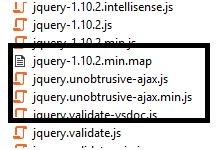
If not then install package using the following command in nuget.
Install-PackageMicrosoft.jQuery.Unobtrusive.Ajax
You may refer the following link to install.
Step 2: Create Controller, Model and View in your MVC application.
Step 3: Include the following two important script file in your project.
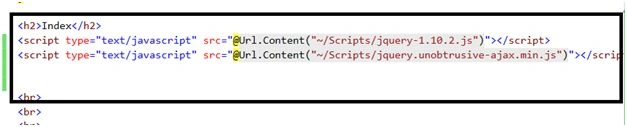
Step 4: Create the viewmodel, add method GetList and you may take this from DB. I have given hardcoded vales.
If not then install package using the following command in nuget.
Install-PackageMicrosoft.jQuery.Unobtrusive.Ajax
You may refer the following link to install.
Step 2: Create Controller, Model and View in your MVC application.
Step 3: Include the following two important script file in your project.
Step 4: Create the viewmodel, add method GetList and you may take this from DB. I have given hardcoded vales.
- public class ImageModel
- {
- public ImageViewModel SelectedImage;
- public ImageModel()
- {
- }
- public List < ImageViewModel > GetList()
- {
- List < ImageViewModel > list = new List < ImageViewModel > ();
- list.Add(new ImageViewModel
- {
- Id = 1, Path = "~/Content/Images/IMG_7785.jpg"
- });
- list.Add(new ImageViewModel
- {
- Id = 2, Path = "~/Content/Images/IMG_7788.jpg"
- });
- list.Add(new ImageViewModel
- {
- Id = 3, Path = "~/Content/Images/IMG_7790.jpg"
- });
- list.Add(new ImageViewModel
- {
- Id = 4, Path = "~/Content/Images/IMG_7799.jpg"
- });
- list.Add(new ImageViewModel
- {
- Id = 5, Path = "~/Content/Images/IMG_7847.jpg"
- });
- list.Add(new ImageViewModel
- {
- Id = 6, Path = "~/Content/Images/IMG_7849.jpg"
- });
- return list;
- }
- }
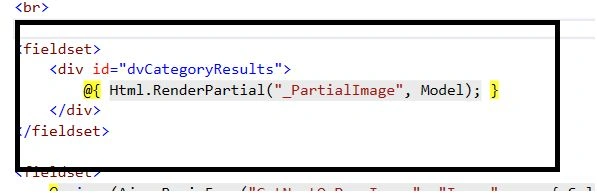
Step 6: Add Ajax.BeginForm
It has the following parameters,
- Action Name
- Controller Name
- AjaxOption (mention HttpMethod =post , UpdateTargetId = “Traget Div to update”
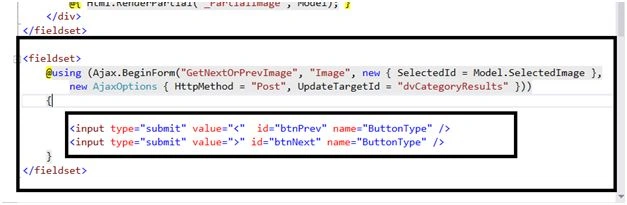
Also add Two button Prev and next My Ajax.BegineForm is as below.
For the btnPrev and btnNext two different values are given and common Name is given as ButtonType. Both the conditions are manipulated in the controller.
And My Final View is as below,
- @model DropdownGrid.Models.ImageModel
- @ {
- ViewBag.Title = "Albam";
- }
- < h2 > Index < /h2> < script type = "text/javascript"
- src = "@Url.Content("~/Scripts/jquery - 1.10 .2.js ")" > < /script> < script type = "text/javascript"
- src = "@Url.Content("~/Scripts/jquery.unobtrusive - ajax.min.js ")" > < /script>
- < br >
- < br >
- < br >
- < br >
- < fieldset >
- < div id = "dvCategoryResults" >
- @ {
- Html.RenderPartial("_PartialImage", Model);
- } < /div> < /fieldset>
- < fieldset >
- @using(Ajax.BeginForm("GetNextOrPrevImage", "Image", new
- {
- SelectedId = Model.SelectedImage
- },
- new AjaxOptions
- {
- HttpMethod = "Post", UpdateTargetId = "dvCategoryResults"
- })) {
- < input type = "submit"
- value = "<"
- id = "btnPrev"
- name = "ButtonType" / >
- < input type = "submit"
- value = ">"
- id = "btnNext"
- name = "ButtonType" / >
- }
- < /fieldset>
- public class ImageController: Controller
- {
- public ActionResult Index() {
- ImageModel _objuserloginmodel = new ImageModel();
- ViewBag.SelectedId = 0;
- TempData["SelectedId"] = 0;
- _objuserloginmodel.SelectedImage = _objuserloginmodel.GetList()[0];
- return View(_objuserloginmodel);
- }
- [HttpPost]
- public ActionResult GetNextOrPrevImage(ImageViewModel SelectedImage, string ButtonType)
- {
- ImageModel _objuserloginmodel = new ImageModel();
- List < ImageViewModel > GetList = _objuserloginmodel.GetList();
- int id = System.Convert.ToInt32(TempData["SelectedId"]);
- if (ButtonType.Trim() == ">")
- _objuserloginmodel.SelectedImage = GetList[++id < GetList.Count ? id : --id];
- else if (ButtonType.Trim() == "<")
- _objuserloginmodel.SelectedImage = GetList[--id > -1 ? id : ++id];
- TempData["SelectedId"] = id;
- return PartialView("_PartialImage", _objuserloginmodel);
- }
- }
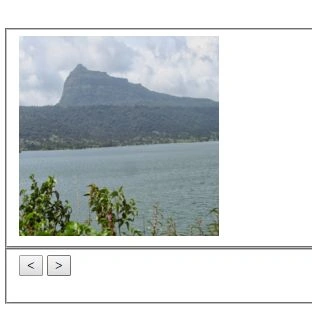
On Submit button you can see the partial view updates without postback whole form.
Muhammad Aqib ShehzadPosted Dec 11, 2015, 6:17 AM
good
Ajay GandhiPosted Dec 8, 2015, 5:29 AM
Thanks everyone
Sridhar SharmaPosted Dec 8, 2015, 1:35 AM
Nice one
Mukesh KumarPosted Dec 8, 2015, 12:40 AM
Good One
Humayun Kabir MamunPosted Dec 8, 2015, 12:09 AM
Nice...
Ajay GandhiPosted Dec 7, 2015, 11:19 PM
Thanks guys
Anu VPosted Dec 7, 2015, 11:03 PM
good one
Ankur MistryPosted Dec 7, 2015, 2:45 PM
nice share Ajay