

Introduction
Today, in this article let's play around with one of the interesting and most useful concepts in .NET 4.5.
What are data annotations in web forms?
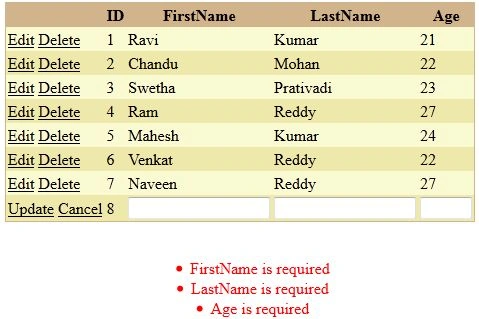
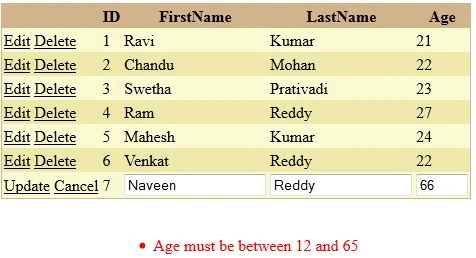
In simple terms "It provides enhanced light-weighted validations with data annotation attributes in web forms".
Step 1. Create a new "ASP.Net Web Forms Application", as in.
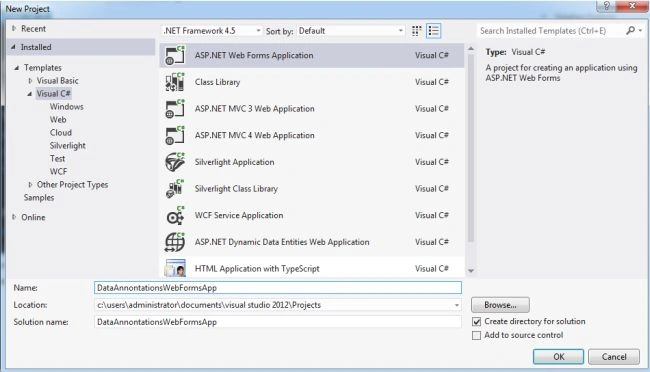
Step 2. Create an Entity Data Model Framework and set it up with an appropriate database.
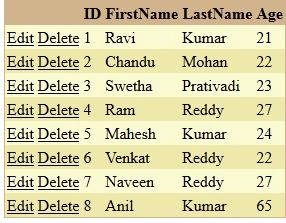
Step 3. The complete code of webform1.aspx looks like this.
<%@ Page Language="C#" AutoEventWireup="true" CodeBehind="WebForm1.aspx.cs" Inherits="EnhancedDeleteSupportApp.WebForm1" %>
<!DOCTYPE html>
<html xmlns="http://www.w3.org/1999/xhtml">
<head id="Head1" runat="server">
    <title></title>
</head>
<body>
    <form id="form1" runat="server">
    <center>
        <div>
            <asp:GridView ID="GridView1" runat="server" BackColor="LightGoldenrodYellow" ItemType="EnhancedDeleteSupportApp.Employee"
                BorderColor="Tan" BorderWidth="1px" CellPadding="2" ForeColor="Black" GridLines="None"
                AutoGenerateColumns="false" SelectMethod="GetData" UpdateMethod="UpdateData"
                AutoGenerateEditButton="true" AutoGenerateDeleteButton="true" DeleteMethod="DeleteData">
                <AlternatingRowStyle BackColor="PaleGoldenrod"></AlternatingRowStyle>
                <FooterStyle BackColor="Tan"></FooterStyle>
                <HeaderStyle BackColor="Tan" Font-Bold="True"></HeaderStyle>
                <PagerStyle HorizontalAlign="Center" BackColor="PaleGoldenrod" ForeColor="DarkSlateBlue">
                </PagerStyle>
                <SelectedRowStyle BackColor="DarkSlateBlue" ForeColor="GhostWhite"></SelectedRowStyle>
                <SortedAscendingCellStyle BackColor="#FAFAE7"></SortedAscendingCellStyle>
                <SortedAscendingHeaderStyle BackColor="#DAC09E"></SortedAscendingHeaderStyle>
                <SortedDescendingCellStyle BackColor="#E1DB9C"></SortedDescendingCellStyle>
                <SortedDescendingHeaderStyle BackColor="#C2A47B"></SortedDescendingHeaderStyle>
                <Columns>
                    <asp:BoundField DataField="Id" HeaderText="ID" ReadOnly="true" />
                    <asp:BoundField DataField="FirstName" HeaderText="FirstName" SortExpression="FirstName" />
                    <asp:BoundField DataField="LastName" HeaderText="LastName" SortExpression="LastName" />
                    <asp:BoundField DataField="Age" HeaderText="Age" SortExpression="Age" />
                </Columns>
            </asp:GridView>
            <br />
            <asp:ValidationSummary ID="StudentsValidationSummary" runat="server" ShowSummary="true"
                DisplayMode="BulletList" Style="color: Red" />
        </div>
    </center>
    </form>
</body>
</html>
Gaurav GuptaPosted Oct 9, 2012, 10:58 PM
Nice concept to learn and it's good way to validate data in grid...