

Introduction
As the name implies, IndexedDB is a database in which we can do all kinds of operations we do in a normal database. This IndexedDB has been introduced with Html. This allows a user to store large amounts of data in their browser. It has been proved that IndexedDB is more powerful and efficient than other storage mechanisms like local storage and session storage. Basically IndexedDB is an API that helps the developers to do some database operations on the client-side, like creating a database, opening the transaction, creating tables, inserting values to tables, deleting values, and reading the data. If you need any other way to save some data on the client-side, you can use storage mechanisms introduced in HTML5. Now we will look at some of the operations a developer can do with IndexedDB. I hope you will like this.
Background
Before introducing IndexedDB, developers were familiar with Web SQL.
Why use IndexedDB instead of Web SQL
W3C has announced that the use of Web SQL is obsolete and deprecated, hence it is not recommended to use Web SQL in your applications. Most of the modern web browsers like Mozilla do not support the use of Web SQL, this is also a great limitation of Web SQL.
Now we have an alternative to Web SQL, IndexedDB, which more efficient and faster than Web SQL. The following are some of the main advantages of IndexedDB.
- It stores the data as Key-Pair values
- It is asynchronous
- It is non-relational
- Can access the data from the same domain
Using the code
As you all know, the first step to work with a database is just creating it.
Create/Open IndexedDB Database
It is always better to check whether your browser supports IndexedDB or not. To check that you can use the following syntax:
- <script type="text/javascript">
- window.indexedDB = window.indexedDB || window.mozIndexedDB || window.webkitIndexedDB || window.msIndexedDB;
- //check whether the database is created or not.
- if (!window.indexedDB)
- {
- alert("Oops, Does not support IndexedDB");
- }
- </script>
- //check whether the database is created or not.
- if (!window.indexedDB)
- {
- alert("Oops, Does not support IndexedDB");
- }
- else
- {
- //Create database
- var dbName = 'myDB'; // Database name
- var dbVersion = 2; // Database version
- var crDB = window.indexedDB.open(dbName, dbVersion);
- }
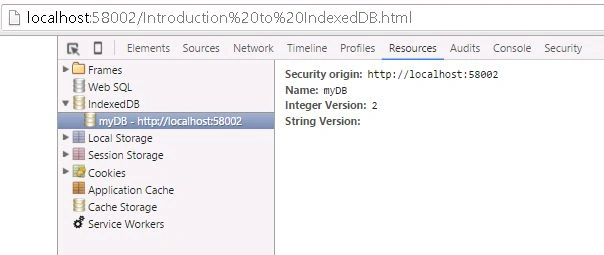
- onupgradeneeded
This event gets fired when you try upgrading your database. Here we are creating an object store with the name ‘UserName’ and index key ‘UserID’. The following is the output you get when the onupgradeneeded is fired.
- crDB.onupgradeneeded = function (event)
- {
- alert("That's cool, we are upgrading");
- db = event.target.result;
- var objectStore = db.createObjectStore("UserName",
- {
- keyPath: "UserID"
- });
- };
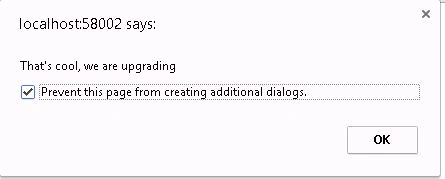 IndexedDB onupgradeneeded Alert
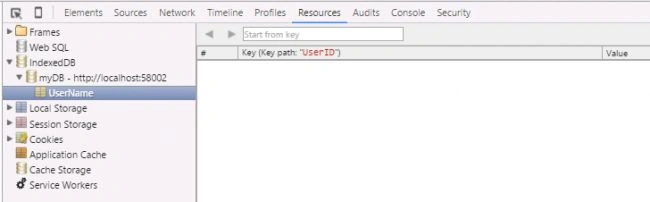 IndexedDB onupgradeneeded Output
 - onsuccess
If there are no errors, you will get an alert as follows.
- crDB.onsuccess = function (event) {
- alert("Awesome, You have successfully Opened a Databse!");
- db = event.target.result;
- }
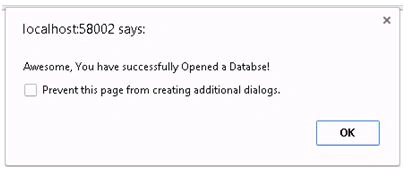 IndexedDB OnSuccess Alert
 - onerror
Here crDB is our database instance. Once this is done, we can start using the transaction as we use in SQL.
- crDB.onerror = function (event) {
- alert("Oops, There is error!", event);
- }
Creating transaction
To create a transaction we can use the following syntax. We can use the transaction method from our database instance.
- //Creating transaction
- var myTran = db.transaction(["UserName"], "readwrite");
- myTran.oncomplete = function (e)
- {
- alert("Awesome, Transaction is successfully created!");
- };
- myTran.onerror = function (e)
- {
- alert("Oops, There is error!", e.message);
- };
- crDB.onsuccess = function (event)
- {
- alert("Awesome, You have successfully Opened a Databse!");
- db = event.target.result;
- //Creating transaction
- var myTran = db.transaction(["UserName"], "readwrite");
- myTran.oncomplete = function (e)
- {
- alert("Awesome, Transaction is successfully created!");
- };
- myTran.onsuccess = function (e)
- {
- alert("Awesome, Transaction is successfully created!");
- //Adding the data
- var myObj = myTran.objectStore("UserName");
- var myNames = ["Sibi", "Aji", "Ansu", "Shantu", "Aghil"]; //Array with names
- for (var i = 0; i < 5; i++)
- { //Adding 5 objects
- myObj.add(
- {
- UserID: 'SBKL0' + i,
- Name: myNames[i]
- });
- }
- };
- myTran.onerror = function (e)
- {
- alert("Oops, There is error!", e.message);
- };
- }
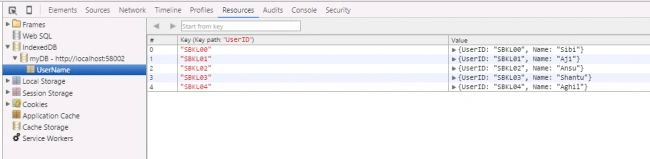
- setTimeout(function () {
- db.transaction(["UserName"], "readwrite").objectStore("UserName").delete('SBKL00');
- }, 10000);
- myTran.onsuccess = function (e)
- {
- alert("Awesome, Transaction is successfully created!");
- //Adding the data
- var myObj = myTran.objectStore("UserName");
- var myNames = ["Sibi", "Aji", "Ansu", "Shantu", "Aghil"]; //Array with names
- for (var i = 0; i < 5; i++)
- { //Adding 5 objects
- myObj.add(
- {
- UserID: 'SBKL0' + i,
- Name: myNames[i]
- });
- }
- setTimeout(function ()
- {
- db.transaction(["UserName"], "readwrite").objectStore("UserName").delete('SBKL00');
- }, 10000);
- };
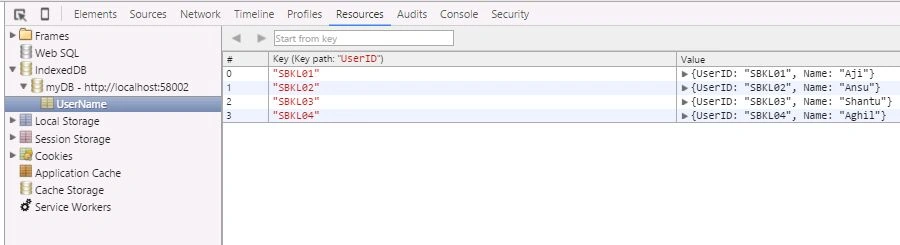
- <input id="btnGet" type="button" value="Get Name" />
- $(function ()
- {
- $('#btnGet').click(function ()
- {
- var get = db.transaction(["UserName"], "readwrite").objectStore("UserName").get('SBKL01');
- get.onsuccess = function (event)
- {
- alert("The name you have requested is : " + get.result.Name);
- };
- });
- });
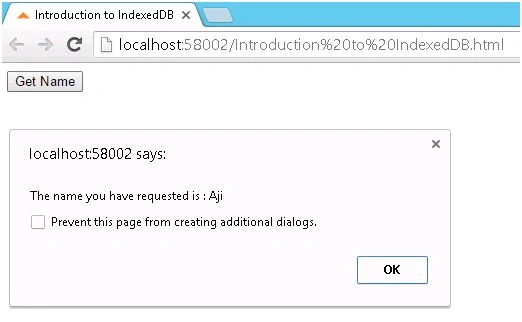
- <input id="btnUpdate" type="button" value="Update Name" />
- $('#btnUpdate').click(function ()
- {
- var updObject = db.transaction(["UserName"], "readwrite").objectStore("UserName");
- var upd = updObject.get('SBKL03');
- upd.onsuccess = function (event)
- {
- upd.result.Name = 'New Name';
- updObject.put(upd.result);
- };
- });
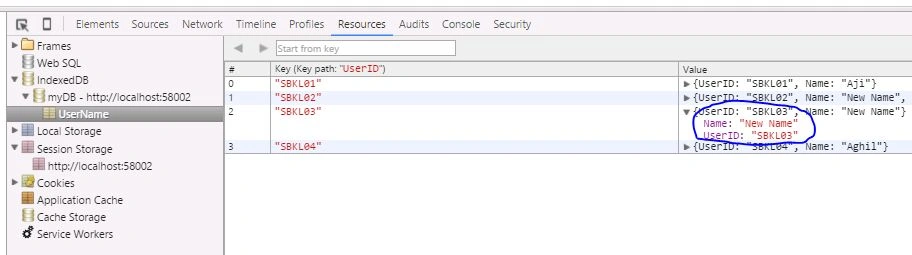
Here we are getting an element using the get method, and we are updating the value in the result, once it is done, we will assign that new result to the object store using put method.
- <input id="btnShow" type="button" value="Show the data" />
- <div id="myTab">
- <table id="show">
- <thead>
- <th>User ID </th>
- <th>Name</th>
- </thead>
- <tbody></tbody>
- </table>
- </div>
- $('#btnShow').click(function ()
- {
- var curObject = db.transaction(["UserName"], "readwrite").objectStore("UserName");
- curObject.openCursor().onsuccess = function (event)
- { //Opening the cursor
- var cur = event.target.result;
- if (cur)
- { // Checks for the cursor
- $('#show').append('<tr><td>' + cur.key + '</td><td>' + cur.value.Name + '</td></tr>');
- cur.continue();
- }
- };
- $('#myTab').show();
- });
- <style>
- table,
- tr,
- td,
- th {
- border: 1px solid #ccc;
- border-radius: 5px;
- padding: 10px;
- margin: 10px;
- }
- </style>

- <!DOCTYPE html>
- <html>
- <head>
- <title>Introduction to IndexedDB</title>
- <script src="Scripts/jquery-1.11.1.min.js"></script>
- <script type="text/javascript">
- var dbName = 'myDB'; // Database name
- var dbVersion = 2; // Database version
- var crDB;
- var db;
- window.indexedDB = window.indexedDB || window.mozIndexedDB || window.webkitIndexedDB || window.msIndexedDB;
- //check whether the database is created or not.
- if (!window.indexedDB)
- {
- alert("Oops, Does not support IndexedDB");
- }
- else
- {
- //Create database
- crDB = window.indexedDB.open(dbName, dbVersion);
- var db;
- crDB.onerror = function (event)
- {
- alert("Oops, There is error!", event);
- }
- crDB.onupgradeneeded = function (event)
- {
- alert("That's cool, we are upgrading");
- db = event.target.result;
- var objectStore = db.createObjectStore("UserName",
- {
- keyPath: "UserID"
- });
- };
- crDB.onsuccess = function (event)
- {
- alert("Awesome, You have successfully Opened a Databse!");
- db = event.target.result;
- //Creating transaction
- var myTran = db.transaction(["UserName"], "readwrite");
- myTran.oncomplete = function (e)
- {
- alert("Awesome, Transaction is successfully created!");
- };
- myTran.onsuccess = function (e)
- {
- alert("Awesome, Transaction is successfully created!");
- //Adding the data
- var myObj = myTran.objectStore("UserName");
- var myNames = ["Sibi", "Aji", "Ansu", "Shantu", "Aghil"]; //Array with names
- for (var i = 0; i < 5; i++)
- { //Adding 5 objects
- myObj.add(
- {
- UserID: 'SBKL0' + i,
- Name: myNames[i]
- });
- }
- setTimeout(function ()
- {
- db.transaction(["UserName"], "readwrite").objectStore("UserName").delete('SBKL00');
- }, 10000);
- };
- myTran.onerror = function (e)
- {
- alert("Oops, There is error!", e.message);
- };
- }
- }
- $(function ()
- {
- $('#myTab').hide();
- $('#btnGet').click(function ()
- {
- var get = db.transaction(["UserName"], "readwrite").objectStore("UserName").get('SBKL01');
- get.onsuccess = function (event)
- {
- alert("The name you have requested is : " + get.result.Name);
- };
- });
- $('#btnUpdate').click(function ()
- {
- var updObject = db.transaction(["UserName"], "readwrite").objectStore("UserName");
- var upd = updObject.get('SBKL03');
- upd.onsuccess = function (event)
- {
- upd.result.Name = 'New Name';
- updObject.put(upd.result);
- };
- });
- $('#btnShow').click(function ()
- {
- var curObject = db.transaction(["UserName"], "readwrite").objectStore("UserName");
- curObject.openCursor().onsuccess = function (event)
- { //Opening the cursor
- var cur = event.target.result;
- if (cur)
- { // Checks for the cursor
- $('#show').append('<tr><td>' + cur.key + '</td><td>' + cur.value.Name + '</td></tr>');
- cur.continue();
- }
- };
- $('#myTab').show();
- });
- });
- </script>
- <style>
- table,
- tr,
- td,
- th {
- border: 1px solid #ccc;
- border-radius: 5px;
- padding: 10px;
- margin: 10px;
- }
- </style>
- </head>
- <body> <input id="btnGet" type="button" value="Get Name" /> <input id="btnUpdate" type="button" value="Update Name" /> <input id="btnShow" type="button" value="Show the data" />
- <div id="myTab">
- <table id="show">
- <thead>
- <th>User ID </th>
- <th>Name</th>
- </thead>
- <tbody></tbody>
- </table>
- </div>
- </body>
- </html>
Conclusion
Did I miss anything that you may think is needed? Did you try Web SQL yet? Have you ever wanted to do this requirement? Did you find this post useful? I hope you liked this article. Please share your valuable suggestions and feedback.
Want to learn more about IndexedDB, contrinue here: HTML 5 IndexedDB Database
Prasanna MuraliPosted May 20, 2016, 11:20 AM
Nice one....
Bhuvanesh MohankumarPosted Apr 30, 2016, 3:09 PM
Good one...
Ehsan SajjadPosted Feb 18, 2016, 1:19 PM
Knowledgable
Kumaresh RajalingamPosted Feb 12, 2016, 2:08 AM
Nice bro
Mohammed IbrahimPosted Feb 11, 2016, 1:15 PM
nice
Kuppurasu NagarajPosted Feb 11, 2016, 12:45 PM
nice
Pankaj Kumar ChoudharyPosted Feb 11, 2016, 11:16 AM
Nice Explanation Sir........
Debasis SahaPosted Feb 11, 2016, 8:29 AM
Nice one..
Amit Kumar SinghPosted Feb 11, 2016, 8:19 AM
Nice one
Rupesh KahanePosted Feb 11, 2016, 8:06 AM
Nice share
Sibeesh VenuPosted Feb 11, 2016, 5:55 AM
Manoj Kulkarni Thank you
Sibeesh VenuPosted Feb 11, 2016, 5:55 AM
Shubham Kumar Thank you
Sibeesh VenuPosted Feb 11, 2016, 5:55 AM
Shridhar Sharma Thank you
Manoj KulkarniPosted Feb 11, 2016, 5:32 AM
Nice article. Thank you for sharing
Shubham KumarPosted Feb 11, 2016, 2:38 AM
nice one sir
Shridhar SharmaPosted Feb 11, 2016, 2:12 AM
IndexedDB.. well ! nice to learn.
Sibeesh VenuPosted Feb 11, 2016, 1:41 AM
Mahesh Chand Thanks much Sir, Yes you are right, performance is also an another criteria.
Mahesh ChandPosted Feb 11, 2016, 1:06 AM
Well done, Sibeesh Venu. I think performance is also one more reason to use IndexedDB.