

Introduction
Today we are explaining how to pick a contact from a contact list in Windows Store apps using C# and XAML. The contact information selected using the contact picker is available through the "ContactInformation" class. This class provides properties like, Name, PhoneNumbers, and Emails etc. This class also provides "GetThumbNailAsync()" method using that the contact image can be extracted. The Contact application on the Windows 8 synchronizes with your contacts on Windows Live, Facebook, and Linkedin etc.
In this example we are using the two namespaces "Windows.ApplicationModel.Contacts" to pick your contact from the people app and "Windows.UI.Xaml.Media.Imaging" for the image of the contact from the contacts list.
Step 1
Open Visual Studio 2012 and start a new Windows Store apps project.
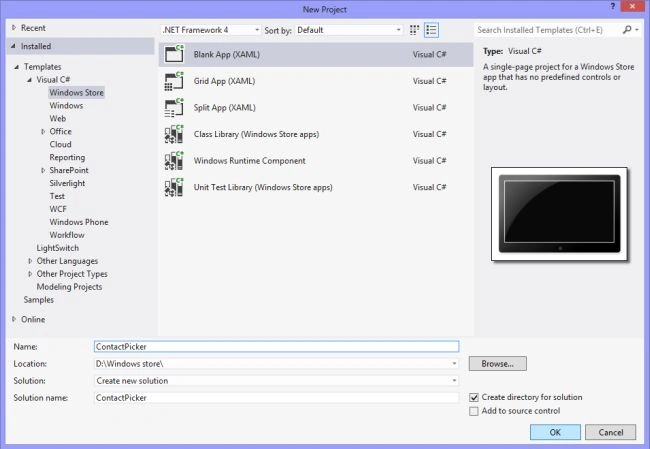
Step 3
Go to Solution Explorer and double-click on "MainPage.xaml" to open it.

Step 4
Your "MainPage.xaml" page is as in the following code:
<Page
x:Class="ContactPicker.MainPage"
xmlns="http://schemas.microsoft.com/winfx/2006/xaml/presentation"
xmlns:x="http://schemas.microsoft.com/winfx/2006/xaml"
xmlns:local="using:ContactPicker"
xmlns:d="http://schemas.microsoft.com/expression/blend/2008"
xmlns:mc="http://schemas.openxmlformats.org/markup-compatibility/2006"
mc:Ignorable="d">
<Page.Resources>
<DataTemplate x:Key="contactTemplate">
<Grid Width="400" Height="200" >
<Grid.ColumnDefinitions>
<ColumnDefinition Width="200"></ColumnDefinition>
<ColumnDefinition Width="200"></ColumnDefinition>
</Grid.ColumnDefinitions>
<Grid.RowDefinitions>
<RowDefinition Height="75"></RowDefinition>
<RowDefinition Height="75"></RowDefinition>
<RowDefinition Height="75"></RowDefinition>
</Grid.RowDefinitions>
<TextBlock Grid.Column="0" Grid.Row="0" Text="Name" FontSize="20" FontWeight="Bold"></TextBlock>
<TextBlock Grid.Column="1"
Grid.Row="0"
Text="{Binding ContactName}" FontWeight="Bold"></TextBlock>
<TextBlock Grid.Column="0"
Grid.Row="1"
Text="Contact Number"
Visibility="{Binding CanShow}" FontSize="20" FontWeight="Bold"></TextBlock>
<ListBox Grid.Column="1"
Grid.Row="1"
ItemsSource="{Binding PhoneNumbers}"
Visibility="{Binding CanShow}"></ListBox>
<TextBlock Grid.Column="0"
Grid.Row="1" Text="Image" FontSize="20" FontWeight="Bold"></TextBlock>
<Image Height="100" Width="100" Grid.Column="1" Grid.Row="1"
Source="{Binding ContactImage}" HorizontalAlignment="Left" VerticalAlignment="Center"></Image>
</Grid>
</DataTemplate>
</Page.Resources>
<Grid Background="{StaticResource ApplicationPageBackgroundThemeBrush}">
<Button x:Name="PickBtn" Content="Pick contact" HorizontalAlignment="Left" Margin="49,118,0,0" VerticalAlignment="Top" Width="200" Height="60" FontSize="22" Click="PickBtn_Click"/>
<ListView x:Name="ContactList"
HorizontalAlignment="Left" Height="500"
Margin="402,106,0,0" VerticalAlignment="Top" Width="500"
ItemTemplate="{StaticResource contactTemplate}"/>
<TextBlock HorizontalAlignment="Left" Margin="49,34,0,0" Text="Click on Button to pick your contact" VerticalAlignment="Top" Height="50" Width="1267" FontSize="45" Foreground="Yellow" FontWeight="Bold"/>
</Grid>
</Page>
Step 4
You "MainPage.xaml.cs" page is as in the following code:
using System;
using System.Collections.Generic;
using System.IO;
using System.Linq;
using Windows.Foundation;
using Windows.Foundation.Collections;
using Windows.UI.Xaml;
using Windows.UI.Xaml.Controls;
using Windows.UI.Xaml.Controls.Primitives;
using Windows.UI.Xaml.Data;
using Windows.UI.Xaml.Input;
using Windows.UI.Xaml.Media;
using Windows.UI.Xaml.Navigation;
using Windows.ApplicationModel.Contacts;
using Windows.UI.Xaml.Media.Imaging;
namespace ContactPicker
{
public sealed partial class MainPage : Page
{
IReadOnlyList<GetContactDetails> ConDetails;
public IReadOnlyList<GetContactDetails> ContactDetails
{
get { return ConDetails; }
set { ConDetails = value; }
}
List<GetContactDetails> Contact;
public List<GetContactDetails> SetContacts
{
get { return Contact; }
set { Contact = value; }
}
public MainPage()
{
this.InitializeComponent();
}
protected override void OnNavigatedTo(NavigationEventArgs e)
{
}
private async void PickBtn_Click(object sender, RoutedEventArgs e)
{
SetContacts = new List<ContactPicker.GetContactDetails>();
var contactSelector = new Windows.ApplicationModel.Contacts.ContactPicker();
contactSelector.CommitButtonText = "Pick contact";
var SelectedContact = await contactSelector.PickMultipleContactsAsync();
foreach (var item in SelectedContact)
{
SetContacts.Add(new GetContactDetails(item));
}
ContactList.ItemsSource = SetContacts;
}
}
public class GetContactDetails
{
public string ContactName { get; private set; }
public BitmapImage ContactImage { get; private set; }
public Visibility CanShow { get; set; }
public List<string> PhoneNumbers { get; set; }
public List<string> ContactEmails { get; set; }
public GetContactDetails(ContactInformation c)
{
PhoneNumbers = new List<string>();
ContactEmails = new List<string>();
CanShow = Visibility.Visible;
ContactName = c.Name;
if (c.PhoneNumbers.Count > 0)
{
foreach (var item in c.PhoneNumbers)
{
PhoneNumbers.Add(item.Value);
}
}
else
{
CanShow = Visibility.Collapsed;
}
GetContactImage(c);
}
async void GetContactImage(ContactInformation Img)
{
var imgStream = await Img.GetThumbnailAsync();
ContactImage = new BitmapImage();
if (imgStream != null && imgStream.Size > 0)
{
ContactImage.SetSource(imgStream);
}
}
}
}
Step 5
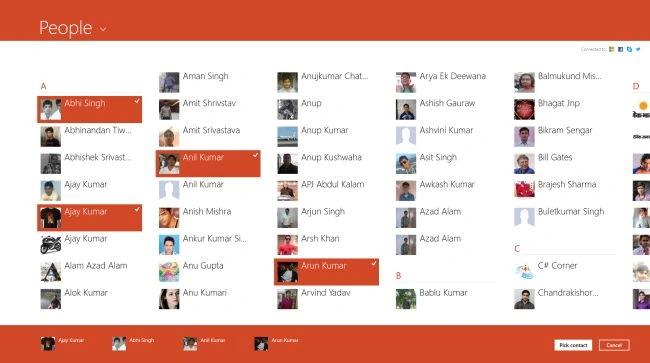
Now run program and click on "Pick Contact" to pick contact. People app will be opened.

Step 6
In this step Select contact form contact list and click on "Pick Contact".
Step 7
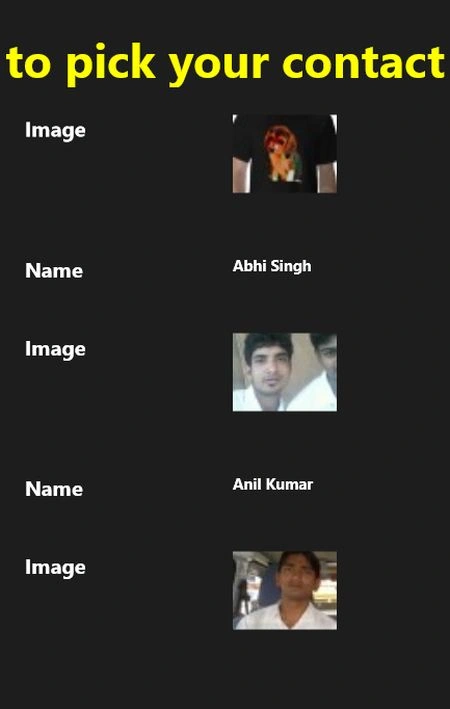
The selected contact will be displayed as in the following:
Abidali SutharPosted Nov 22, 2013, 6:17 AM
Is it possible to add new contact in People hub from app?
TimPosted May 29, 2013, 9:18 AM
How can you get the Email address.
Prabhakar MauryaPosted Mar 8, 2013, 4:59 AM
Hello sir, No any permission require before accessing contacts. Buts must you have an Microsoft account to login people App and if you want to access Facebook contact then your Facebook account must be connected to your Microsoft account.
Mahesh ChandPosted Mar 7, 2013, 4:58 PM
Does app need some kind of permission before accessing contacts?