

Introduction
The GridView control displays the values of a data source in a table. Each column represents a field, while each row represents a record. The GridView control supports the following features:
- Binding to data source controls, such as SqlDataSource.
- Built-in sort capabilities.
- Built-in update and delete capabilities.
- Built-in paging capabilities.
- Built-in row selection capabilities.
- Programmatic access to the GridView object model to dynamically set properties, handle events, and so on.
- Multiple key fields.
- Multiple data fields for the hyperlink columns.
- Customizable appearance through themes and styles.
Creating a GridView
<asp:GridView ID="gridService" runat="server">
</asp:GridView>
This article shows how to use a GridView control in ASP.Net using C# code behind. In this, we perform the following operations on GridView.
- Bind data to the GridView column
- Edit data in GridView
- Delete rows from GridView
- Update row from database
I have a sample example that explains all the preceding operations.
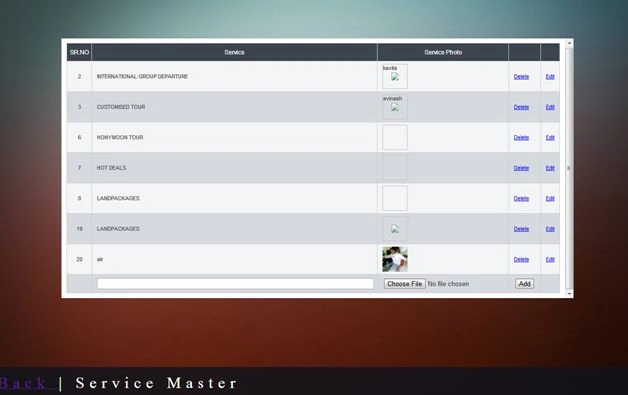
HTML Code for generating GridView UI
<p id="panel" style="height: 500px; background-color: White; padding: 10px; overflow: auto">
    <h1>
        <a href="../adminIndex.aspx">Back</a> | Service Master
    </h1>
    <asp:UpdatePanel ID="UpdatePanelService" runat="server" updatemode="Conditional">
        <ContentTemplate>
            <asp:GridView ID="gridService" runat="server" CssClass="EU_DataTable" AutoGenerateColumns="false" ShowFooter="true" OnRowEditing="gridService_RowEditing" onrowcreated="gridService_RowCreated" onrowupdating="gridService_RowUpdating">
                <Columns>
                    <asp:TemplateField ItemStyle-Width="30px" HeaderText="SR.NO">
                        <ItemTemplate>
                            <asp:Label ID="lblID" runat="server" Text='<%#Eval("service_id")%>'></asp:Label>
                        </ItemTemplate>
                    </asp:TemplateField>
                    <asp:TemplateField ItemStyle-Width="600px" HeaderText="Service">
                        <ItemTemplate>
                            <asp:Label ID="lblService" runat="server" Text='<%#Eval("service_name")%>'></asp:Label>
                        </ItemTemplate>
                        <EditItemTemplate>
                            <asp:TextBox ID="txtService" runat="server" Text='<%#Eval("service_name")%>'></asp:TextBox>
                        </EditItemTemplate>
                        <FooterTemplate>
                            <asp:TextBox ID="txtService" runat="server"></asp:TextBox>
                        </FooterTemplate>
                    </asp:TemplateField>
                    <asp:TemplateField ItemStyle-Width="100px" HeaderText="Service Photo">
                        <ItemTemplate>
                            <img src='<%# Eval("service_image")%>' alt='<%# Eval("service_image")%>' height="50px" width="50px" />
                        </ItemTemplate>
                        <EditItemTemplate>
                            <asp:FileUpload ID="fuService" runat="server" />
                        </EditItemTemplate>
                        <FooterTemplate>
                            <asp:FileUpload ID="fuService" runat="server" />
                        </FooterTemplate>
                    </asp:TemplateField>
                    <asp:TemplateField>
                        <ItemTemplate>
                            <asp:LinkButton ID="lnkRemove" runat="server" CommandArgument='<%# Eval("service_id")%>' OnClientClick="return confirm('Do you want to delete?')" Text="Delete"></asp:LinkButton>
                        </ItemTemplate>
                        <FooterTemplate>
                            <asp:Button ID="btnAdd" runat="server" Text="Add" OnClick="AddService" />
                        </FooterTemplate>
                    </asp:TemplateField>
                    <asp:CommandField ShowEditButton="True" />
                </Columns>
            </asp:GridView>
            <asp:UpdateProgress ID="UpdateProgress1" runat="server" AssociatedUpdatePanelID="UpdatePanelService">
                <ProgressTemplate>
                    Please wait image is getting uploaded....
                </ProgressTemplate>
            </asp:UpdateProgress>
        </ContentTemplate>
        <Triggers>
        </Triggers>
    </asp:UpdatePanel>
</p>
Santhakumar MunuswamyPosted Apr 9, 2015, 2:19 PM
Good