

Windows Phone 8.1 comes with many prospects for geo location and usually the next thing after detecting your location, people tend to look for something else and that is tracking the location since it should update itself. So, if you're wondering how to instantiate a map and track your location, you really should check out my previous article.
And if you have already done that then I hope you liked it. Then you probably already understand how to do the following:
- Please proceed to your Visual Studio (I'm using Visual Studio 2013 Community Edition) and create a new Blank App project on Windows Phone 8.1.
- Go over your project properties and go over Capabilities. Enable Location for your app. (If you are from Windows Phone 8, you will be pretty amazed that you don't see ID_CAP_MAP anymore.)
A Basic UI
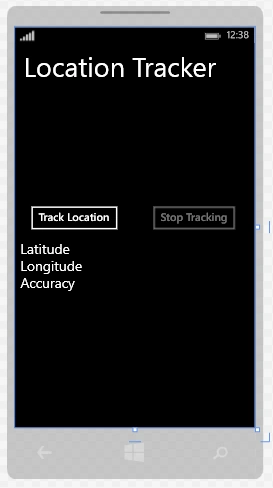
Let's set up a basic UI and yes the following is kind of a rip-off from MSDN but as long as it helps people, it's cool. Our little UI has two Buttons and a number of textblocks and looks as in the following in XAML (I'm only posting the main grid).
- private Geolocator locator = null;
- private void TrackLocationButton_Click(object sender, RoutedEventArgs e)
- {
- if (locator == null)
- {
- locator = new Geolocator();
- }
- if (locator != null)
- {
- locator.MovementThreshold = 3;
- locator.PositionChanged +=
- new TypedEventHandler<Geolocator,
- PositionChangedEventArgs>(locator_PositionChanged);
- }
- TrackLocationButton.IsEnabled = false;
- StoptrackingButton.IsEnabled = true;
- }
- async private void locator_PositionChanged(Geolocator sender, PositionChangedEventArgs e)
- {
- await dispatcher.RunAsync(CoreDispatcherPriority.Normal, () =>
- {
- Geoposition geoPosition = e.Position;
- LatitudeText.Text = geoPosition.Coordinate.Point.Position.Latitude.ToString();
- LongitudeText.Text = geoPosition.Coordinate.Point.Position.Longitude.ToString();
- AccuracyText.Text = geoPosition.Coordinate.Accuracy.ToString();
- });
- }
- private CoreDispatcher dispatcher;
- public MainPage()
- {
- this.InitializeComponent();
- dispatcher = Window.Current.CoreWindow.Dispatcher;
- }
Now all you need is a StoptrackingButton to get things to stop and all you need to do is unhook the locator_PositionChanged event handler.
- private void StoptrackingButton_Click(object sender, RoutedEventArgs e)
- {
- if (locator != null)
- {
- locator.PositionChanged -= new TypedEventHandler<Geolocator, PositionChangedEventArgs>(locator_PositionChanged);
- }
- StoptrackingButton.IsEnabled = false;
- TrackLocationButton.IsEnabled = true;
- }
Since this sample has geolocator usage, this is always better to be tested in a device but you can definitely try it on an emulator too. To test it load the app on the emulator first by invoking build.



Now you have pointed to a primary location in the map. Now you can try clicking the track location button. After you do that the Latitude, Longitude and Accuracy will pop up for the place you clicked on the map. Now click some more around it. And you will see the data changes on the textblocks. You can do one thing more too. You can change the interaction mode from Live to Pin and play all the pins. That would even allow you to emulate place changes in your emulator. The following GIF would definitely help you.
Murali RPosted Sep 24, 2015, 7:58 AM
Hi i am new to windows phone 8.1 development.if location is turned off in mobile and i coded Geolocator locator= new Geolocator(); if (locator.LocationStatus == PositionStatus.Disabled) { ShowMessage("Location Services are turned off"); }...I want to turn on location by asking a confirmation from the user and importantly my app should refresh after turning on location.so that the app will move to next screen..pls guide me..
Murali RPosted Sep 24, 2015, 7:55 AM
hi i am new to windows phone 8.1 development.if location is turned off in mobile and i coded Geolocator locator= new Geolocator(); if (locator.LocationStatus == PositionStatus.Disabled) { ShowMessage("Location Services are turned off"); }
Will StroupPosted Jun 29, 2015, 3:45 PM
Nice tutorial! What is the best practice for the location and initialization of the GeoLocator object when it needs to be used between multiple pages? Should the object go in the App class and be initialized on Main Page navigate to? Or should it be initialized in one of the App startup events?
Chiheb ChebbiPosted Feb 1, 2015, 5:08 AM
very useful :)