

Introduction
SignalR is a pretty new and very exciting feature in ASP.NET. It offers a simple and clean API that allows you to create real-time web applications where the server needs to continuously push data to clients. Common applications are chat, news feeds, notifications, and multi-player games.
For this exercise, we're going to build a simple chat application in ASP.NET MVC 4 using the power of SignalR. I presume that you already have the basic knowledge of ASP.NET MVC and how stuff works (for example Model, View, and Controller) in the MVC development approach because the details of them will not be covered in this exercise.
Step 1. Setting up your ASP.NET MVC Project.
To get started, let's proceed and fire up Visual Studio 2012 and create a new project by selecting File > New Project. Under the templates panel, select Visual C# > Web > ASP.NET MVC 4 Web Application. Name your project and click on the OK button.
In the ASP.NET MVC 4 Project Template window, just select ”Basic” since we don't really want to use the built-in forms authentication in this exercise. Then click OK to generate the necessary files for you.
Step 2. Adding SignalR to your Project.
SignalR is available in Visual Studio 2010 (.NET 4.0) and later versions of Visual Studio and can be referenced from Nuget.
Under the Visual Studio Tools tab, select Library Package Manager > Manage Nuget Package for the solution. In the search bar type “Microsoft.Aspnet.SignalR” and hit Enter. The result should provide you with something as in the following.
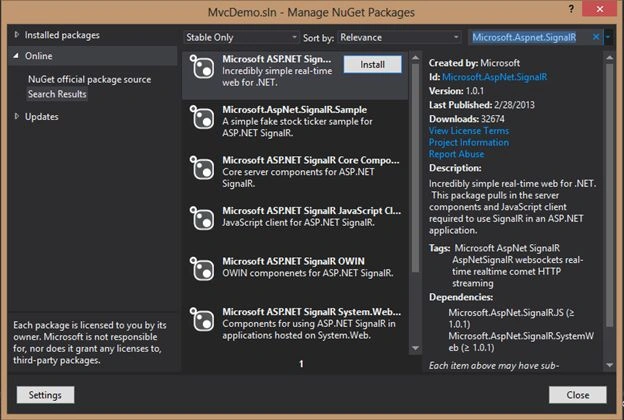
Now click the Install button to add the SignalR library and its dependencies to your project. Just follow the procedure specified in the wizard until all the necessary files are successfully installed. After the installation you should be able to see the newly added DLLs in your project references folder. See the following:
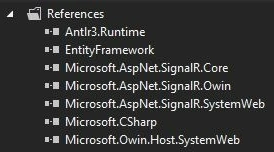
Okay, we’re now all set and ready to get our hands dirty.
Step 3. Adding a Controller
To add a new controller, just right-click on the Controller’s folder and then select Add > Controller. Name the controller ChatRoomController and then click Add.
Here’s the code of the Controller class.
namespace MvcDemo.Controllers
{
    public class ChatRoomController : Controller
    {
        // GET: /ChatRoom/
        public ActionResult SignalRChat()
        {
            return View();
        }
    }
}
As you can see, there’s nothing really fancy in the Controller. It just contains the SignalRChat action method that returns a View.
Now let’s proceed and create the SignalRChat view.
Step 4. Adding a View
The first thing we need here is to add a ChatRoom folder within the View folder. The reason for this is that the folder name should match the name of the Controller you’ve created in Step 3. That’s one of the MVC conventions. So for example, if you have a “HomeController”, then you should have a “Home” folder within your View.
Alright, let’s proceed. In your ChatRoom folder add a new view by right-clicking on it and then selecting Add > View. Be sure to name the view “SignaRChat” since that’s the name of the view that the controller must expect. Then click Add to generate the View.
Just for the simplicity of this exercise, I just set it up like this.
<div id="container">
    <input type="hidden" id="nickname" />
    <div id="chatlog"></div>
    <div id="onlineusers">
        <b>Online Users</b>
    </div>
    <div id="chatarea">
        <div class="messagelog">
            <textarea spellcheck="true" id="message" class="messagebox"></textarea>
        </div>
        <div class="actionpane">
            <input type="button" id="btnsend" value="Send" />
        </div>
        <div class="actionpane">
            <select id="users">
                <option value="All">All</option>
            </select>
        </div>
    </div>
    <div id="dialog" title="Enter your name to start a chat.">
        <input type="text" id="nick" />
    </div>
</div>
Step 5. Adding a Hub
To provide you with a quick overview, the Hub is the centerpiece of the SignalR. Similar to the Controller in ASP.NET MVC, a Hub is responsible for receiving input and generating the output to the client.
Before we create a Hub, let’s add a new folder first within the root of the project. In this exercise, I named the folder Hubs. Right-click on that folder and select Add > ASP.NET SignalR Hub class. Name the class “ChatHub” and then click OK to generate the file.
Here’s the code block of the Hub class.
using System;
using System.Collections.Generic;
using System.Linq;
using Microsoft.AspNet.SignalR;
using System.Collections.Concurrent;
using System.Threading.Tasks;

namespace MvcDemo.Hubs
{
    public class ChatHub : Hub
    {
        static ConcurrentDictionary<string, string> dic = new ConcurrentDictionary<string, string>();

        public void Send(string name, string message)
        {
            Clients.All.broadcastMessage(name, message);
        }
        public void SendToSpecific(string name, string message, string to)
        {
            Clients.Caller.broadcastMessage(name, message);
            Clients.Client(dic[to]).broadcastMessage(name, message);
        }
        public void Notify(string name, string id)
        {
            if (dic.ContainsKey(name))
            {
                Clients.Caller.differentName();
            }
            else
            {
                dic.TryAdd(name, id);
                foreach (KeyValuePair<string, string> entry in dic)
                {
                    Clients.Caller.online(entry.Key);
                }
                Clients.Others.enters(name);
            }
        }
        public override Task OnDisconnected()
        {
            var name = dic.FirstOrDefault(x => x.Value == Context.ConnectionId.ToString());
            string s;
            dic.TryRemove(name.Key, out s);
            return Clients.All.disconnected(name.Key);
        }
    }
}
As you may have noticed, the ChatHub class inherits from Microsoft.Aspnet.SignalR.Hubs.Hub. Keep in mind that public methods defined within the Hub class are intended to be called from the client code (JavaScript). They actually result in a response being sent to the client.
At runtime, a JavaScript file is generated dynamically that contains the client-side implementations of the public methods defined in the Hub. These client-side methods will act as a proxy to the server-side methods. You write an implementation of public methods from the Hub in your client-side code so that the Hub can call it and thereby provide the response.
The dictionary is where we store the list of available users that have joined the chat room. I used a dictionary so we can easily add and remove items from it using key/value pairs.
The Send() method broadcasts the message to the users by passing the name and the message as the parameters. The SendToSpecific() method on the other hand broadcasts the message to a specific user. The Notify() method tells the client when someone enters the chat room and then adds them to the list of the available users. The OnDisconnected() method handles the removal of users if someone leaves the chat room. This method is asynchronous and will be called whenever the connection from the client is closed (for example closing the browser).
Step 6. Implementing the Client-Side code
Now that we already have our Hub setup we can now proceed with the client-side implementation of our chat application.
Add the following code block below in your View (.cshtml/.aspx).
@section scripts {
    @Scripts.Render("~/Scripts/jquery-ui-1.9.2.min.js")
    @Scripts.Render("~/Scripts/jquery.signalR-1.0.1.min.js")
    @Scripts.Render("/signalr/hubs")

    <script type="text/javascript">
        $(function () {
            showModalUserNickName();
        });
        function showModalUserNickName() {
            $("#dialog").dialog({
                modal: true,
                buttons: {
                    Ok: function () {
                        $(this).dialog("close");
                        startChatHub();
                    }
                }
            });
        }
        function startChatHub() {
            var chat = $.connection.chatHub;

            // Get the user name.
            $('#nickname').val($('#nick').val());
            chat.client.differentName = function (name) {
                showModalUserNickName();
                return false;
                // Prompts for different user name
                $('#nickname').val($('#nick').val());
                chat.server.notify($('#nickname').val(), $.connection.hub.id);
            };
            chat.client.online = function (name) {
                // Update list of users
                if (name == $('#nickname').val())
                    $('#onlineusers').append('<div class="border" style="color:green">You: ' + name + '</div>');
                else {
                    $('#onlineusers').append('<div class="border">' + name + '</div>');
                    $("#users").append('<option value="' + name + '">' + name + '</option>');
                }
            };
            chat.client.enters = function (name) {
                $('#chatlog').append('<div><i>' + name + ' joins the conversation</i></div>');
                $("#users").append('<option value="' + name + '">' + name + '</option>');
                $('#onlineusers').append('<div class="border">' + name + '</div>');
            };
            // Create a function that the hub can call to broadcast chat messages.
            chat.client.broadcastMessage = function (name, message) {
                // Interpret smileys
                message = message.replace(":)", "<img src=\"/images/smile.gif\" class=\"smileys\" />");
                message = message.replace(":D", "<img src=\"/images/laugh.gif\" class=\"smileys\" />");
                message = message.replace(":o", "<img src=\"/images/cool.gif\" class=\"smileys\" />");

                // Display the message
                $('#chatlog').append('<div class="border"><span style="color:orange">' + name + '</span>: ' + message + '</div>');
            };

            chat.client.disconnected = function (name) {
                // Calls when someone leaves the page
                $('#chatlog').append('<div><i>' + name + ' leaves the conversation</i></div>');
                $('#onlineusers div').remove(":contains('" + name + "')");
                $("#users option").remove(":contains('" + name + "')");
            };
            // Start the connection.
            $.connection.hub.start().done(function () {
                // Calls the notify method of the server
                chat.server.notify($('#nickname').val(), $.connection.hub.id);

                $('#btnsend').click(function () {
                    if ($("#users").val() == "All") {
                        // Call the Send method on the hub.
                        chat.server.send($('#nickname').val(), $('#message').val());
                    }
                    else {
                        chat.server.sendToSpecific($('#nickname').val(), $('#message').val(), $("#users").val());
                    }
                    // Clear text box and reset focus for next comment.
                    $('#message').val('').focus();
                });
            });
        }
    </script>
}
At the very top within the @RenderSection, you need to define a reference to jQueryUI and SignalR scripts. Please note that the script reference should be in the following order.
- jQuery Script
- jQueryUI
- SignalR script
- SignalR/Hubs
- Your custom-defined script
You might be wondering why we haven’t included a reference to the jQuery script in the code above. The reason for this is that when you created the Template, the engine automatically added a reference to the jQuery script within your _Layout.cshml before the closing tag of the <body> element and automatically bundled it for you for page performance.
Note. Adding a reference to the jQuery script within your View will cause an error when running your application that uses SignalR. This is because the reference to the jQuery script will be duplicated and the order of the script references will be changed and that can cause the SignalR script to throw an exception.
The showModalUserNickName() function calls the jQueryUI dialog. This function will be called when the browser is loaded to prompt the user to enter their name before joining the chat room. After entering their name the startChatHub() function will be called. This function is where the actual implementation of the chat is defined. The logic is that it first creates a proxy connection to the Hub (ChatHub). Once connected, we then have access to the public methods defined in our Hub class. The next step is to get the name of the user. If the user already exists in the dictionary then they will be prompted to enter another name. Then it will call the Notify() method to add the new user to the dictionary and notify other users that someone has joined the chat room. The next function updates the message logs, available users, and the online user’s panel when someone joins the room. Then it calls the broadcastMessage() function to display the messages among users in the message logs. You will also see that I’ve added some code within that function that will interpret smileys. The client. disconnected() function is responsible for updating the UI and the list of users when someone leaves the chat room. And finally, call the hub. start() function to start the connection between the client and the hub (server). This method contains the implementation of sending the message to other users or specific users.
Step 7. Wrapping Up
- Adding a new CSS file: Create a new CSS file under the Content folder. Name it “chat.css”. Then add the following style definitions to the CSS file.
#container { width: 400px; margin-left: auto; margin-right: auto; } #chatlog { width: 250px; background-color: aliceblue; float: left; } #onlineusers { float: right; width: 100px; background-color: #D4D4D4; } #chatarea { clear: both; width: 200px; } #chatarea .messagelog { float: left; height: 90%; top: 10%; position: relative; } #chatarea .messagelog .messagebox { width: 400px; height: 80%; } #chatarea .actionpane { position: relative; float: left; } .smileys { width: 14px; height: 14px; } - Adding Smiley images: Create a new folder within the root project and name it “Images”. Then add your smileys within that folder.
- Referencing CSS files: Then add the following references at the <head> section in your _Layout.cshtml.
<link href="~/Content/chat.css" rel="stylesheet" /> <link href="~/Content/themes/base/jquery-ui.css" rel="stylesheet" /> - Modifying the default Route: Update the default route under App_Start > RouteConfig so that it will automatically display the SignalRChat page when you run the application. Here’s the updated code.
routes.MapRoute( name: "Default", url: "{controller}/{action}/{id}", defaults: new { controller = "ChatRoom", action = "SignalRChat", id = UrlParameter.Optional } ); - Registering the MapHubs Route: And finally, the most important thing is to make things work. Add the following line below in your Global.asax.cs under the Application_Start event.
RouteTable.Routes.MapHubs();
Note. Be sure to define the MapHubs() route before the RegisterRoutes() call.
Step 8. Run the Page
Here’s the output below.
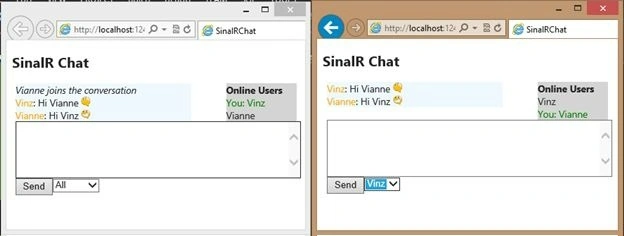
That’s it! I hope someone finds this article useful!
awais awanPosted Aug 2, 2024, 10:44 AM
Send message between two user not clearly understand please can you elaborate this furture. ConnectionId who to get the specfic user
Fezile MntanjiPosted Sep 8, 2020, 12:22 AM
Hello Vincent Great tutorial, but i'm having issue with the getting user's name and i can't send the message
margam chakriPosted May 29, 2019, 6:52 AM
How do call it Please let me know
margam chakriPosted May 29, 2019, 6:52 AM
Hi,whenever i am logging out that time unable to call "chat.client.disconnected" .
Pergin SheniPosted Jan 22, 2019, 1:57 AM
Not executing inside of chat.client.differentName in client side. May I know what issue would be?
Chandra PathakPosted Dec 20, 2017, 8:24 AM
Its not working in version 2.0
Hendrix RoaPosted Nov 25, 2017, 9:23 PM
Excellent post, thank you
Archie JocsonPosted Oct 26, 2017, 3:25 AM
What will happen if I will test this in actual live production? do need to pay for the service? Or I can test this in actual live production free and will work as is?
marjaan ahmadiPosted Oct 10, 2017, 1:00 AM
Hello vincet,tank u for this usefull article
Thilina GunawardanePosted Sep 29, 2017, 6:24 AM
Hello Vincent, Im also trying this code. in here it this phase 'var chat = $.connection.chathub;' returns Undefined , may i know the reason for that ?
Manav PandyaPosted May 3, 2017, 8:12 AM
Shows error in "Client" word at many places
Saad ArmanPosted Jan 14, 2017, 11:44 PM
That is a great tutorial working great, but there is no data base. Can someone tell me how I can attach database with it?
Ekundayo JacobsPosted Jan 11, 2017, 5:46 PM
Please ,could I by any chance send you my project and you will look at it for me, because I'm tryna work on this chat with signalr in my project but it ain't working. will be grateful if you could help me, using the webform
Anu VPosted Jan 10, 2017, 7:06 AM
I GOT THE ERROR BELOW "The following errors occurred while attempting to load the app.- No assembly found containing an OwinStartupAttribute. - No assembly found containing a Startup or [AssemblyName].Startup class. To disable OWIN startup discovery, add the appSetting owin:AutomaticAppStartup with a value of "false" in your web.config. To specify the OWIN startup Assembly, Class, or Method, add the appSetting owin:AppStartup with the fully qualified startup class or configuration method name in your web.config."
Anu VPosted Jan 10, 2017, 7:03 AM
I got the error as "No assembly found containing an OwinStartupAttribute"
Ekundayo JacobsPosted Oct 12, 2016, 7:46 PM
Please am new to asp.net , i want to know how i can implement this in web form asp.net because i don't work with mvc
Waleed OmerPosted May 13, 2016, 2:37 PM
error CS0619: 'System.Web.Routing.SignalRRouteExtensions.MapHubs(System.Web.Routing.RouteCollection)' is obsolete: 'Use IAppBuilder.MapSignalR in an Owin Startup class. See http://go.microsoft.com/fwlink/?LinkId=320578 for more details
Dipak PatelPosted Apr 6, 2016, 1:20 AM
Hey Vincent i use the Single R in my web application i want to perform one task can you help me on this ,each time when a new user start chat they have different color and it must manage across the browser, i am using the math.random() class to generate the new color but the issue come is that it will assign the same color to all user so can u help me on this topic thank u
Humayun Kabir MamunPosted Feb 23, 2016, 10:39 PM
Nice...
TestPosted Aug 20, 2015, 10:20 PM
Vincent Maverick Durano can you tell me where am doing wrong.
TestPosted Aug 18, 2015, 5:18 AM
Unhandled exception at line 246, column 13 in http://localhost:55175/Scripts/jquery.signalR-2.2.0.js 0x800a139e - JavaScript runtime error: SignalR: Error loading hubs. Ensure your hubs reference is correct, e.g. <script src='/signalr/js'></script>. Please tell me what i should do
TestPosted Aug 18, 2015, 4:07 AM
package id="Microsoft.AspNet.SignalR" version="2.2.0" targetFramework="net45" SignalR Version is 2.2.0 is this the problem
TestPosted Aug 18, 2015, 3:45 AM
Finally after all these i get the error - Unhandled exception at line 111, column 13 in http://localhost:59982/0x800a138f - JavaScript runtime error: Unable to get property 'client' of undefined or null reference please tell me how to resolve it var chat = $.connection.chatHub; here chat is undefined. i created the solution in VS 2012.
TestPosted Aug 18, 2015, 3:44 AM
Error 1 'System.Web.Routing.SignalRRouteExtensions.MapHubs(System.Web.Routing.RouteCollection)' is obsolete: 'Use IAppBuilder.MapSignalR in an Owin Startup class. See http://go.microsoft.com/fwlink/?LinkId=320578 for more details.' i get this , if i add RouteTable.Routes.MapHubs(); in the Global.asax , So i added the Seperate class as Startup.cspublic class Startup { public void Configuration(IAppBuilder app) { app.MapSignalR(); } } is this correct.
TestPosted Aug 18, 2015, 3:40 AM
Error 1 'MvcSignalR.Hubs.ChatHub.OnDisconnected()': no suitable method found to override ... i Corrected public override Task OnDisconnected(bool stopCalled){ var name = dic.FirstOrDefault(x => x.Value == Context.ConnectionId.ToString()); string s; dic.TryRemove(name.Key, out s); Clients.All.disconnected(name.Key); return base.OnDisconnected(stopCalled); } Is this correct
Jalal MammadzadaPosted Jun 23, 2015, 5:42 AM
great article, thanks!
Vincent Maverick DuranoPosted May 18, 2015, 9:04 AM
Datha Haresh What version of SignalR are you using? Check out this thread and see if this helps: http://stackoverflow.com/questions/25596130/ondisconnected-no-suitable-method-found-to-override-signalr
Datha HareshPosted May 18, 2015, 8:16 AM
i am getting the following error 'MvcDemo.Hubs.ChatHub.OnDisconnected()': no suitable method found to override
Yogendra YadavPosted May 16, 2015, 1:40 AM
nice article sir
Vincent Maverick DuranoPosted May 15, 2015, 8:55 AM
Chandan Dey - I'm sure there's a way to do that. but I'd would suggest you to post your query at forums instead so other members can also give you some inputs.
Prashant JaylePosted May 15, 2015, 3:31 AM
Awesome explained.... thanx for sharing
vanama saishanthanPosted May 15, 2015, 12:26 AM
Good one sir
K P Singh ChundawatPosted May 9, 2015, 9:06 AM
nice ,,
Upendra Pratap ShahiPosted May 4, 2015, 7:29 AM
nice article sir..
Tom MohanPosted May 2, 2015, 11:27 AM
Great one.
Sourabh SomaniPosted Apr 30, 2015, 2:07 AM
Vincent Maverick Durano gr8, Nice article :)
Vincent Maverick DuranoPosted Apr 29, 2015, 11:00 AM
I'll try to update the article to include the source codes.
Chandan DeyPosted Apr 29, 2015, 10:09 AM
Hi can you share any codebase, unfortunately I am unable to run the app may be the folder structure. --thanks Chandan
Vincent Maverick DuranoPosted Apr 29, 2015, 9:50 AM
Glad you liked it! Thanks everyone! :)
Saroj Kumar SahuPosted Apr 29, 2015, 8:51 AM
Nice one sir..
Rahul Kumar SaxenaPosted Apr 28, 2015, 12:02 PM
Good Show..
Suresh SundarPosted Apr 28, 2015, 1:43 AM
Vincent Maverick Durano Simple and effective work :) , keep posting.
Vincent Maverick DuranoPosted Apr 27, 2015, 9:04 PM
@toto, please post your query to forums so we can discuss it there. Also other members can help you
Vincent Maverick DuranoPosted Apr 27, 2015, 9:02 PM
You are correct Steven, right clicking on the action to add view will do too. I needed to make the article more simply and familiar with developers as possible. :)
Steven WoolstonPosted Apr 27, 2015, 5:42 PM
Thanks for the well described article. One shortcut I have found in MVC is that you can right click within the action to add a view. Then the correctly named view and folder will be created for you.
Abhineet SrivastavaPosted Apr 27, 2015, 1:13 PM
Simply Awesome (Y)
totoPosted Apr 27, 2015, 12:55 PM
How to customize it for one to one chat like in help desk system?
Shubham KumarPosted Apr 27, 2015, 11:29 AM
Thnx for share
Karthik Muthu KaruppanPosted Apr 27, 2015, 10:43 AM
Nice
Sibeesh VenuPosted Apr 27, 2015, 9:04 AM
Good one
Santhakumar MunuswamyPosted Apr 26, 2015, 11:42 PM
Good work
Safayat ZisanPosted Apr 26, 2015, 4:24 PM
very helpfull