Canvas Images
Let’s have some knowledge of the canvas images by understanding its function for drawing the images. To draw a canvas image, the
drawImage() method is used that requires an image object and a destination point. The destination point means the top-left corner of the images relative to the top-left corner of the canvas on which the image is to be drawn.
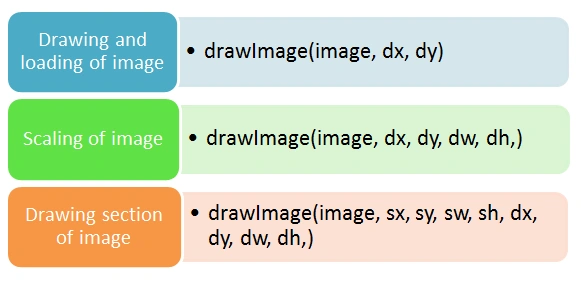
There are the following three variants of this method.
- drawImage(image, dx, dy).
- drawImage(image, dx, dy, dw, dh)
- drawImage(image, sx, sy, sw, sh, dx, dy, dw, dh,).
First, we should know about all the parameters given in the methods, so we can understand the use of all the parameters and can easily play with the images.
The parameter "images" is the image that is to be drawn.
The parameters "dx" and "dy" are known as "destinationX" and "destinationY" respectively and determine where the image is to be drawn on the canvas.
The parameters "dw" and "dh" are known as "destinationWidth" and "destinationHeight" respectively and determine the scale size of the image.
The parameters "sx" and "sy" are known as "sourceX" and "sourceY" respectively and determine the wherein the source images to start copying the rectangle of the images onto the canvas.
The parameters "sw" and "sh" are known as "sourceWidth" and "sourceHeight" respectively and determine the scaling (extent of copying of width and height) of the source image.
As we all know, the drawImage() method needs an object, so first, we should create an image object and should wait for it to load by applying
the window.onload() function before the initiation of
the drawImages() method.
Now let’s move to see the example of the first variant, imageDraw(image, dx, dy).
Example : Drawing and loading
- <html>
- <body>
- <p>Image being used:</p>
- <img id="skullash" width="250" height="210"
- src="C:\Users\dddd\Desktop\cigarette-smoke-skull.jpg" alt="The Skull Ash">
- <p>Canvas Image:</p>
- <canvas id="smokeCanvas" width="325" height="225"
- style="border:3px solid red;">
- < script > window.onload = function ashSkull() {
- var newCanvas = document.getElementById("smokeCanvas");
- var context = newCanvas.getContext("2d");
- var image = document.getElementById("skullash");
- context.drawImage(image, 0, 0);
- }
- </script>
- </canvas>
- </body>
- </html>
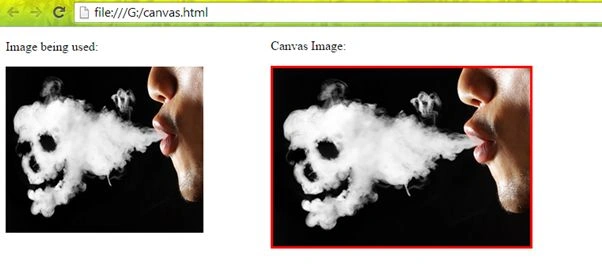
Output
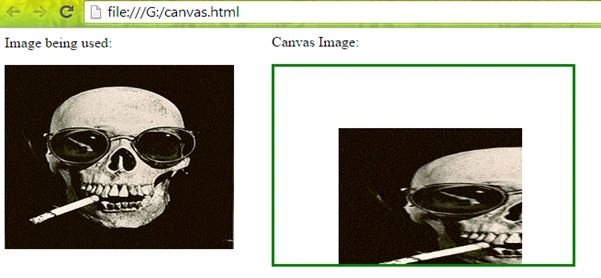
We can observe the image drawn on the canvas (with a Red border).
Next, we are going to discuss the second variant as in the following:
- drawImage(image, dx, dy, dw, dh)
Example: Scaling of image
Here we will change the image and the method in JavaScript for scaling the image.
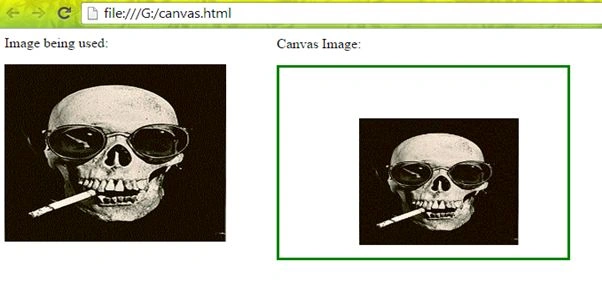
- context.drawImage(image, 90, 60, 180, 150);
Here is the output after scaling.
Output
We can see the scale size and the position of the image onto the canvas.
Now to draw the section of the image using the next variant method as in the following:
- drawImage(image, sx, sy, sw, sh, dx, dy, dw, dh,)
Example: Drawing section of the image
By changing the method in JavaScript:
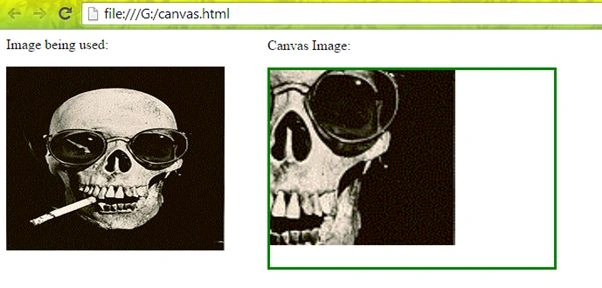
- context.drawImage(image, 90, 90, 130, 110, 0, 0, 250, 200);
Output
Another section by:
- context.drawImage(image, 0, 0, 100, 250, 70, 70, 200, 180);
Output
The preceding output is the two different sections of the given image with its scale size as well as the position of the image on the canvas.
Thank you, keep learning and sharing.


NitinPosted May 8, 2015, 12:19 PM
nice
Gopi ChandPosted May 7, 2015, 10:13 AM
Thanks to all of you...
Abhishek JaiswalPosted May 7, 2015, 2:29 AM
It's always good to see HTML working! :)
Sibeesh VenuPosted May 7, 2015, 2:22 AM
Good one :)
Santhakumar MunuswamyPosted May 6, 2015, 9:40 PM
Thanks for sharing