
Keyword View helps to create and view the steps of testing in a keyword driven format, by selecting the 'items' and 'operations' we can create or modify the tests. This view will be helpful for the testers, who are not familiar with the VBScript language. We use the step generator or insert step to add the additional steps in the test script.
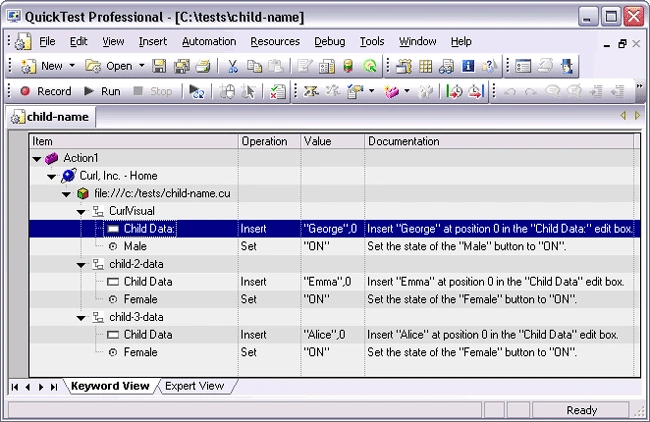
Columns in keyword view
- Item: This column contains a list of all available operations (methods, functions, or properties) that can be performed on the item selected in the item column, for example, Click and Select. The default operation for the item selected in the item column is displayed by default.
- Operation: The Operation column shows the type of operation you perform in the items. For example select, click and etc.
- Value: The argument values for the selected operation, or the content of the statement. The value cell is partitioned according to the number of arguments of the selected operation.
- Documentation: The Documentation section will display some short description in simple English about your step or item. It comes automatically.
The Keyword Driven framework consists of the basic components given below:
- Control File
- Test Case File
- Test Execution Tool
- Driver Script
- Library Files
Control File
- Consists of details of all the Test scenarios to be automated.
- The User will be able to select a specific scenario to execute based on turning on or off a flag in the Control File.
- The Control File is in the form of an Excel worksheet and contains columns for Scenario ID, Execute (Y/N), Object Repository Path, Test Case File Path.
Test Case File
- Contains the detailed steps to be carried out for the execution of a test case.
- It is also in the form of an Excel sheet and contains columns for Keyword, Object Name, Parameter.
Test Execution Tool
- Acts as the execution agent for the automated test cases.
Driver Script
- This constitutes the first level of script that initiates the test execution.
- This forms the link between the test management tool and the actual test cases stored in the test case repository.
Library Files
- These are the shared library files which can be called in various test scripts. They usually contain common functionality used across multiple scripts. Library files are uploaded and stored in QC.
Benefits of keyword driven framework
- A Keyword-based software test automation framework can reduce the cost and time of a test design, automation and execution. It allows members of a testing team to focus on what they do best, but also allows non-technical testers and business analysts to write automated tests.
- Building of Test Scenarios and execution of the Functional Test Suite was feasible without QTP and scripting knowledge.
- When properly implemented and maintained, keywords present a superior return on investment because each business event is designed, automated and maintained as a discrete entity.
- Re-usability significantly increased over a period of time.
- We can write the detailed test plan having desired inputs and verification data in the form of simple and convenient spreadsheets.
- Greater traceability to manual test cases. Given the fact that keyword data tables so closely resemble a manual test procedure, it becomes simpler to trace actions in automated tests to actions in manual tests. In addition, there will be a greater reuse of manual test procedures.
Join the conversation! Your thoughts help the community grow.