

Introduction
Today I will share a new article, this is on the camera in Android.
This article shows how to make a custom camera in Android and how to save the image in the gallery that's captured by the custom camera.
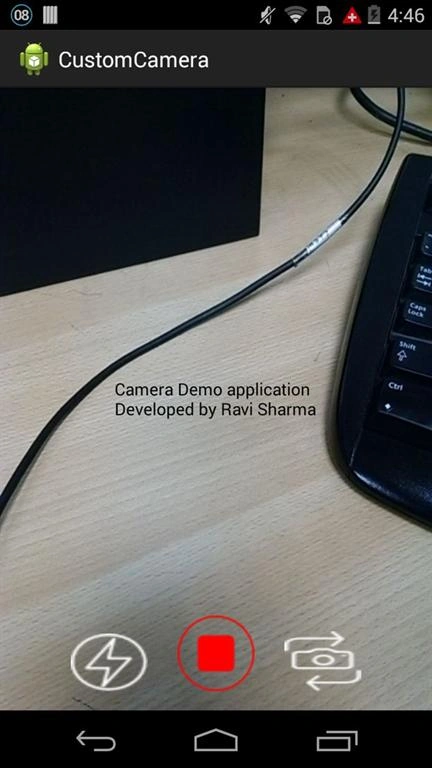
For this first off make the Layout XML file in the resource folder. The code is shown below.
- camerademo_activity.xml
- <RelativeLayout xmlns:android="http://schemas.android.com/apk/res/android"
- xmlns:tools="http://schemas.android.com/tools"
- android:layout_width="match_parent"
- android:layout_height="match_parent" >
- <SurfaceView
- android:id="@+id/surfaceView"
- android:layout_width="fill_parent"
- android:layout_height="fill_parent" />
- <TextView
- android:layout_width="wrap_content"
- android:layout_height="wrap_content"
- android:layout_centerInParent="true"
- android:text="Camera Demo application\nDeveloped by Ravi Sharma"
- android:textColor="@android:color/black" />
- <Button
- android:id="@+id/captureImage"
- android:layout_width="wrap_content"
- android:layout_height="wrap_content"
- android:layout_alignParentBottom="true"
- android:layout_centerHorizontal="true"
- android:layout_marginBottom="@dimen/activity_vertical_margin"
- android:background="@drawable/btn_broadcast_selected" />
- <Button
- android:id="@+id/flash"
- android:layout_width="wrap_content"
- android:layout_height="wrap_content"
- android:layout_alignParentBottom="true"
- android:layout_marginBottom="@dimen/activity_vertical_margin"
- android:layout_marginRight="25dp"
- android:layout_toLeftOf="@id/captureImage"
- android:background="@drawable/btn_flash" />
- <Button
- android:id="@+id/flipCamera"
- android:layout_width="wrap_content"
- android:layout_height="wrap_content"
- android:layout_alignParentBottom="true"
- android:layout_marginBottom="@dimen/activity_vertical_margin"
- android:layout_marginLeft="25dp"
- android:layout_toRightOf="@id/captureImage"
- android:background="@drawable/btn_flipcamera" />
- </RelativeLayout>
- One for capturing the image.
- One for turning on/off the flash (if the device supports it).
- One to change the camera (back or front).
The surface view shows the camera to be displayed on the screen.
For this make a CameraDemoActivity.java class and extend it with activity and override the onCreate method and make the object of all the Buttons and SurfaceView.
- public class CameraDemoActivity extends Activity{
- private SurfaceView surfaceView;
- private SurfaceHolder surfaceHolder;
- private Camera camera;
- private Button flipCamera;
- private Button flashCameraButton;
- private Button captureImage;
- private int cameraId;
- private boolean flashmode = false;
- private int rotation;
- @Override
- protected void onCreate(Bundle savedInstanceState) {
- super.onCreate(savedInstanceState);
- setContentView(R.layout.camerademo_activity);
- // camera surface view created
- cameraId = CameraInfo.CAMERA_FACING_BACK;
- flipCamera = (Button) findViewById(R.id.flipCamera);
- flashCameraButton = (Button) findViewById(R.id.flash);
- captureImage = (Button) findViewById(R.id.captureImage);
- surfaceView = (SurfaceView) findViewById(R.id.surfaceView);
- }
- }
- public class CameraDemoActivity extends Activity implements Callback,
- OnClickListener
- surfaceHolder = surfaceView.getHolder();
- surfaceHolder.addCallback(this);
- flipCamera.setOnClickListener(this);
- captureImage.setOnClickListener(this);
- flashCameraButton.setOnClickListener(this);
- getWindow().addFlags(WindowManager.LayoutParams.FLAG_KEEP_SCREEN_ON);
- if (Camera.getNumberOfCameras() > 1) {
- flipCamera.setVisibility(View.VISIBLE);
- }
- if (!getBaseContext().getPackageManager().hasSystemFeature(
- PackageManager.FEATURE_CAMERA_FLASH)) {
- flashCameraButton.setVisibility(View.GONE);
- }
- @Override
- public void surfaceCreated(SurfaceHolder holder) {
- }
- @Override
- public void surfaceChanged(SurfaceHolder holder, int format, int width,
- int height) {
- }
- @Override
- public void surfaceDestroyed(SurfaceHolder holder) {
- }
- @Override
- public void surfaceCreated(SurfaceHolder holder) {
- if (!openCamera(CameraInfo.CAMERA_FACING_BACK)) {
- alertCameraDialog ();
- }
- }
- private void alertCameraDialog() {
- AlertDialog.Builder dialog = createAlert(CameraDemoActivity.this,
- "Camera info", "error to open camera");
- dialog.setNegativeButton("OK", new DialogInterface.OnClickListener() {
- @Override
- public void onClick(DialogInterface dialog, int which) {
- dialog.cancel();
- }
- });
- dialog.show();
- }
- private boolean openCamera(int id) {
- boolean result = false;
- cameraId = id;
- releaseCamera();
- try {
- camera = Camera.open(cameraId);
- } catch (Exception e) {
- e.printStackTrace();
- }
- if (camera != null) {
- try {
- setUpCamera(camera);
- camera.setErrorCallback(new ErrorCallback() {
- @Override
- public void onError(int error, Camera camera) {
- //to show the error message.
- }
- });
- camera.setPreviewDisplay(surfaceHolder);
- camera.startPreview();
- result = true;
- } catch (IOException e) {
- e.printStackTrace();
- result = false;
- releaseCamera();
- }
- }
- return result;
- }
- private void releaseCamera() {
- try {
- if (camera != null) {
- camera.setPreviewCallback(null);
- camera.setErrorCallback(null);
- camera.stopPreview();
- camera.release();
- camera = null;
- }
- } catch (Exception e) {
- e.printStackTrace();
- Log.e("error", e.toString());
- camera = null;
- }
- }
- private void setUpCamera(Camera c) {
- Camera.CameraInfo info = new Camera.CameraInfo();
- Camera.getCameraInfo(cameraId, info);
- rotation = getWindowManager().getDefaultDisplay().getRotation();
- int degree = 0;
- switch (rotation) {
- case Surface.ROTATION_0:
- degree = 0;
- break;
- case Surface.ROTATION_90:
- degree = 90;
- break;
- case Surface.ROTATION_180:
- degree = 180;
- break;
- case Surface.ROTATION_270:
- degree = 270;
- break;
- default:
- break;
- }
- if (info.facing == Camera.CameraInfo.CAMERA_FACING_FRONT) {
- // frontFacing
- rotation = (info.orientation + degree) % 330;
- rotation = (360 - rotation) % 360;
- } else {
- // Back-facing
- rotation = (info.orientation - degree + 360) % 360;
- }
- c.setDisplayOrientation(rotation);
- Parameters params = c.getParameters();
- showFlashButton(params);
- List<String> focusModes = params.getSupportedFlashModes();
- if (focusModes != null) {
- if (focusModes
- .contains(Camera.Parameters.FOCUS_MODE_CONTINUOUS_PICTURE)) {
- params.setFlashMode(Camera.Parameters.FOCUS_MODE_CONTINUOUS_PICTURE);
- }
- }
- params.setRotation(rotation);
- }
- private void showFlashButton(Parameters params) {
- boolean showFlash = (getPackageManager().hasSystemFeature(
- PackageManager.FEATURE_CAMERA_FLASH) && params.getFlashMode() != null)
- && params.getSupportedFlashModes() != null
- && params.getSupportedFocusModes().size() > 1;
- flashCameraButton.setVisibility(showFlash ? View.VISIBLE
- : View.INVISIBLE);
- }
- @Override
- public void onClick(View v) {
- switch (v.getId()) {
- case R.id.flash:
- flashOnButton();
- break;
- case R.id.flipCamera:
- flipCamera();
- break;
- case R.id.captureImage:
- takeImage();
- break;
- default:
- break;
- }
- }
- private void flashOnButton() {
- if (camera != null) {
- try {
- Parameters param = camera.getParameters();
- param.setFlashMode(!flashmode ? Parameters.FLASH_MODE_TORCH
- : Parameters.FLASH_MODE_OFF);
- camera.setParameters(param);
- flashmode = !flashmode;
- } catch (Exception e) {
- // TODO: handle exception
- }
- }
- }
- private void flipCamera() {
- int id = (cameraId == CameraInfo.CAMERA_FACING_BACK ? CameraInfo.CAMERA_FACING_FRONT
- : CameraInfo.CAMERA_FACING_BACK);
- if (!openCamera(id)) {
- alertCameraDialog();
- }
- }
- private void takeImage() {
- camera.takePicture(null, null, new PictureCallback() {
- private File imageFile;
- @Override
- public void onPictureTaken(byte[] data, Camera camera) {
- try {
- // convert byte array into bitmap
- Bitmap loadedImage = BitmapFactory.decodeByteArray(data, 0,
- data.length);
- // rotate Image
- Matrix rotateMatrix = new Matrix();
- rotateMatrix.postRotate(rotation);
- Bitmap rotatedBitmap = Bitmap.createBitmap(loadedImage, 0,
- 0, loadedImage.getWidth(), loadedImage.getHeight(),
- rotateMatrix, false);
- String state = Environment.getExternalStorageState();
- File folder = null;
- if (state.contains(Environment.MEDIA_MOUNTED)) {
- folder = new File(Environment
- .getExternalStorageDirectory() + "/Demo");
- } else {
- folder = new File(Environment
- .getExternalStorageDirectory() + "/Demo");
- }
- boolean success = true;
- if (!folder.exists()) {
- success = folder.mkdirs();
- }
- if (success) {
- java.util.Date date = new java.util.Date();
- imageFile = new File(folder.getAbsolutePath()
- + File.separator
- + new Timestamp(date.getTime()).toString()
- + "Image.jpg");
- imageFile.createNewFile();
- } else {
- Toast.makeText(getBaseContext(), "Image Not saved",
- Toast.LENGTH_SHORT).show();
- return;
- }
- ByteArrayOutputStream ostream = new ByteArrayOutputStream();
- // save image into gallery
- rotatedBitmap.compress(CompressFormat.JPEG, 100, ostream);
- FileOutputStream fout = new FileOutputStream(imageFile);
- fout.write(ostream.toByteArray());
- fout.close();
- ContentValues values = new ContentValues();
- values.put(Images.Media.DATE_TAKEN,
- System.currentTimeMillis());
- values.put(Images.Media.MIME_TYPE, "image/jpeg");
- values.put(MediaStore.MediaColumns.DATA,
- imageFile.getAbsolutePath());
- CameraDemoActivity.this.getContentResolver().insert(
- Images.Media.EXTERNAL_CONTENT_URI, values);
- } catch (Exception e) {
- e.printStackTrace();
- }
- }
- });
- }
- <uses-feature android:name="android.hardware.camera" />
- <uses-permission android:name="android.permission.CAMERA" />
- <uses-permission android:name="android.permission.WRITE_EXTERNAL_STORAGE" />
- <uses-permission
- android:name="android.permission.FLASHLIGHT"
- android:permissionGroup="android.permission-group.HARDWARE_CONTROLS"
- android:protectionLevel="normal" />
- <application
- .
- .
- .
- android:largeHeap="true"
- android:theme="@style/AppTheme" >
- package com.example.customcamera;
- import java.io.ByteArrayOutputStream;
- import java.io.File;
- import java.io.FileOutputStream;
- import java.io.IOException;
- import java.sql.Timestamp;
- import java.util.List;
- import android.app.Activity;
- import android.app.AlertDialog;
- import android.app.AlertDialog.Builder;
- import android.content.ContentValues;
- import android.content.Context;
- import android.content.DialogInterface;
- import android.content.pm.PackageManager;
- import android.graphics.Bitmap;
- import android.graphics.Bitmap.CompressFormat;
- import android.graphics.BitmapFactory;
- import android.graphics.Matrix;
- import android.hardware.Camera;
- import android.hardware.Camera.CameraInfo;
- import android.hardware.Camera.ErrorCallback;
- import android.hardware.Camera.Parameters;
- import android.hardware.Camera.PictureCallback;
- import android.os.Bundle;
- import android.os.Environment;
- import android.provider.MediaStore;
- import android.provider.MediaStore.Images;
- import android.util.Log;
- import android.view.ContextThemeWrapper;
- import android.view.Surface;
- import android.view.SurfaceHolder;
- import android.view.SurfaceHolder.Callback;
- import android.view.SurfaceView;
- import android.view.View;
- import android.view.View.OnClickListener;
- import android.view.WindowManager;
- import android.widget.Button;
- import android.widget.Toast;
- public class CameraDemoActivity extends Activity implements Callback,
- OnClickListener {
- private SurfaceView surfaceView;
- private SurfaceHolder surfaceHolder;
- private Camera camera;
- private Button flipCamera;
- private Button flashCameraButton;
- private Button captureImage;
- private int cameraId;
- private boolean flashmode = false;
- private int rotation;
- @Override
- protected void onCreate(Bundle savedInstanceState) {
- super.onCreate(savedInstanceState);
- setContentView(R.layout.camerademo_activity);
- // camera surface view created
- cameraId = CameraInfo.CAMERA_FACING_BACK;
- flipCamera = (Button) findViewById(R.id.flipCamera);
- flashCameraButton = (Button) findViewById(R.id.flash);
- captureImage = (Button) findViewById(R.id.captureImage);
- surfaceView = (SurfaceView) findViewById(R.id.surfaceView);
- surfaceHolder = surfaceView.getHolder();
- surfaceHolder.addCallback(this);
- flipCamera.setOnClickListener(this);
- captureImage.setOnClickListener(this);
- flashCameraButton.setOnClickListener(this);
- getWindow().addFlags(WindowManager.LayoutParams.FLAG_KEEP_SCREEN_ON);
- if (Camera.getNumberOfCameras() > 1) {
- flipCamera.setVisibility(View.VISIBLE);
- }
- if (!getBaseContext().getPackageManager().hasSystemFeature(
- PackageManager.FEATURE_CAMERA_FLASH)) {
- flashCameraButton.setVisibility(View.GONE);
- }
- }
- @Override
- public void surfaceCreated(SurfaceHolder holder) {
- if (!openCamera(CameraInfo.CAMERA_FACING_BACK)) {
- alertCameraDialog();
- }
- }
- private boolean openCamera(int id) {
- boolean result = false;
- cameraId = id;
- releaseCamera();
- try {
- camera = Camera.open(cameraId);
- } catch (Exception e) {
- e.printStackTrace();
- }
- if (camera != null) {
- try {
- setUpCamera(camera);
- camera.setErrorCallback(new ErrorCallback() {
- @Override
- public void onError(int error, Camera camera) {
- }
- });
- camera.setPreviewDisplay(surfaceHolder);
- camera.startPreview();
- result = true;
- } catch (IOException e) {
- e.printStackTrace();
- result = false;
- releaseCamera();
- }
- }
- return result;
- }
- private void setUpCamera(Camera c) {
- Camera.CameraInfo info = new Camera.CameraInfo();
- Camera.getCameraInfo(cameraId, info);
- rotation = getWindowManager().getDefaultDisplay().getRotation();
- int degree = 0;
- switch (rotation) {
- case Surface.ROTATION_0:
- degree = 0;
- break;
- case Surface.ROTATION_90:
- degree = 90;
- break;
- case Surface.ROTATION_180:
- degree = 180;
- break;
- case Surface.ROTATION_270:
- degree = 270;
- break;
- default:
- break;
- }
- if (info.facing == Camera.CameraInfo.CAMERA_FACING_FRONT) {
- // frontFacing
- rotation = (info.orientation + degree) % 330;
- rotation = (360 - rotation) % 360;
- } else {
- // Back-facing
- rotation = (info.orientation - degree + 360) % 360;
- }
- c.setDisplayOrientation(rotation);
- Parameters params = c.getParameters();
- showFlashButton(params);
- List<String> focusModes = params.getSupportedFlashModes();
- if (focusModes != null) {
- if (focusModes
- .contains(Camera.Parameters.FOCUS_MODE_CONTINUOUS_PICTURE)) {
- params.setFlashMode(Camera.Parameters.FOCUS_MODE_CONTINUOUS_PICTURE);
- }
- }
- params.setRotation(rotation);
- }
- private void showFlashButton(Parameters params) {
- boolean showFlash = (getPackageManager().hasSystemFeature(
- PackageManager.FEATURE_CAMERA_FLASH) && params.getFlashMode() != null)
- && params.getSupportedFlashModes() != null
- && params.getSupportedFocusModes().size() > 1;
- flashCameraButton.setVisibility(showFlash ? View.VISIBLE
- : View.INVISIBLE);
- }
- private void releaseCamera() {
- try {
- if (camera != null) {
- camera.setPreviewCallback(null);
- camera.setErrorCallback(null);
- camera.stopPreview();
- camera.release();
- camera = null;
- }
- } catch (Exception e) {
- e.printStackTrace();
- Log.e("error", e.toString());
- camera = null;
- }
- }
- @Override
- public void surfaceChanged(SurfaceHolder holder, int format, int width,
- int height) {
- }
- @Override
- public void surfaceDestroyed(SurfaceHolder holder) {
- }
- @Override
- public void onClick(View v) {
- switch (v.getId()) {
- case R.id.flash:
- flashOnButton();
- break;
- case R.id.flipCamera:
- flipCamera();
- break;
- case R.id.captureImage:
- takeImage();
- break;
- default:
- break;
- }
- }
- private void takeImage() {
- camera.takePicture(null, null, new PictureCallback() {
- private File imageFile;
- @Override
- public void onPictureTaken(byte[] data, Camera camera) {
- try {
- // convert byte array into bitmap
- Bitmap loadedImage = null;
- Bitmap rotatedBitmap = null;
- loadedImage = BitmapFactory.decodeByteArray(data, 0,
- data.length);
- // rotate Image
- Matrix rotateMatrix = new Matrix();
- rotateMatrix.postRotate(rotation);
- rotatedBitmap = Bitmap.createBitmap(loadedImage, 0, 0,
- loadedImage.getWidth(), loadedImage.getHeight(),
- rotateMatrix, false);
- String state = Environment.getExternalStorageState();
- File folder = null;
- if (state.contains(Environment.MEDIA_MOUNTED)) {
- folder = new File(Environment
- .getExternalStorageDirectory() + "/Demo");
- } else {
- folder = new File(Environment
- .getExternalStorageDirectory() + "/Demo");
- }
- boolean success = true;
- if (!folder.exists()) {
- success = folder.mkdirs();
- }
- if (success) {
- java.util.Date date = new java.util.Date();
- imageFile = new File(folder.getAbsolutePath()
- + File.separator
- + new Timestamp(date.getTime()).toString()
- + "Image.jpg");
- imageFile.createNewFile();
- } else {
- Toast.makeText(getBaseContext(), "Image Not saved",
- Toast.LENGTH_SHORT).show();
- return;
- }
- ByteArrayOutputStream ostream = new ByteArrayOutputStream();
- // save image into gallery
- rotatedBitmap.compress(CompressFormat.JPEG, 100, ostream);
- FileOutputStream fout = new FileOutputStream(imageFile);
- fout.write(ostream.toByteArray());
- fout.close();
- ContentValues values = new ContentValues();
- values.put(Images.Media.DATE_TAKEN,
- System.currentTimeMillis());
- values.put(Images.Media.MIME_TYPE, "image/jpeg");
- values.put(MediaStore.MediaColumns.DATA,
- imageFile.getAbsolutePath());
- CameraDemoActivity.this.getContentResolver().insert(
- Images.Media.EXTERNAL_CONTENT_URI, values);
- } catch (Exception e) {
- e.printStackTrace();
- }
- }
- });
- }
- private void flipCamera() {
- int id = (cameraId == CameraInfo.CAMERA_FACING_BACK ? CameraInfo.CAMERA_FACING_FRONT
- : CameraInfo.CAMERA_FACING_BACK);
- if (!openCamera(id)) {
- alertCameraDialog();
- }
- }
- private void alertCameraDialog() {
- AlertDialog.Builder dialog = createAlert(CameraDemoActivity.this,
- "Camera info", "error to open camera");
- dialog.setNegativeButton("OK", new DialogInterface.OnClickListener() {
- @Override
- public void onClick(DialogInterface dialog, int which) {
- dialog.cancel();
- }
- });
- dialog.show();
- }
- private Builder createAlert(Context context, String title, String message) {
- AlertDialog.Builder dialog = new AlertDialog.Builder(
- new ContextThemeWrapper(context,
- android.R.style.Theme_Holo_Light_Dialog));
- dialog.setIcon(R.drawable.ic_launcher);
- if (title != null)
- dialog.setTitle(title);
- else
- dialog.setTitle("Information");
- dialog.setMessage(message);
- dialog.setCancelable(false);
- return dialog;
- }
- private void flashOnButton() {
- if (camera != null) {
- try {
- Parameters param = camera.getParameters();
- param.setFlashMode(!flashmode ? Parameters.FLASH_MODE_TORCH
- : Parameters.FLASH_MODE_OFF);
- camera.setParameters(param);
- flashmode = !flashmode;
- } catch (Exception e) {
- // TODO: handle exception
- }
- }
- }
- }
Joshi SankarPosted Jul 18, 2020, 8:20 PM
Sir i am getting the dialog box camera as error to open camera but how can i run the camera
manasa nPosted Jul 13, 2019, 1:37 AM
Hi sir i have used this camera code in my app it worked great thanks for the simple code. But how to add grid line on camera view. onDraw() is not coming in override methods.
Atul DhanukaPosted Jun 24, 2017, 2:04 AM
Hi while using ur code in many phone it is showing out of memeory error and how to make the image size should be between 1-3Mb only and exist image should get delete
Muhammad AdeelPosted Feb 23, 2017, 6:19 AM
Not working in Android 6.0
Aditya RajPosted Mar 17, 2016, 11:40 AM
Image that saved in SD card is very low, how to get high quality ?
Ankur ShuklaPosted Oct 21, 2015, 3:55 PM
i have one doubt i want to set image in one specific form after clicking the pic from this custom camera and want to crop the image also after clicking from this custom camera app
Ankur ShuklaPosted Oct 21, 2015, 3:54 PM
hello sir,
Chris ClarkPosted Sep 11, 2015, 7:41 PM
might you have an example on how to manipulate the resulting image... ie zoom crop rotate?
Shruti DasgopalPosted May 21, 2015, 6:08 AM
Thanks a lot.. You saved my time.!
Lahari BungaPosted May 15, 2015, 3:38 AM
Actually I have one doubt. The front facing camera is not working properly,after capturing the image it was displaying reverse mode. Plz clarify my doubt.
Lahari BungaPosted May 14, 2015, 6:39 AM
Thanks alot.