
Referrences:
Add the below references from .Net tab (Projects -> Add Reference..)
CrystalDecisions.CrystalReports.Engine
CrystalDecisions.Shared
Namespaces:
using
CrystalDecisions.CrystalReports.Engine;
using
CrystalDecisions.Shared;
using
System.Data.SqlClient;
Global Variable declaration:
ReportDocument
rpt = new
ReportDocument();
Display the report through CrystalViewer in Form_Load() event:
private
void Form1_Load(object
sender, EventArgs e)
{
rpt.Load(@"D:\Muthu\Tech\Blogs\CrystalReportsApp\CrystalReportsApp\ChartReport.rpt");
crystalReportViewer1.ReportSource = rpt;
crystalReportViewer1.Refresh();
}
Bind the Crystal report dynamically and Update the crystal report label value
dynamically:
private
void btnRefresh_Click(object
sender, EventArgs e)
{
//Begin: Bind the reports dynamically
DataTable dtReports = BindReports();
rpt.SetDataSource(dtReports);
//End: Bind the reports dynamically
//Begin: Update the report label value
from All to the entered employee name in the text box
TextObject myTextObjectOnReport;
if (rpt.ReportDefinition.ReportObjects["txtEmpName"]
!= null)
{
myTextObjectOnReport = (TextObject)rpt.ReportDefinition.ReportObjects["txtEmpName"];
myTextObjectOnReport.Text = txtName.Text;
}
crystalReportViewer1.ReportSource = rpt;
crystalReportViewer1.Refresh();
//End
}
//Filtered the report details based on the employee name entered in the textbox
private DataTable BindReports()
{
string conString =
@"Data Source=WVDI1IHCL32\WVDI1IHCL32;Initial
Catalog=Test;Integrated Security=True;";
SqlConnection con = new
SqlConnection(conString);
con.Open();
string query =
"SELECT EmployeeID, DepID, Name, Mark FROM Employee
E WHERE E.Name='" + txtName.Text + "'";
SqlDataAdapter sqlAdapter = new
SqlDataAdapter(query, con);
DataTable dtReport = new DataTable();
sqlAdapter.Fill(dtReport);
con.Close();
return dtReport;
}
Generate the Crystal report as a PDF, Word or Excel:
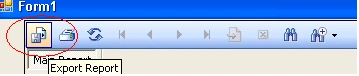
When we use the CrystalReportViewer to display reports, we have a provision to
export the report as PDF or any other format using the below icon.
If we want to generate the report without the viewer control, that time we can
use the below code. (Automation of report generation using windows service or
console app)
private
void btnExport_Click(object
sender, EventArgs e)
{
ExportOptions rptExportOption;
DiskFileDestinationOptions
rptFileDestOption = new
DiskFileDestinationOptions();
PdfRtfWordFormatOptions
rptFormatOption = new
PdfRtfWordFormatOptions();
//If we want to generate the report as pdf,
change the file extention type as "D:\Muthu\SampleReport.pdf"
//If we want to generate the report as
excel, change the file extention type as "D:\Muthu\SampleReport.xls"
string reportFileName =
@"D:\Muthu\SampleReport.doc";
rptFileDestOption.DiskFileName = reportFileName;
rptExportOption = rpt.ExportOptions;
{
rptExportOption.ExportDestinationType =
ExportDestinationType.DiskFile;
//if we want to generate the report as
PDF, change the ExportFormatType as "ExportFormatType.PortableDocFormat"
//if we want to generate the
report as Excel, change the ExportFormatType as "ExportFormatType.Excel"
rptExportOption.ExportFormatType =
ExportFormatType.RichText;
rptExportOption.ExportDestinationOptions = rptFileDestOption;
rptExportOption.ExportFormatOptions = rptFormatOption;
}
rpt.Export();
}
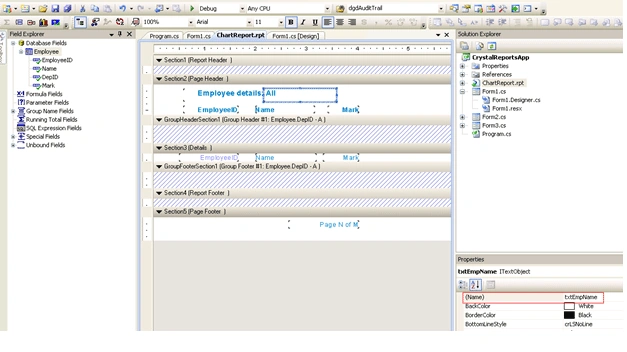
Report Design:
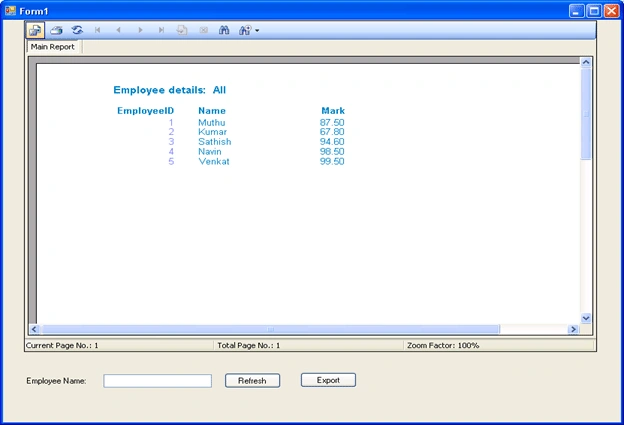
Output: (First time, report will looks like the below)
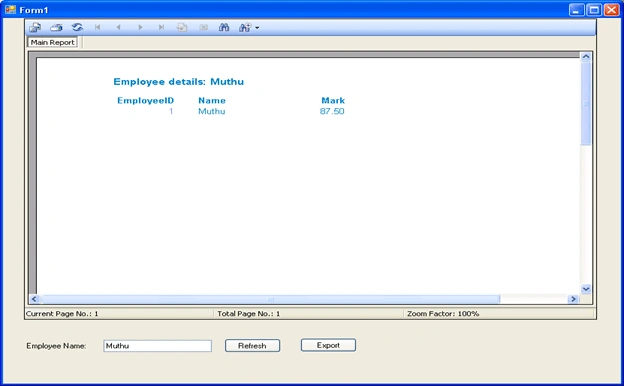
Enter employee name in the textbox and click "Refresh" button.
To generate the report as doc, click on "Export" button.
Ritwesh ChatterjeePosted Nov 25, 2010, 12:18 PM
Respected Sir, I went through your article and I have some questions : a)Do we have to create only bound controls in crystal reports b)Is a crystal report needed to be to be created for every condition. c)Can |DataDirectory| be used while writing the path name. I will be waiting for your reply. I am very young learner of class 8. So I could not follow correctly. Thanking You, Yours faithfully, Ritwesh Chatterjee.
sarada vedantamPosted Jul 3, 2010, 7:05 AM
Hi I am not getting the option export options when i am trying to convert crystal report to pdf format in c#
Lince AntonyPosted Jun 19, 2010, 3:07 AM
I also facing the same problem in asp.net 2005 (vb) if i Run report from dataset ,first time report run correctly. if i click print,export,group,next,and zoom button on crystal report, report will clear in the case of group button only get error "cant get pagenumber" if i connect report direct from a database table all button working fine anyone can help me please email: [email protected] By Lince