

The XML data type lets you store XML documents and fragments in a SQL Server database. An XML fragment is an XML instance that is missing a single top-level element. You can create columns and variables of the XML type and store XML instances in them.
Limitations
Note the following general limitations that apply to the XML data type:
- The stored representation of XML data type instances cannot exceed 2 GB.
- It cannot be used as a subtype of a sql_variant instance.
- It does not support casting or converting to either text or ntext. Use varchar(max) or nvarchar(max) instead.
- It cannot be compared or sorted. This means an XML data type cannot be used in a GROUP BY statement.
- It cannot be used as a parameter to any scalar, built-in functions other than ISNULL, COALESCE, and DATALENGTH.
- It cannot be used as a key column in an index. However, it can be included as data in a clustered index or explicitly added to a nonclustered index using the INCLUDE keyword when the nonclustered index is created.
Demo
This demo is to be considered as a continuation of my previous article:
Introduction to Merge Statement in SQL Server
Steps
1. Create 2 Tables, "[Source]" and "[Target]", and insert some dummy data in both using the following script:
CREATE Table [Source] (id int, name varchar(50))
CREATE Table [Target] (id int, name varchar(50), status varchar(10))
TRUNCATE TABLE [Source]
TRUNCATE TABLE [Target]
INSERT INTO [Source] VALUES (1, 'abc'), (2,'pqr' ), (3, 'xyz')
INSERT INTO [Target](id, name)VALUES (1, 'abc'), (2,'sdfdf'), (4, 'abc')
2. Insert the data from the "[Target]" table to a temp table, "tempTarget2" as in the following:
SELECT id, name, [status]
INTO tempTarget2
FROM [Target]
3. Fetch the newly inserted temp table data using XML as follows:
SELECT id AS "@ID", name AS "@Name", status AS "@Status" FROM tempTarget2
--WHERE name like 'a%'
/*Here We can use any predicate like WHERE, ORDER BY etc. */
FOR XML PATH('product'), ROOT('products');
Here, we mapped the id as the ID parameter via id AS "@ID", similarly other columns are mapped in the child node's parameters query that will return the XML path to be mapped as nodes as "product" having the root node "product" as shown below: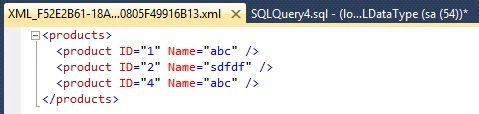
Remember: XML is case sensitive!
This query will return XML in the temp column header as in the following: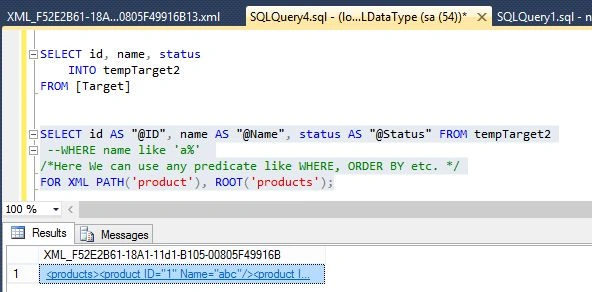
4. Copy the queried data and declare an XML variable like :
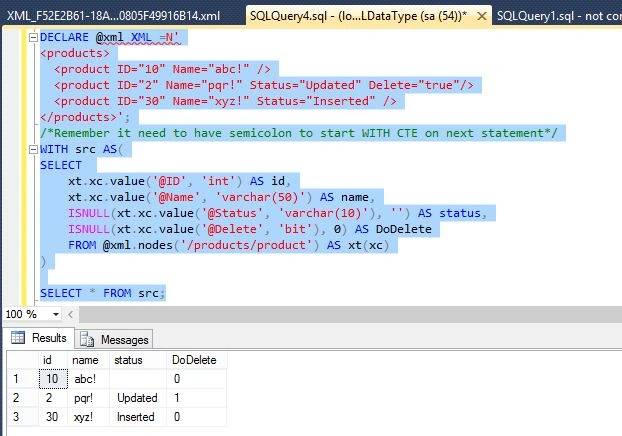
DECLARE @xml XML =N'<products>
<product ID="10" Name="abc!" />
<product ID="2" Name="pqr!" Status="Updated" Delete="true"/>
<product ID="30" Name="xyz!" Status="Inserted" />
</products>'
5. Querying through XML data syntax:
SELECT
xt.xc.value('@ID', 'int') AS id,
xt.xc.value('@Name', 'varchar(50)') AS name,
Dinesh BeniwalPosted Nov 14, 2013, 1:50 AM
Good Work