

Introduction: This article shows how to validate an XML document against
a schema using C#. For demonstration of this, I have created a GUI application
using Visual Studio 2005 Express Edition.
XML is a tag-based markup language used mainly for data transfer. The main
advantage of XML is that it is extensible. It allows user-defined tags to store
data. Also since it is written purely as text, it is portable across various
software and hardware platforms.
A well-formed XML document follows certain rules. The rules for well-formed XML
documents are as follows:
- Every tag must have a corresponding closing tag.
- Empty tags must be terminated with a slash (/).
- Attribute values must be enclosed within quotes.
- Opening and closing tags must be written using the same case.
- Tags must be nested and not overlapping.
The structure of an XML file can be specified
by creating a schema. A schema is used to validate the structure and data of an
XML file. If an XML file conforms to its schema, it is considered to be valid.
Microsoft has created a language called XML Schema Definition (XSD) to help in
validating an XML file against a schema. The syntax of XSD is similar to XML.
A schema-validator can be created to validate an XML file against a schema.
Assume the following XML document:
<?xml version="1.0" encoding="UTF-8"?>
<employees>
<emp id="S001">
<name>ABC</name>
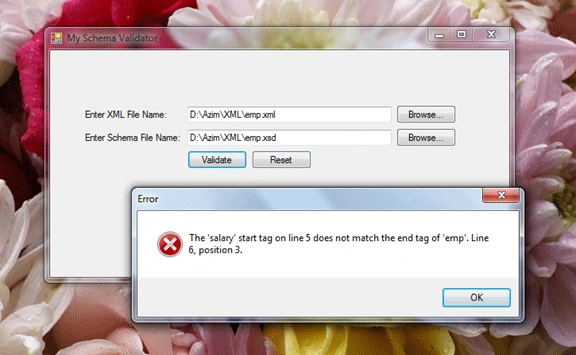
<salary>5000
</emp>
<emp id="S002">
<name>PQR</name>
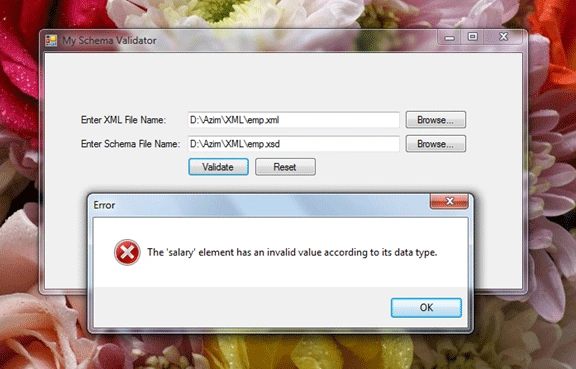
<salary>-7000</salary>
</emp>
<emp id="S003">
<name>XYZ</name>
<salary>9000</salary>
</emp>
</employees>
Assume the following (Schema) XSD document:
<?xml version="1.0" encoding="UTF-8"?>
<xsd:schema xmlns:xsd="http://www.w3.org/2001/XMLSchema">
<xsd:element name="employees" type="empdt"/>
<xsd:complexType name="empdt">
<xsd:sequence>
<xsd:element name="emp" type="edt" minOccurs="1" maxOccurs="unbounded"/>
</xsd:sequence>
</xsd:complexType>
<xsd:complexType name="edt">
<xsd:sequence>
<xsd:element name="name" type="xsd:string"/>
<xsd:element name="salary" type="xsd:positiveInteger"/>
</xsd:sequence>
<xsd:attribute name="id" type="idtype"/>
</xsd:complexType>
<xsd:simpleType name="idtype">
<xsd:restriction base="xsd:string">
<xsd:pattern value="S\d{3}"/>
</xsd:restriction>
</xsd:simpleType>
</xsd:schema>
The following code is used to browse for the XML file and display the XML
filename in the text box:
private
void btnBrowseXML_Click(object
sender, EventArgs e)
{
try
{
FileDialog dialog =
new OpenFileDialog();
dialog.Filter = "XML Files (*.xml)|*.xml|All
Files (*.*)|*.*";
dialog.FilterIndex = 1;
dialog.DefaultExt = "xml";
if (dialog.ShowDialog() ==
DialogResult.OK)
{
txtXMLFileName.Text = dialog.FileName;
}
}
catch (Exception
ex)
{
MessageBox.Show(ex.Message,
"Error",
MessageBoxButtons.OK, MessageBoxIcon.Error);
}
}
The following code is used to browse for the XSD file and display the XSD
filename in the text box:
private void
btnBrowseXSD_Click(object sender,
EventArgs e)
{
try
{
FileDialog dialog =
new OpenFileDialog();
dialog.Filter = "Schema Files (*.xsd)|*.xsd|All
Files (*.*)|*.*";
dialog.FilterIndex = 1;
dialog.DefaultExt = "xsd";
if (dialog.ShowDialog() ==
DialogResult.OK)
{
txtXSDFileName.Text = dialog.FileName;
}
}
catch (Exception
ex)
{
MessageBox.Show(ex.Message,
"Error",
MessageBoxButtons.OK, MessageBoxIcon.Error);
}
}
The following code is used to validate the XML file against the Schema:
private
void btnValidate_Click(object
sender, EventArgs e)
{
try
{
XmlReader reader =
XmlReader.Create(txtXMLFileName.Text);
XmlValidatingReader vreader =
new XmlValidatingReader(reader);
XmlReader schemareader =
XmlReader.Create(txtXSDFileName.Text);
XmlSchemaCollection
schemacollection = new
XmlSchemaCollection();
schemacollection.Add("",
txtXSDFileName.Text);
vreader.Schemas.Add(schemacollection);
vreader.ValidationEventHandler += new
ValidationEventHandler(vreader_ValidationEventHandler);
while (vreader.Read()) { }
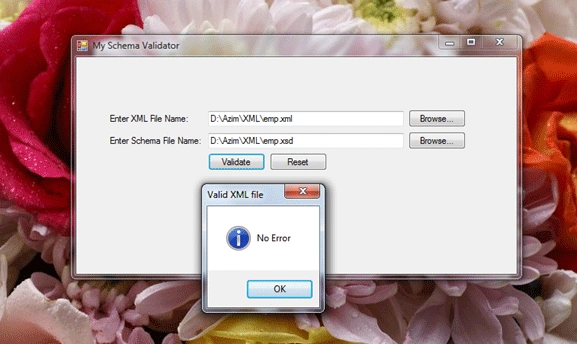
if (!error_flag)
{
MessageBox.Show("No
Error", "Valid XML file",
MessageBoxButtons.OK,
MessageBoxIcon.Information);
}
}
catch (Exception
ex)
{
MessageBox.Show(ex.Message,
"Error",
MessageBoxButtons.OK, MessageBoxIcon.Error);
}
}
Hariharan KrishnamoorthiPosted Nov 30, 2016, 4:36 AM
Thank you Azim Zahir, This helped me lot.
Azim ZahirPosted Dec 2, 2011, 7:01 AM
Thanks every one. Your comments have really made my day.
Alok PandeyPosted Dec 2, 2011, 2:29 AM
Nice Article.
Prashant ChaudharyPosted Dec 2, 2011, 1:17 AM
Hope to see some more article like this
Akash AhlawatPosted Dec 2, 2011, 1:10 AM
Really like your presentation..simple and effective.
Arjun PanwarPosted Dec 2, 2011, 1:08 AM
Hi,Azim Nice presentation.
Monika AroraPosted Dec 2, 2011, 1:08 AM
Nice article.