

Introduction

What a Mind Reader Quiz Game is
A Mind Reader Quiz game is a quiz game where users can think of any one of his dream stars from the list of names. In an online quiz there will be some limited questions with Yes or No options that the users will be asked related to his dream star. Depending on the user's answer the system will finally find the person in the user's mind and produce the result.
In my online quiz application (Shanu-Who's In Your Mind Reader) users can think of a famous person from the list from the Main Page. I will determine who's in your mind. You can select any popular person from the list. He or she might be an Actor, Actress, cricketer or any other celebrity from the list. I will ask a few questions about who's in your mind. You can answer Yes or No. Finally I will tell your the star's personality of whom you are thinking of.
This article will explain in detail how to create an Online Mind Reader quiz game using Angular JS and a WCF Rest Service. This article will explain:
- How to create a WCF Rest service and retrieve data from a database.
- How to install the Angular JS Package into a MVC application.
- How to create our Angular JS application to create our own Master Detail Grid.
- How to use a WCS service in Angular JS to create our own online Quiz Game for Mind Reader.
Here we can see some basics and reference links for Windows Communication Foundation (WCF). WCF is a framework for building service-oriented applications.
Service-oriented application
Using a protocol the service can be shared and used over a network.
For example, let's consider now we are working on a project and we need to create a common database function and those functions need to be used in multiple projects and the projects are in a different place and connected by the internet.
In this case we can create a WCF service and we can write all our common database functions in our WCF service class. We can deploy our WCF in IIS and use the URL in our application to do DB functions. In the code part let's see how to create a WCF REST service and use it in our Angular JS application.
If you are interested in reading more about WCF then kindly go through this link.
https://msdn.microsoft.com/en-in/library/dd203052.aspx
Angular JS
We might be be familiar with what the Model, View, View Model (MVVM) and what Model, View and Controller (MVC) are. Angular JS is a JavaScript framework that is purely based on HTML, CSS and JavaScript.
The Angular JS Model View Whatever (MVW) pattern is similar to the MVC and MVVM patterns. In our example I have used Model, View and Service. In the code part let's see how to install and create Angular JS in our MVC application.
If you are interested in reading more about Angular JS then kindly go through the following link.
http://www.w3schools.com/angular/default.asp
Code Part
1) Create Database and Table
We will create a Professional_Type, Character_Type, Character_Name and Questions table under the Database MindReader. The following is the script to create a database, table and sample insert query. Run this script in your SQL Server. I have used SQL Server 2012.
- -- =============================================
- -- Author : Shanu
- -- Create date : 2015-03-16
- -- Description : To Create Database,Table and Sample Insert Query
- -- Latest
- -- Modifier : Shanu
- -- Modify date : 2015-03-16
- -- =============================================
- --Script to create DB,Table and sample Insert data
- USE MASTER
- GO
- -- 1) Check for the Database Exists .If the database is exist then drop and create new DB
- IF EXISTS (SELECT [name] FROM sys.databases WHERE [name] = 'MindReader' )
- DROP DATABASE MindReader
- GO
- CREATE DATABASE MindReader
- GO
- USE MindReader
- GO
- -- 1) //////////// Professional_Type table
- -- Create Table Professional_Type ,This table will be used to store the details like Professional type as Sports,Bollywood Movie Star,kollywood Movie Star
- IF EXISTS ( SELECT [name] FROM sys.tables WHERE [name] = 'Professional_Type' )
- DROP TABLE Professional_Type
- GO
- CREATE TABLE Professional_Type
- (
- Profes_ID VARCHAR(10) NOT NULL,
- Profes_Type VARCHAR(50)
- CONSTRAINT [PK_Professional_Type] PRIMARY KEY CLUSTERED
- (
- [Profes_ID] ASC
- )WITH (PAD_INDEX = OFF, STATISTICS_NORECOMPUTE = OFF, IGNORE_DUP_KEY = OFF, ALLOW_ROW_LOCKS = ON, ALLOW_PAGE_LOCKS = ON) ON [PRIMARY]
- ) ON [PRIMARY]
- GO
- -- Insert the sample records to the Character_Type Table
- Insert into Professional_Type(Profes_ID,Profes_Type) values('1','Sports')
- Insert into Professional_Type(Profes_ID,Profes_Type) values('2','Bollywood Movie Star')
- Insert into Professional_Type(Profes_ID,Profes_Type) values('3','kollywood Movie Star')
- -- 1) END //
- -- 2) //////////// Character_type table
- -- Create Table Character_Type ,This table will be used to store the details like Character type as Cricket,Bollywood Actor,kollywood Actor
- IF EXISTS ( SELECT [name] FROM sys.tables WHERE [name] = 'Character_Type' )
- DROP TABLE Character_Type
- GO
- CREATE TABLE Character_Type
- (
- Char_ID VARCHAR(10) NOT NULL,
- Profes_ID VARCHAR(10) NOT NULL CONSTRAINT fk_Professional_Type FOREIGN KEY REFERENCES Professional_Type,
- Char_Type VARCHAR(50)
- CONSTRAINT [PK_Character_Type] PRIMARY KEY CLUSTERED
- (
- [Char_ID] ASC
- )WITH (PAD_INDEX = OFF, STATISTICS_NORECOMPUTE = OFF, IGNORE_DUP_KEY = OFF, ALLOW_ROW_LOCKS = ON, ALLOW_PAGE_LOCKS = ON) ON [PRIMARY]
- ) ON [PRIMARY]
- GO
- -- Insert the sample records to the Character_Type Table
- Insert into Character_Type(Char_ID,Profes_ID,Char_Type) values('1','1','Cricket')
- Insert into Character_Type(Char_ID,Profes_ID,Char_Type) values('2','2','Bollywood Actor')
- --Insert into Character_Type(Char_ID,Profes_ID,Char_Type) values('3','2','Bollywood Actress')
- Insert into Character_Type(Char_ID,Profes_ID,Char_Type) values('4','3','kollywood Actor')
- --Insert into Character_Type(Char_ID,Profes_ID,Char_Type) values('5','3','kollywood Actress')
- -- 2) END //
- -- 3) //////////// Character_Name
- -- Create Table Character_Name ,This table will be used to store the details of Character Names
- IF EXISTS ( SELECT [name] FROM sys.tables WHERE [name] = 'Character_Name' )
- DROP TABLE Character_Name
- GO
- CREATE TABLE Character_Name
- (
- Char_Name_ID VARCHAR(10) NOT NULL,
- Char_ID VARCHAR(10) NOT NULL CONSTRAINT fk_Character_Type FOREIGN KEY REFERENCES Character_Type,
- Char_Name VARCHAR(50),
- Char_Status VARCHAR(20)
- CONSTRAINT [PK_Char_Name] PRIMARY KEY CLUSTERED
- (
- [Char_Name_ID] ASC
- )WITH (PAD_INDEX = OFF, STATISTICS_NORECOMPUTE = OFF, IGNORE_DUP_KEY = OFF, ALLOW_ROW_LOCKS = ON, ALLOW_PAGE_LOCKS = ON) ON [PRIMARY]
- ) ON [PRIMARY]
- GO
- -- Insert the sample records to the Character_Type Table
- --Sports
- Insert into Character_Name(Char_Name_ID,Char_ID,Char_Name,Char_Status) values('1','1','Sachin Tendulkar','Past')
- Insert into Character_Name(Char_Name_ID,Char_ID,Char_Name,Char_Status) values('2','1','Sunil Gavaskar' ,'Past')
- Insert into Character_Name(Char_Name_ID,Char_ID,Char_Name,Char_Status) values('3','1','Mohammed Azharuddin','Past')
- Insert into Character_Name(Char_Name_ID,Char_ID,Char_Name,Char_Status) values('4','1','Mahender Singh Dhoni','Present')
- Insert into Character_Name(Char_Name_ID,Char_ID,Char_Name,Char_Status) values('5','1','Shikhar Dhawan','Present')
- --Bollywood Actor
- Insert into Character_Name(Char_Name_ID,Char_ID,Char_Name,Char_Status) values('6','2','Amitabh Bachchan','Present')
- Insert into Character_Name(Char_Name_ID,Char_ID,Char_Name,Char_Status) values('7','2','Shah Rukh Khan' ,'Present')
- Insert into Character_Name(Char_Name_ID,Char_ID,Char_Name,Char_Status) values('8','2','Aamir Khan','Present')
- Insert into Character_Name(Char_Name_ID,Char_ID,Char_Name,Char_Status) values('9','2','Salman Khan','Present')
- --kollywood Actor
- Insert into Character_Name(Char_Name_ID,Char_ID,Char_Name,Char_Status) values('10','4','Rajini Kanth','Present')
- Insert into Character_Name(Char_Name_ID,Char_ID,Char_Name,Char_Status) values('11','4','Ajith Kumar' ,'Present')
- Insert into Character_Name(Char_Name_ID,Char_ID,Char_Name,Char_Status) values('12','4','Kamala Hasan','Present')
- Insert into Character_Name(Char_Name_ID,Char_ID,Char_Name,Char_Status) values('13','4','Vijay','Present')
- -- 3) END //
- --//test Select
- --select * from Professional_Type
- --select * from Character_Type
- --select * from Character_Name
- --////end test select
- -- 4) //////////// Questions
- -- Create Table Questions ,This table will be used to store the details of Character Names
- IF EXISTS ( SELECT [name] FROM sys.tables WHERE [name] = 'Questions' )
- DROP TABLE Questions
- GO
- CREATE TABLE Questions
- (
- Question_ID VARCHAR(10) NOT NULL,
- Char_Name_ID VARCHAR(10) NOT NULL CONSTRAINT fk_Character_Name FOREIGN KEY REFERENCES Character_Name,
- Question VARCHAR(300),
- Answer VARCHAR(100)
- CONSTRAINT [PK_Questions] PRIMARY KEY CLUSTERED
- (
- [Question_ID] ASC
- )WITH (PAD_INDEX = OFF, STATISTICS_NORECOMPUTE = OFF, IGNORE_DUP_KEY = OFF, ALLOW_ROW_LOCKS = ON, ALLOW_PAGE_LOCKS = ON) ON [PRIMARY]
- ) ON [PRIMARY]
- GO
- -- Insert the sample records to the Character_Type Table
- --Sports
- --// Sachin
- Insert into Questions(Question_ID,Char_Name_ID,Question,Answer) values('1','1','Is he Present Player?','No')
- Insert into Questions(Question_ID,Char_Name_ID,Question,Answer) values('2','1','Is he born in Mumbai, Maharastra?' ,'Yes')
- Insert into Questions(Question_ID,Char_Name_ID,Question,Answer) values('3','1','Is he also called as nick name Little Master?','Yes')
- --// Sunil Gavaskar
- Insert into Questions(Question_ID,Char_Name_ID,Question,Answer) values('4','2','Is he Present Player?','No')
- Insert into Questions(Question_ID,Char_Name_ID,Question,Answer) values('5','2','Is he born in Mumbai, Maharastra?' ,'Yes')
- Insert into Questions(Question_ID,Char_Name_ID,Question,Answer) values('6','2','Is he also called as nickname Sunny?','Yes')
- --// Mohammed Azharuddin
- Insert into Questions(Question_ID,Char_Name_ID,Question,Answer) values('7','3','Is he Present Player?','No')
- Insert into Questions(Question_ID,Char_Name_ID,Question,Answer) values('8','3','Is he born in Hyderabad, Andhra Pradesh?' ,'Yes')
- Insert into Questions(Question_ID,Char_Name_ID,Question,Answer) values('9','3','Is he also called as nickname Ajju?','Yes')
- --// Mahender Singh Dhoni
- Insert into Questions(Question_ID,Char_Name_ID,Question,Answer) values('10','4','Is he Present Player?','Yes')
- Insert into Questions(Question_ID,Char_Name_ID,Question,Answer) values('11','4','Is he born in Ranchi, Jharkhand?' ,'Yes')
- Insert into Questions(Question_ID,Char_Name_ID,Question,Answer) values('12','4','Is he also called as nickname Mahi?','Yes')
- --// Shikhar Dhawan
- Insert into Questions(Question_ID,Char_Name_ID,Question,Answer) values('13','5','Is he Present Player?','Yes')
- Insert into Questions(Question_ID,Char_Name_ID,Question,Answer) values('14','5','Is he born in Delhi?' ,'Yes')
- Insert into Questions(Question_ID,Char_Name_ID,Question,Answer) values('15','5','Is he also called as nickname Gabbar?','Yes')
- --Bollywood Actor
- --// Amitabh Bachchan
- Insert into Questions(Question_ID,Char_Name_ID,Question,Answer) values('16','6','Is Your Actor Born in Allahabad, Uttar Pradesh?','Yes')
- Insert into Questions(Question_ID,Char_Name_ID,Question,Answer) values('17','6','Is Your Actor Father Was a Hindi Poet?' ,'Yes')
- Insert into Questions(Question_ID,Char_Name_ID,Question,Answer) values('18','6','Is your Actor married to a Actress named Jaya Bhaduri?','Yes')
- --// Shah Rukh Khan
- Insert into Questions(Question_ID,Char_Name_ID,Question,Answer) values('19','7','Is your Actor born in New Delhi?','Yes')
- Insert into Questions(Question_ID,Char_Name_ID,Question,Answer) values('20','7','Is one of his Famous film runs in a Theatre for nearly 20 Years?' ,'Yes')
- Insert into Questions(Question_ID,Char_Name_ID,Question,Answer) values('21','7','Is your Actor is called as King Khan?','Yes')
- --// Aamir Khan
- Insert into Questions(Question_ID,Char_Name_ID,Question,Answer) values('22','8','Is your Actor born in Mumbai?','Yes')
- Insert into Questions(Question_ID,Char_Name_ID,Question,Answer) values('23','8','Is his father was a producer?' ,'Yes')
- Insert into Questions(Question_ID,Char_Name_ID,Question,Answer) values('24','8','Is he acted in a movie which has Cricket Matches and that movie got so many awards?','Yes')
- --// Salman Khan
- Insert into Questions(Question_ID,Char_Name_ID,Question,Answer) values('25','9','Is your Actor born in Indore?','Yes')
- Insert into Questions(Question_ID,Char_Name_ID,Question,Answer) values('26','9','Is his father was a screenwriter?' ,'Yes')
- Insert into Questions(Question_ID,Char_Name_ID,Question,Answer) values('27','9',') Is your Actor brothers name is Arbaaz khan?','Yes')
- --kollywood Actor
- --// Rajini Kanth
- Insert into Questions(Question_ID,Char_Name_ID,Question,Answer) values('28','10','Is your Actor born in Karnataka?','Yes')
- Insert into Questions(Question_ID,Char_Name_ID,Question,Answer) values('29','10','Is your Actor is called as Super Star?' ,'Yes')
- Insert into Questions(Question_ID,Char_Name_ID,Question,Answer) values('30','10','Is your Actor is called as Thalapathy?','Yes')
- --// Ajith Kumar
- Insert into Questions(Question_ID,Char_Name_ID,Question,Answer) values('31','11','Is Your Actor Born in Hyderabad?','Yes')
- Insert into Questions(Question_ID,Char_Name_ID,Question,Answer) values('32','11','Is Your Actor Motor Bike racer?' ,'Yes')
- Insert into Questions(Question_ID,Char_Name_ID,Question,Answer) values('33','11','Is your Actor nick name is Thala?','Yes')
- --// Kamala Hasan
- Insert into Questions(Question_ID,Char_Name_ID,Question,Answer) values('34','12','Is your Actor born in Paramakudi?','Yes')
- Insert into Questions(Question_ID,Char_Name_ID,Question,Answer) values('35','12','Is your Actor received padma shri award during 1990?' ,'Yes')
- Insert into Questions(Question_ID,Char_Name_ID,Question,Answer) values('36','12','Is your Actor acted in a file with 10 Characters Roles?','Yes')
- --// Vijay
- Insert into Questions(Question_ID,Char_Name_ID,Question,Answer) values('37','13','Is your Actor born in Chennai?','Yes')
- Insert into Questions(Question_ID,Char_Name_ID,Question,Answer) values('38','13','Is his father producer/Director?' ,'Yes')
- Insert into Questions(Question_ID,Char_Name_ID,Question,Answer) values('39','13','Is your Actor Called as Ilaya Thalapathy?','Yes')
- -- 4) END //
- --//test Select
- select * from Professional_Type
- select * from Character_Type
- select * from Character_Name
- select * from Questions order by Question_ID,Char_Name_ID
- --////end test select
- --// this is sample join query which i will be used in WCF function for Linq query
- select A.Question_ID,
- A.Char_Name_ID,
- B.Char_ID,
- A.Question,
- A.Answer,
- B.Char_Name,
- B.Char_Status
- FROM
- Questions A
- Inner JOIN Character_Name B
- ON A.Char_Name_ID=B.Char_Name_ID
- WHERE
- B.Char_ID='1'
- order by cast(A.Question_ID as INT)
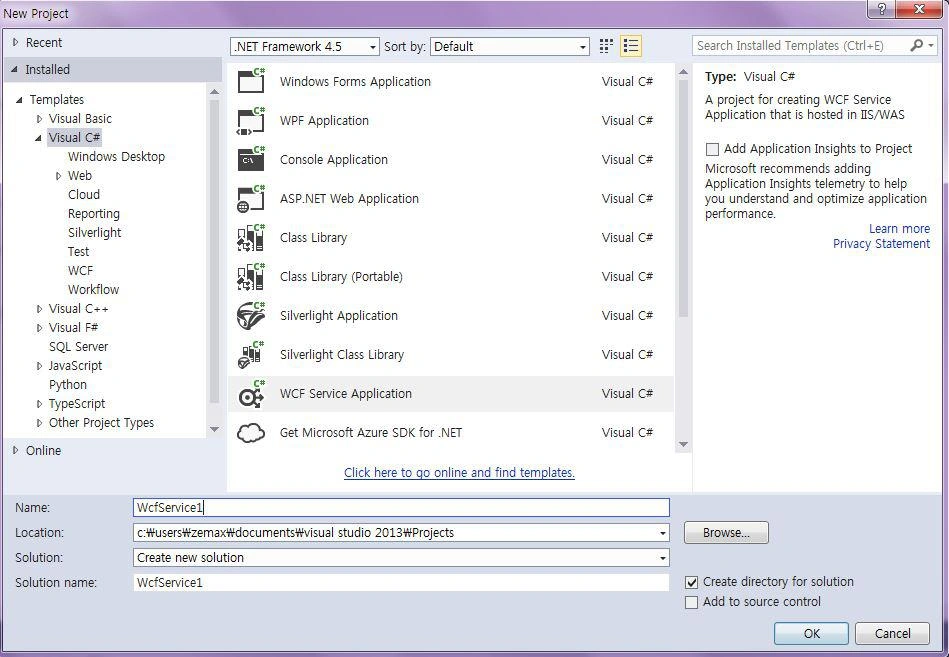
Open Visual Studio 2013 then select "File" -> "New" -> "Project..." then select WCF Service Application then select your project path and name your WCF service and click OK.
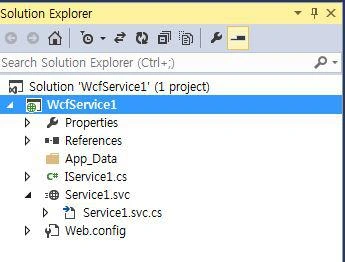
Once we created our WCF Service we can see “IService.CS” and “Service1.svc” in the Solution Explorer as in the following.
IService.CS in “IService.CS” we can see 3 contracts by default as in the following:
[ServiceContract] describes the methods or any operations available for the service. The Service Contract is an interface and the methods can be declared inside the Service Interface using the Operation Contract attribute.
[OperationContract] is similar to a web service [WEBMETHOD]
[DataContract] describes the data exchange between the client and the service.
[ServiceContract]
The following code will be automatically created for all the IService.CS files. We can change and write our own code here.
- public interface IService1
- {
- [OperationContract]
- string GetData(int value);
- [OperationContract]
- CompositeType GetDataUsingDataContract(CompositeType composite);
- // TODO: Add your service operations here
- }
- // Use a data contract as illustrated in the sample below to add composite types to service operations.
- [DataContract]
- public class CompositeType
- {
- bool boolValue = true;
- string stringValue = "Hello ";
- [DataMember]
- public bool BoolValue
- {
- get { return boolValue; }
- set { boolValue = value; }
- }
- [DataMember]
- public string StringValue
- {
- get { return stringValue; }
- set { stringValue = value; }
- }
- }
In our example we need to get both the Character Type and Character Name from the database, so I have created three the Data Contracts “CharacterTypeDataContract”, “CharacterNameDataContract” and “questionAnswersDataContract”.
Here we can see we have decelerated our entire table column name as Data Member.
- public class whosInYourMinDataContract
- {
- [DataContract]
- public class CharacterTypeDataContract
- {
- [DataMember]
- public string Char_ID { get; set; }
- [DataMember]
- public string Character_Type { get; set; }
- }
- [DataContract]
- public class CharacterNameDataContract
- {
- [DataMember]
- public string Char_Name_ID { get; set; }
- [DataMember]
- public string Char_ID { get; set; }
- [DataMember]
- public string Char_Name { get; set; }
- [DataMember]
- public string Char_Status { get; set; }
- }
- [DataContract]
- public class questionAnswersDataContract
- {
- [DataMember]
- public string Question_ID { get; set; }
- [DataMember]
- public string Char_Name_ID { get; set; }
- [DataMember]
- public string Char_ID { get; set; }
- [DataMember]
- public string Question { get; set; }
- [DataMember]
- public string Answer { get; set; }
- [DataMember]
- public string Char_Name { get; set; }
- [DataMember]
- public string Char_Status { get; set; }
- }
- }
In operation Contract we can see “WebInvoke” and “WebGet” that retrieve the data from the database in the REST Serivce.
- RequestFormat = WebMessageFormat.Json,
- ResponseFormat = WebMessageFormat.Json,
JavaScript Object Notation (JSON) is a lightweight data interchange format.
UriTemplate is our Method Name and here our method return type is List.
Here I have declared the 3 method “GetCharacterType”, “getCharacterNames” and “questionAnswers” . The “GetOrderMaster” method gets the Celebrity Profession (he or she might be a cricketer, movie actor or something else). “getCharacterNames” gets all the Celebrity Names from the database and “questionAnswers” gets all the Questions from the database.
[ServiceContract]
- public interface IService1
- {
- [OperationContract]
- [WebInvoke(Method = "GET",
- RequestFormat = WebMessageFormat.Json,
- ResponseFormat = WebMessageFormat.Json,
- UriTemplate = "/GetCharacterType/")]
- List<whosInYourMinDataContract.CharacterTypeDataContract> GetCharacterType();
- [OperationContract]
- [WebGet(RequestFormat = WebMessageFormat.Json,
- ResponseFormat = WebMessageFormat.Json,
- UriTemplate = "/getCharacterNames/")]
- List<whosInYourMinDataContract.CharacterNameDataContract> getCharacterNames();
- [OperationContract]
- [WebInvoke(Method = "GET",
- RequestFormat = WebMessageFormat.Json,
- ResponseFormat = WebMessageFormat.Json,
- UriTemplate = "/questionAnswers/{Char_ID}")]
- List<whosInYourMinDataContract.questionAnswersDataContract> questionAnswers(string Char_ID);
- }
- using System;
- using System.Collections.Generic;
- using System.Linq;
- using System.Runtime.Serialization;
- using System.ServiceModel;
- using System.ServiceModel.Web;
- using System.Text;
- namespace Shanu_QuizWcfService
- {
- // NOTE: You can use the "Rename" command on the "Refactor" menu to change the interface name "IService1" in both code and config file together.
- [ServiceContract]
- public interface IService1
- {
- [OperationContract]
- [WebInvoke(Method = "GET",
- RequestFormat = WebMessageFormat.Json,
- ResponseFormat = WebMessageFormat.Json,
- UriTemplate = "/GetCharacterType/")]
- List<whosInYourMinDataContract.CharacterTypeDataContract> GetCharacterType();
- [OperationContract]
- [WebGet(RequestFormat = WebMessageFormat.Json,
- ResponseFormat = WebMessageFormat.Json,
- UriTemplate = "/getCharacterNames/")]
- List<whosInYourMinDataContract.CharacterNameDataContract> getCharacterNames();
- [OperationContract]
- [WebInvoke(Method = "GET",
- RequestFormat = WebMessageFormat.Json,
- ResponseFormat = WebMessageFormat.Json,
- UriTemplate = "/questionAnswers/{Char_ID}")]
- List<whosInYourMinDataContract.questionAnswersDataContract> questionAnswers(string Char_ID);
- }
- // Use a data contract as illustrated in the sample below to add composite types to service operations.
- public class whosInYourMinDataContract
- {
- [DataContract]
- public class CharacterTypeDataContract
- {
- [DataMember]
- public string Char_ID { get; set; }
- [DataMember]
- public string Character_Type { get; set; }
- }
- [DataContract]
- public class CharacterNameDataContract
- {
- [DataMember]
- public string Char_Name_ID { get; set; }
- [DataMember]
- public string Char_ID { get; set; }
- [DataMember]
- public string Char_Name { get; set; }
- [DataMember]
- public string Char_Status { get; set; }
- }
- [DataContract]
- public class questionAnswersDataContract
- {
- [DataMember]
- public string Question_ID { get; set; }
- [DataMember]
- public string Char_Name_ID { get; set; }
- [DataMember]
- public string Char_ID { get; set; }
- [DataMember]
- public string Question { get; set; }
- [DataMember]
- public string Answer { get; set; }
- [DataMember]
- public string Char_Name { get; set; }
- [DataMember]
- public string Char_Status { get; set; }
- }
- }
- }
Right-click your WCF project and select Add New Item then select ADO.NET Entity Data Model and click Add.
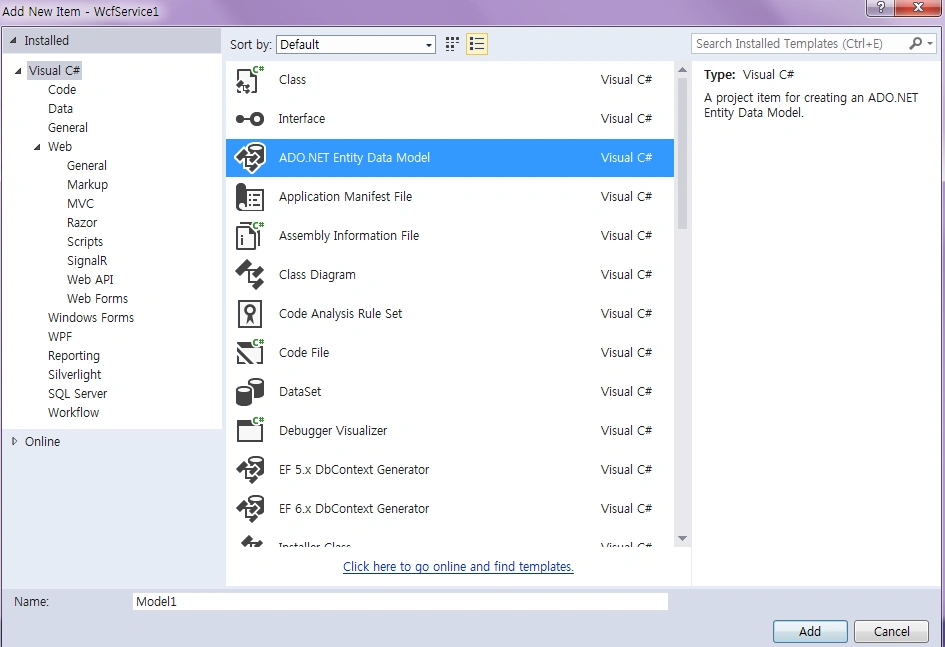
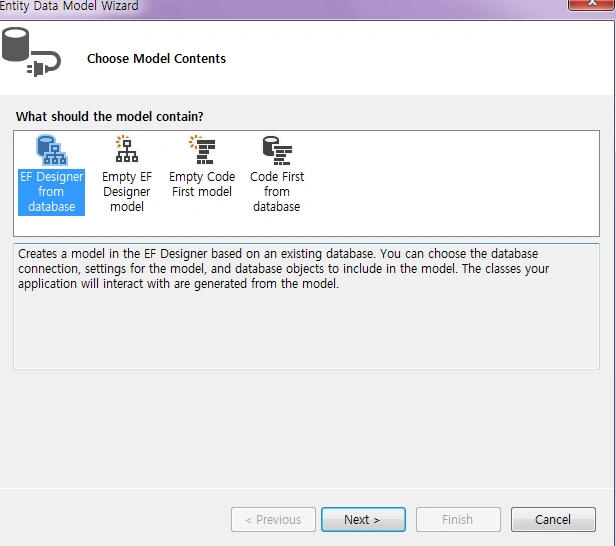
Select EF Designer from database and click Next.
Click New Connection
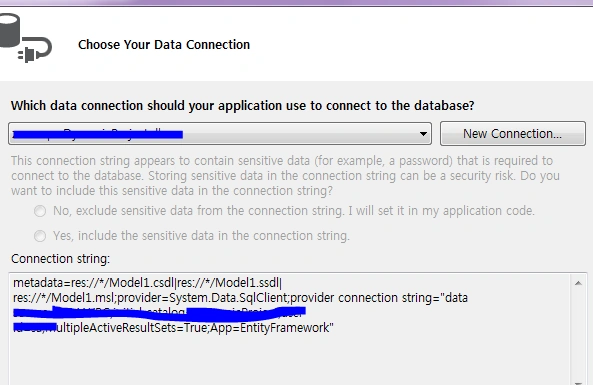
Here we can select our Database Server Name and enter your DB server, SQL Server Authentication, User ID and Password. We have already created our database as “OrderManagement” so we can select the database and click OK.

Click Next and select our tables that are needed and click Finish. Here we can see now we have created our shanuQuizModel.
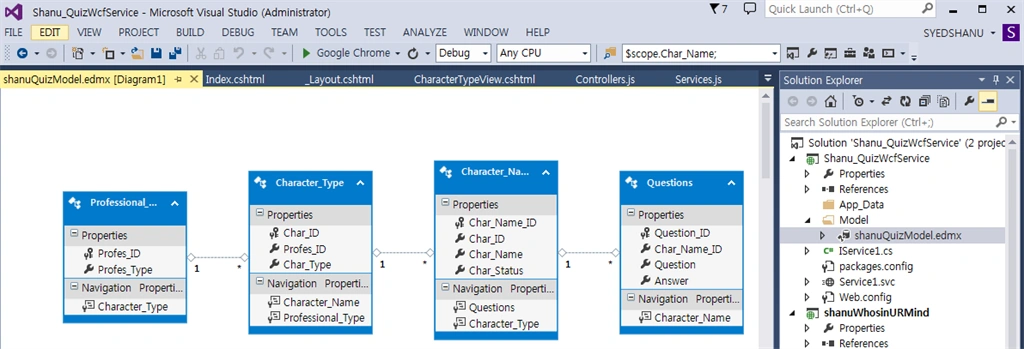
Service1.SVC
“Service.SVC.CS” implements the IService interface (and overrides) and define all the methods of the Operation Contract. For example here we can see I have implemented the IService1 in the Service1 class. We created the object for our entity model and in questionAnswers using a LINQ Query, I have used the LINQ Join query to join 2 tables and get the result from the database filtering by the Char_Id and the result was added to the list.
- public class Service1 : IService1
- {
- shanuQuizEntities OME;
- public Service1()
- {
- OME = new shanuQuizEntities();
- }
- public List<whosInYourMinDataContract.questionAnswersDataContract> questionAnswers(string Char_ID)
- {
- var query = (from A in OME.Questions
- join B in OME.Character_Name on A.Char_Name_ID equals B.Char_Name_ID
- where B.Char_ID.Equals(Char_ID)
- select new
- {
- A.Question_ID,
- A.Char_Name_ID,
- B.Char_ID,
- A.Question,
- A.Answer,
- B.Char_Name,
- B.Char_Status
- }).ToList().OrderBy(q => Int32.Parse(q.Question_ID));
- List<whosInYourMinDataContract.questionAnswersDataContract> questionAnswersList = new List<whosInYourMinDataContract.questionAnswersDataContract>();
- query.ToList().ForEach(rec =>
- {
- questionAnswersList.Add(new whosInYourMinDataContract.questionAnswersDataContract
- {
- Question_ID =rec.Question_ID,
- Char_Name_ID = rec.Char_Name_ID,
- Char_ID = rec.Char_ID,
- Question = rec.Question,
- Answer = rec.Answer,
- Char_Name = rec.Char_Name,
- Char_Status = rec.Char_Status
- });
- });
- return questionAnswersList;
- }
- }
- using System;
- using System.Collections.Generic;
- using System.Linq;
- using System.Runtime.Serialization;
- using System.ServiceModel;
- using System.ServiceModel.Web;
- using System.Text;
- using Shanu_QuizWcfService.Model;
- namespace Shanu_QuizWcfService
- {
- // NOTE: You can use the "Rename" command on the "Refactor" menu to change the class name "Service1" in code, svc and config file together.
- // NOTE: In order to launch WCF Test Client for testing this service, please select Service1.svc or Service1.svc.cs at the Solution Explorer and start debugging.
- public class Service1 : IService1
- {
- shanuQuizEntities OME;
- public Service1()
- {
- OME = new shanuQuizEntities();
- }
- public List<whosInYourMinDataContract.CharacterTypeDataContract> GetCharacterType()
- {
- var query = (from a in OME.Character_Type
- select a).Distinct();
- List<whosInYourMinDataContract.CharacterTypeDataContract> CharacterTypeList = new List<whosInYourMinDataContract.CharacterTypeDataContract>();
- query.ToList().ForEach(rec =>
- {
- CharacterTypeList.Add(new whosInYourMinDataContract.CharacterTypeDataContract
- {
- Char_ID = rec.Char_ID,
- Character_Type = rec.Char_Type
- });
- });
- return CharacterTypeList;
- }
- public List<whosInYourMinDataContract.CharacterNameDataContract> getCharacterNames()
- {
- List<whosInYourMinDataContract.CharacterNameDataContract> CharacterNameList = new List<whosInYourMinDataContract.CharacterNameDataContract>();
- try
- {
- var query = (from a in OME.Character_Name
- select a).ToList().OrderBy(q => Int32.Parse(q.Char_Name_ID));
- query.ToList().ForEach(rec =>
- {
- CharacterNameList.Add(new whosInYourMinDataContract.CharacterNameDataContract
- {
- Char_Name_ID = rec.Char_Name_ID,
- Char_ID = rec.Char_ID,
- Char_Name = rec.Char_Name,
- Char_Status = rec.Char_Status
- });
- });
- return CharacterNameList;
- }
- catch (Exception ex)
- {
- throw new FaultException<string>
- (ex.Message);
- }
- }
- public List<whosInYourMinDataContract.questionAnswersDataContract> questionAnswers(string Char_ID)
- {
- var query = (from A in OME.Questions
- join B in OME.Character_Name on A.Char_Name_ID equals B.Char_Name_ID
- where B.Char_ID.Equals(Char_ID)
- select new
- {
- A.Question_ID,
- A.Char_Name_ID,
- B.Char_ID,
- A.Question,
- A.Answer,
- B.Char_Name,
- B.Char_Status
- }).ToList().OrderBy(q => Int32.Parse(q.Question_ID));
- List<whosInYourMinDataContract.questionAnswersDataContract> questionAnswersList = new List<whosInYourMinDataContract.questionAnswersDataContract>();
- query.ToList().ForEach(rec =>
- {
- questionAnswersList.Add(new whosInYourMinDataContract.questionAnswersDataContract
- {
- Question_ID =rec.Question_ID,
- Char_Name_ID = rec.Char_Name_ID,
- Char_ID = rec.Char_ID,
- Question = rec.Question,
- Answer = rec.Answer,
- Char_Name = rec.Char_Name,
- Char_Status = rec.Char_Status
- });
- });
- return questionAnswersList;
- }
- }
- }
In the WCF project's “Web.Config” make the following changes.
1) Change:
- <add binding="basicHttpsBinding" scheme="https" /> to <add binding="webHttpBinding" scheme="http" />
- </behaviors>
- <endpointBehaviors>
- <behavior>
- <webHttp helpEnabled="True"/>
- </behavior>
- </endpointBehaviors>
- </behaviors>
Now that we have created our WCF Rest service, let's run and test our service. In our service URL we can add our method name and we can see the JSON result data from the database.
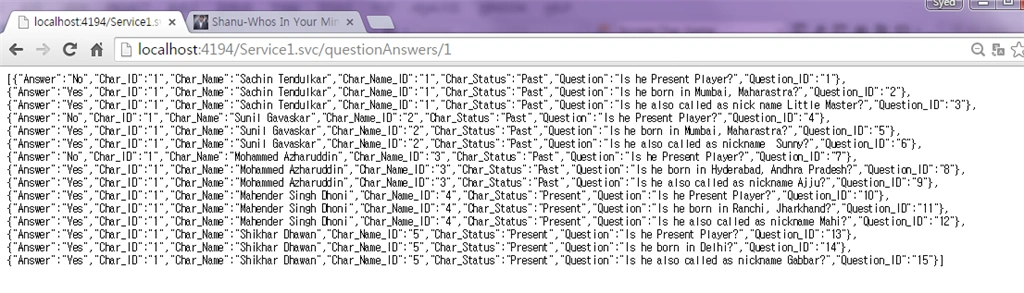
Create MVC Web Application
So now we have completed our WCF and now it's time to create our MVC Angular JS application. We can add a new project to our existing project and create a new MVC web application as in the following.
Right-click your solution and click Add New Project tehn enter your project name and click OK.
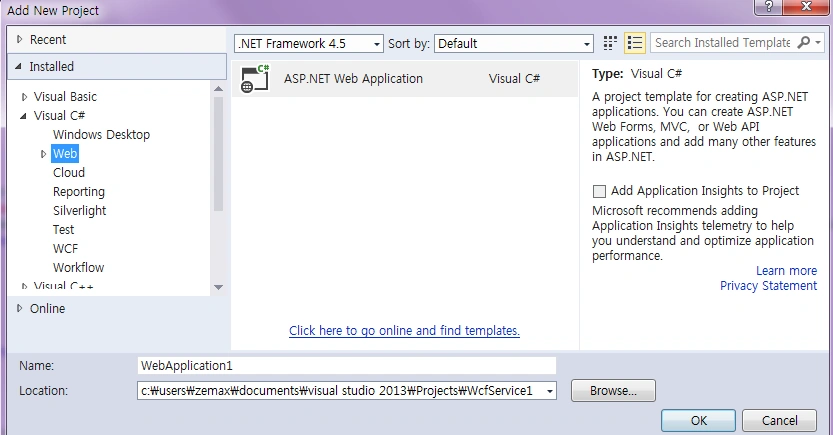
Select MVC and click OK.
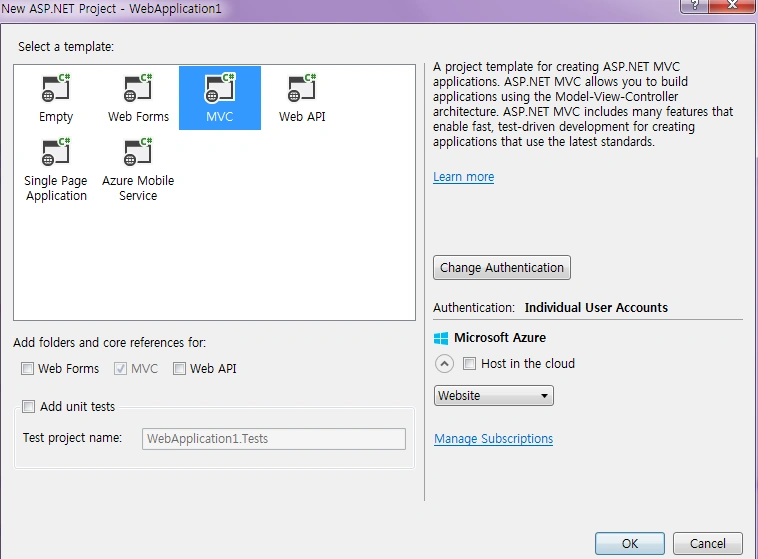
Now we have created our MVC application and it's time to add our WCF Service and install the Angular JS package to our solution.
Add WCF Service
Right-click the MVC Solution and click Add then click Service Reference.
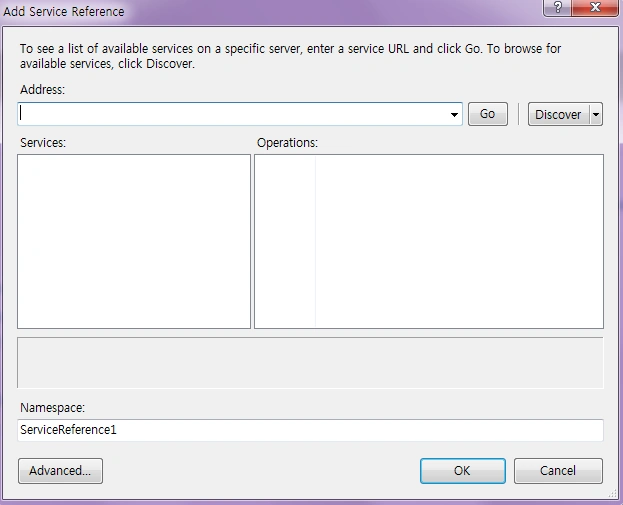
Enter your WCF URL and click GO. Here my WCF URL is http://localhost:4194/Service1.svc
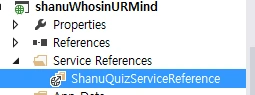
Add your name and click OK.
Now we have successfully added our WCF Service to our MVC application.
Procedure to Install Angular JS package
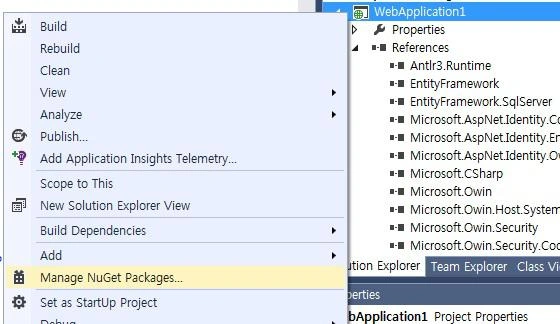
Right-click your MVC project and click Manage NuGet Packages.
Select online and search for Angular JS. Select the AngularJs and click Install.
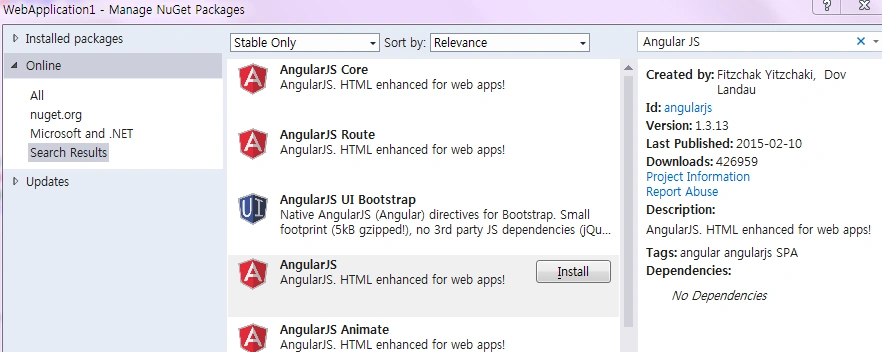
Now we have installed the AngularJS package into our MVC Project. Now let's create our Angular Js.
- Modules.js
- Controllers.js
- Services.js
Right-click the Script folder and create your own folder to create our Angular Js Model/Controller and Service JavaScript. In your script folder add three JavaScript files and name them Modules.js, Controllers.js and Services,js as in the following.

Modules.js
Here we add the reference to the Angular.js JavaScript and create a Angular Module named “RESTClientModule”.
- /// <reference path="../angular.js" />
- /// <reference path="../angular.min.js" />
- var app;
- (function () {
- app = angular.module("RESTClientModule", []);
- })();
Here we add the reference to the Angular.js JavaScript and our Module.js.
Here we provide the name of our service and we use this name in controllers.js. Here for the Angular service I have given the name "AngularJs_WCFService". You can provide your own name but be careful about changing the name in Controllers.js. Here we can see in the method since I have passed the URL of our WCF Service URL.
- /// <reference path="../angular.js" />
- /// <reference path="../angular.min.js" />
- /// <reference path="Modules.js" />
- app.service("AngularJs_WCFService", function ($http) {
- //Get Order Master Records
- this.GetCharacterType = function () {
- return $http.get("http://localhost:4194/Service1.svc/GetCharacterType");
- };
- //Search Order Master Records
- this.getCharacterNames = function () {
- return $http.get("http://localhost:4194/Service1.svc/getCharacterNames/");
- }
- this.getquestionAnswers = function (Char_ID) {
- return $http.get("http://localhost:4194/Service1.svc/questionAnswers/" + Char_ID);
- }
- });
Here we add the reference to the Angular.js JavaScript and our Module.js and Services.js. The same as for services. For the controller I have given the name "AngularJs_WCFController". In the Controller I have done all the business logic and returned the data from the WCF JSON data to our MVC HTML page.
1) Variable declarations
First I declared all the local variables that need to be used and the current date and store the date using $scope.date.
Note: $scope.finalresultCount = 3;
This is a very important variable. Here I have set the default value to 3. In my Quiz program I have inserted 3 questions per celebrity. If we increase the questions then we need to provide the same count here.
2) Methods
Hidetables()
This method is used to hide and show the display of the table TR to show the Celebrity Profession selection and to answer the question and to display the final result in the same page.
getCharacterNames()
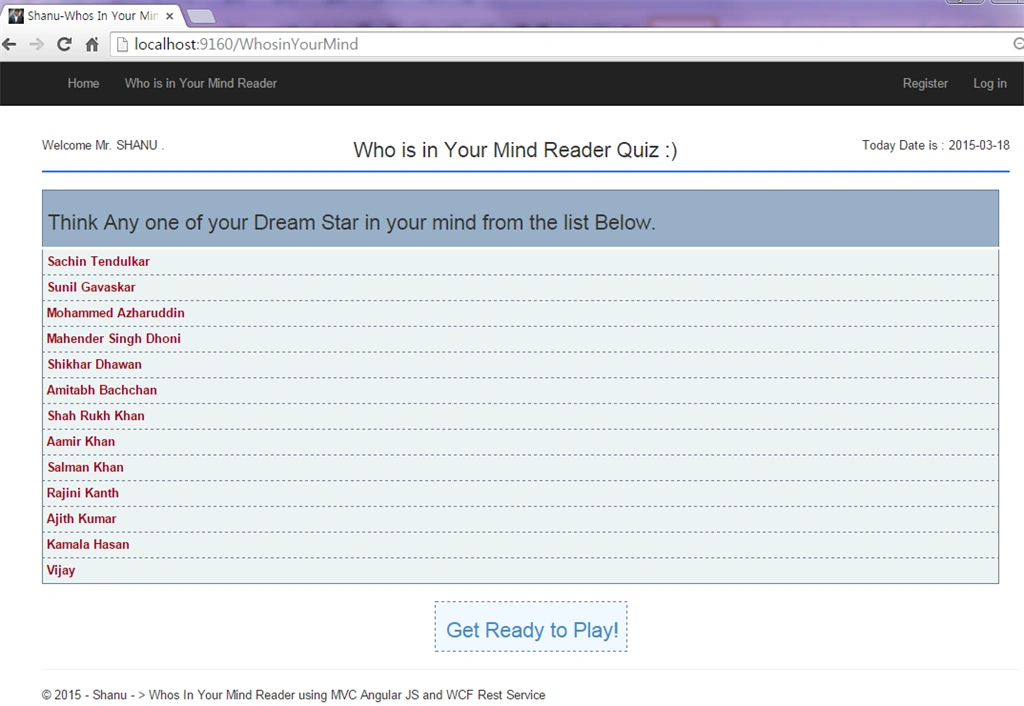
In this method I will get all the Celebrity Names from the JSON and bind the result to the Main page. From there the user can think of anyone that is a celebrity and start playing the quiz game.
GetCharacterType()
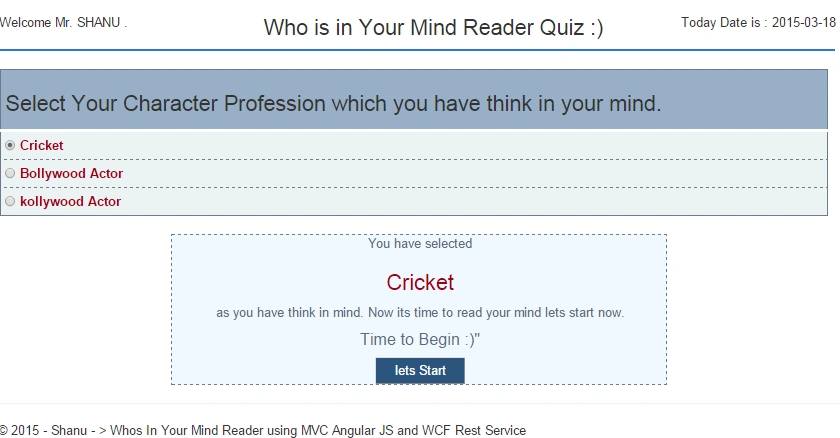
In this method I will get all the Celebrity Profession types from the JSON and bind the final result to the radio button.
findYourAnswer()
This method gets the question from the database one by one and binds the question for the users to answer.
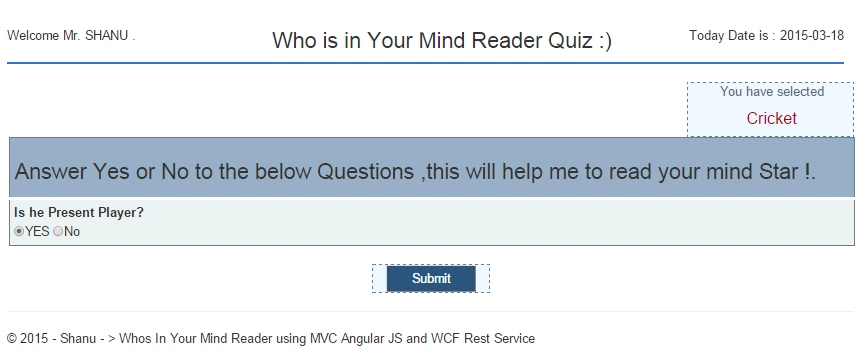
$scope.findAnswers = function ()
This method will be called when the user clicks on the Submit button. In this method I will do all the business logic for displaying the next questions and check for the final result and display the appropriate celebrity Name as the Final result.
Controller.js full source code
- /// <reference path="../angular.js" />
- /// <reference path="../angular.min.js" />
- /// <reference path="Modules.js" />
- /// <reference path="Services.js" />
- app.controller("AngularJs_WCFController", function ($scope, $rootScope, $window, AngularJs_WCFService) {
- $scope.date = new Date();
- // 1) To Store the user selected Character Profession
- $scope.CharacterID = 4;
- $scope.CharacterType = 'kollywood Actor';
- // 2) To show and Hide the Table to display Character Type Selection and Question
- var firstbool = true;
- var secondbool = false;
- var thirdbool = false;
- // * 3) Question and Answer final Judgement Local Variables
- $scope.Question_ID;
- $scope.Char_Name_ID;
- $scope.Char_ID;
- $scope.Question;
- $scope.Answer;
- $scope.Char_Name;
- $scope.Char_Status;
- $scope.User_Selected_Result = 'Yes';
- $scope.loopCount = 0;
- $scope.resultCount = 0;
- $scope.finalresultCount = 3;
- $scope.NextStar = 0;
- $scope.totalQuestionCount = 0;
- $scope.QuestionIncrement = 0;
- $scope.YourDreamStarName = "";
- // end 3)
- Hidetables()
- function Hidetables() {
- if ($scope.firstbool == false) {
- $scope.firstbool = true;
- $scope.secondbool = false;
- $scope.thirdbool = true
- }
- else
- {
- $scope.firstbool = false;
- $scope.secondbool = true;
- $scope.thirdbool = true;
- }
- }
- hideresult()
- function hideresult() {
- if ($scope.thirdbool == false) {
- $scope.thirdbool = true;
- }
- }
- GetCharacterType();
- getCharacterNames();
- //To Get All Records
- function GetCharacterType() {
- var promiseGet = AngularJs_WCFService.GetCharacterType();
- promiseGet.then(function (pl) {
- $scope.getCharacterTypeDisp = pl.data
- },
- function (errorPl) {
- });
- }
- //To Get Student Detail on the Base of Student ID
- function getCharacterNames() {
- var promiseGet = AngularJs_WCFService.getCharacterNames();
- promiseGet.then(function (pl) {
- $scope.getCharacterNamesDisp = pl.data;
- // alert(res.Char_Name);
- },
- function (errorPl) {
- });
- }
- $scope.radioCheckValue = function (CharID, CharType) {
- $scope.CharacterID = CharID;
- $scope.CharacterType = CharType;
- };
- $scope.get = function () {
- $scope.firstbool = true;
- $scope.secondbool = false;
- $scope.NextStar = 0;
- $scope.loopCount = 0;
- findYourAnswer();
- }
- function findYourAnswer()
- {
- var promiseGet = AngularJs_WCFService.getquestionAnswers($scope.CharacterID);
- promiseGet.then(function (pl) {
- $scope.questionAnswersDisp = pl.data
- $scope.totalQuestionCount = $scope.questionAnswersDisp.length;
- for (x in $scope.questionAnswersDisp) {
- if (x == $scope.loopCount) {
- $scope.Question_ID = $scope.questionAnswersDisp[x].Question_ID;
- $scope.Char_Name_ID = $scope.questionAnswersDisp[x].Char_Name_ID;
- $scope.Char_ID = $scope.questionAnswersDisp[x].Char_ID;
- $scope.Question = $scope.questionAnswersDisp[x].Question;
- $scope.Answer = $scope.questionAnswersDisp[x].Answer;
- $scope.Char_Name = $scope.questionAnswersDisp[x].Char_Name;
- $scope.Char_Status = $scope.questionAnswersDisp[x].Char_Status;
- $scope.QuestionIncrement = $scope.QuestionIncrement + 1;
- }
- }
- },
- function (errorPl) {
- });
- }
- $scope.rdoAnschk = function (chkResult) {
- $scope.User_Selected_Result = chkResult;
- };
- $scope.findAnswers = function () {
- if ($scope.User_Selected_Result == 'Yes')
- {
- $scope.resultCount = $scope.resultCount + 1;
- }
- else
- {
- if ($scope.Answer == 'No') {
- $scope.resultCount = $scope.resultCount + 1;
- if ($scope.NextStar > 0) {
- $scope.NextStar = $scope.NextStar - 1;
- }
- }
- else {
- if ($scope.resultCount > 0) {
- $scope.resultCount = $scope.resultCount - 1;
- }
- $scope.NextStar = $scope.NextStar + 1;
- }
- }
- if ($scope.NextStar == $scope.finalresultCount)
- {
- alert('Hope my guess was Wrong! lets start for other Star ')
- $scope.NextStar = 0;
- }
- if ($scope.resultCount == $scope.finalresultCount) {
- $scope.secondbool = true;
- $scope.thirdbool = false;
- $scope.YourDreamStarName = $scope.Char_Name;
- alert('Your Dream Star in your mind is ' + $scope.YourDreamStarName)
- return;
- }
- $scope.loopCount = $scope.loopCount + 1;
- findYourAnswer();
- if($scope.QuestionIncrement>= $scope.totalQuestionCount)
- {
- $scope.secondbool = true;
- $scope.thirdbool = false;
- $scope.YourDreamStarName = "Sorry My Dear Friend.All the Questions are Completed. I cont find your answer. Shall we try again"
- alert($scope.YourDreamStarName);
- return;
- }
- }
- });
Create MVC Control and View to display our result.
Add Controller
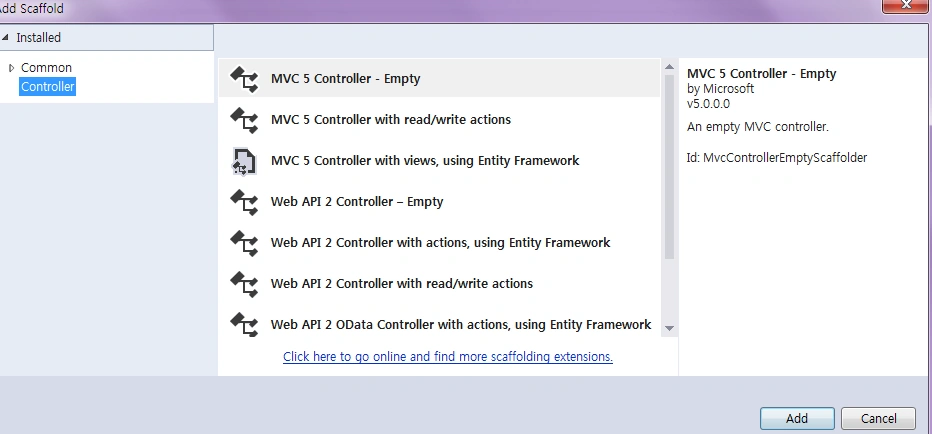
Right-click Controllersthen select Add Controller then select MVC 5 Controller – Empty then click Add.
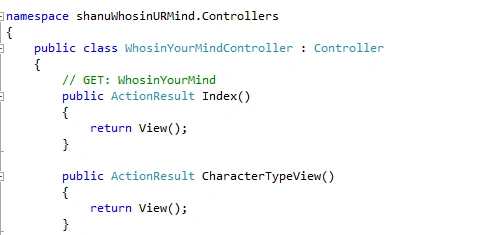
Change the Controller name and here I have given the name “WhosinYourMindController”. Then click OK.
Add View
Right-click on the Controller Index and click Add View.
1) Index View
Name the View “Index”.
In the View, design your page and reference angular.Js, Modules.js, Services.js and Controllers.js.
In Angular JS we use {{ }} to bind or display the data.
Here we can see that I first created a table and something for that table.
First the in table I used the data-ng-controller="AngularJs_WCFController" and here we can see data-ng-controller will be used to bind the data of the controller to the HTML table.
Using <tbody data-ng-repeat=" detail in getCharacterNamesDisp"> we can get all the records and using the <td><span>{{ detail.Char_Name}}</span></td> bind all the data inside the table.
- <html data-ng-app="RESTClientModule">
- @{
- ViewBag.Title = "Who is in Your Mind Reader";
- }
- <body>
- <img src="~/Images/blank.gif" alt="" width="1" height="10" />
- <table width="99%" style=" border-bottom:3px solid #3273d5;">
- <tr>
- <td width=" 250">
- <table width="99%">
- <tr>
- <td>
- Welcome Mr. {{'SHANU'}} .
- </td>
- </tr>
- </table>
- </td>
- <td class="style1" align="center">
- <h3>Who is in Your Mind Reader Quiz :)</h3>
- </td>
- <td align="right">
- <div ng-controller="AngularJs_WCFController">
- Today Date is :
- {{date | date:'yyyy-MM-dd'}}
- </div>
- </td>
- </tr>
- </table>
- <img src="~/Images/blank.gif" alt="" width="1" height="10" />
- <table id="tblContainer" data-ng-controller="AngularJs_WCFController" style='width: 99%;table-layout:fixed;'>
- <tr>
- <td>
- <table style=" background-color:#ECF3F4; border: solid 2px #6D7B8D; padding: 5px;width: 99%;table-layout:fixed;">
- <tr>
- <th style=" background-color:#98AFC7; border-bottom: solid 4px #FFFFFF; padding: 5px;width: 99%;table-layout:fixed;">
- <h3>Think Any one of your Dream Star in your mind from the list Below.</h3>
- </th>
- </tr>
- <tbody data-ng-repeat="detail in getCharacterNamesDisp">
- <tr>
- <td style=" border: dashed 2px #6D7B8D; padding: 5px;width: 99%;table-layout:fixed;">
- <b> <span style="color:#9F000F">{{detail.Char_Name}}</span></b>
- </td>
- </tr>
- </table>
- </td>
- </tr>
- </tr>
- </table>
- <img src="~/Images/blank.gif" alt="" width="1" height="10" />
- <table id="tblContainers" style='width: 20%;table-layout:fixed;' align="center">
- <tr>
- <td align="center">
- <table style=" background-color:#F0F8FF;color:#566D7E; border: dashed 2px #6D7B8D; padding: 5px;width: 99%;table-layout:fixed;">
- <tr>
- <td align="center" style="color:#9F000F;">
- <h3>@Html.ActionLink("Get Ready to Play!", "CharacterTypeView", "WhosinYourMind")</h3>
- </td>
- </tr>
- </table>
- </td>
- </tr>
- </table>
- </body>
- </html>
- <script src="~/Scripts/angular.js"></script>
- <script src="~/Scripts/shanuAngularScript/Modules.js"></script>
- <script src="~/Scripts/shanuAngularScript/Services.js"></script>
- <script src="~/Scripts/shanuAngularScript/Controllers.js"></script>
Add another view named “CharacterTypeView”.
This is our main View. Here I will display the Celebrity Profession type and the user can select any celebrity profession that they can think of from the index page list. The user can start to play the game. Answer all the questions and find there the result.
- <html data-ng-app="RESTClientModule">
- @{
- ViewBag.Title = "Select Your Character Profession";
- }
- <body>
- <img src="~/Images/blank.gif" alt="" width="1" height="10" />
- <table width="99%" style=" border-bottom:3px solid #3273d5;">
- <tr>
- <td width=" 250">
- <table width="99%">
- <tr>
- <td>
- Welcome Mr. {{'SHANU'}} .
- </td>
- </tr>
- </table>
- </td>
- <td class="style1" align="center">
- <h3>Who is in Your Mind Reader Quiz :)</h3>
- </td>
- <td align="right">
- <div ng-controller="AngularJs_WCFController">
- Today Date is :
- {{date | date:'yyyy-MM-dd'}}
- </div>
- </td>
- </tr>
- </table>
- <img src="~/Images/blank.gif" alt="" width="1" height="10" />
- <table width="100%" data-ng-controller="AngularJs_WCFController">
- <tr ng-hide="firstbool" ng-init="Hidetables()">
- <td>
- <table id="tblContainer" style='width: 99%;table-layout:fixed;'>
- <tr>
- <td>
- <table style=" background-color:#ECF3F4; border: solid 2px #6D7B8D; padding: 5px;width: 99%;table-layout:fixed;">
- <tr>
- <th style=" background-color:#98AFC7; border-bottom: solid 4px #FFFFFF; padding: 5px;width: 99%;table-layout:fixed;">
- <h3>Select Your Character Profession which you have think in your mind.</h3>
- </th>
- </tr>
- <tbody data-ng-repeat="detail in getCharacterTypeDisp">
- <tr>
- <td style=" border: dashed 2px #6D7B8D; padding: 5px;width: 99%;table-layout:fixed;">
- <b>
- <input type="radio" name="rdoCharType" ng-model="detail.Character_Type" value="detail.Character_Type" ng-value="detail.Character_Type" ng-click="radioCheckValue(detail.Char_ID,detail.Character_Type)" />
- <span style="color:#9F000F">{{detail.Character_Type}}</span>
- </b>
- </td>
- </tr>
- </table>
- </td>
- </tr>
- <tr>
- <td>
- <img src="~/Images/blank.gif" alt="" width="1" height="10" />
- <table id="tblContainers" style='width: 60%;table-layout:fixed;' align="center">
- <tr>
- <td align="center">
- <table style=" background-color:#F0F8FF;color:#566D7E; border: dashed 2px #6D7B8D; padding: 5px;width: 99%;table-layout:fixed;">
- <tr>
- <td align="center" style="color:#566d7e;">
- You have selected <div><h3 style="color:#9F000F">{{CharacterType}} </h3></div> as you have think in mind.
- Now its time to read your mind lets start now.<br />
- <h4> Time to Begin :)"</h4>
- <input type="button" id="Detail" value="lets Start" data-ng-click="get()" style="background-color:#2B547E;color:#FFFFFF;width:100px;height:30px">
- </td>
- </tr>
- </table>
- </td>
- </tr>
- </table>
- </td>
- </tr>
- </table>
- </td>
- </tr>
- <tr ng-hide="secondbool" ng-init="Hidetables()">
- <td>
- <table>
- <tr>
- <td>
- <table id="tblContainer" style='width: 100%;table-layout:fixed;'>
- <tr>
- <td align="right">
- <table id="tblContainers" style='width: 20%;table-layout:fixed;' align="right">
- <tr>
- <td align="center">
- <table style=" background-color:#F0F8FF;color:#566D7E; border: dashed 2px #6D7B8D; padding: 5px;width: 99%;table-layout:fixed;">
- <tr>
- <td align="center" style="color:#566d7e;">
- <div>You have selected <h4 style="color:#9F000F">{{CharacterType}} </h4></div>
- </td>
- </tr>
- </table>
- </td>
- </tr>
- </table>
- </td>
- </tr>
- <tr>
- <td>
- <table style=" background-color:#ECF3F4; border: solid 2px #6D7B8D; padding: 5px;width: 100%;table-layout:fixed;">
- <tr>
- <th style=" background-color:#98AFC7; border-bottom: solid 4px #FFFFFF; padding: 5px;width: 99%;table-layout:fixed;">
- <h3>Answer Yes or No to the below Questions ,this will help me to read your mind Star !.</h3>
- </th>
- </tr>
- <tr>
- <td style=" border: dashed 2px #6D7B8D; padding: 5px;width: 99%;table-layout:fixed;">
- <b>
- {{Question}}
- </b>
- <br />
- <input type="radio" name="rdoAns" value="Yes" ng-click="rdoAnschk('Yes')" checked='checked' />YES
- <input type="radio" name="rdoAns" value="No" ng-click="rdoAnschk('No')" />No
- </td>
- </tr>
- </table>
- </td>
- </tr>
- </table>
- <tr>
- <td>
- <img src="~/Images/blank.gif" alt="" width="1" height="10" />
- </td>
- </tr>
- <tr>
- <td align="center">
- <table style=" background-color:#F0F8FF;color:#566D7E; border: dashed 2px #6D7B8D; padding: 5px;width: 14%;table-layout:fixed;">
- <tr>
- <td align="center" style="color:#566d7e;">
- <input type="button" id="Detail" value="Submit" data-ng-click="findAnswers()" style="background-color:#2B547E;color:#FFFFFF;width:100px;height:30px">
- </td>
- </tr>
- </table>
- </td>
- </tr>
- </table>
- </td>
- </tr>
- <tr ng-hide="thirdbool" ng-init="hideresult()">
- <td>
- <table>
- <tr>
- <td align="center">
- <table style=" background-color:#F0F8FF;color:#566D7E; border: dashed 2px #6D7B8D; padding: 5px;width: 99%;table-layout:fixed;">
- <tr>
- <td align="center" style="color:#566d7e;">
- <div> I hope so this is your Star <h3 style="color:#9F000F">{{YourDreamStarName}} </h3> whom you think in your Mind. </div>
- <h3 style="color:#566D7E;">@Html.ActionLink("Shall we play again :)", "Index", "WhosinYourMind")</h3>
- </td>
- </tr>
- </table>
- </td>
- </tr>
- </table>
- </td>
- </tr>
- </table>
- </body>
- </html>
- <script src="~/Scripts/angular.js"></script>
- <script src="~/Scripts/shanuAngularScript/Modules.js"></script>
- <script src="~/Scripts/shanuAngularScript/Services.js"></script>
- <script src="~/Scripts/shanuAngularScript/Controllers.js"></script>
Here we can see that when I run the program, I first display the celebrity.
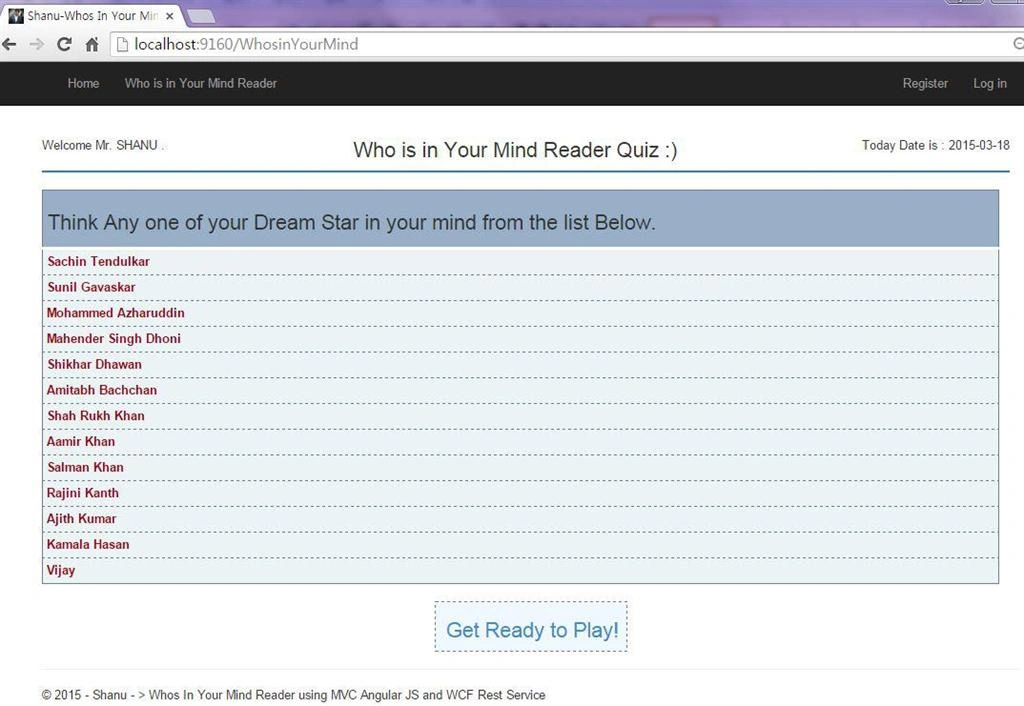
After clicking the Get ready to play link it will be redirected to the next page.
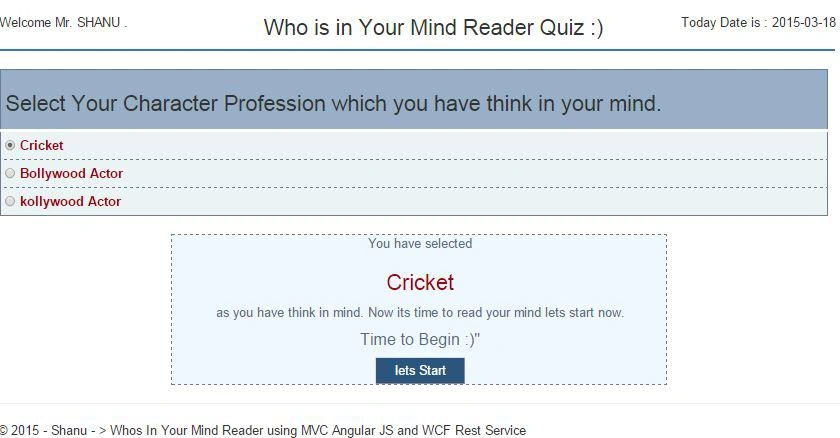
Here the user can select any one character profession that they can think of and click on Let's Start.
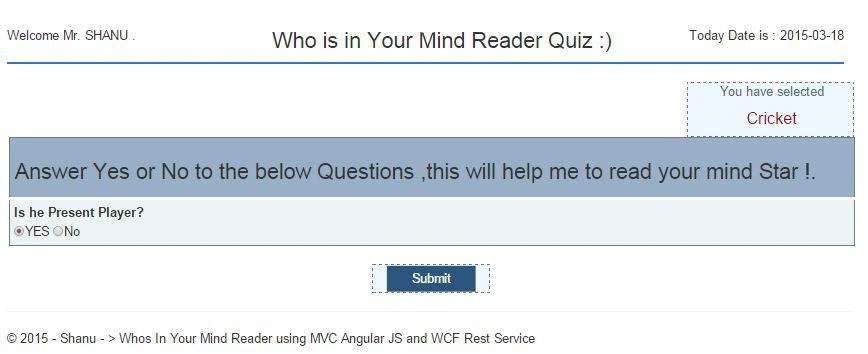
Here the user can answer the question as Yes or No and click submit to check the next question.
Note: Here in my application I have set a maximum of 3 questions for a celebrity. The user can increase the questions depending on your requirements in the database and in Controler.js provide the question count the same as in the database in “$scope.finalresultCount = 3;”
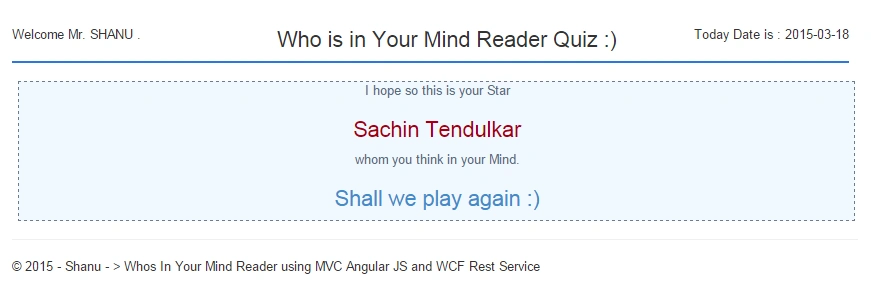
The final result will be displayed like this.
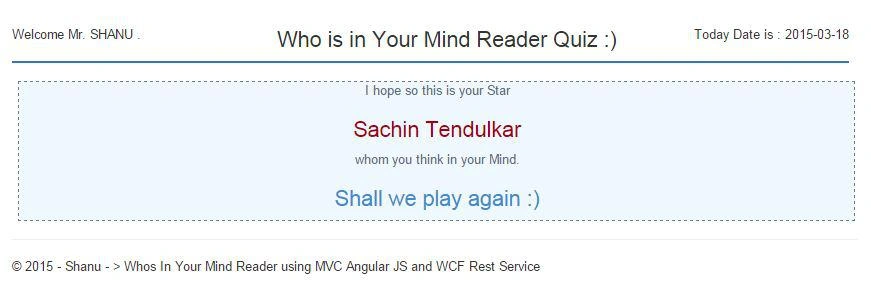
Note: Here are all the Celebrity Names, Celebrity Professions, Questions and Answers. All of them have been displayed from the database. There is no static data in my application. So the user can add their own celebrity Name, Profession and Question to the DB and have fun.
Supported Browsers: Chrome and Firefox.
kalu singh raoPosted Jul 22, 2016, 2:01 AM
Nice sir
manokaran manivasakanPosted Nov 9, 2015, 11:03 AM
very nice article
Muralishankar SundaramPosted Apr 22, 2015, 1:54 AM
Nice Article,great .....
Jitendra KumarPosted Apr 21, 2015, 5:34 AM
Nice Article..
Syed ShanuPosted Mar 20, 2015, 4:54 AM
Thank You Gowtham.But not genious have to learn a lot.
Gowtham RajamanickamPosted Mar 20, 2015, 4:52 AM
genious.........
Syed ShanuPosted Mar 20, 2015, 12:40 AM
Thank You Manish
Manish Kumar ChoudharyPosted Mar 20, 2015, 12:33 AM
Nice one.
Syed ShanuPosted Mar 19, 2015, 5:29 PM
Thank youRamesh and Tom
Tom MohanPosted Mar 19, 2015, 12:33 PM
good effort
Ramesh MaruthiPosted Mar 19, 2015, 10:25 AM
Awesome Article, I was looking for a small angular.js complete application here we go :) thank you sir !!
Syed ShanuPosted Mar 19, 2015, 4:22 AM
Thank You Nimit
Nimit JoshiPosted Mar 19, 2015, 4:15 AM
Very Nice Article and easy to understand. Thanks
Former memberPosted Mar 19, 2015, 3:33 AM
please tell me what is angualr service ? is it used to consume web service/ wcf service or web api ?
Syed ShanuPosted Mar 19, 2015, 12:52 AM
Thank You Rahul
Rahul Kumar SaxenaPosted Mar 19, 2015, 12:51 AM
Good Show Syed Shanu...
Dinesh BeniwalPosted Mar 19, 2015, 12:36 AM
Thanks for sharing.