

First create a project for a Windows Forms application in Visual Studio.
Then open the Form1.cs GUI file and make the design with one MenuStrip, two TextBoxes and a Label and drag an openfileDialog, saveFileDialog, folderBrowserDialog, colorDialog and fontDialogs). Make one Menu as in the following: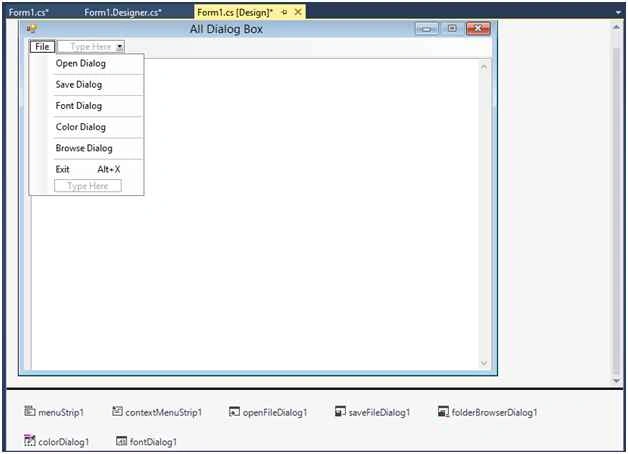
Now we move to the code.
openFileDialog Click Event
- private void openDialogToolStripMenuItem_Click(object sender, EventArgs e)
- {
- openFileDialog1.Filter = "Text file (*.txt)|*.txt|All file(*.*)|*.*";
- if (openFileDialog1.ShowDialog() == DialogResult.OK)
- {
- stropen = openFileDialog1.FileName;
- textBox1.Text = System.IO.File.ReadAllText(stropen);
- }
- }

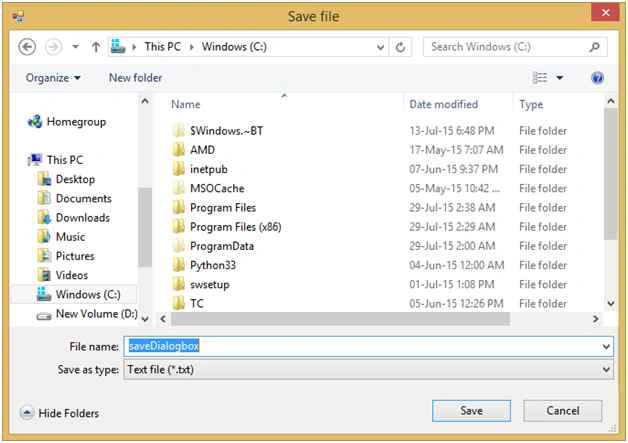
saveFileDialog Click Event
Write text in the TextBox area and then click on the Save menu option.
- private void saveDialogToolStripMenuItem_Click(object sender, EventArgs e)
- {
- saveFileDialog1.Filter = "Text file (*.txt)|*.txt|All file(*.*)|*.*";
- if (saveFileDialog1.ShowDialog() == DialogResult.OK)
- {
- strsave = saveFileDialog1.FileName;
- System.IO.File.WriteAllText(strsave, textBox1.Text);
- }
- }
fontDialog Click Event
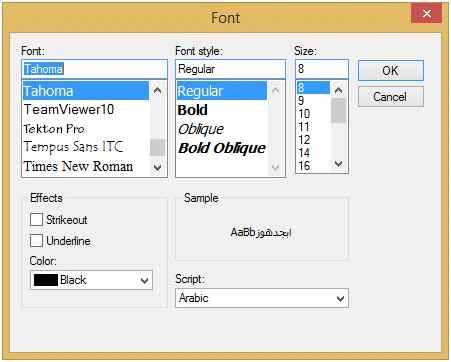
- private void fontDialogToolStripMenuItem_Click(object sender, EventArgs e)
- {
- if (fontDialog1.ShowDialog() == DialogResult.OK)
- {
- textBox1.Font = fontDialog1.Font;
- textBox1.ForeColor = fontDialog1.Color;
- }
- }
colorDialog Click Event
- private void colorDialogToolStripMenuItem_Click(object sender, EventArgs e)
- {
- if (colorDialog1.ShowDialog() == DialogResult.OK)
- {
- //this.BackColor = colorDialog1.Color;
- //menuStrip1.BackColor = colorDialog1.Color;
- textBox1.BackColor = colorDialog1.Color;
- }
- }

browserDialog Click Event
- private void browseDialogToolStripMenuItem_Click(object sender, EventArgs e)
- {
- folderBrowserDialog1.RootFolder = Environment.SpecialFolder.Desktop;
- if (folderBrowserDialog1.ShowDialog() == DialogResult.OK)
- {
- textBox2.Text = folderBrowserDialog1.SelectedPath;
- }
- }
Thank you.
Neeraj KumarPosted Aug 5, 2015, 5:58 PM
thank you Mohammed Ibrahim
Mohammed IbrahimPosted Jul 31, 2015, 8:47 PM
nice
Neeraj KumarPosted Jul 31, 2015, 11:41 AM
Thank you Rajeesh Menoth , Vipul Malhotra , Nilesh Jadav & Rakesh Chavda
RakeshPosted Jul 31, 2015, 11:17 AM
Good
Nilesh JadavPosted Jul 31, 2015, 6:26 AM
Nice one sir
Vipul MalhotraPosted Jul 31, 2015, 6:12 AM
nice
Rajeesh MenothPosted Jul 31, 2015, 5:35 AM
Good One
Neeraj KumarPosted Jul 31, 2015, 3:57 AM
Thank you Gopi Chand , Debasis Saha & Sibeesh Venu
Sibeesh VenuPosted Jul 31, 2015, 1:57 AM
Nice Share!.
Debasis SahaPosted Jul 31, 2015, 12:42 AM
Good One..
Gopi ChandPosted Jul 31, 2015, 12:37 AM
Its nice one