

Introduction
This article shows how to create a Hello World example using Angularjs in an ASP.NET application.
Angularjs works great on HTML, MVC and ASP.NET as well, it contains some important directives like np-model, np-bind, np-app, np-controller, all these will be explained with examples for them. Let's create a Simple Hello World Example that is first step of learning any new technology, framework and so on.
Step 1
First of all you need to add an external Angular.js file to your application, for this you can go to the AngularJS official site or download my source code and then fetch it or you can click on this link to download it: ANGULARJS.
After downloading the external file you now need to add this file to the Head section of your application.
<head>
<script src="angular.min.js"></script>
</head>
Step 2
Now I will create a JavaScript function that will work for showing the Hello World.
Add this JavaScript function in the head section of your application.
<script>
function HelloWorld($scope) {
$scope.test = 'World';
}
</script>
Here I had created a function named as "HelloWorld", in this HelloWorld "$scope" makes a connection between the function and the View, in other words the Design part. "Test" is a variable that will be holding "World" as it's default value.
Step 3
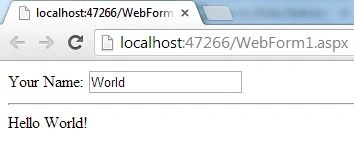
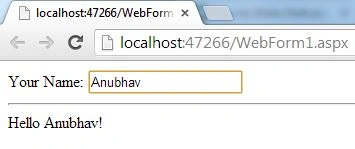
Now I will create a Div, TextBox and some Labels for showing the Hello World example.
<body>
<div ng-controller="HelloWorld">
Your Name: <input type="text" ng-model="test"/>
<hr/>
Hello {{test || "World"}}!
</div>
</body>
Hamid KhanPosted Sep 23, 2017, 1:39 PM
Nice............................................
Rajeev PunhaniPosted Mar 30, 2016, 2:14 AM
Nice Basic Article.
rkraju mPosted Nov 25, 2015, 1:32 AM
Good Article! http://dotnetlearners.com/tutorial/angularjs/17/angularjs-tutorial-introuduction-to-angularjs
Anubhav ChaudharyPosted Aug 26, 2014, 12:52 AM
Thanks Punith
Punith NagarajPosted Aug 25, 2014, 12:56 AM
It's an pretty good start to AngularJS for the begginners